
Common Acura ZDX Radio Code Problems
Many owners encounter radio lock problems on their ZDX after battery-related issues.
Below are the most common situations when this can happen.
Lock After a Battery Work
After a battery replacement, your radio may lock.
This happens because the radio recognizes a voltage interruption, which triggers the security lock.
More Situations That Can Lock Your ZDX's Radio
- After a software update, electrical repair, or an ECU reset, some Acura ZDX radios display a CODE message.
- After a jump-start, the radio may lose power and request a radio code.
- When the head unit is replaced, it usually locks automatically.
- If a fuse is pulled, the radio can lock itself.
What You Might Try First
Before you decide to pay, it's worth checking a few places where the code is often stored.
Some drivers find their Acura ZDX radio code without needing any tools or paperwork.
Here are the most common things to check first.
Check Inside the Dashboard Area
- Inside the glovebox, sometimes on a small card.
- In your maintenance booklet from the previous owner.
- In the owner's manual, often on a code card.
- In the trunk, on a radio label.
- On the radio unit itself, if it was serviced earlier.
Dealer Retrieval Option
A Acura dealer can usually look up the security code using your ZDX's vehicle identification number.
In most cases, you need to visit or contact them and show vehicle documents.
Once verified, they can request the original unlock code for your radio.
Downsides:
- Dealers often ask for payment for the lookup service and it can cost more than 100$.
- You usually need to book an appointment and bring ID.
- The process can take days depending on the model and database.
- Some older Acura ZDX radios may not be supported.
Searching for the S/N on a ZDX
To get the correct security code, you first need the serial number from the radio.
Depending on your model, you can see it on the screen or locate it on the unit.
You may see labels such as: Serial Num. / S/N / Serial Number etc.
These are the typical ways to get it:
1. How to See the Serial Number on the ZDX Screen
Accessing the Serial Number in Acura ZDX
The new Acura ZDX (2024–present) is Acura's first all-electric SUV, built on the GM Ultium platform. It features a modern digital infotainment system with Google Built-in technology.
Primary Method (Settings Menu):
- Power on the vehicle (press Start button).
- Navigate to Settings → System → About or System Information on the 11-inch touchscreen.
- The serial number and device information should be listed.
ZDX Notes:
- 2024–2025 ZDX – As an all-electric vehicle with Google Built-in infotainment, the ZDX uses a distinct system from traditional Honda/Acura radios. The settings menu is the primary method for serial access.
- The ZDX does not have physical preset buttons, so the classic Honda 1+6 method does not apply.
Note: If you cannot find the serial in settings, contact your Acura dealer for assistance, as the ZDX's GM-derived infotainment has a unique architecture.
2. The Serial Number on the Radio Housing
To find the serial number, you'll need to take out the head unit from the dashboard.
- Start by turning off the vehicle and removing the trim panel.
- Next, release the clips and slide the radio out to check the sticker on the back of the radio. Pay attention not to damage the connections.
- Write down full serial number precisely and then come back to our website.
- Know that serial number and part number are not the same. You will find both on the sticker, and you only need for the serial.
Alternative: Removing the Acura Radio
If you cannot view the serial on screen, remove the radio by unclipping the trim panel around the unit. The serial sticker is on the body of the radio.
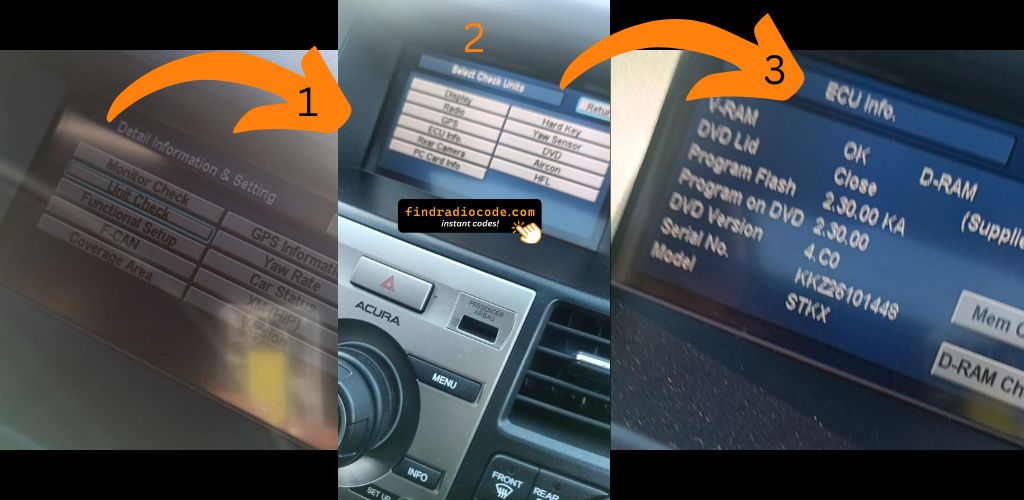
Example: Acura ZDX serial number label location
Serial Number Formats You'll See on Acura ZDX
The radio uses a serial number in U####L#### format (e.g. U3456 L7890). Acura shares this format with Honda. Navigation systems display a GNA or HBM prefix.
Entering the Radio Code on Acura ZDX
Once you have the unlock code, it's time to input it into the Acura ZDX's radio.
The locked radio will usually show an "ENTER CODE" message.
Use the built-in buttons or touch controls to dial in each digit, then press OK to activate the stereo.
To enter your Acura ZDX unlock code:
- Power on the vehicle.
- The 11-inch touchscreen will display a code prompt or numeric keypad.
- Tap each digit of your unlock code using the on-screen keypad.
- Press "Enter" or "Confirm" to submit.
Lockout Warning: After multiple incorrect attempts, the system may enter a timed lockout. Keep the vehicle powered on during the waiting period.