
How to Retrieve Alfa Romeo Radio Code Fast?

Dealer offer: $120-150 92% OFF!
Our offer: only $19.99
Alfa Romeo radio code online instant unlock service
Secure Payment
Get Code Instantly
245+ Reviews
See reviews →

The code generator covers most Alfa Romeo radios.

If the serial number matches our database, the correct code is generated instantly.

1. Check our step-by-step demo video to see in detail how the service works.

2. Explore verified reviews from our customers.

3. You can also check our blog for many tutorials and explanations.

If your radio does not accept the code, you can request a full refund..

A quick recording of the code attempt and serial number is required to process the refund.

Check the Refund Policy page for more information.

As soon as payment is processed, the radio code becomes available on-screen and by email.

Our support operates 24 hours a day, 7 days a week.

If manual processing is required (rare cases), you'll be informed before the checkout.

These the code usually arrives within 1 hour, with a max timeframe of 24 hours.

1. To get your radio's serial number, you will need to pull out the radio to see the label on the back. The serial number can be found on this label and it is all you need - there's no need to provide the VIN number.

2. When you have the serial number ready, just type it in the serial number field.

3. Go to checkout and instantly receive your 4-digit or 5-digit anti-theft radio unlock code, displayed on the screen and sent to your email.

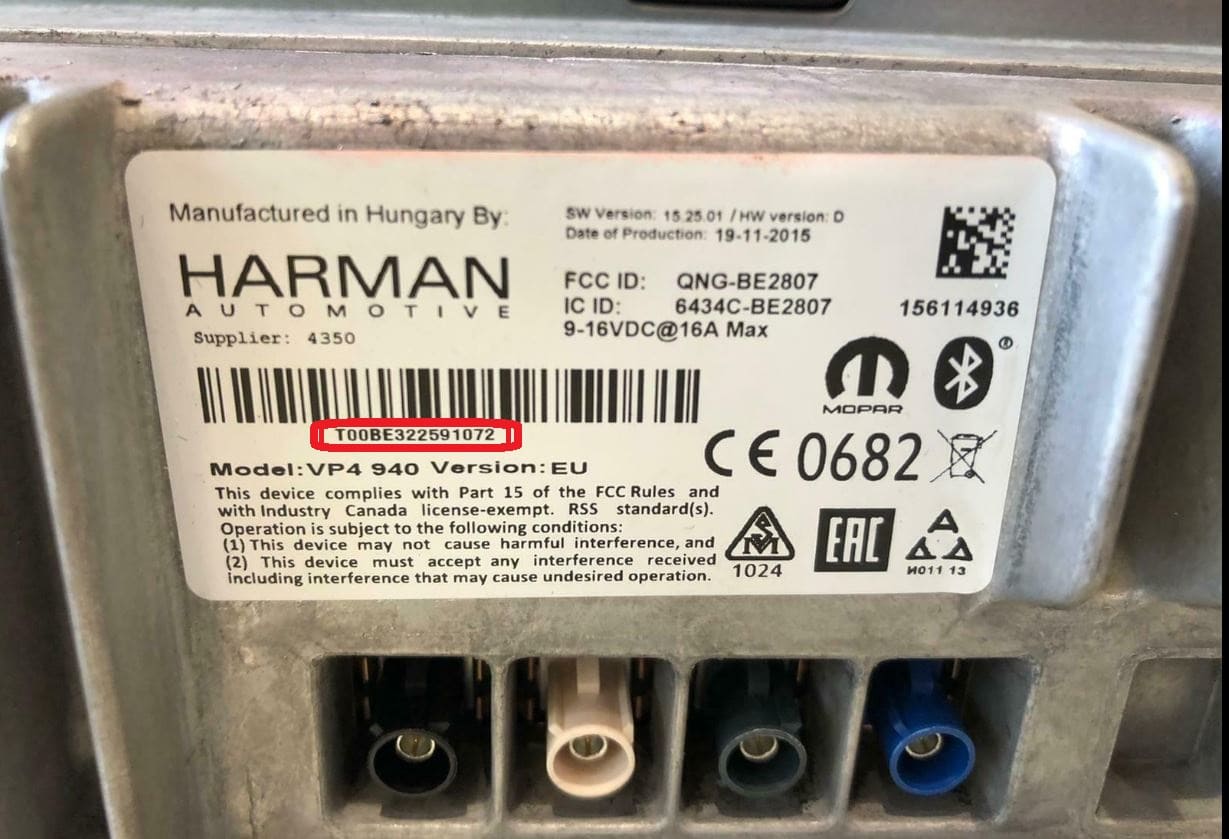
Alfa Romeo Harman VP4 940 serial number radio code QNG BE2807

Harman VP4 940 (QNG/BE2807)

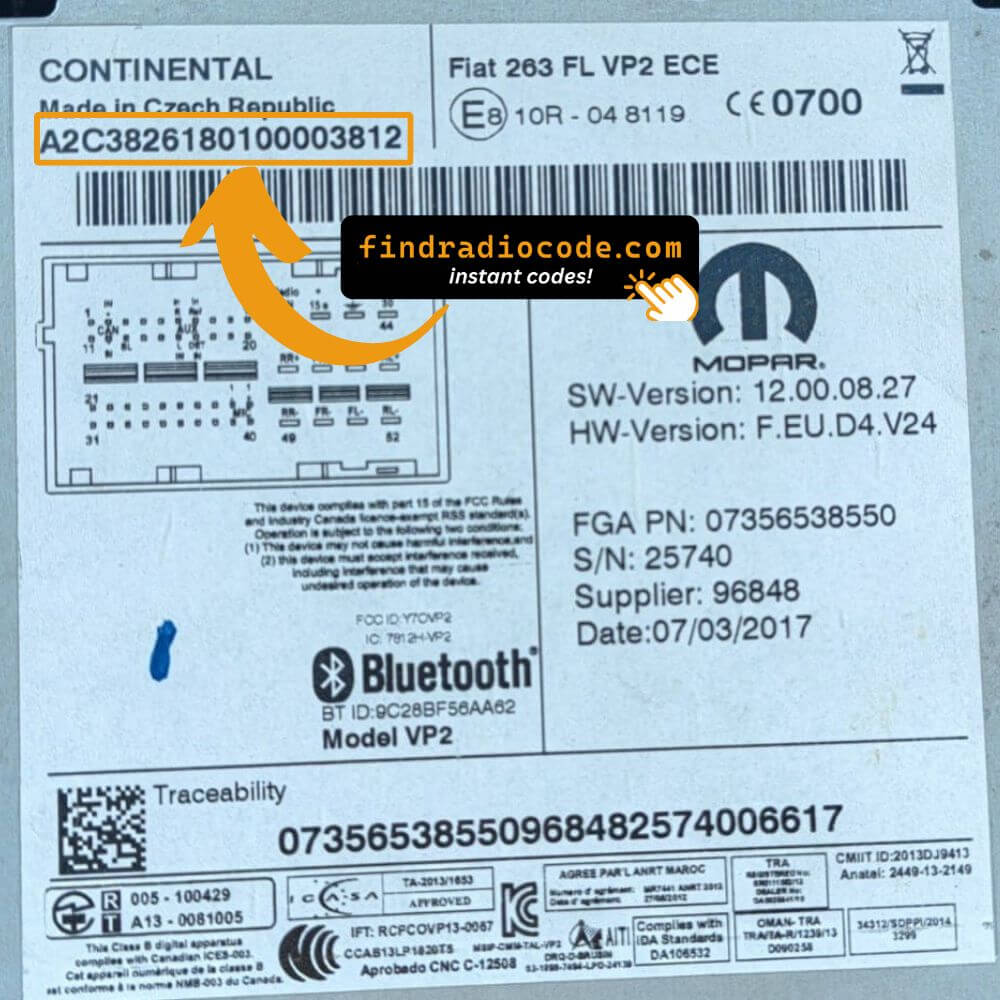
Alfa Romeo Continental VP2 263 serial number radio code

Continental VP2 263

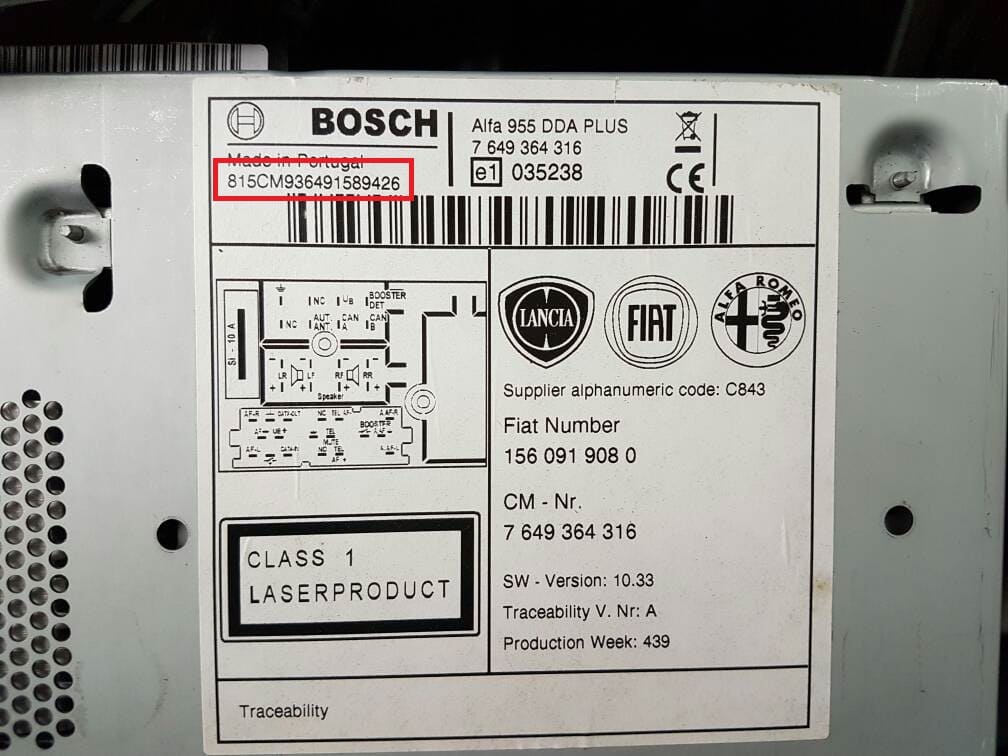
Alfa Romeo Bosch 995 CM9364 radio code serial number

Bosch 995 (CM9364)

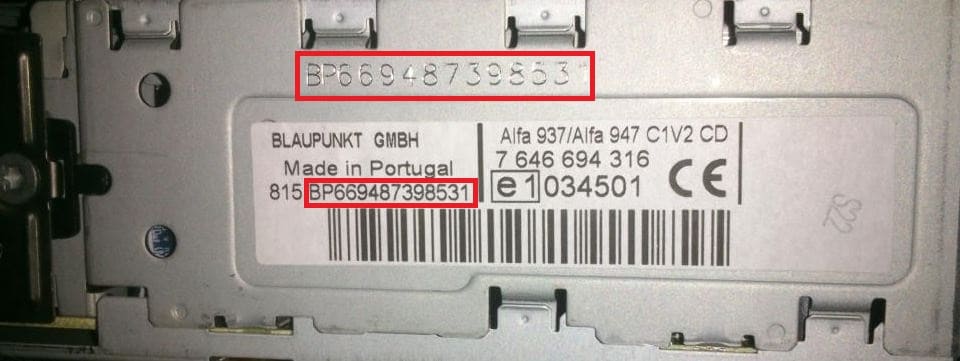
Alfa Romeo Blaupunkt 937 947 BP6694 radio code serial number

Blaupunkt 937/947 (BP6694)

Alfa Romeo Logo

Radio Unit Brands Supported

Harman Logo

Harman

1 model • 14+ part numbers

Continental Logo

Continental

1 model • 24+ part numbers

Blaupunkt Logo

Blaupunkt

1 model • 72+ part numbers

Bosch Logo

Bosch

1 model • 33+ part numbers


Alfa Romeo Models We Support

Service Reviews

5 out of 5
Based on 1 reviews
Write a Review
Victor Verified
Alfa Romeo logo Alfa Romeo
I’m so thankful with your help I will recommend y’all to anyone that need help with the radio … thank you so much 🙏🏽

Recovering Your Radio Security Code

If you no longer have the original code, you can recover it using several methods:

Manufacturer or Dealer Code Retrieval

Vehicle manufacturers store security codes in their internal databases. To get it through official channels, you often need to contact a dealer or authorized service center.

Before providing the code, the dealer will request the VIN, proof of ownership, and supporting vehicle documents. This verification process confirms that the radio belongs to your vehicle.

Because this is done manually, response times vary. Some of them can provide the code the same day, while others may take a few days.

In addition, certain dealers charge a service fee for retrieving your code, which can make this option relatively costly.

Our Instant Radio Code Service - Fast and Reliable

The fastest and easiest way to unlock your Alfa Romeo radio is through our online service.

The only requirements are the radio's serial number, which you can find on the unit, retrieved from the display, or located on the sticker.

There's no need to provide a VIN. Once the payment is completed, your code is displayed instantly and sent to your email.

The database includes thousands of supported Alfa Romeo radio units.

Find Radio Code handles the whole process securely. If the code doesn't work, you're protected by a money-back guarantee.

Dealer Method vs Instant Code Lookup

Dealer
  • Turnaround time: Few hours up to several days
  • Service availability: Limited to dealership hours
  • Visit required?: Usually required
  • Typical cost: Usually expensive
  • Refund policy: No guarantee
Find Radio Code
  • Turnaround time: Instant 95% of times
  • Service availability: Anytime, day or night
  • Visit required?: Not required
  • Typical cost: Starting at $19.99
  • Refund policy: 100% Refund

How to Find the Serial Number (S/N)

To generate the unlock code, you first need the serial number from your Alfa Romeo radio.

By Extracting the Radio

The serial number is on a label on the back or side of the radio unit. To access it, the radio must be pulled out from the dashboard.

  • Look for a barcode sticker marked "S/N" on the rear or side of the unit.
  • Alfa Romeo radio serial formats: Harman VP4 (prefix QNG or BE), Continental VP2 (e.g. 263123456), Bosch (prefix CM, e.g. CM9364), Blaupunkt (prefix BP6694).
  • Do not enter the VIN number or part number — only the radio serial is accepted.
Alfa Romeo Harman VP4 940 serial number radio code QNG BE2807

Harman VP4 940 (QNG/BE2807)

Alfa Romeo Continental VP2 263 serial number radio code

Continental VP2 263

Alfa Romeo Bosch 995 CM9364 radio code serial number

Bosch 995 (CM9364)

Alfa Romeo Blaupunkt 937 947 BP6694 radio code serial number

Blaupunkt 937/947 (BP6694)

Finding the Serial Number on the Display

Alfa Romeo radios do not support on-screen serial retrieval. The radio must be physically removed from the dashboard to read the serial label on the unit's chassis.

Entering Your Radio Unlock Code

Once you have the code, entering it is usually simple.

Most radios display a code prompt after power loss.

Use the radio keys to input each digit.

Some models require you to press a specific button - like pressing OK, Enter, or 5 to confirm or holding preset key, Seek or Tune.

Too many wrong attempts may lock the radio.

After several failed attempts the radio may temporarily disable input.

The wait time depends on the model, from a few minutes to several hours.

If the radio remains locked, consult our help guides for the correct procedure.

Help & FAQs

A radio unlock code, sometimes also known as an anti-theft code is a unique numeric unlock key that restores access to your car stereo after it has been disabled.

This factory security PIN is triggered when the radio is disconnected from power.

This system helps prevent stolen radios from working in other vehicles.

If power is lost, the radio locks automatically and asks for the CODE before it can be used again.

Once the right combination is entered, the stereo is restored to normal operation.

  • Service work affected radio power
  • Too many failed code entries triggered a lockout
  • A blown fuse caused the radio to reset
  • Your vehicle battery died or was replaced
  • You or a mechanic performed a factory reset
  • You changed your car stereo or moved it between vehicles
  • You bought a used car and the code wasn't provided
  • Long periods of disuse can trigger code prompts
  • The car experienced a sudden loss of power

Yes, all Alfa Romeo vehicles with factory-installed radios require a radio code after battery disconnection or radio replacement. This applies to all models including Giulia, Stelvio, Giulietta, MiTo, 159, 147, 156, GT, Spider, and Brera.

The anti-theft feature is standard on all Alfa Romeo models equipped with Harman Uconnect, Continental VP2, Blaupunkt, or Bosch radio systems. Your 4-digit or 5-digit code is permanently linked to your radio's unique serial number.

Start by looking inside the owner's manual. The code is occasionally found on a small card or written directly on a section.

You can also look the glovebox or trunk, where dealers or previous owners may have stuck a sticker with the code. Some also check behind trim pieces or inside the fuse box.

If you have the original manufacturer label, that's the simplest place to find the code - it usually includes both the serial number and unlock key.

There are a few options - but they depend on your situation.

  1. Check your owner's manual or code card - some vehicles came with the code printed at delivery.
  2. Call an authorized service center - some offer free code retrieval if you're the original owner and can provide VIN.
  3. If none of these work, our service is the fastest and most accurate option.
  4. Try DIY forums or online databases, but they don't work for serial-based systems.