How to Find the Serial Number on a Radio
The only thing you'll need to find the corresponding code is your radio's unit serial. No VIN is needed.
On most Alfa Romeo vehicles, you can find it in one of these places:
- Visible on the radio screen (in some cases by using button combinations)
- On the radio unit itself - you'll need to pull it out and write down serial (which is not as hard as it seems)
Search for a label such as: Serial Num. or SN.
1. View the Serial Number on Alfa Romeo 156's Display
Alfa Romeo 156 radios do not support on-screen serial display. The radio must be physically removed from the dashboard to access the serial label on its back or side.
2. Finding the S/N on the Radio Unit's Sticker
The serial number is usually printed on a label attached to the head unit.
Step 1: Turn off the the ignition.
Step 2: After that, remove the dashboard trim.
Step 3: Then release the mounting clips.
Step 4: Carefully pull the radio forward partially (Be careful not to damage the connections).
Step 5: Search for the serial on the rear of the unit.
Step 6: Write down the full Serial Number carefully and come back here so that we can generate your code.
Important: Differentiate the Serial Number for the Part Number!
Removing the Alfa Romeo 156 Radio
The radio is held by screws behind the trim. Remove the trim, unscrew, and slide the unit out. The serial is on the chassis.
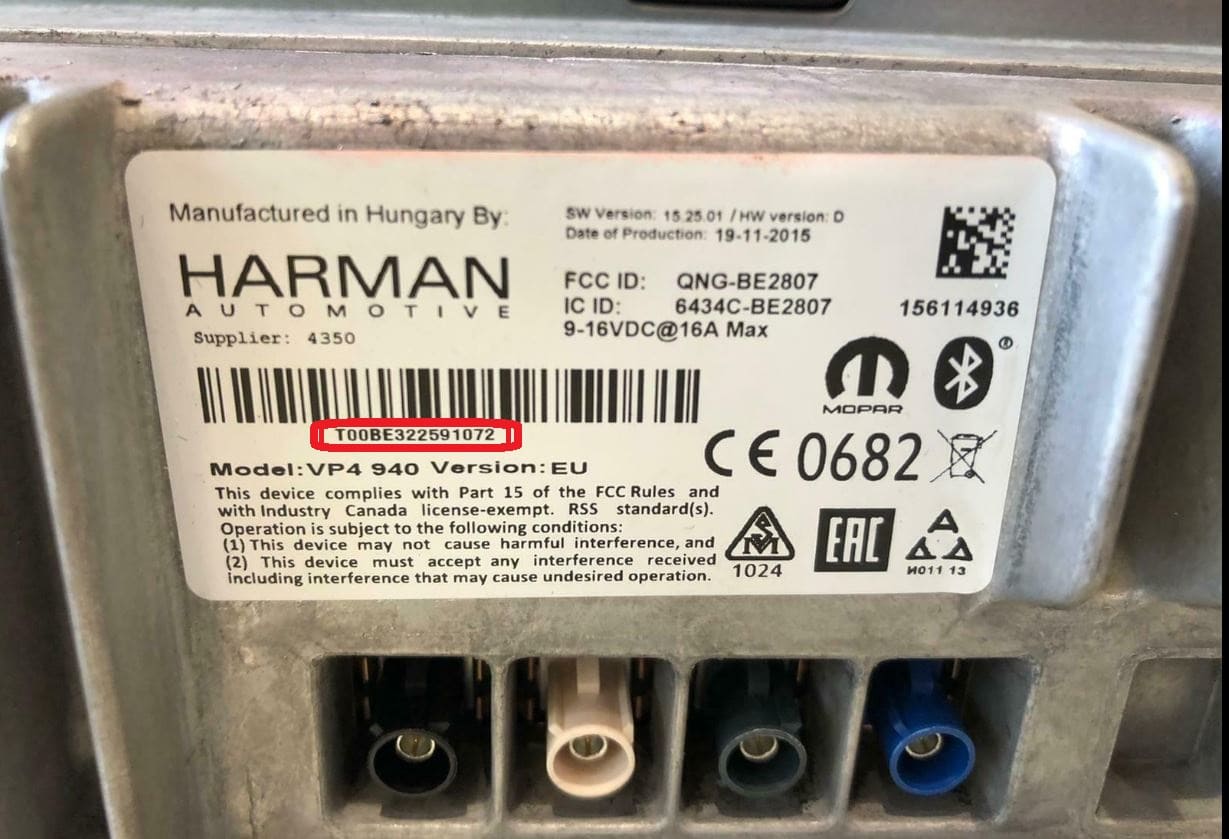
Example: Alfa Romeo 156 serial number label location
Usual Serial Formats on Alfa Romeo 156 Factory Units
Your Alfa Romeo 156 radio serial depends on the manufacturer: Harman VP4 units use QNG or BE prefixes, Continental VP2 units start with 263 (e.g. 263123456), Bosch units use CM9364, and Blaupunkt units use BP6694.
Common Alfa Romeo 156 Radio Code Problems
Dealing with a locked Alfa Romeo 156 radio? Usually, it was caused by one of these well-known events.
Battery Replacement Radio Code Problem
A disconnected battery is the most common reason a Alfa Romeo 156 radio asks for a code.
Even a momentary power loss is enough to trigger the built-in security system.
More Situations That Can Lock Your 156's Radio
- Jump-starting the vehicle can trigger anti-theft mode, requiring the unlock code.
- Installing a used head unit will trigger the original anti-theft code.
- A fuse removal can cause the Alfa Romeo 156 radio to lock.
- After an ECU or software reset, the radio may enter security mode.
Quick Checks First
There is a chance your Alfa Romeo 156 radio code is already somewhere in your car.
Before using a paid service, quickly check the places below - it costs nothing to look.
Look Inside the Car Papers
- In the boot compartment, on a service sticker.
- Inside the center console, sometimes on a small card.
- In the owner's manual, often on a sticker page.
- On the head unit itself, if it was removed before.
- In your maintenance booklet from the previous owner.
Can You Get a Alfa Romeo 156 Radio Code from the Dealer?
Dealerships can generate your radio code by checking the VIN in their system.
They typically ask for registration and ID before sharing the security PIN.
This is the official way to restore access to the factory radio.
Disadvantages:
- Dealers frequently bill for the code (sometimes more than 100$).
- Some imported or older radios may not be in their database.
- You may need to visit the dealer during business hours.
- The lookup is often not instant and may require waiting.
You Found the Corresponding PIN. How the Entering Process Works?
With your code ready, it's time to enter it into the Alfa Romeo 156's radio.
The locked radio will usually show a blank screen with dashes.
Use the built-in buttons or touch controls to dial in each digit, then confirm to unlock the head unit.
If you fail multiple times, you may cause the 156's head unit to enter lockout mode.
When this happens, the screen can display messages like "CODE ERR", "ERROR", or a blank screen.
To unlock it, you usually need to leave the radio powered for a shown waiting period or up to a full hour before trying again.
156's Radio Code FAQs
Free radio codes are not easy to find.
Some manuals may help, but most codes require a dealer lookup.
The only no-cost option would be to check your vehicle and its documentation to see if you have it written down.
Many original head units use a radio unlock code, but not all production years require one.
Whether a code is needed is determined by the factory stereo and the vehicle generation.
Yes. Each factory stereo has its own security code.
If you install a used radio, you'll need the code for that particular device.