How to Locate the Serial Number on a 166
To retrieve the correct security code, you first need the serial number from the radio.
Depending on your model, you can find it shown on the display or check the radio hardware.
You may see labels such as: S/N / SN / Serial / Serial Num. / Serial Number.
These are the most common ways to get it:
1. Get the S/N from Alfa Romeo 166's Display
None of the radio systems support on-screen serial retrieval. The unit must be extracted from the dashboard to access the sticker on its housing.
2. How to Find the Serial Number on the Radio Body
The serial number is usually located on a sticker attached to the head unit.
Step 1: Turn off the vehicle.
Step 2: After that, take off the surrounding panel.
Step 3: Then release the mounting clips.
Step 4: Carefully pull the radio forward partially (Be careful not to damage the cables that the unit is connected to).
Step 5: Search for the serial number on the rear of the unit.
Step 6: Write down the full number carefully and come back to our website so that we can generate the code.
Important: Be careful not to mix the Serial Number and the Part Number!
How to Extract Your Alfa Romeo Radio
To remove the Alfa Romeo 166 radio, pop off the dash bezel and unscrew the mounting hardware. The serial label is on the back or side of the unit.
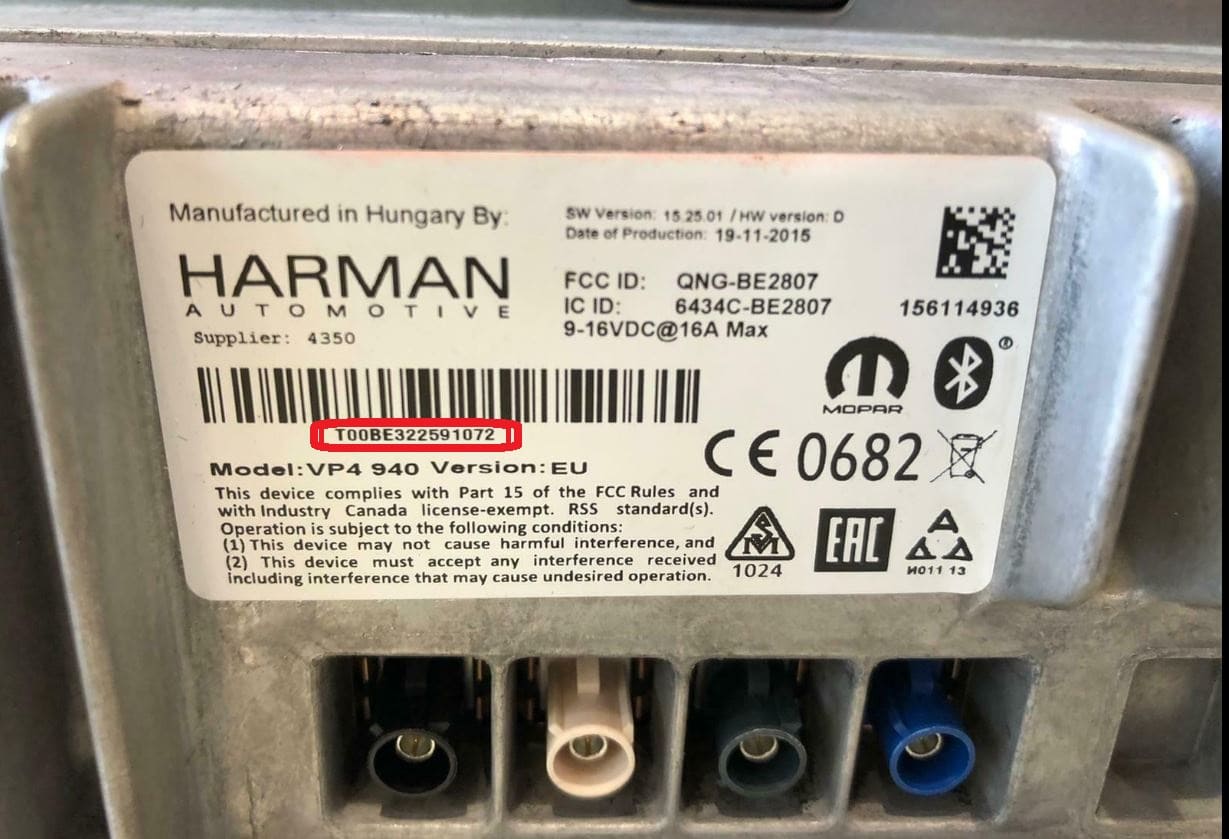
Example: Alfa Romeo 166 serial number label location
Most Common Alfa Romeo 166 S/N Formats
To unlock your radio, identify the serial: QNG/BE = Harman VP4, 263 = Continental VP2, CM9364 = Bosch, BP6694 = Blaupunkt. The label is on the radio body.
Situations When your 166 Requests a Code
Many drivers encounter radio lock problems on their 166 after electrical work.
Below are the most typical situations when this can happen.
Radio Locked After Battery Swap
When the battery is removed, the Alfa Romeo 166 radio requests a security code.
This factory protection system is designed to protect the original head unit by disabling the radio after power loss.
Other Cases When The Radio May Ask for a Code
- If a fuse is pulled, the radio can enter anti-theft mode.
- After an ECU reset, software update, or electrical repair, some Alfa Romeo 166 radios display a CODE message.
- After a boost start, the radio may reset and request a security code.
- When the radio is replaced, it usually locks automatically.
Check These Places First
There is a chance your Alfa Romeo 166 radio code is already somewhere in your car.
Before spending money, take a few minutes check the places below - it costs nothing to look.
Look Through Car Documentation
- In the vehicle handbook, often on a code card.
- Inside the center console, sometimes on a label.
- In the spare wheel area, on a service sticker.
- In your car paperwork from the previous owner.
- On the radio unit itself, if it was serviced earlier.
Through the Dealer
Dealerships can generate your radio code by checking the vehicle records in their system.
They typically ask for registration and ID before sharing the security PIN.
This is the official way to restore access to the factory radio.
Things to Consider:
- You may need to contact service support during business hours.
- The lookup is often not instant and may require waiting.
- Some imported or older radios may need extra verification.
- Dealers frequently charge a service fee (sometimes more than 100$).
How to Enter the Radio Code on Alfa Romeo 166
Once you have the Alfa Romeo's unlock code, you can enter it using the infotainment controls.
Most radios display "ENTER CODE", "----" or "XXXX" message when they are locked.
You typically use the preset buttons to input the code.
After entering the full code, the radio will confirm the entry.
Try not to make mistakes, because too many wrong attempts can temporarily lock the radio.
It will allow you a few incorrect tries before showing a LOCKED message.
You can reset the lockout by keeping the ignition on for 60 minutes or a set waiting period.