What Exactly is a Radio Anti-Theft Code?
When the radio is disconnected from power, it automatically locks and requires an anti-theft code to be entered before it can be operated.
A radio unlock code (also known as an anti-theft code) is a built-in security system integrated into factory car stereos to prevent theft.
This system ensures that a removed radio becomes inoperable without the correct code.
Entering the correct code returns full stereo and infotainment functionality.
Common Situations Requiring a Code
Facing a locked Alfa Romeo Giulietta radio? Usually, it was triggered by one of these common situations.
Battery Change Lock (Most Common)
A dead battery is the most common reason a Alfa Romeo Giulietta radio asks for a code.
Even a momentary power loss is enough to trigger the built-in anti-theft lock.
Other Situations That Trigger PIN Code
- A fuse removal can cause the Alfa Romeo Giulietta radio to request a security code.
- Jump-starting the vehicle can reset the radio, requiring the unlock code.
- After an ECU or software reset, the radio may enter security mode.
- Installing a replacement head unit will require the original radio code.
Check These Free Methods
Before you decide to pay, it's worth checking a few places where the code is often already written down.
Some drivers find their Alfa Romeo Giulietta radio code without needing any tools or paperwork.
Here are the easiest things to check first.
Look Around the Dashboard
- In the owner's manual, often on a code card.
- In your maintenance booklet from the previous owner.
- On the radio unit itself, if it was serviced earlier.
- In the boot compartment, on a service sticker.
- Inside the center console, sometimes on a small card.
Alfa Romeo Dealer Assistance Option
Dealerships can generate your radio code by checking the vehicle records in their system.
They typically ask for registration and ID before sharing the unlock code.
This is the official way to restore access to the factory radio.
Things to Consider:
- Dealers frequently charge a service fee (It may cost more than 100$).
- You may need to contact service support during business hours.
- Some imported or older radios may need extra verification.
- The lookup is often not instant and may require waiting.
Finding the Serial N. on a Giulietta's Radio
To get the correct unlock code, you first need the radio serial number.
Depending on your vehicle model, you can find it shown on the display or check the radio hardware.
It's often written as: S/N / SN / Serial / Serial Num. / Serial Number.
These are the typical ways to find it:
1. How to See the Serial Number on the Giulietta Screen
None of the radio systems support on-screen serial retrieval. The unit must be extracted from the dashboard to access the sticker on its housing.
2. Locating your Serial Number on the Radio Itself
The serial number is usually located on a sticker attached to the radio casing.
Step 1: Turn off the vehicle.
Step 2: After that, remove the dashboard trim.
Step 3: Then unscrew the radio brackets.
Step 4: Carefully slide the unit out partially (Be careful not to damage the cables that the unit is connected to).
Step 5: Look for the serial number on the rear of the unit.
Step 6: Write down the full number carefully and come back to our website so that we can generate the code.
Important: Be careful not to mix the Serial Number for the Part Number!
Alfa Romeo Radio Removal Guide
Radio removal: unclip the trim surround, remove the screws, and extract the unit. The serial label is on the back.
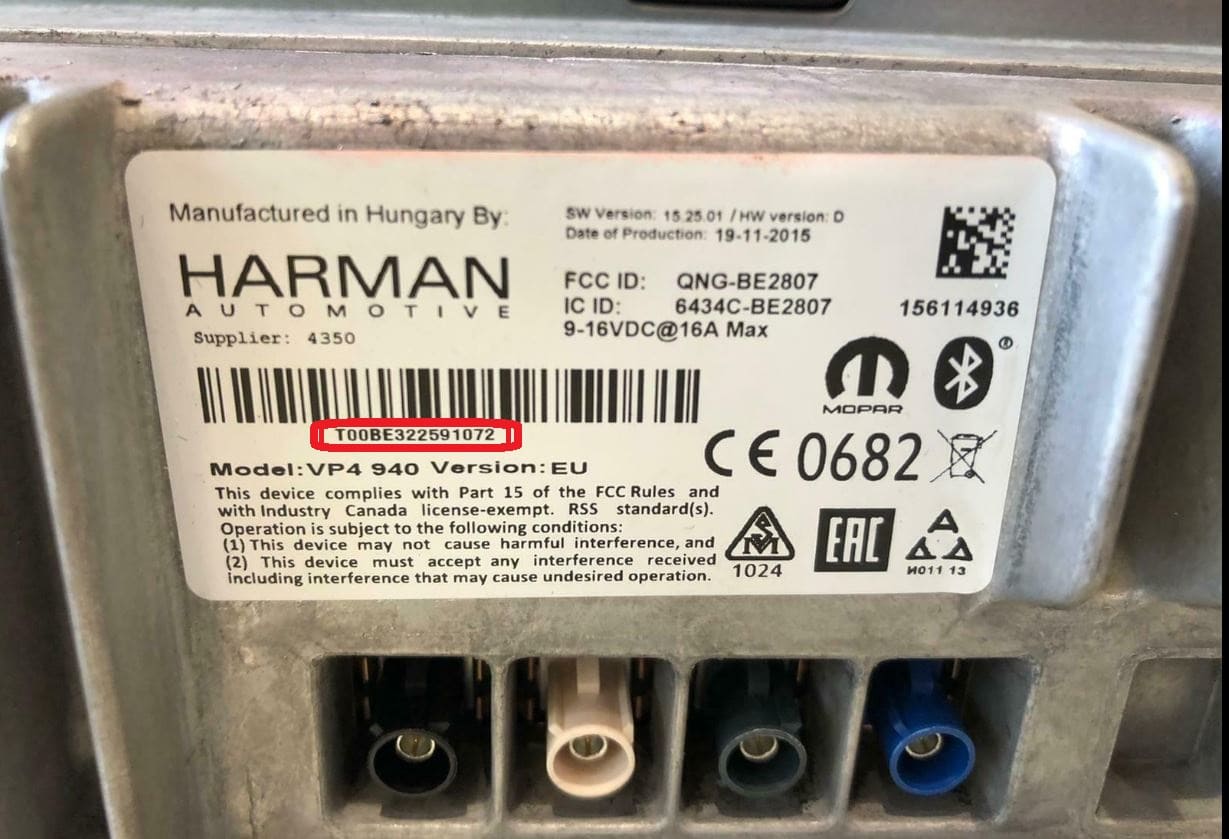
Example: Alfa Romeo Giulietta serial number label location
Usual Serial Letters and Numbers on Alfa Romeo Giulietta Radios
Your Alfa Romeo Giulietta radio serial depends on the manufacturer: Harman VP4 units use QNG or BE prefixes, Continental VP2 units start with 263 (e.g. 263123456), Bosch units use CM9364, and Blaupunkt units use BP6694.
You Found the Corresponding Security Code. How to Enter It?
Once you have the Alfa Romeo's radio code, you can enter it using the infotainment controls.
Most radios display a "CODE", "ENTER CODE", or "----" message when they are locked.
You typically use the number keys to input the code.
After entering the full code, the radio will unlock automatically.
Try not to make mistakes, because too many wrong attempts can disable your radio temporarily.
It will allow you a few incorrect tries before showing a WAIT message.
You can try again by leaving the radio on for one hour or a set waiting period.