
Common Audi TT Radio Code Situations
Your radio may lock automatically when it loses power.
These are the some typical scenarios that activate the radio code prompt.
Radio Asking for Code After Battery Change
A disconnected battery is the most common reason a Audi TT radio asks for a code.
Even a brief power loss is enough to activate the built-in security system.
More Events That Can Lock Your TT's Radio
- A power surge can reset the radio and trigger the security lock.
- Replacing the head unit with a different one requires the code for that particular radio.
- ECU reflashing may reset the radio memory on some Audi TT units.
- Even a quick battery boost can wake the anti-theft lock.
Places to Check Before Paying for a Radio Code
Before you pay for it, you should check a few places where the code is often stored.
Some owners find their Audi TT radio code without needing any tools or paperwork.
Here are the most common things to check first.
Check the Owner's Manual and Paperwork
- In the radio manual, often on a separate code card.
- On the radio chassis if the unit was previously removed.
- In the service booklet provided with the car.
- On a label in the glove compartment.
- Near the boot panel, where some manufacturers place radio labels.
Can You Get a Audi TT Radio Code from the Dealer?
Dealerships can generate your radio code by checking the VIN in their system.
They typically require proof of ownership before sharing the unlock code.
This is the official way to restore access to the factory radio.
Things to Consider:
- You may need to visit the dealer during business hours.
- Some imported or older radios may not be in their database.
- Dealers frequently charge a service fee (sometimes more than 100$).
- The lookup is often not instant and may require waiting.
Finding the Serial N. on a TT's Radio
To generate the correct radio code, you will need the serial number from your Audi TT's head unit.
You can usually find it on the radio body. Common labels to look for: S/N, SN, Serial, Serial Number.
1. Get the S/N from Audi TT's Screen
The RNS-E is the only Audi radio that can display its serial on screen — press and hold buttons 1 + 6 while powering on. For all other head units, including the Chorus, Concert, and Symphony, the radio must be removed from the dashboard.
2. Find the Serial Number on the Radio Sticker
The serial number is usually printed on a label attached to the radio casing.
Step 1: Turn off the vehicle.
Step 2: After that, take off the surrounding panel.
Step 3: Then release the mounting clips.
Step 4: Carefully pull the radio forward partially (Be careful not to damage the cables that the unit is connected to).
Step 5: Look for the serial number on the side of the unit.
Step 6: Write down the full number carefully and come back here so that we can generate the code.
Important: Don't mix the Serial Number and the Part Number!
Audi Radio Removal with Extraction Keys
Audi radios use the standard VAG extraction key system. Push the flat, U-shaped keys into the round holes on both sides of the radio faceplate. When the clips disengage, pull the radio forward. The serial label is on the back or side of the housing.
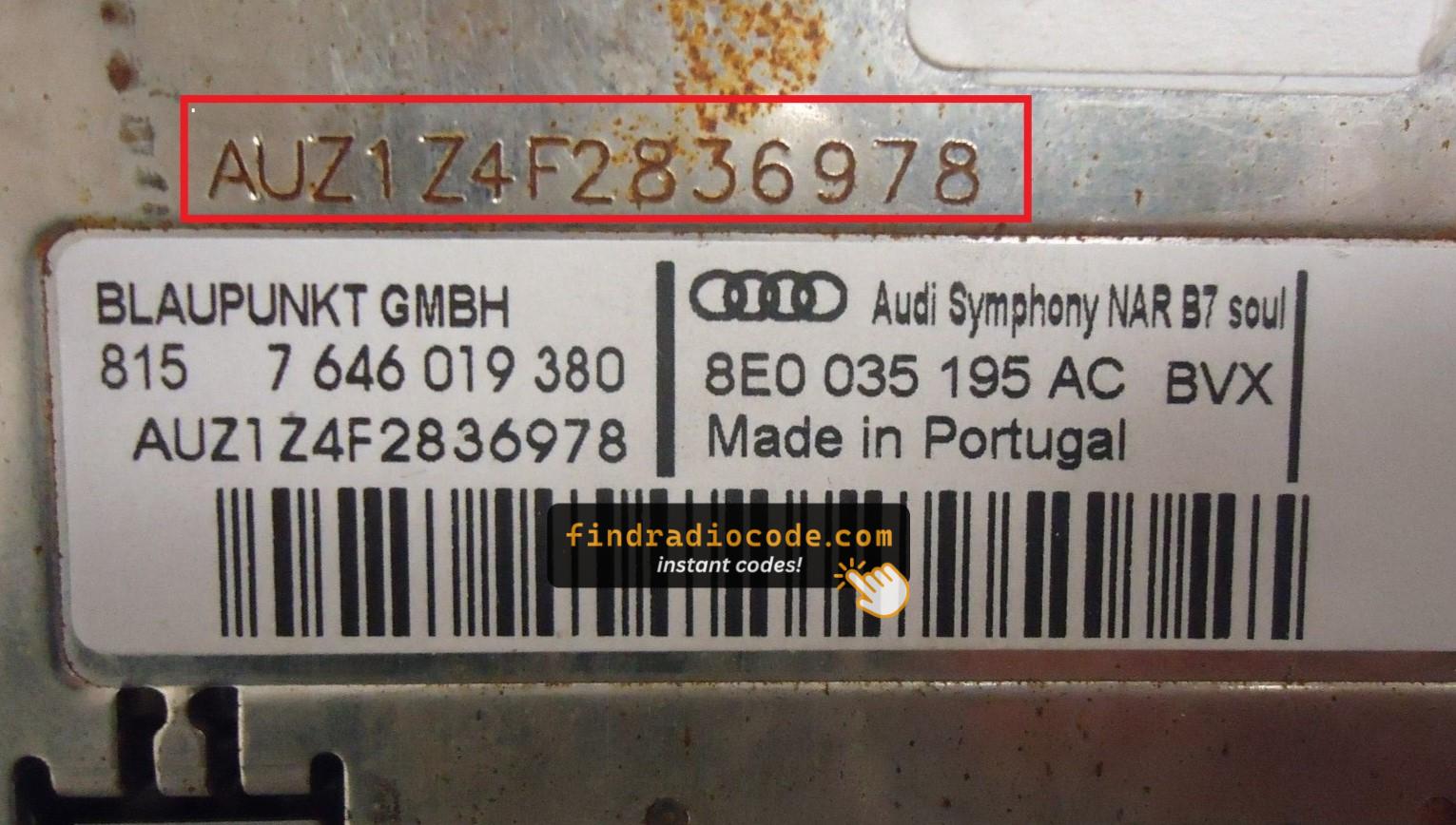
Example: Audi TT serial number label location
Usual Serial Letters and Numbers on Audi TT Units
To decode your radio, locate the serial that starts with AUZ (typical format: AUZ1Z1K1234567). Some units may show a VWZ prefix instead. The serial is 13 characters long and sits on a label on the unit itself.
You Found the Corresponding Security Code. How Entering Works?
You need to input the radio security code into the system to unlock your Audi's radio.
In the locked unit, the screen usually displays a code prompt.
Based on the radio, use control knob, touchscreen, or radio presets to enter the numbers, then confirm the code to reactivate the audio system.
Try not to make mistakes, because too many wrong attempts can disable your radio temporarily.
It allows a few incorrect tries before showing a LOCKED message.
You can reset the lockout by leaving the radio on for one hour or a set waiting period.
Frequent Questions about Audi TT Unlock Code
Not all of them require a radio code, but many factory radios use it as an security measure.
Some production series may still use a code depending on the radio unit.
Free codes are uncommon.
You might locate the code in the paperwork or from a service center, but most require a database lookup.
Yes. Each factory radio has its own unique security code.
A replacement radio will need its own code to work.