Finding the S/N on a E34's Radio
To generate the correct radio code, you will need the radio serial number from your BMW E34's head unit.
You may be able to find it directly on the screen. Common labels to look for: S/N, SN, Serial, Serial Number.
1. Viewing E34's S/N on the Infotainment
None of the radio systems support on-screen serial retrieval. The unit must be extracted from the dashboard to access the label.
2. How to Find the S/N on the Radio Body
To find the serial number, you'll need to pull out the head unit from the dashboard.
- Start by turning off the vehicle and taking off the dashboard bezel.
- Next, unscrew the mounting bolts and slide the radio out to check the label on the side of the radio. Be careful not to damage the connections.
- Write down full serial number carefully and then come back to the website.
- Know that serial number and part number are not the same. You can find both of them on the sticker, but you only need for the serial.
How to Extract Your BMW Radio
To remove the BMW E34 radio, you need BMW radio extraction tools or must remove the surrounding trim to access the mounting hardware. The serial label is on the back or side of the unit.
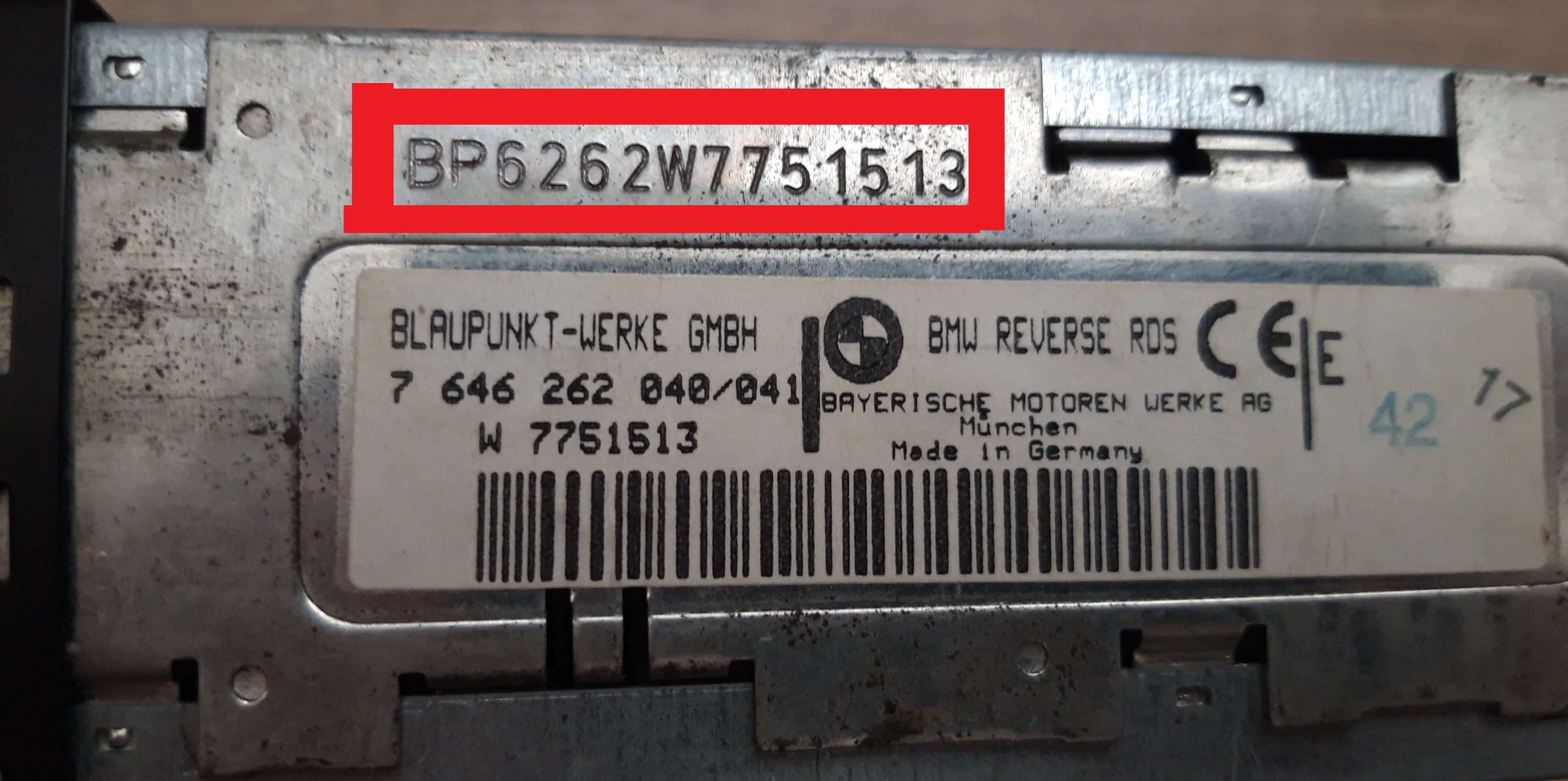
Example: BMW E34 serial number label location
Common Serial Prefixes on BMW E34 Factory Units
Your BMW E34 radio serial starts with BP (Blaupunkt, e.g. BP1234567), BE (Becker), or CM (Bosch). The serial is on a label on the radio housing — not visible without removal.
Situations When your E34 Requests a Code
Facing a locked BMW E34 radio? In most cases, it was triggered by one of these well-known situations.
Error After a Battery Replacement
After a battery replacement, your radio may stop working.
This happens because the radio detects a power reset, which activates the anti-theft system.
Other Situations That May Trigger the Code
- A fuse removal can cause the BMW E34 radio to lock.
- Jump-starting the vehicle can reset the radio, requiring the unlock code.
- After an ECU or software reset, the radio may enter security mode.
- Installing a used head unit will trigger the original anti-theft code.
Places to Check Before Paying for a Radio Code
Before you pay for it, you should check a few places where the code is often stored.
Some drivers find their BMW E34 radio code without needing any tools or paperwork.
Here are the easiest things to check first.
Search the Vehicle Documents
- In the trunk, on a service sticker.
- In your service book from the previous owner.
- On the radio unit itself, if it was serviced earlier.
- In the vehicle handbook, often on a sticker page.
- Inside the glovebox, sometimes on a small card.
Requesting It from the Dealer
A BMW dealer can usually retrieve the radio code using your E34's vehicle identification number.
In most cases, you need to visit or contact them and show vehicle documents.
When it is verified, they can generate the original unlock code for your radio.
Limitations:
- Dealers often ask for payment for the lookup service and it's sometimes more than 100$.
- Some older BMW E34 radios may not be supported.
- The process can take days depending on the model and database.
- You usually need to visit in person and bring ID.
Entering the Radio Code on BMW E34
You need to type in the radio security code into the system to unlock your BMW's radio.
In the locked unit, the screen usually displays a security message.
You should use radio presets, control knob, or touchscreen to set each digit, then submit the code to restore radio functionality.
Be careful, because too many wrong attempts can disable your radio temporarily.
It will allow you a few missed shots before showing a SAFE message.
You can reset the lockout by keeping the ignition on for 60 minutes or a set waiting period.
What Exactly is a Radio Anti-Theft Code?
The security code is a manufacturer-assigned numeric code that keeps your stereo secure.
It is programmed into the radio at the factory and activates automatically whenever the unit is disconnected.
If the correct code is not entered, the radio remains disabled and cannot be operated.
Entering the code tells the radio that the owner is present, restoring normal operation immediately.
Frequent Questions about BMW E34 Radio Code
Yes. Each stereo has its own unlock code.
A replacement radio will need its own code to work.
Not all of them require a security code, but many factory radios use it as an anti-theft feature.
Some production series may still use a code depending on the radio unit.
Free codes are rare.
You might locate the code in the manual or from a service center, but most require a database lookup.