How to Locate the S/N on a Dacia
To generate the unlock code, you first need the serial number from your Dacia radio.
Remove the Radio Unit
The serial number is on a label on the back or side of the radio unit. To access it, the radio must be pulled out from the dashboard.
- Look for a barcode sticker marked "S/N" on the rear or side of the unit.
- Dacia radio serial formats: 8200
123456, 2811123456, or 7700123456.
- Some models use a Precode — a short code (one letter + 3 digits, e.g.
A123) printed on a card in the glovebox or on a sticker on the unit.
- Do not enter the VIN number or part number — only the radio serial or precode is accepted.
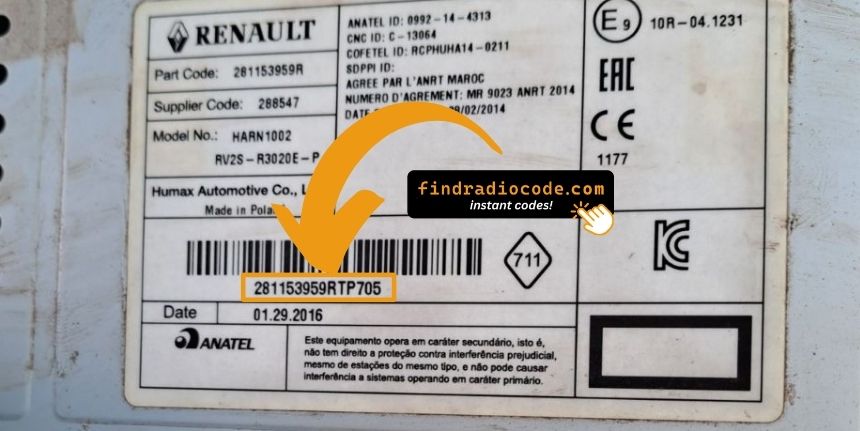
Serial Number Format 2811
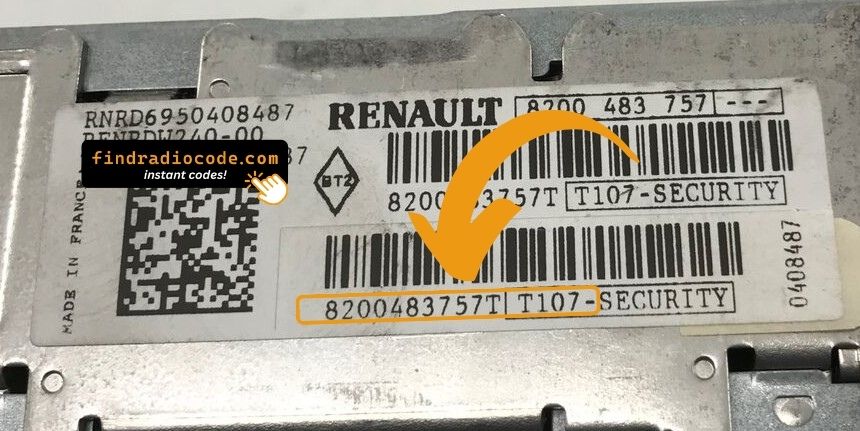
Serial Number Format 8200
Pro Tip: For most Dacia radios, you can display the precode on screen by pressing buttons 1+6 together. No radio removal needed!
Finding the Serial Number on the Display
Some Dacia radios support on-screen serial/precode retrieval:
- Press and hold buttons 1 & 6 simultaneously while the radio is on to display the serial or precode.
- On some models, try buttons 1 & 5 instead.
If neither method works, the radio must be physically removed to read the serial label.
How to Enter Dacia Radio Code
Entering the code into your radio takes only a few steps.
Many radios show four dashes on startup.
Use the radio keys to select the numbers.
Some models require you to press a specific button - like pressing 5, Enter or OK to confirm or holding "Seek", "Tune" or the preset key.
Repeated incorrect attempts can cause lockout.
Too many incorrect tries the radio may trigger a lockout timer.
The wait time depends on the model, sometimes requiring extended waiting.
If the radio remains locked, consult our help guides for the correct procedure.
Ways to Recover Your Dacia Radio Code
If you no longer have the original code, you can recover it using several methods:
Getting the Code from a Dealer (VIN Needed)
Car manufacturers store security codes in their internal databases. To get it through official channels, you usually need to contact a dealer or authorized service center.
Before providing it, the dealer will typically request the VIN, proof of ownership, and vehicle documents. The verification process confirms that the radio belongs to your vehicle.
Because this is handled manually, response can be slow. Some dealerships can provide the code in a few hours, while others may take a few days.
Many dealers charge a service fee for retrieving the PIN, which can make this option quite costly.
Our Instant Radio Code Service - Fast and Reliable
There's a quite faster alternative to the dealer method - our Dacia radio code generator.
All you need is the radio's serial number, which you can find on the sticker, the unit or the display.
There's no personal data required. Once the payment is done, the correct PIN code is displayed instantly and sent to your email.
We cover a wide range of original Dacia radios and models.
Find Radio Code handles the whole process securely. If the code doesn't work, you're protected by a 100% refund.
Frequently Asked Questions
Many OEM head units will ask for a radio unlock code after a power interruption.
This happens because the radio includes an built-in protection feature designed to protect the stereo.
When power is restored, the unit requests the unlock code before normal operation resumes.
The required code is a PIN-style unlock code that allows the radio to function again.
- You installed a new or used radio
- A previous owner didn't supply the radio code
- Long periods of disuse can trigger code prompts
- A blown fuse caused the radio to reset
- Someone entered incorrect codes too many times
- A reset cleared the saved code
- The car experienced a sudden loss of power
- You recently changed or disconnected the battery
- Vehicle was serviced or scanned
Yes, all Dacia vehicles with factory-installed radios require a radio code after battery disconnection or radio replacement. This applies to all models including Duster, Sandero, Logan, Lodgy, Dokker, and Spring.
The anti-theft feature is standard on all Dacia radios manufactured by Blaupunkt, Bosch, Philips, VDO, and other suppliers. Your 4-digit code is permanently linked to your radio's unique serial number or precode. Dacia uses the same radio systems as Renault.
Start by checking the user guide. The code is occasionally found on a detachable slip or written directly on a dedicated panel.
You can also check the glovebox or trunk, where dealers or previous owners may have stuck a sticker with the code. Some also search for it behind trim pieces or inside the fuse box.
If you have the original radio code card, that's the simplest place to find the code - it usually includes both the serial number and unlock key.
There are a few options - but they aren't guaranteed.
- Call an authorized service center - some offer free code retrieval if you're the original owner and can provide registration papers.
- Check your owner's manual or code card - some vehicles came with the code printed at delivery.
- If none of these work, our service is the fastest and most accurate option.
- Try DIY forums or online databases, but these are risky and rarely accurate.
IMPORTANT: Radio Lockout System
Dacia radios have a security lockout feature to prevent code theft attempts.
What happens during lockout:
- After 3-10 incorrect code attempts, the radio will lock
- Display may show "LOCKED", "WAIT", or remain blank
- You must wait 1 hour with the radio OFF before trying again
- Some models may require longer wait times after multiple lockouts
How to avoid lockout:
- Double-check your precode or serial number before ordering
- Verify you're entering the code correctly (buttons 1, 2, 3, 4, then confirm with button 6)
- If locked, be patient and wait the full hour before retrying
Our Guarantee: We provide the correct code based on your precode/serial. If our code doesn't work, we offer a 100% money-back guarantee.
Get Your Dacia Radio Code Now
Full refund if your code fails


 Dacia
Dacia