What Exactly is a Radio Anti-Theft Code?
A radio code, sometimes also known as an anti-theft code is a unique numeric unlock key that restores access to your car stereo after it has been locked.
This anti-theft code is triggered when the radio is disconnected from power.
Car manufacturers use this security system to prevent stolen radios from being reused.
If power is cut, the radio stops functioning and requires the unlock CODE before it can work again.
Once the correct numbers is entered, the stereo is fully reactivated.
Common Dodge Charger Radio Code Problems
Your radio may request a security code when it loses power.
These are the most common scenarios that trigger the radio code prompt.
Lock After a Battery Work
A replaced battery is the most common reason a Dodge Charger radio asks for a code.
Even a momentary power loss is enough to trigger the built-in security system.
Additional Scenarios Where Radio Requires a Code
- Replacing the factory stereo with a used one requires the code for that specific unit.
- ECU reflashing may reset the radio memory on some Dodge Charger units.
- A power surge can reset the radio and prompt for a code.
- Even a brief jump-start can wake the anti-theft system.
Before Paying for Help
Want free Dodge Charger Radio Code? Actually, you may find it.
In some cases, your code may already be available in the vehicle itself or in the documentation.
Checking these sources can save you time and money before using an online lookup tool.
Below are the most reliable places to look.
Look Through Car Documentation
- In the boot compartment, on a service sticker.
- In your maintenance booklet from the previous owner.
- On the head unit itself, if it was serviced earlier.
- Inside the center console, sometimes on a small card.
- In the owner's manual, often on a sticker page.
Requesting It from the Dealer
A Dodge dealer can usually look up the radio code using your Charger's VIN.
In most cases, you need to contact the service department or visit the dealership and show vehicle documents.
Once verified, they can request the original unlock code for your radio.
Limitations:
- You usually need to visit in person and bring vehicle paperwork.
- The process can take days depending on the model and database.
- Dealers often ask for payment for the lookup service and it's sometimes more than 100$.
- Some older Dodge Charger radios may require manual lookup.
How to Find the S/N on a Charger's Radio
The only thing you'll need to retrieve the unlock code is your radio's unit serial. VIN or other details are not required.
On most Dodge vehicles, you can find it in these common spots:
- Visible on the radio screen (sometimes by using a key combination)
- On the radio unit itself - you'll need to remove the unit slightly and write down the serial number (which is fairly easy)
Search for text similar to: S/N or Serial.
1. Find the S/N on Dodge Charger's Display
Good news for Dodge Charger owners: this LX-platform muscle car sedan has had Uconnect 8.4" since 2011, and the serial number is accessible on-screen without any tools. It also shares its dashboard layout with the Chrysler 300, so the methods are identical across both.
2011–2018 — Uconnect 8.4" Classic
Hold Fan Up + Fan Down + Front Defrost for 5 seconds → Dealer Mode.
OR: hold Temp Up (red) + Temp Down (blue) for 5 seconds → Engineering Menu.
Both routes: System Info → Radio Part Info → Serial Number
2019+ — Uconnect 8.4" NEW
Press the bottom-left + bottom-right edges of the plastic bezel frame simultaneously. Hold until Dealer Mode opens.
Important Press the bezel frame — not the glass.
System Info → Radio Part Info → Serial Number
If Dealer Mode is restricted (some 2020+ models after a software update), the serial label is on the top or side of the radio unit — see the removal guide below. Serial format: 14 characters, e.g. T00AM394958584.
2. Locating your S/N on the Radio Itself
To find the serial number, you'll need to remove the radio unit from the dashboard.
- Start by turning off the vehicle and taking off the dashboard bezel.
- Next, unscrew the mounting bolts and pull the unit forward to check the sticker on the side of the radio. Pay attention not to damage the connections.
- Write down the serial number carefully and come back to our website.
- Know that serial number and part number are not the same. You can find both of them on the sticker, but you only care for the serial.
Accessing the Serial Number in Dodge Charger
Before you can retrieve your unlock code, you'll need to access the serial number. Here's how to remove the radio unit:
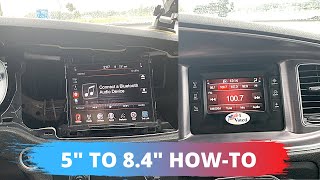
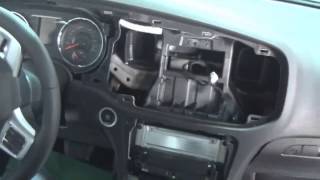
Removal Process Varies by Year:
2011-2014 Models: The center bezel is one large piece secured by clips. Gently remove the bezel to expose three harness connectors (hazard light switch and two climate control plugs). Once disconnected, you can access the radio unit secured by 4 Phillips screws.
2015+ Models: Start by removing the power outlet pocket below the radio (2 clips). Next, remove the radio/climate trim panel (4 clips around the perimeter). The radio unit is held by 4 screws—you may need a Phillips screwdriver or a 9/32" socket depending on your trim level.
Note: 2015+ Charger shares its dashboard layout with the Chrysler 300, so removal procedures are nearly identical. You'll need a plastic pry tool to avoid scratching the trim.

Example: Dodge Charger serial number label location
Common Serial Prefixes on Dodge Charger Factory Units
Your Dodge Charger radio serial may be in T00AM format (14 characters, e.g. T00AM394958584), TM9 format (e.g. TM9123456789), or A2C format on newer Uconnect systems. The serial is printed on a label on the radio housing.
You've Got the Corresponding Security Code. How Entering Works?
With your code ready, it's time to input it into the Dodge Charger's radio.
The locked radio will usually show a blank screen with dashes.
Use the built-in buttons or touch controls to dial in each digit, then confirm to unlock the head unit.
Once you have your unlock code, here's how to enter it in your Charger:
- Turn on the ignition—the radio will display "CODE" (on 4.3" displays) or "Please enter Anti-Theft Code" (on 8.4" touchscreens).
- Use preset buttons 1 through 4 on the radio faceplate. Even if you have an 8.4" touchscreen, code entry uses the physical buttons below the screen.
- Each button cycles through digits 0-9 for its position. Press button 1 repeatedly until you reach the first digit of your code, then move to button 2 for the second digit, and so on.
- Confirm by pressing and holding the ENTER/OK button for 2-5 seconds. The code does not auto-confirm, so you must complete this step.
Lockout Warning: After 3 incorrect attempts, the radio will display "WAIT" and lock for 30 minutes. The ignition must remain ON during this entire waiting period—turning it off resets the timer.