
How to Find the S/N on a Dart's Radio
To get the correct security code, you first need the radio serial number.
Depending on your radio model, you can see it on the screen or check the radio hardware.
It's often written as: S/N / SN / Serial / Serial Num. / Serial Number.
These are the most common ways to find it:
1. Finding Dart's S/N on the Display
The Dodge Dart (2013–2016) is a compact car built on the Alfa Romeo Giulietta platform — the only Stellantis compact with a genuine European sporting pedigree. Mid and upper trims (SXT, GT, R/T, Aero) come with the full Uconnect 8.4" Classic system, which means the serial number is on-screen and accessible without tools.
One caveat upfront: the base Dart SE trim with the 5" Uconnect display may not support Dealer Mode. If you're on a base model, try the button combinations first — if nothing happens, see the removal guide below.
On an 8.4" Uconnect Classic Dart, turn the ignition to ACC or ON, then hold Fan Up + Fan Down + Front Defrost for 5 seconds. Dealer Mode opens. Navigate: System Info → Radio Part Info → Serial Number.
Alternate: hold Temp Up + Temp Down for 5 seconds to reach the Engineering Menu, then navigate the same path. Serial format: 14 characters, e.g. T00AM394958584.
2. Finding the S/N on the Radio Unit
To find the serial number, you'll need to pull out the head unit out.
- Start by turning off the ignition and removing the trim panel.
- Next, release the clips and pull the unit forward to check the sticker on the back of the radio. Pay attention not to damage the cables.
- Write down full serial number carefully and then come back to the website.
- Know that serial number and part number are not the same. You will find both of them on the sticker, and you only need for the serial.
Accessing the Serial Number in Dodge Dart
The Dart has one of the more involved radio removal procedures, requiring removal of the upper dash pad before accessing the radio unit. Take your time with this process.
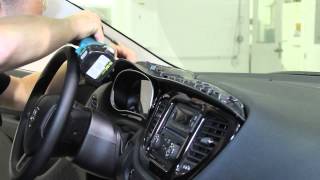
Removal Process:
- Remove the upper dash pad—secured by up to 9 screws: 3 visible from the windshield area, plus additional screws on the sides including a plastic screw on the right side.
- Remove the radio bezel—held by clips plus one stubborn metal clip on the far right that requires extra force.
- Remove the radio unit—4 Phillips screws. Note the structural 2-inch steel pipe behind the radio cavity.
Important notes:
- On 8.4" Uconnect models, the display and amplifier are separate units—the amp is located behind the glove box.
- If you disconnect the battery during this process, allow the vehicle to "sleep" for a few minutes before reconnecting to avoid odometer display issues.
Tools needed: Phillips screwdriver, plastic pry tool

Example: Dodge Dart serial number label location
Common Serial Formats on Dodge Dart Units
To unlock your radio, find the serial that starts with T00AM, TM9, or A2C. Important: do NOT use serials ending in W, J, L, or S — those are screen/DVD/amplifier modules, not the main radio brain.
Common Dodge Dart Radio Code Situations
Your radio may enter anti-theft mode when it loses power.
These are the some typical scenarios that activate the radio code prompt.
Battery Disconnect Triggering the Radio Lock
When the battery is removed, the Dodge Dart radio locks automatically.
This security feature is designed to protect the original head unit by disabling the radio after electrical reset.
More Situations That Can Lock Your Dart's Radio
- A fuse removal can cause the Dodge Dart radio to request a security code.
- Installing a used head unit will require the original anti-theft code.
- After an ECU or software reset, the radio may enter security mode.
- Jump-starting the vehicle can trigger anti-theft mode, requiring the PIN.
Quick Fixes Before Paying for a Radio Code
There is a chance your Dodge Dart radio code is written down in your documents.
Before using a paid service, take a few minutes check the places below - you might be surprised.
Look Through Car Documentation
- Near the spare tire, where some manufacturers place radio labels.
- In the service booklet provided with the car.
- On a sticker in the center console.
- On the head unit casing if the unit was previously removed.
- In the owner's handbook, often on a separate page.
Can You Get a Dodge Dart Radio Code from the Dealership?
A Dodge dealer can usually look up the security code using your Dart's VIN.
In most cases, you need to contact the service department or visit the dealership and prove ownership.
Once verified, they can request the original anti-theft code for your radio.
Not Always Ideal:
- The process can take days depending on the model and database.
- You usually need to book an appointment and bring vehicle paperwork.
- Some older Dodge Dart radios may require manual lookup.
- Dealers often ask for payment for the lookup service and it can cost more than 100$.
Entering the Radio Code on Dodge Dart
With your code ready, it's time to enter it into the Dodge Dart's radio.
The locked radio will usually show a blank screen with dashes.
Use the radio presets or a rotary dial to dial in each digit, then confirm to activate the head unit.
The code entry method depends on your Dart's radio type:
Touchscreen models (Uconnect 5.0 or 8.4):
- The screen displays an on-screen numeric keypad.
- Tap each digit of your 4-digit code.
- Tap Confirm or Enter to unlock.
Base models (non-touchscreen):
- Turn on the ignition—display shows "CODE".
- Use preset buttons 1-4 to cycle digits.
- Press and hold ENTER/OK to confirm.
Lockout Warning: After 3 incorrect attempts, the radio locks for 30 minutes with ignition ON.
The Radio Code - What is It and Why It's Important for Dodge Dart?
A factory radio code, also known as an anti-theft code is a security PIN that restores access to your car stereo after it has been locked.
This security code is triggered when the radio detects a power interruption.
Automakers include this feature to protect factory stereos from theft.
If power is lost, the radio disables itself and asks for the CODE before it can function normally.
Once the right combination is entered, the stereo is unlocked.