Dodge Nitro's Usual Radio Code Triggers
Facing a locked Dodge Nitro radio? In most cases, it was triggered by one of these common events.
Radio Asking for Code After Battery Change
A disconnected battery is the most common reason a Dodge Nitro radio asks for a code.
Even a momentary voltage drop is enough to activate the built-in anti-theft lock.
Other Situations That Trigger PIN Code
- When the head unit is replaced, it usually locks automatically.
- After an ECU reset, software update, or electrical repair, some Dodge Nitro radios display a CODE message.
- After a boost start, the radio may reset and request a security code.
- If a power circuit is interrupted, the radio can lock itself.
Places to Check Before Buying a Radio Code
Want free Dodge Nitro Radio Code? Actually, you may find it.
In few cases, your code may already be available in the vehicle itself or in the documentation.
Checking these sources can save you time and money before using an online generator.
Below are the simplest places to look.
Check Inside the Dashboard Area
- Inside the glovebox, sometimes on a small card.
- In the owner's manual, often on a sticker page.
- In the spare wheel area, on a service sticker.
- In your service book from the previous owner.
- On the radio unit itself, if it was removed before.
Can You Get a Dodge Nitro Radio Code from the Dealer?
Dealerships can generate your radio code by checking the vehicle records in their system.
They typically require proof of ownership before sharing the unlock code.
This is the official way to restore access to the factory radio.
Things to Consider:
- The lookup is often not instant and may require waiting.
- Some imported or older radios may need extra verification.
- You may need to contact service support during business hours.
- Dealers frequently bill for the code (It may cost more than 100$).
Finding the Serial Number on a Nitro's Radio
To generate the correct unlock code, you will need the serial number from your Dodge Nitro's head unit.
You can usually find it in one of two places. Common labels to look for: S/N, SN, Serial, Serial Number.
1. Get the S/N from Dodge Nitro's Display
The Dodge Nitro (2007–2011) is a rugged body-on-frame compact SUV built on the Jeep Liberty platform. Its radio is a basic Chrysler AM/FM/CD unit — no touchscreen, no Dealer Mode. The serial can only be accessed by removing the radio.
One thing to be aware of if you've been off-road: the Nitro's interior can accumulate dust and dirt around the dash panels. A clean, dry workspace makes the removal process easier and reduces the chance of debris falling into the radio cavity during disassembly.
After removal, the white or silver serial label is on the top or side of the radio chassis. Look for the 14-character alphanumeric code (e.g. T00AM394958584). See the removal guide below — the Nitro has a storage tray above the radio that must be removed first as an extra step.
2. Find the S/N on the Radio Body
The serial number is usually found on a sticker attached to the radio casing.
Step 1: Turn off the the ignition.
Step 2: After that, remove the dashboard trim.
Step 3: Then unscrew the radio brackets.
Step 4: Carefully slide the unit out partially (Be careful not to damage the cables that the unit is connected to).
Step 5: Search for the serial on the side of the unit.
Step 6: Write down the full Serial Number carefully and come back to our website so that we can generate your code.
Important: Differentiate the Serial Number for the Part Number!
Accessing the Serial Number in Dodge Nitro
The Nitro requires a few preliminary steps before you can access the radio unit, including removing the storage tray above the radio area.
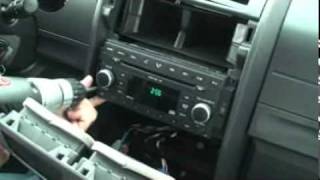
Removal Process:
- Pull the shifter to the lowest gear position—this provides clearance to work in the center console area.
- Remove the rubber mat from the top storage tray to expose 2 Phillips screws.
- Remove the storage tray—unscrew the 2 Phillips screws, then pull the tray out (it's also held by clips).
- Remove the silver center bezel—one large piece secured entirely by clips. Use a plastic pry tool.
- Remove the radio—4 Phillips screws.
Tools needed: Phillips screwdriver, plastic pry tool

Example: Dodge Nitro serial number label location
Typical Dodge Nitro Serial Number Formats
To unlock your radio, find the serial that starts with T00AM, TM9, or A2C. Important: do NOT use serials ending in W, J, L, or S — those are screen/DVD/amplifier modules, not the main radio brain.
Entering the Unlock Code on the Vehicle
Once you have the Dodge's unlock code, you can enter it using the infotainment controls.
Most radios display "ENTER CODE", "----" or "XXXX" message when they are locked.
You typically use the preset buttons to select each digit.
After entering the full code, the radio will unlock automatically.
To enter your unlock code in the Nitro:
- Turn on the ignition—the radio display shows "CODE".
- Use preset buttons 1-4 to cycle through digits for each position.
- Press and hold ENTER/OK for 2-5 seconds to unlock the radio.
Lockout Warning: After 3 incorrect attempts, the radio locks for 30 minutes. Keep the ignition ON during the waiting period.
Dodge Nitro Radio Code - Common Questions
Free are not easy to find.
Some online tools may help, but most codes require a dealer lookup.
The only free way would be to search your vehicle and its manual to see if you already have the code.
Many OEM stereos use a security code, but not every model year require one.
Whether a code is needed is determined by the factory stereo and the production year.
Yes. Each car stereo has its own unique code.
If you install a replacement radio, you'll need the code for that individual radio.
Uconnect is the infotainment system manufactured by Stellantis (formerly Fiat Chrysler Automobiles) and used across Chrysler, Dodge, Jeep, Ram, Fiat, and Alfa Romeo vehicles. Most Uconnect radios include an anti-theft protection system that activates whenever the radio loses power – for example after a battery replacement, a dead battery, or electrical work.
When triggered, the radio displays "ENTER CODE" and will not function until the correct 4-digit unlock code is entered. The code is permanently tied to the radio's serial number, not the vehicle's VIN, which is why finding the serial number is the first step to unlocking.
Yes, for most vehicles. Uconnect systems from 2013 onwards include a hidden Dealer Mode (or Engineering Mode) diagnostic menu that shows the serial number directly on screen. You can access it by holding specific button combinations – no tools or radio removal required.
However, some 2020+ models may have had Dealer Mode restricted via software updates. If you cannot access the on-screen menu, the radio must be physically removed to read the serial number label on the unit. See our full Dealer Mode guide for step-by-step instructions with video tutorials.