Common Fiat Panda Radio Code Situations
Many drivers encounter radio code issues on their Panda after battery-related issues.
Below are the most frequent situations when this can happen.
Problems After a Battery Change
After a battery change, your radio may lock.
This happens because the radio recognizes a voltage interruption, which activates the anti-theft system.
Additional Scenarios Where Radio Requires a Code
- Installing a used head unit will require the original anti-theft code.
- After an ECU or software reset, the radio may enter security mode.
- A blown fuse can cause the Fiat Panda radio to lock.
- Jump-starting the vehicle can trigger anti-theft mode, requiring the unlock code.
Radio Code Explained
A radio code, sometimes also known as an anti-theft code is a unique numeric unlock key that restores access to your car stereo after it has been disabled.
This factory security PIN is triggered when the radio detects a power interruption.
This system helps prevent stolen radios from working in other vehicles.
If power is cut, the radio locks automatically and asks for the CODE before it can function normally.
Once the correct numbers is entered, the stereo is restored to normal operation.
Things to Try First
There is a chance your Fiat Panda radio code is written down in your documents.
Before using a paid service, take a few minutes check the places below - it costs nothing to look.
Search the Car Interior
- Inside the glovebox, sometimes on a label.
- In the owner's manual, often on a sticker page.
- On the radio unit itself, if it was removed before.
- In your maintenance booklet from the previous owner.
- In the trunk, on a radio label.
Getting It from the Fiat Dealer
Dealerships can retrieve your radio code by checking the vehicle records in their system.
They typically ask for registration and ID before sharing the unlock code.
This is the official way to restore access to the factory radio.
Things to Consider:
- Some imported or older radios may not be in their database.
- Dealers frequently charge a service fee (sometimes more than 100$).
- You may need to visit the dealer during business hours.
- The lookup is often slower and may require waiting.
How to Find the Serial No. on a Radio
The only thing you'll need to retrieve the unlock code is your radio's unit serial. VIN or other details are not required.
On most Fiat vehicles, you can find it in one of these places:
- Visible on the radio screen (sometimes by using specific button presses)
- On the radio body itself - you'll need to remove the unit slightly and write down serial (which is usually simple)
Search for something like: Serial Num. or SN.
1. Displaying the Serial Number on the Panda Screen
If the radio is a Continental VP1/VP2 unit, try 1 + 6 while turning on. For Blaupunkt and Bosch radios, the unit must be removed to read the serial.
2. How to Find the Serial Number on the Radio Unit
The serial number is usually located on a label attached to the head unit.
Step 1: Turn off the vehicle.
Step 2: After that, take off the surrounding panel.
Step 3: Then unscrew the radio brackets.
Step 4: Carefully slide the unit out partially (Be careful not to damage the connections).
Step 5: Look for the serial on the rear of the unit.
Step 6: Write down the full Serial Number carefully and come back to our website so that we can generate the code.
Important: Don't mix the Serial Number for the Part Number!
How to Pull Out Your Fiat Radio
To remove the Fiat Panda radio, you typically need to pop off the dash bezel and unscrew the mounting hardware. The serial label is on the back or side of the unit. Be careful with the plastic trim clips.
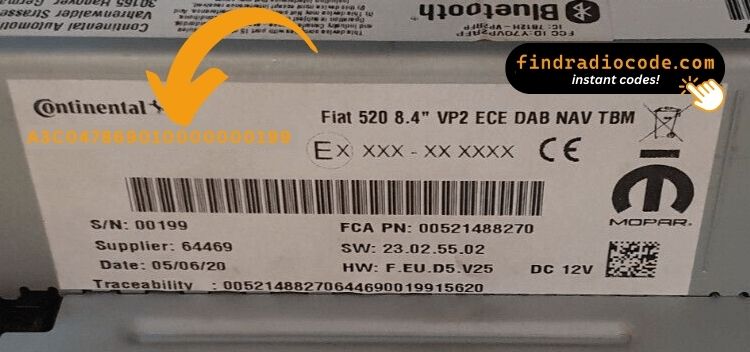
Example: Fiat Panda serial number label location
Common Fiat Panda Serial Number Formats
Your Fiat Panda radio serial depends on the unit type: Continental VP1/VP2 units use a 263 prefix (e.g. VP263123456), Blaupunkt units start with BP6694, and Bosch units use a CM prefix (e.g. CM####). The serial is on a label on the radio body.
You Found the Security Code. How Entering Works?
You need to input the radio security code into the system to unlock your Fiat's radio.
In the locked unit, the screen usually displays a code prompt.
You should use radio presets, control knob, or touchscreen to set each digit, then confirm the code to reactivate the audio system.
If you fail multiple times, you may cause the Panda's head unit to block further attempts.
When this happens, the screen usually displays messages like "CODE ERR", "ERROR", or a blank screen.
To unlock it, you usually need to leave the radio powered for a shown waiting period or up to an hour before trying again.