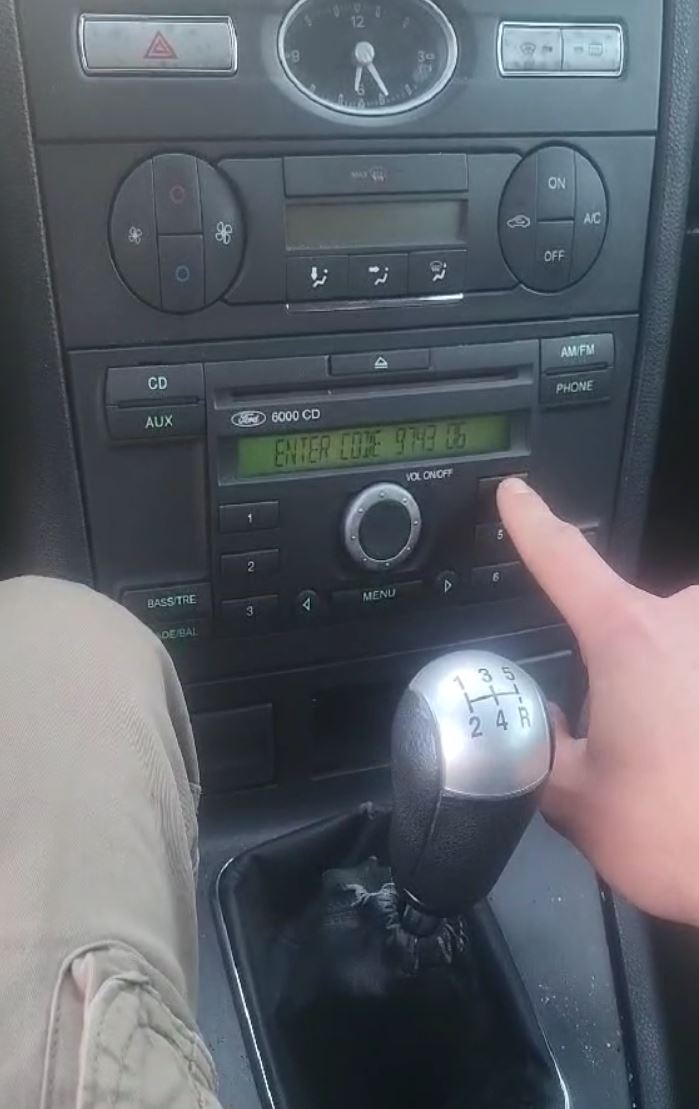
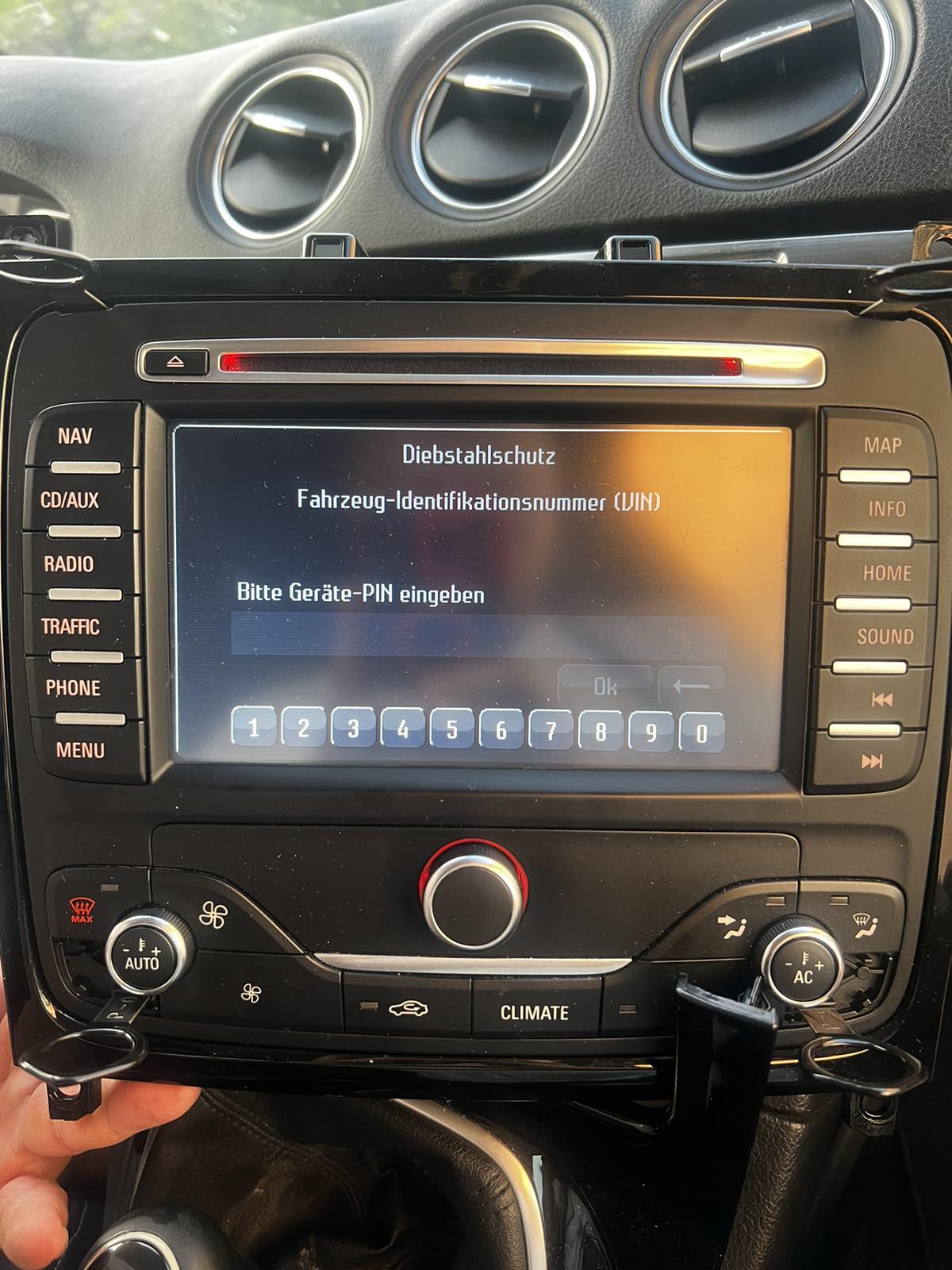
How to Get Ford Radio Code?
If the security code for your Ford radio is missing, there are a few ways to recover it.
Dealer Retrieval (VIN Required)
One way to retrieve the radio code is by contacting a Ford dealer, manufacturer, or authorized service center.
They usually require your Vehicle Identification Number (VIN), proof of ownership, and car documentation.
In some cases, additional verification such as a photo ID may also be required.
The process is frequently delayed. Depending on the each dealer and availability of records, retrieving it may take half a day or even a few days.
Some of them provide the code for free, while others charge a fee - which can sometimes be expensive.
Find Radio Code - Fast, Reliable and Low-Cost
Find Radio Code is a reliable lookup tool that retrieves the correct code for your Ford radio.
The system does so by matching the radio's serial number with the manufacturer database.
To generate the code, requires the serial number from your radio and a valid email address..
Once you submit the serial number and the order is completed, your PIN is generated instantly and displayed on screen.
Our service supports most original Ford radios installed across different vehicle models.
All requests are processed automatically through our secure lookup tool, and each order is covered by a 100% refund guarantee if the code does not work.
Dealer vs Find Radio Code
Delivery time
Dealer: Few hours up to several days
Find Radio Code: Instant 95% of times
Working hours
Dealer: Mon–Fri
Find Radio Code: Available 24 hours a day
In person?
Dealer: Sometimes
Find Radio Code: Fully online
Typical cost
Dealer: $120 - $200
Find Radio Code: Affordable pricing from $9.99
Refund
Dealer: Usually no refund policy
Find Radio Code: Full refund guarantee
Finding the Serial Number on a Ford Radio
The radio serial number is required to retrieve the correct unlock code.
By Removing the Radio Unit
In most cases, the serial number is printed on a label on the top, back or side of the radio unit. To access it, gently slide the radio out using radio extraction keys or a panel lever.
- Look for a white or yellow sticker marked "Serial" or "S/N".
- The serial number is typically 6–14 characters long.
- Ford radios use prefixes M (e.g.
M123456) or V (e.g. V123456). Becker/TravelPilot units may start with BP.
- Do not confuse it with the part number, which is longer and not used for code generation.
This method applies to Ford 4500 RDS, 6000 CD, TravelPilot EX/NX/FX, and similar units.
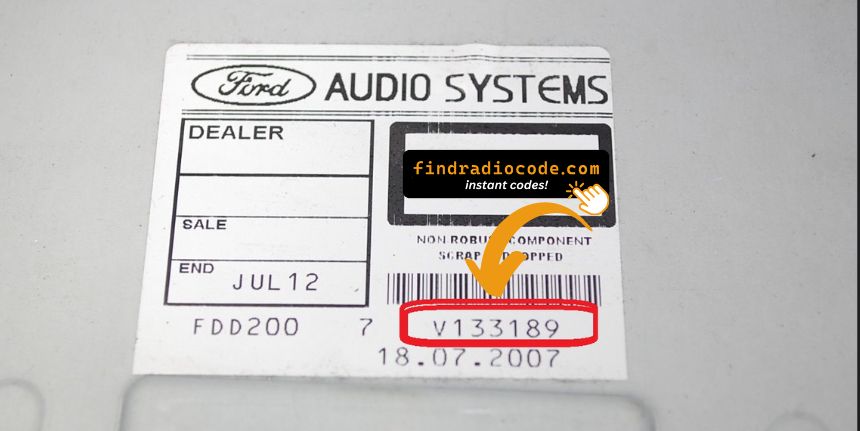
Ford Radio Serial Number Label
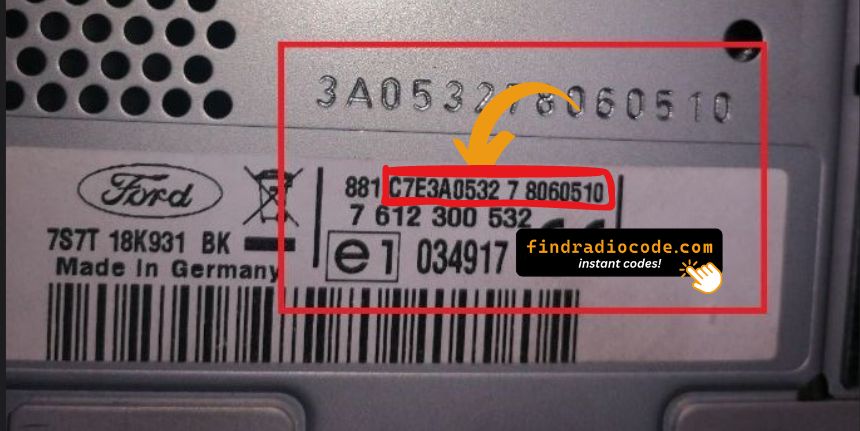
TravelPilot Serial Number
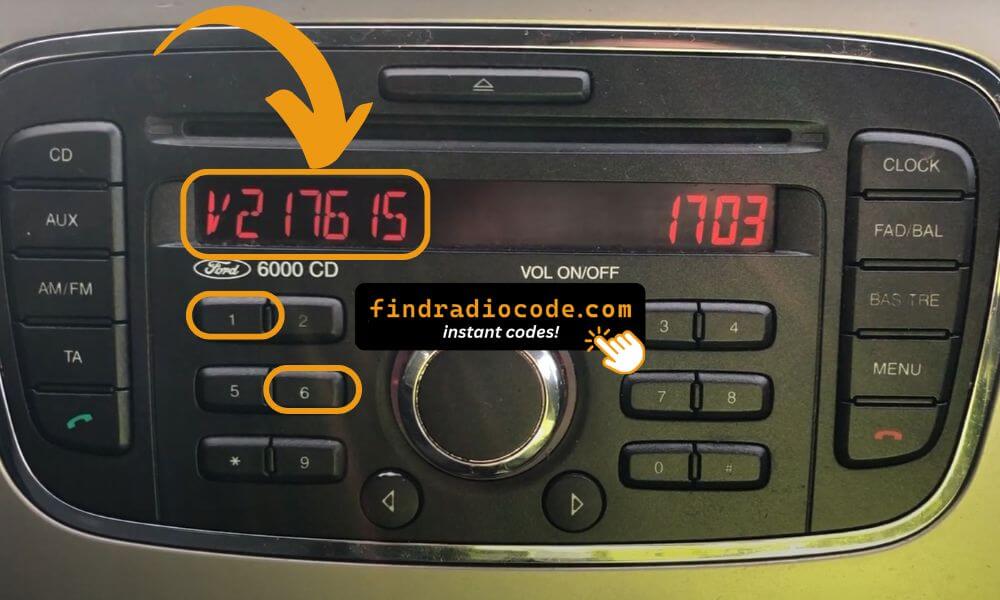
Pro Tip: For most Ford radios, you can display the serial number on screen without removing the unit. Press and hold buttons 1+6 together!
Model-Specific Serial Number Instructions
Radio Serial Number Examples: M123123, V123123, SOCD6X7V123123
- Press and hold buttons 1 & 6 simultaneously to display serial
- Example Serial: V123123
- To enter code: use preset buttons, then press and hold 5 (or Enter) to confirm
- Press and hold buttons 1 & 6 simultaneously to display serial
- Example Serial: SOCD6X8V404077
- To enter code: use preset buttons, then press and hold central button for 3 seconds
- Press and hold buttons 2 & 6 simultaneously to display serial
- Example Serial: M123123
- To confirm code: press and hold 5 button (or TA button if 5 doesn't work)
- Pull out the label on the right side of the radio
- Example Serial: C7 BP C7E3F0547A3240643 or BP62034
- To confirm code: press and hold the SELECT button on the right turn-wheel
Finding the Serial Number on the Display
Most Ford radios support on-screen serial retrieval — no need to remove the unit:
- Ford 6000 CD / Sony models: Turn the radio on and press and hold buttons 1 & 6 simultaneously. The serial (e.g.
V123456) appears on screen.
- Ford 4500 RDS E-O-N: Press and hold buttons 2 & 6 simultaneously. Serial starts with
M.
- Ford TravelPilot FX / Navigation: Press and hold buttons 2 & 6 (or 1 & 5 on some models).
Ford TravelPilot EX/NX units do not support on-screen display — the serial label is on a pull-out tab on the right side of the unit.
The Difference Between the Serial Number and Part Number
The Serial Number (S/N):
- This is the unit-specific code assigned to your specific radio.
- It's the only input used by our lookup system.
- Usually found next to a barcode.
The Part Number:
- This refers to the internal hardware specification of the unit.
- It's used by manufacturers for replacement purposes, but irrelevant for unlocking your stereo.
- Often longer and more generic.
How to Input the Security Unlock Code
With the correct code, unlocking the radio is straightforward.
Many radios show a code prompt after power loss.
Use the radio keys to enter the code.
Some models require you to press a specific button - like pressing ENTER or OK to confirm or holding "Seek", "Tune" or the preset key.
Too many wrong attempts may lock the radio.
After 3 to 10 incorrect attempts the radio may trigger a lockout timer.
Different radios use different timers, before another attempt is allowed.
If the radio remains locked, consult our help guides for the correct procedure.
Frequently Asked Questions
Many OEM head units will ask for a PIN code after a battery replacement.
This happens because the radio includes an factory security mechanism designed to discourage stolen units.
When power is restored, the unit requests the unlock code before normal operation resumes.
The required code is a few digit code that unlocks the radio.
- You changed your car stereo or moved it between vehicles
- You recently changed or disconnected the battery
- Service work affected radio power
- You bought a used car and the code wasn't provided
- The car was jump-started or lost power
- You or a mechanic performed a factory reset
- Too many failed code entries triggered a lockout
- Fuse was blown and replaced
- Inactivity can cause the anti-theft lock to engage
Yes, all Ford vehicles with factory-installed radios require a radio code after battery disconnection or radio replacement. This applies to all models including F-150, F-250, Focus, Fiesta, Fusion, Escape, Explorer, Edge, Mustang, and Transit.
The anti-theft feature is standard on Ford radios manufactured by Sony, Visteon, Blaupunkt, and other suppliers. Your 4-digit code is permanently linked to your radio's unique serial number (starting with M, V, or BP).
Start by looking inside the vehicle handbook. The code is sometimes found on a label or written directly on a page.
You can also search the glovebox or trunk, where dealers or previous owners may have stored a sticker with the code. Some also search for it behind trim pieces or inside the fuse box.
If you have the original radio code card, that's the simplest place to find the code - it usually includes both the serial number and unlock key.
There are a few options - but they depend on your situation.
- Check your owner's manual or code card - some vehicles came with the code printed at delivery.
- Call an authorized service center - some offer free code retrieval if you're the original owner and can provide registration papers.
- Try DIY forums or online databases, but these are risky and rarely accurate.
- For most users, our system is the easiest way to retrieve the correct code instantly.
IMPORTANT: "LOCKED 13" Warning
If your Ford radio displays "LOCKED 13", this means the radio has been locked after 13 incorrect code attempts.
What to do:
- Leave the radio ON with ignition ON for 30-60 minutes
- The "LOCKED 13" will change to "CODE" or allow code entry again
- Enter your correct 4-digit code carefully
- If it remains locked, you may need to leave it on for several hours or overnight
Prevention: Always double-check your serial number before ordering to ensure you receive the correct code. Wrong codes can lead to lockout.
Get Your Ford Radio Code Now
100% money-back guarantee if the code doesn't work


 Ford
Ford