
How to Retrieve Jaguar Radio Code Fast?

Codes Generated Instantly⚡

Dealer fee: $120-150 92% OFF!
Our fee: only $9.99
Jaguar radio code online instant unlock service
Safe Payment
Instant Delivery
245+ Reviews
See reviews →

The lookup tool works with a wide range of Jaguar OEM radios.

If the unit is in the lookup system, the unlock code is displayed within seconds.

1. See the full process in our demo video showing how the code is retrieved.

2. You can also review feedback from real customers who unlocked their radio units using our service.

3. You can also check our blog for tutorials, case examples, and verification videos.

After checkout, the unlock code is displayed immediately and delivered to your inbox for backup.

.

In exceptional cases, manual handling may be needed, and this will be shown before payment.

These the code in most cases arrives within 1 hour, with a maximum timeframe of 24 hours.

Every order is protected by a full money-back guarantee if the code fails.

Refund requests require a short video showing the code attempt and the radio serial number.

You can find all conditions in the Refund section.

Our lookup system works with the radio serial number, so the VIN is not required.

All we need is the radio serial number - the code is then delivered to your email.

Jaguar Logo

Jaguar Vehicles Compatible with This Service


OEM Radio Unit Manufacturers

Harman Logo

Harman

Meridian Logo

Meridian

Alpine Logo

Alpine

Customer Experiences

5 out of 5
Based on 3 reviews
Write a Review
Jason Verified
Jaguar logo Jaguar
Fantastic: only to took 5seconds to receive code ..was skeptic at first..will fully recommend there services..Thanks saved alot of money : compared to taking it to the dealership..Very happy customer:
Bernard Walters Verified
Jaguar logo Jaguar
Great Service !!!!
Fred Stafford Verified
Jaguar logo Jaguar
Works instantly thank you for all your help in time of need .

Where to Locate the Serial Number on Your Jaguar Radio

The radio serial number is required to retrieve the correct unlock code.

Physical Radio Removal

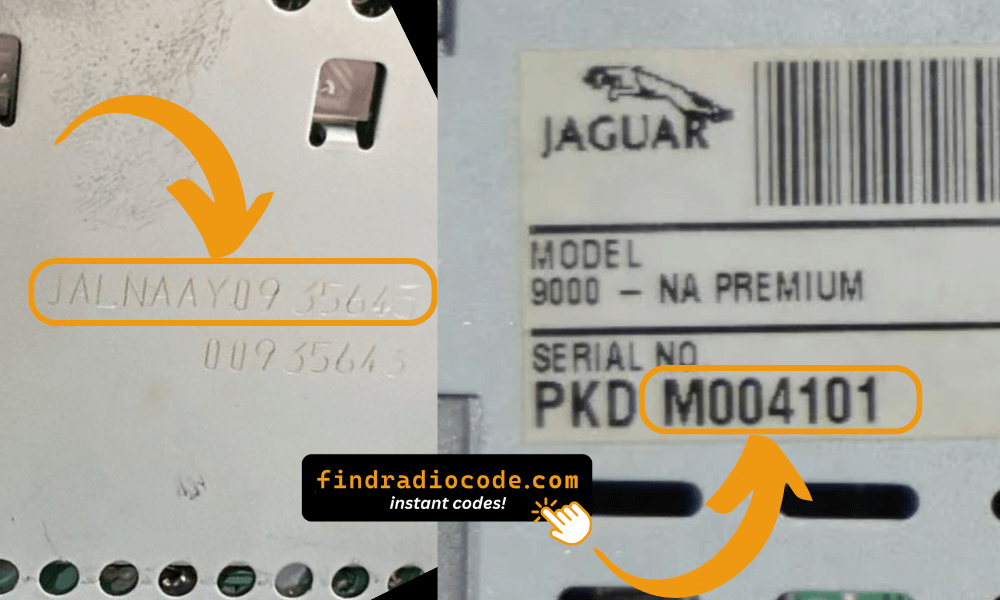
The serial number is on a label on the back or side of the radio unit. To access it, the radio must be pulled out from the dashboard.

  • Look for a barcode sticker marked "S/N" on the rear or side of the unit.
  • Jaguar radio serial prefixes: JAC (e.g. JAC1234567), BPJWM (Blaupunkt), or M (e.g. M123456).
  • Do not enter the part number — only the serial number is accepted.
Jaguar radio serial number engraved or on label

Jaguar Serial Number Location (Engraved or on Label)

Note: Jaguar radio serial numbers often begin with "JAC", "BPJWM", or "M" followed by numbers. They can be found engraved on the radio chassis or on a label on the side/back of the unit.

Button Combinations to Display Serial Number

Some Jaguar models allow you to display the serial number on screen without removing the radio:

Method 1: Standard Button Combination

  • Press and hold buttons 1 and 6 together for at least 5 seconds
  • If nothing happens, try buttons 2 and 6 instead

Method 2: PTY & EJECT Combination

  • Press "PTY" and "EJECT" buttons simultaneously
  • On certain models, this brings up an 8-digit code that can be used to generate your unlock code

These button combinations don't work on all models. If unsuccessful, physical radio removal is required to find the serial number.

Finding the Serial Number on the Display

Some older Jaguar radios support on-screen serial retrieval. Try pressing PTY + EJECT simultaneously. On other models try buttons 1 & 6 or 2 & 6.

If these combinations don't work, the radio must be physically removed to read the serial label.

The Difference Between the Serial Number (S/N) and Part Number (P/N)

The Serial Number (S/N):

  • This is the unit-specific code assigned to your specific radio.
  • It's required to generate the unlock code.
  • Usually found on a label marked "S/N" or "Serial".

The Part Number:

  • This refers to the model type of the unit.
  • It's used by manufacturers for repairs, but irrelevant for unlocking your stereo.
  • Often longer and more generic.

Entering Jaguar Radio Code

Once you have the code, entering it is usually simple.

Many radios show "ENTER CODE" after power loss.

Use the radio keys to select the numbers.

Some models auto-confirm on final digit - like pressing ENTER or OK to confirm or holding preset key, Seek or Tune.

Too many wrong attempts may lock the radio.

Too many incorrect tries the radio may display WAIT mode.

Different radios use different timers, before another attempt is allowed.

If you're unsure about the entry method, check the manual or our guides.

Getting the Unlock Code for Your Radio

A missing code can be retrieved through a few different options:

Requesting the Code from an Authorized Dealer

The slower way to retrieve the radio code is by contacting a Jaguar dealer, manufacturer, or authorized service center.

They usually require your Vehicle Identification Number (VIN), proof of ownership, and vehicle documentation.

In some cases, additional verification such as a photo ID may also be required.

The process is usually inconvenient. Depending on the dealership and database of records, retrieving it may take several hours or even a few days.

Some dealers provide the code for free, while others charge a fee - which is often expensive.

Our Instant Radio Code Service - Fast and Reliable

The fastest and easiest way to unlock your Jaguar radio is through our online service.

All you need is the radio's serial number, which you can find on the unit, retrieved from the display, or located on the sticker.

There's no personal data required. Once the payment is completed, the correct PIN code is displayed instantly and sent to your email.

We cover a wide range of original Jaguar radios and models.

Find Radio Code handles everything automatically. If the code doesn't work, you're protected by a 100% refund.

Frequently Asked Questions

Many OEM head units will ask for a PIN code after a battery disconnect.

This happens because the radio includes an radio locking system designed to discourage stolen units.

When power is restored, the unit enters CODE mode before normal operation resumes.

The required code is a PIN-style unlock code that allows the radio to function again.

  • Radio was locked after multiple wrong code attempts
  • You changed your car stereo or moved it between vehicles
  • A reset cleared the saved code
  • A previous owner didn't supply the radio code
  • The car experienced a sudden loss of power
  • Long periods of disuse can trigger code prompts
  • Battery was disconnected or replaced
  • There was an electrical issue affecting the radio fuse
  • A technician disconnected the battery or ran a diagnostic

Yes, all Jaguar vehicles with factory-installed radios require a radio code after battery disconnection or radio replacement. This applies to all models including XE, XF, XJ, XJ S, XK, XKR, S-Type, and X-Type.

The anti-theft feature is standard on all Jaguar radios manufactured by Alpine, Denso, and Visteon. Your 4-digit code is permanently linked to your radio's unique serial number (often starting with JAC or BPJWM). Some pre-2005 models may support button bypass methods.

Start by looking inside the vehicle handbook. The code is often found on a detachable slip or written directly on a section.

You can also search the glovebox or trunk, where dealers or previous owners may have placed a sticker with the code. Some also search for it behind trim pieces or inside the fuse box.

If you have the original factory-issued code slip, that's the best place to find the code - it usually includes both the serial number and unlock key.

There are a few options - but they don't always work.

  1. Some online communities share generic code info, but these are risky and rarely accurate.
  2. If none of these work, our service is the fastest and most accurate option.
  3. Call an authorized service center - some offer free code retrieval if you're the original owner and can provide VIN.
  4. Look inside the glovebox or vehicle documents - some vehicles came with the code printed at delivery.

Button Bypass Method (Pre-2005 Models Only)

Some older Jaguar models (manufactured before 2005) allow you to bypass the code requirement using button combinations.

  • Press ">>" (fast forward), "A.MEM" and "PTY" buttons simultaneously
  • X-Type models: Hold ">>" and "PTY" buttons together
  • S-Type radios: Press preset buttons 2 & 6 at the same time

Note: If unsuccessful, these button combinations may not work on your specific model or production year. In that case, you'll need to enter the radio code.

Get Your Jaguar Radio Code Now
Full refund if your code fails