Mercedes Radio Code: Fast, Secure, VIN-Free⚡

Fast Mercedes Radio Code Lookup

Dealer fee: $120-150 Save $110+
Our fee: only $9.99
Mercedes radio code online instant unlock service
Secure Payment
Fast Delivery
245+ Reviews
See reviews →

The code generator covers a wide range of Mercedes OEM radios.

If the serial number matches our database, the security PIN is retrieved automatically.

1. Not sure how it works? Watch our demo video for a quick walkthrough of the entire process.

2. Thousands of users have already used the lookup - check their verified reviews.

3. Our blog includes comprehensive guides, video examples, and real user experiences.

As soon as payment is processed, the radio code becomes available on-screen and by email.

24/7 support is available.

If instant delivery is not available (in rare cases), the request is marked for manual processing before payment.

These the code in most cases arrives within 1 hour, with a maximum wait of 24 hours.

Our service is risk-free - if the code fails, you are eligible for a 100% refund.

Simply record the code entry while showing the serial number on the unit.

You can find all conditions in the Refund section.

Our lookup system works with the radio serial number, so the VIN is not required.

Mercedes Logo

OEM Radio Manufacturers

Becker Logo

Becker

31 models • 106+ part numbers

Alpine Logo

Alpine

18 models • 30+ part numbers


Mercedes Models We Support

Customer Experiences

5 out of 5
Based on 1 reviews
Write a Review
MARK S MATUSIK Verified

Mercedes logo Mercedes
Worked perfectly, got the code right away
How to Locate the S/N on a Mercedes

Once you find the radio serial number, the unlock code can be generated instantly.

Remove the Radio Unit

The serial number is on a label on the back or chassis of the radio unit. To access it, the radio must be physically removed from the dashboard.

  • Look for a barcode sticker marked "S/N" or "Serial" on the rear or side of the unit.
  • Mercedes radio serial prefixes: AL (Alpine), BE (Becker), BP (Blaupunkt), CM (Bosch). Example: BE7822, AL2910.
  • Do not enter the part number (e.g. A163820...) — only the serial number is accepted.

Step-by-Step: How to Remove Your Mercedes Radio

  1. Get the release keys — Mercedes radios use 2 or 4 DIN release keys (flat metal tools, roughly 130mm long). You can purchase these at auto parts stores or online for a few dollars.
  2. Insert the keys — Push the release keys firmly into the small holes at the bottom corners of the radio until you hear/feel a click. For 4-key radios, also insert keys in the top corners.
  3. Apply gentle outward pressure — Squeeze the keys outward while pulling the radio forward. It should slide out of the DIN cage smoothly.
  4. Look for the serial number label — The white or silver label is on the top, side, or back of the radio unit. The serial number is printed in large text.
Serial Number Formats:
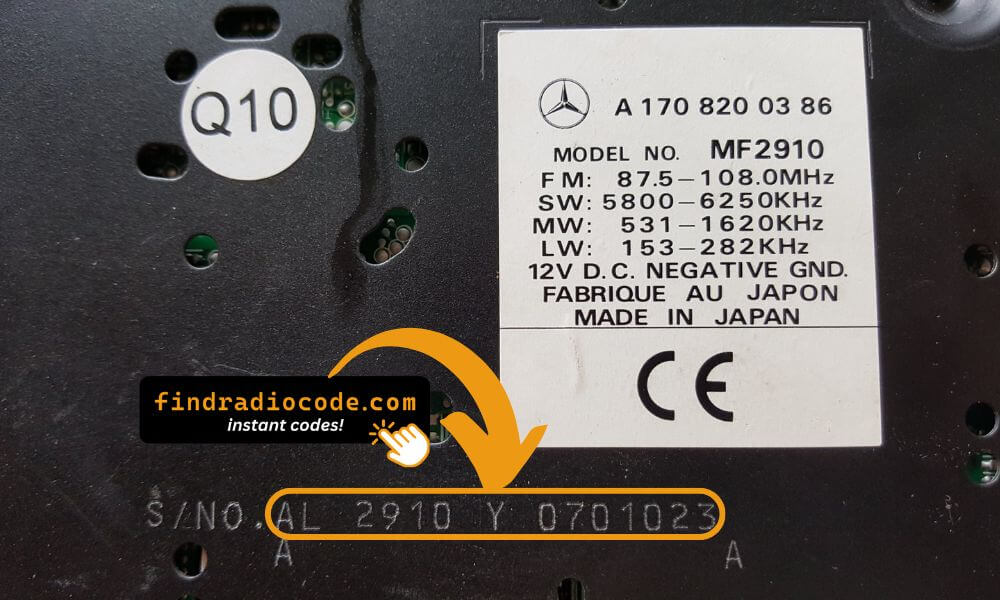
  • Alpine: AL2910X1234567 or AL0135 format
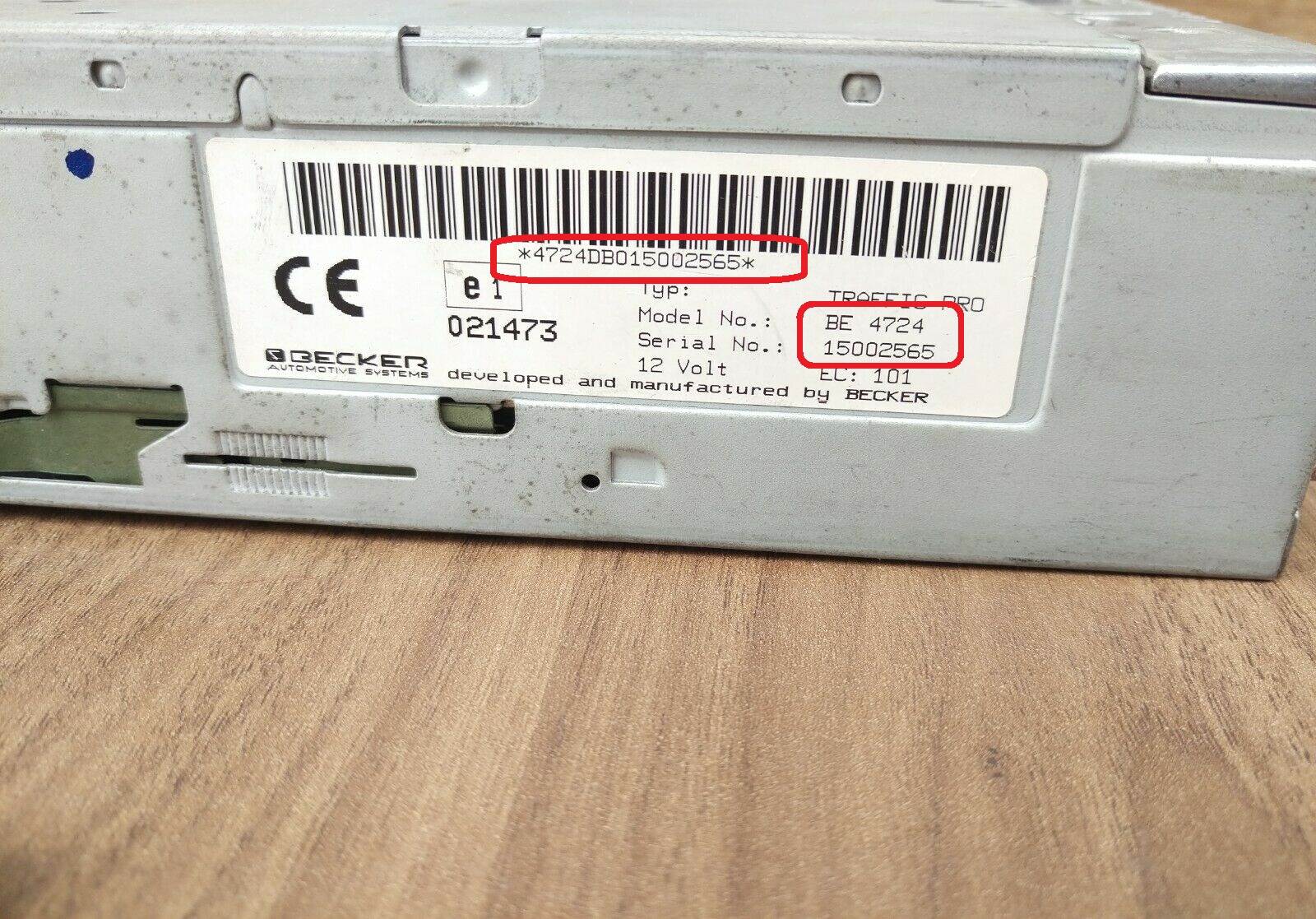
  • Becker: BE2060X1231234 or BE4724 format
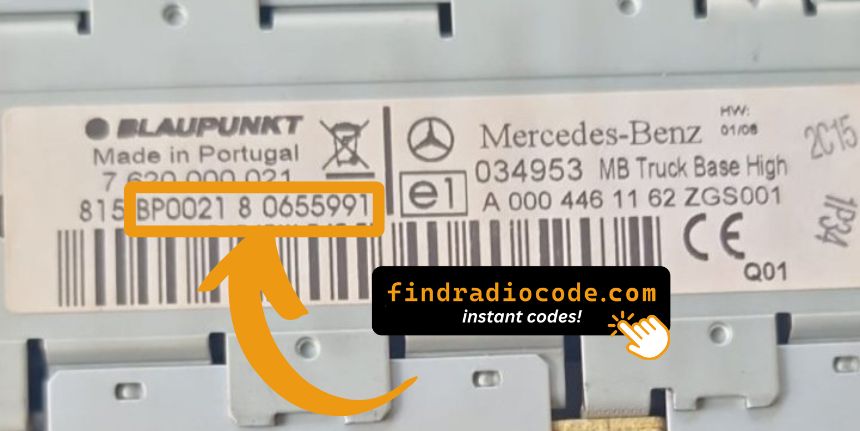
  • Blaupunkt/Bosch: BP0526A6326431 or CM prefix
Mercedes Alpine MF2910 AL2910 serial number

Alpine MF2910 (AL2910X...)

Mercedes Bosch truck radio serial number

Bosch Truck (BP/CM...)

Mercedes Becker BE4724 Traffic Pro serial number

Becker Audio (BE...)

Tip: Mercedes radios use different manufacturers. Alpine units start with "AL", Becker units with "BE" or "BP", and Bosch/Blaupunkt units with "BP", "BO", or "CM". All serial numbers are located on labels - you'll need to remove the radio to see them.

Finding the Serial Number on the Display

Mercedes radios do not support on-screen serial retrieval. The radio must be physically removed from the dashboard to read the serial label on the unit's chassis.

The Difference Between the Serial Number and Part Number

The Serial Number (S/N):

  • This is the individual ID assigned to your specific radio.
  • It's used by our radio code generator.
  • Usually found on a label marked "S/N" or "Serial".

The Part Number:

  • This refers to the radio series of the unit.
  • It's used by manufacturers for replacement purposes, but irrelevant for unlocking your stereo.
  • May look similar, but doesn't link to your specific code.

How to Input the Security Unlock Code

Entering the code into your unit takes only a few steps.

The unit typically shows four dashes on the screen.

Use the radio keys to input each digit.

Some models require you to press a specific button - such as pressing ENTER or OK to confirm or holding preset key, Seek or Tune.

Repeated incorrect attempts can cause lockout.

After 3 to 10 incorrect attempts the radio may temporarily disable input.

The wait time depends on the model, sometimes requiring extended waiting.

Refer to your radio manual or our support guides if needed.

Code Entry Method (Most Models)

  1. Turn ignition to position 1 or ACC - wait for "CODE" to appear on display
  2. Use preset buttons 1-4 to enter each digit:
    • Press button 1 multiple times for the first digit
    • Press button 2 for the second digit
    • Press button 3 for the third digit
    • Press button 4 for the fourth digit
  3. Press and hold button 6 (or AM/FM button) to confirm
  4. Radio displays "OK" and unlocks immediately

Older Models with Tuning Knob

Turn the tuning knob to select each digit, press the knob to confirm each digit. After all digits are entered, press and hold the right knob or an arrow button to confirm.

Getting the Unlock Code for Your Radio

If you no longer have the original code, you can recover it using these methods:

Dealer Option (Slow, VIN Required)

The slower way to retrieve the radio code is by contacting a Mercedes dealer, manufacturer, or authorized service center.

They usually ask for your Vehicle Identification Number (VIN), proof of ownership, and vehicle documentation.

In some cases, additional verification such as a photo ID may also be required.

The process is often slow. Depending on the each dealer and availability of records, retrieving it may take several hours or even a few days.

Some of them provide the code for free, while others charge a fee - which is often expensive.

Unlock Your Radio Online - Quick and Affordable

Instead of that slow and expensive process, you can retrieve your Mercedes radio code instantly using our system.

All you need is the radio's serial number, which can be found on the unit, retrieved from the display, or located on the sticker.

There's no personal data required. Once the payment is done, the correct PIN code is displayed instantly and sent to your email.

Our system supports most factory-installed Mercedes radios.

Find Radio Code handles the whole process securely. If the code doesn't work, you're protected by a 100% refund.

Common Questions

A factory radio code, sometimes also known as an anti-theft code is a numeric security code that reactivates your car audio system after it has been locked.

This security code is triggered when the radio loses power.

Automakers include this feature to protect factory stereos from theft.

If power is interrupted, the radio locks automatically and requires the unlock CODE before it can be used again.

Once the valid numbers combination is entered, the stereo is unlocked.

  • Too many failed code entries triggered a lockout
  • Inactivity can cause the anti-theft lock to engage
  • You jump-started the vehicle
  • You purchased a used vehicle without the unlock code
  • There was an electrical issue affecting the radio fuse
  • You installed a new or used radio
  • Service work affected radio power
  • You recently changed or disconnected the battery
  • A reset cleared the saved code

Yes, all Mercedes-Benz vehicles with factory-installed radios require a radio code after battery disconnection or radio replacement. This applies to all models including A-Class, B-Class, C-Class, E-Class, ML-Class, SL-Class, SLK-Class, Sprinter, Vito, AMG, and Citan Van.

The anti-theft feature is standard on all Mercedes radios manufactured by Alpine, Becker, and Blaupunkt. Your 4-digit or 5-digit code is permanently linked to your radio's unique serial number (AL, BE, or BP prefix). Most models require radio removal to access the serial number label.

Start by checking the owner's manual. The code is sometimes found on a detachable slip or written directly on a dedicated panel.

You can also look the glovebox or trunk, where dealers or previous owners may have stored a sticker with the code. Some also search for it behind trim pieces or inside the fuse box.

If you have the original manufacturer label, that's the most reliable place to find the code - it usually includes both the serial number and unlock key.

There are a few options - but they depend on your situation.

  1. Some online communities share generic code info, but they don't work for serial-based systems.
  2. Look inside the glovebox or vehicle documents - some vehicles came with the code printed at delivery.
  3. If none of these work, our service is the fastest and most accurate option.
  4. Contact your dealership - some offer free code retrieval if you're the original owner and can provide proof of ownership.
Get Your Mercedes Radio Code Now
Guaranteed refund if the code is invalid