Nissan Radio Code - Instant Unlock⚡

Instant Nissan Radio Unlock

Dealer offer: $120-150 85% OFF!
Our fee: only $9.99
Nissan radio code online instant unlock service
Secure Payment
Instant Delivery
245+ Reviews
See reviews →

If the code doesn't work, you're protected by our 100% money-back guarantee.

For verification, we ask for a video showing both the serial number and the code entry attempt.

Check the Refund Policy page for further clarification.

The lookup tool works with most Nissan radios.

If the unit is in the lookup system, the correct code is retrieved automatically.

1. View our demonstration video to see in detail how the service works.

2. You can also review feedback from verified users who unlocked their radios using our generator.

3. Read our in-depth blog for service verification, video proof, and customer feedback.

Code delivery is usually instant - you'll see it immediately after completing the purchase.

We're available 24/7, day and night.

If your request cannot be processed instantly (which happens rarely), we'll let you know before purchase.

Those the code in most cases arrives within 1 hour, with a maximum wait of 24 hours.

You don't need the VIN. Our system generates the unlock code using the radio's serial number.

Enter the radio serial number and your email and the system will generate the code.

User Reviews

5 out of 5
Based on 3 reviews
Write a Review
Jason Verified
Nissan logo Nissan
Fantastic: only to took 5seconds to receive code ..was skeptic at first..will fully recommend there services..Thanks saved alot of money : compared to taking it to the dealership..Very happy customer:
Malik Stuckey Verified
Nissan logo Nissan
thought this was a scam lol. They are legit and saved me a couple hundred dollars! 08/13/25
Mike Verified
Nissan logo Nissan
Code worked perfect - came within a minute. Thank you for cracking the code without having to deal with the dealership!

Need to Remove Your Nissan Radio?

Watch video tutorials on how to safely remove your Nissan radio to access the serial number label

How to Remove Nissan Radio

How to Retrieve a Nissan Radio Code?

If you no longer have the original code, you can recover it using these methods:

Manufacturer or Dealer Code Retrieval

The slower way to get the radio code is by contacting a Nissan dealer, manufacturer, or authorized service center.

They usually require your Vehicle Identification Number (VIN), proof of ownership, and car documentation.

In some cases, additional verification such as a photo ID may also be required.

The process is usually slow. Depending on the each dealer and database of records, retrieving it may take half a day or even a few days.

Some dealers provide the code for free, while others charge a fee - which is often expensive.

Instant Radio Unlock Service

Find Radio Code is a quick lookup tool that finds the correct unlock code for your Nissan radio.

It works by matching the radio's S/N with the manufacturer database.

The process of generating the code, requires the serial number from your radio and a valid email address. No VIN, dealership visit, or paperwork is required.

Once the serial is submitted and the order is completed, your PIN is generated instantly and displayed on screen.

Our service supports most original Nissan radios installed across different vehicle models.

All requests are processed automatically through our secure lookup tool, and every order is covered by a 100% refund guarantee if the code fails.

How to Find the Serial Number (S/N)

Before generating the radio code, you need to locate the serial number on the unit.

By Removing the Radio Unit

In most cases, the serial number is printed on a ID label located on the back, side or the top of the radio.

To access it, you'll need to remove the head unit using radio removal keys.

  • Find a prominent label containing "Serial".
  • The serial number is generally an alphanumeric code.
  • It may include prefixes such as M, V, T00, etc.
  • Do not mix it with the part number, which is longer.

Standard method for many vehicles.

Serial Number Label Examples

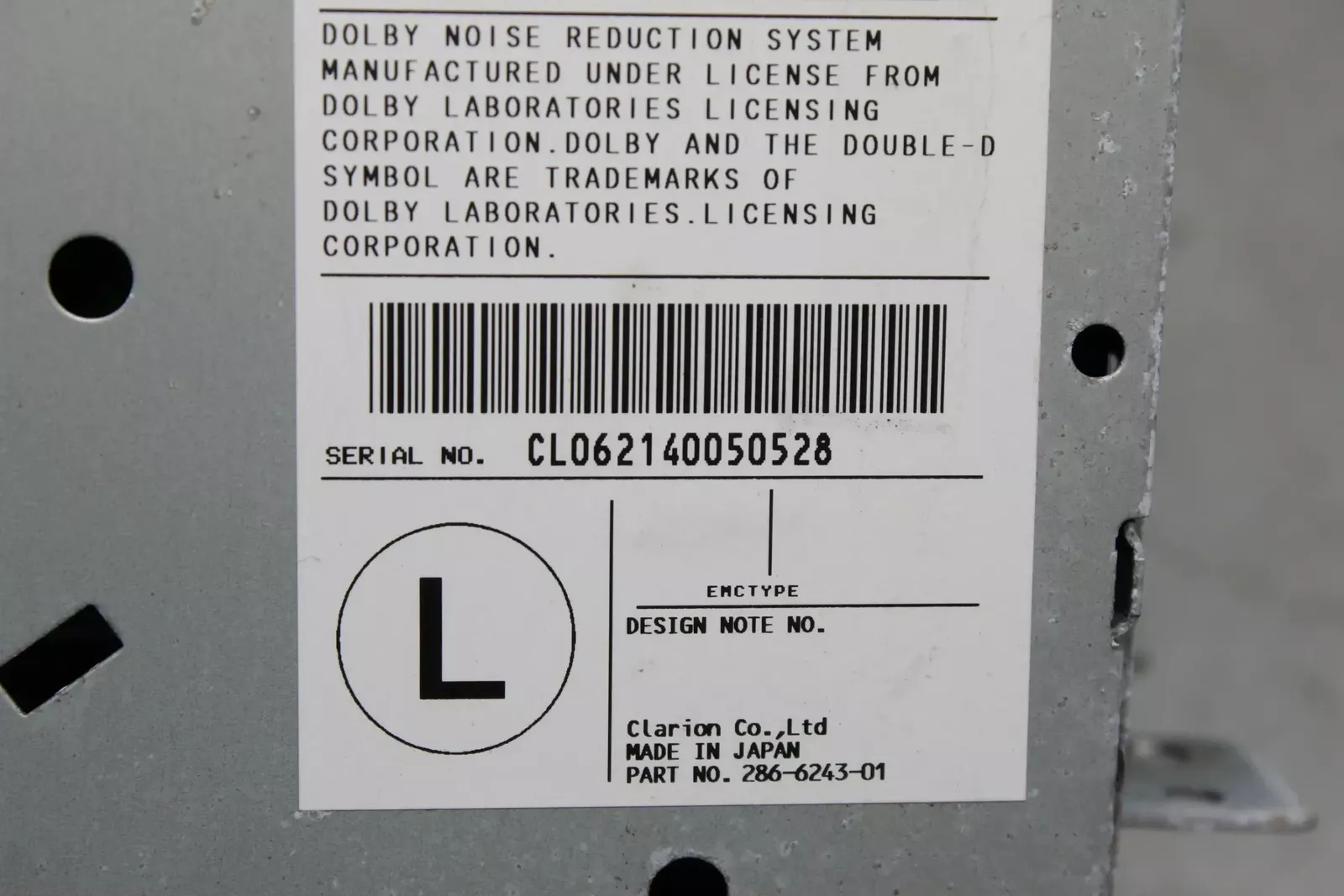
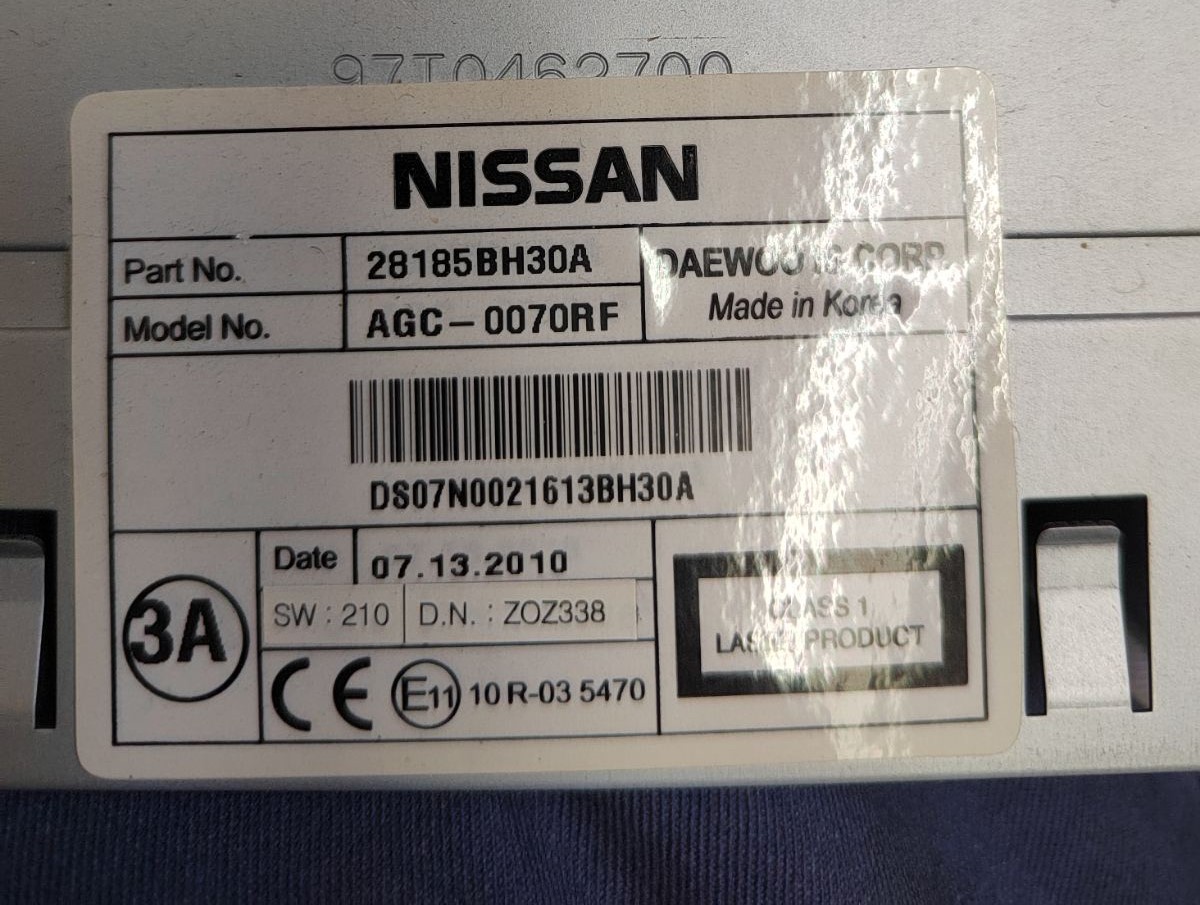
For Clarion, Blaupunkt, and other radio types, you'll need to remove the unit to find the serial number on a label:

Serial number formats:

  • Clarion: CL094390003175, PN2804FB0122741, PP2804FB0122741
  • Blaupunkt: BP1092X1231234
  • Daewoo: Various formats
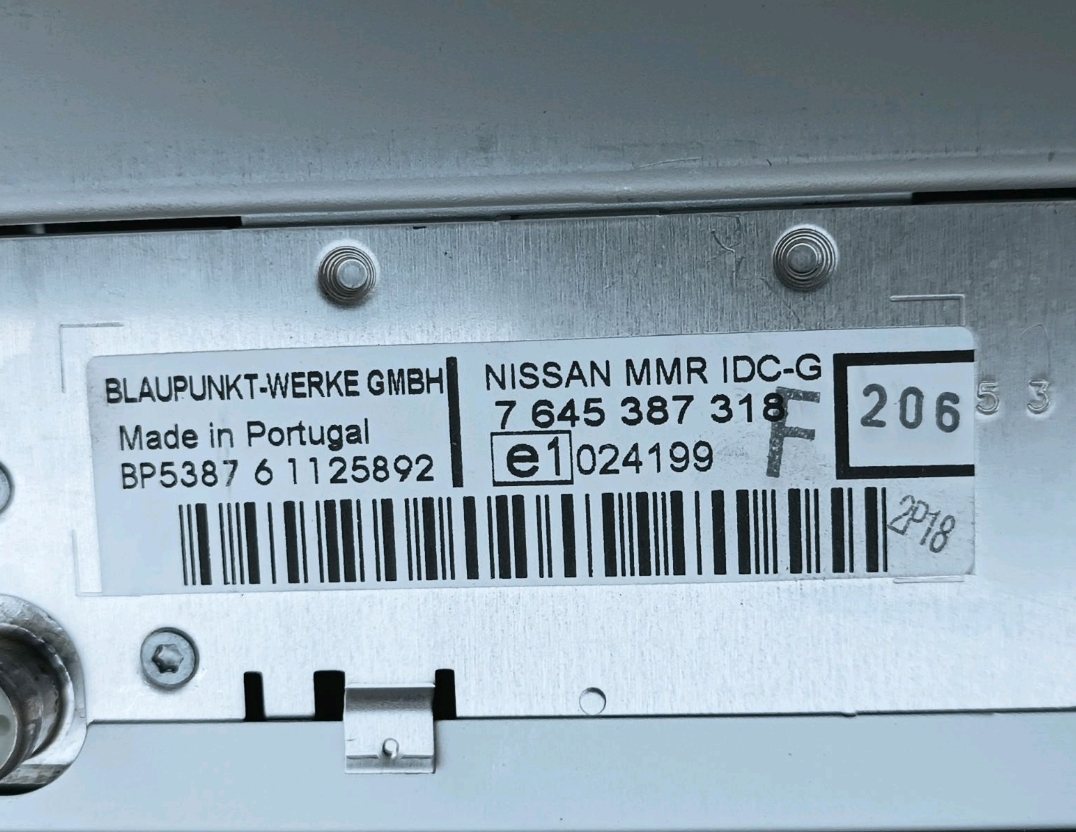
Nissan Blaupunkt radio label serial number

Blaupunkt Label

Nissan Clarion radio label

Clarion Label

Nissan Daewoo radio label

Daewoo Label

No VIN required - just the radio serial number!

On the Display (Without Unit Removal)

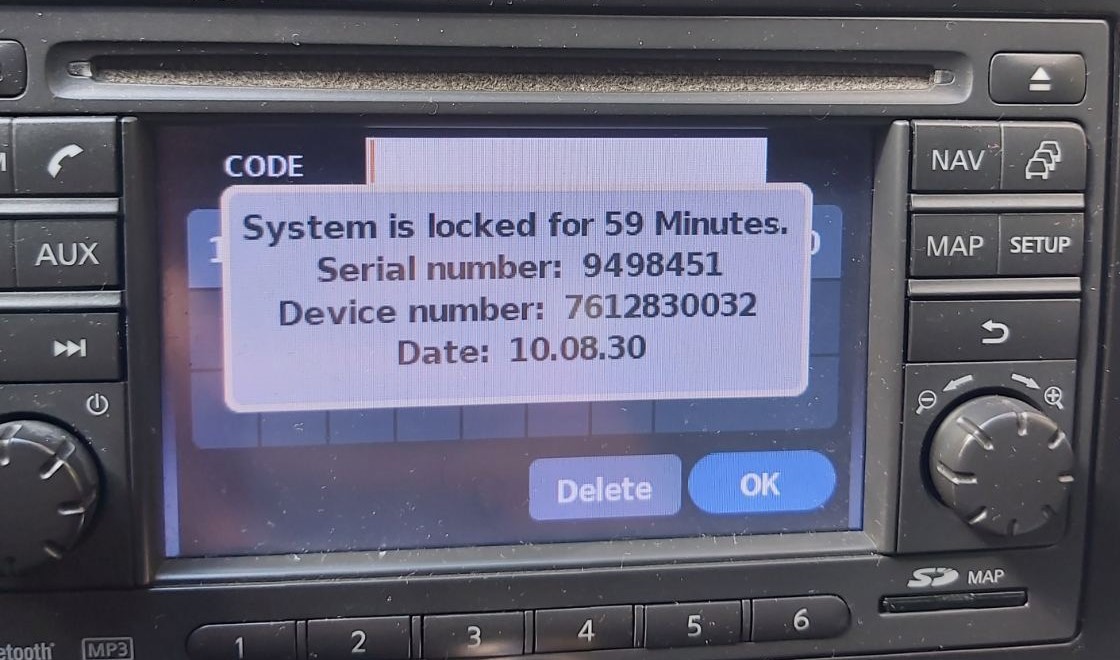
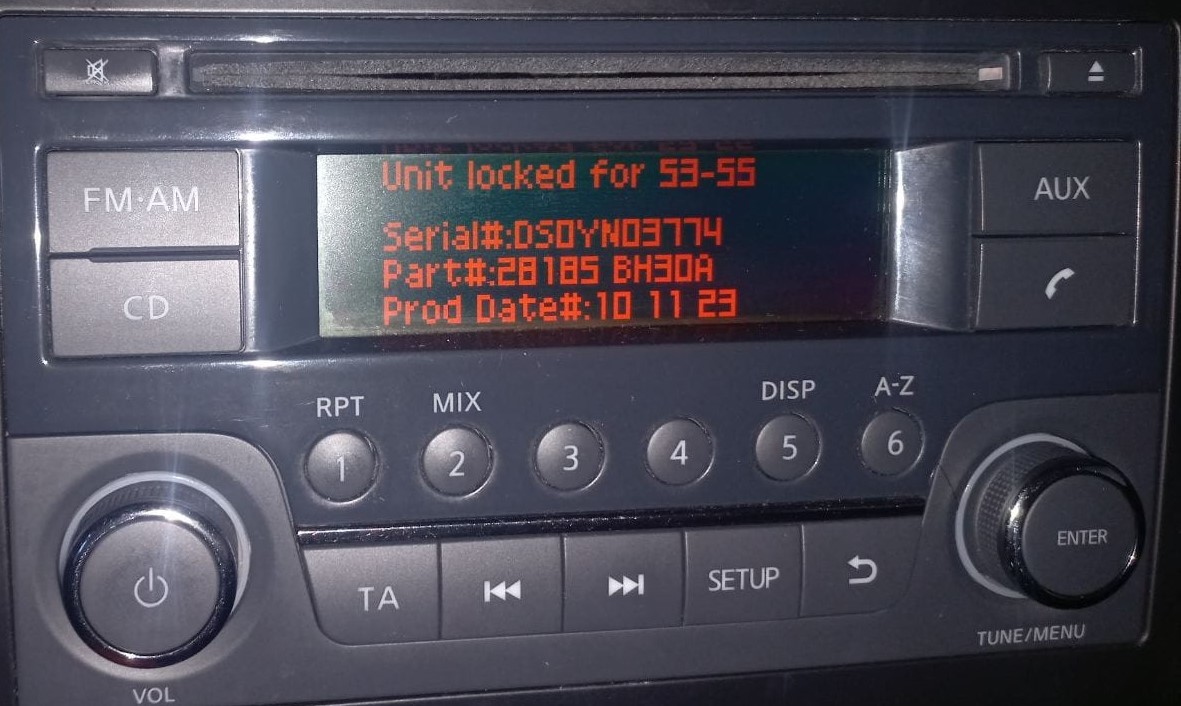
Modern Nissan vehicles (2010+) with LCN/Navi/Connect systems can display the serial number on screen:

Important: Unlike other vehicles that show serial numbers immediately, Nissan radios require you to enter a wrong code 3 times first to display the serial number and device information.
Step-by-Step Instructions
  1. Power on the radio - the display shows "CODE"
  2. Enter any random 4-digit number (e.g., 0000) and press OK/Enter
  3. Repeat this process two more times (total of 3 wrong attempts)
  4. After the 3rd incorrect code entry, the screen will automatically display:
    • Serial Number
    • Device Number
    • Date
  5. Write down all displayed information

Screen data example LCN: 1234567 7612830076 11.07.26

Nissan LCN screen serial number display

LCN Screen Display

Screen data example Juke: DSDYN03774 28185BH30A 10.11.23

Nissan Juke screen serial number

Juke Screen Display

Pro Tip: For most modern Nissan vehicles with LCN/Navi systems, you can display the serial number on screen by entering 3 incorrect codes. No radio removal needed!

How to Input the Security Unlock Code

Entering the code into your unit takes only a few steps.

Many radios show "CODE" when powered on.

Use the radio preset buttons to select the numbers.

Some models auto-confirm on final digit - such as pressing OK, Enter, or 5 to confirm or holding preset key, Seek or Tune.

Avoid entering the wrong code repeatedly.

Too many incorrect tries the radio may trigger a lockout timer.

Lockout time varies by brand, from a few minutes to several hours.

If the radio remains locked, consult our help guides for the correct procedure.

Frequently Asked Questions

Many factory radios will ask for a anti-theft code after a battery disconnect.

This happens because the radio includes an factory security mechanism designed to discourage stolen units.

When power is restored, the unit enters CODE mode before normal operation resumes.

The required code is a PIN-style unlock code that restores normal operation.

  • The car experienced a sudden loss of power
  • Radio asks for the code after sitting unused for a long time
  • Battery was disconnected or replaced
  • You purchased a used vehicle without the unlock code
  • Someone entered incorrect codes too many times
  • A reset cleared the saved code
  • You installed a new or used radio
  • There was an electrical issue affecting the radio fuse
  • Service work affected radio power

Yes, all Nissan vehicles with factory-installed radios require a radio code after battery disconnection or radio replacement. This applies to all models including Micra, Qashqai, Juke, X-Trail, Navara, Note, Leaf, Pulsar, and Qashqai.

The anti-theft feature is standard on all Nissan radios manufactured by Blaupunkt, Clarion, Bosch, Continental (LCN), and Daewoo. Your 4-digit code is permanently linked to your radio's unique serial number. Modern vehicles can display the serial on screen without removal.

Start by inspecting the user guide. The code is often found on a detachable slip or written directly on a dedicated panel.

You can also search the glovebox or trunk, where dealers or previous owners may have stored a sticker with the code. Some also check behind trim pieces or inside the fuse box.

If you have the original factory-issued code slip, that's the most reliable place to find the code - it usually includes both the serial number and unlock key.

There are a few options - but they don't always work.

  1. For most users, our system is the easiest way to retrieve the correct code instantly.
  2. Some online communities share generic code info, but they don't work for serial-based systems.
  3. Look inside the glovebox or vehicle documents - some vehicles came with the code printed at delivery.
  4. Call an authorized service center - some offer free code retrieval if you're the original owner and can provide registration papers.
Get Your Nissan Radio Code Now
100% money-back guarantee if the code doesn't work