Common Nissan Juke Radio Code Problems
Many owners encounter security code prompts on their Juke after electrical work.
Below are the most frequent situations when this can happen.
Radio Asking for Code After Battery Swap
A replaced battery is the most common reason a Nissan Juke radio asks for a code.
Even a brief voltage drop is enough to activate the built-in anti-theft lock.
Other Cases When The Radio May Ask for a PIN
- Installing a used head unit will require the original anti-theft code.
- Jump-starting the vehicle can reset the radio, requiring the unlock code.
- A fuse removal can cause the Nissan Juke radio to request a security code.
- After an ECU or software reset, the radio may lock.
Radio Code - Quick Explanation
A factory radio code, sometimes also known as an anti-theft code is a numeric security code that unlocks your factory radio after it has been disabled.
This security code is triggered when the radio is disconnected from power.
Automakers include this feature to protect factory stereos from theft.
If power is lost, the radio disables itself and asks for the CODE before it can be used again.
Once the correct numbers is entered, the stereo is restored to normal operation.
What You Might Try First
There is a chance your Nissan Juke radio code is written down in your documents.
Before spending money, quickly check the places below - it costs nothing to look.
Search the Vehicle Documents
- Inside the center console, sometimes on a label.
- On the head unit itself, if it was removed before.
- In the radio manual, often on a sticker page.
- In the boot compartment, on a service sticker.
- In your service book from the previous owner.
Nissan Dealer Assistance Option
Dealerships can generate your radio code by checking the VIN in their system.
They typically require proof of ownership before sharing the unlock code.
This is the official way to restore access to the factory radio.
Drawbacks:
- You may need to visit the dealer during business hours.
- The lookup is often slower and may require waiting.
- Some imported or older radios may need extra verification.
- Dealers frequently charge a service fee (sometimes more than 100$).
Where to Look for the S/N
To get the correct radio code, you will need the serial number from your Nissan Juke's radio unit.
You may be able to find it directly on the screen. Common labels to look for: S/N, SN, Serial, Serial Number.
1. View the Serial Number on Nissan Juke's Screen
The Nissan Juke (2010–2019) fitted with the LCN navigation/infotainment system can display the serial number on screen using the standard Nissan 3-wrong-code method. Base models with a non-LCN radio require physical removal.
LCN System — 3 Wrong Codes Method
- Power on the radio — display shows "CODE".
- Enter any random 4-digit number (e.g. 0000) and press OK/Enter.
- Repeat two more times (3 wrong attempts total).
- After the 3rd incorrect entry, the screen automatically displays the serial number, device number, and date.
The screen shows a format similar to: DSDYN03774 28185BH30A 10.11.23. The first sequence is the serial number.
2. Locating the S/N on the Radio Unit
The serial number is usually found on a sticker attached to the radio casing.
Step 1: Turn off the the ignition.
Step 2: After that, remove the dashboard trim.
Step 3: Then unscrew the radio brackets.
Step 4: Carefully pull the radio forward partially (Be careful not to damage the cables that the unit is connected to).
Step 5: Look for the serial number on the side of the unit.
Step 6: Write down the full number carefully and come back here so that we can generate the code.
Important: Differentiate the Serial Number and the Part Number!
📹 Video Guide: Removing Your Nissan Radio
For most modern Nissan vehicles with LCN/Connect systems, you don't need to remove the radio! Use the on-screen method above (enter wrong code 3 times).
However, if you need to physically remove the radio for Clarion, Blaupunkt, or Daewoo units:
- Disconnect the battery – For safety, disconnect the negative terminal before beginning.
- Remove the trim bezel – Carefully pry off the dashboard trim surrounding the radio using plastic trim tools.
- Unscrew mounting bolts – Remove the screws securing the radio to the dash frame.
- Slide the unit forward – Gently pull the radio out to access the label on the back or side.
- Locate the serial number label – Look for the barcode sticker with the serial number.
- Take a photo – Document the serial number before reinstalling.
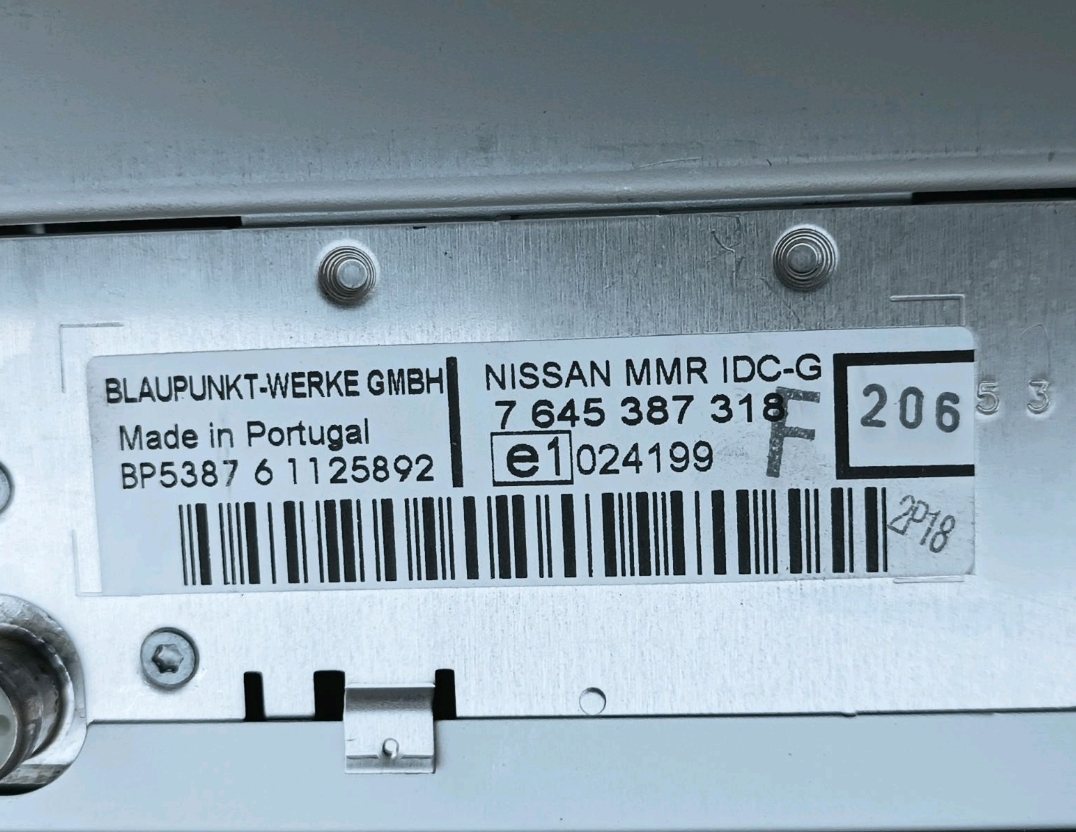
Example: Nissan Juke serial number label location
Usual Serial Letters and Numbers on Nissan Juke Units
Your Nissan Juke radio serial number may start with:
BPCNLCN
Now You Have the Corresponding PIN. How Entering Works?
You need to type in the radio security code into the system to unlock your Nissan's radio.
In the locked unit, the screen usually shows a code prompt.
Based on the radio, use control knob, touchscreen, or radio presets to set each digit, then submit the code to restore radio functionality.
Try not to make mistakes, because too many wrong attempts can temporarily lock the radio.
It allows a few incorrect tries before showing a SAFE message.
You can try again by leaving the radio on for an hour or a set waiting period.
Nissan Juke Radio Code - Common Questions
Yes. Each factory stereo has its own unlock code.
If you install a used radio, you'll need the code for that specific unit.
Free security codes are rarely available.
Some manuals may help, but most codes require a database lookup.
The only free possibility would be to check your vehicle and its manual to see if you already have the code.
Many OEM stereos use a anti-theft code, but some versions require one.
Whether a code is needed depends on the installed head unit and the vehicle generation.