How to Find the Serial Number on a Radio
To get the correct security code, you first need the radio serial number.
Depending on your radio model, you can display it on the radio screen or locate it on the unit.
It's often written as: Serial Num. / S/N / Serial Number etc.
These are the easiest ways to find it:
1. Getting Micra's S/N on the Screen
The serial number is printed on a sticker label on the top or side of the radio unit. After reading the serial number, reinstall the radio before entering the code. Refer to the removal guide below for instructions.
2. The Serial Number on the Radio Housing
To find the serial number, you'll need to pull out the head unit out.
- Start by turning off the vehicle and taking off the dashboard bezel.
- Next, release the clips and pull the unit forward to check the label on the back of the radio. Be careful not to damage the cables that the unit is connected to.
- Write down the serial number precisely and then come back to the website.
- Know that serial number and part number are not the same thing. You will find both of them on the sticker, but you only need for the serial.
📹 Video Guide: Removing Your Nissan Radio
For most modern Nissan vehicles with LCN/Connect systems, you don't need to remove the radio! Use the on-screen method above (enter wrong code 3 times).
However, if you need to physically remove the radio for Clarion, Blaupunkt, or Daewoo units:
- Disconnect the battery – For safety, disconnect the negative terminal before beginning.
- Remove the trim bezel – Carefully pry off the dashboard trim surrounding the radio using plastic trim tools.
- Unscrew mounting bolts – Remove the screws securing the radio to the dash frame.
- Slide the unit forward – Gently pull the radio out to access the label on the back or side.
- Locate the serial number label – Look for the barcode sticker with the serial number.
- Take a photo – Document the serial number before reinstalling.
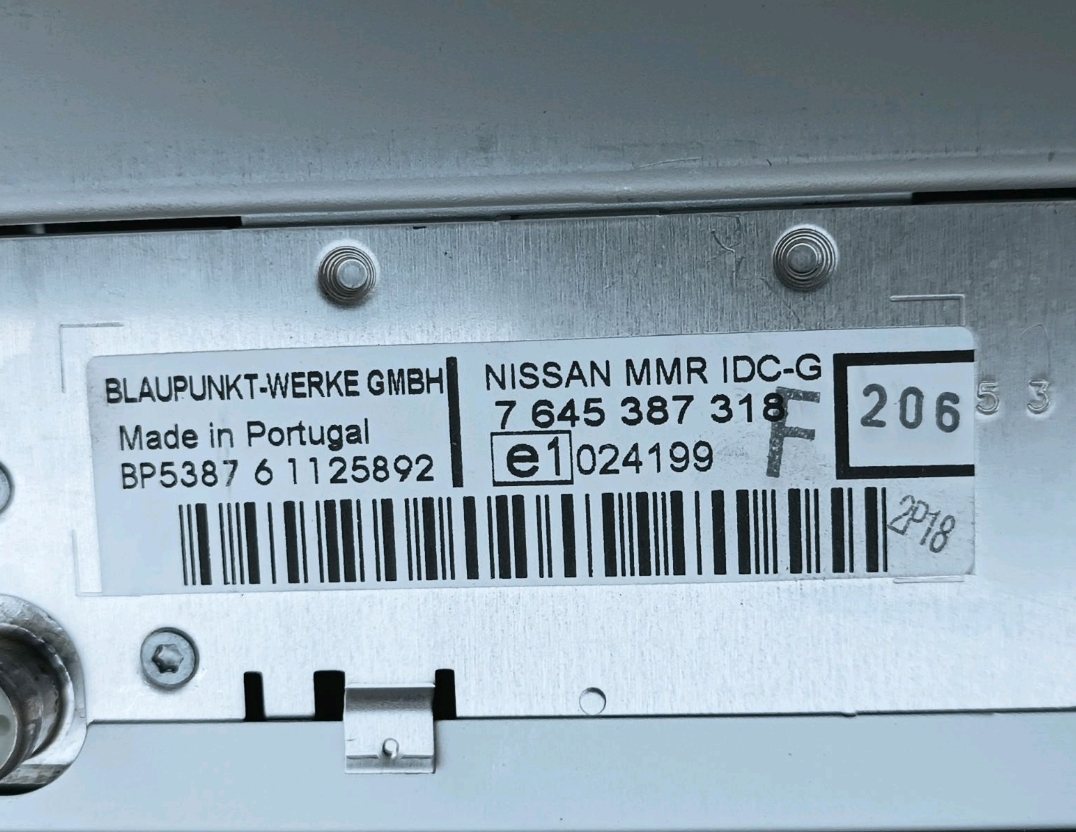
Example: Nissan Micra serial number label location
Usual Serial Letters and Numbers on Nissan Micra Factory Units
Your Nissan Micra radio serial number may start with:
BPCNLCN
Nissan Micra's Most Common Unlock Code Causes
Many drivers encounter radio code issues on their Micra after power loss.
Below are the most common situations when this can occur.
Radio Asking for Code After Battery Replacement
After a battery change, your radio may stop working.
This happens because the radio detects a power reset, which activates the security lock.
Other Situations
- After an ECU reset, software update, or electrical repair, some Nissan Micra radios ask for a code.
- After a boost start, the radio may reset and request a radio code.
- When the head unit is replaced, it usually locks automatically.
- If a fuse is pulled, the radio can lock itself.
Places to Check First
Looking for a free Nissan Micra Radio Code? Actually, you may find it.
In some cases, the code may already be available in the vehicle itself or in the documentation.
Checking these sources can save you time and money before using an online generator.
Below are the simplest places to look.
Search the Car Interior
- On the radio unit itself, if it was serviced earlier.
- In the vehicle handbook, often on a code card.
- In the boot compartment, on a service sticker.
- Inside the glovebox, sometimes on a small card.
- In your service book from the previous owner.
Getting It from the Nissan Dealer
A Nissan dealer can usually retrieve the security code using your Micra's VIN.
In most cases, you need to visit or contact them and prove ownership.
Once verified, they can generate the original unlock code for your radio.
Limitations:
- Some older Nissan Micra radios may require manual lookup.
- Dealers often ask for payment for the lookup service and it's sometimes more than 100$.
- The process can take hours depending on the model and database.
- You usually need to visit in person and bring vehicle paperwork.
Entering the Security Code on Your Vehicle
Once you have the unlock code, it's time to input it into the Nissan Micra's radio.
The locked radio will usually show an "ENTER CODE" message.
Use the radio presets or a rotary dial to dial in each digit, then confirm to activate the stereo.
Try not to make mistakes, because too many wrong attempts can temporarily lock the radio.
It will allow you a few incorrect tries before showing a WAIT message.
You can reset the lockout by leaving the radio on for one hour or a set waiting period.
What Exactly is a Radio Anti-Theft Code?
A radio code, also known as an anti-theft code is a numeric security code that restores access to your car stereo after it has been locked.
This factory security PIN is triggered when the radio detects a power interruption.
This system helps prevent stolen radios from working in other vehicles.
If power is interrupted, the radio stops functioning and asks for the CODE before it can work again.
Once the right combination is entered, the stereo is restored to normal operation.
Nissan Micra Radio Code - FAQ
Free codes are uncommon.
You might already possess the code in the owner's booklet or from a dealer, but most require a serial number lookup.
Not all of them require a security code, but many factory radios use it as an security measure.
Some production series may still use a code depending on the radio unit.
Yes. Each radio unit has its own unlock code.
A second-hand radio will need its original code to work.