
How to Locate the S/N on Your Radio
To generate the right unlock code, you first need the serial number from the radio.
Depending on your radio model, you can find it shown on the display or locate it on the unit.
You may see labels such as: S/N / SN / Serial / Serial Num. / Serial Number.
These are the most common ways to find it:
1. How to See the Serial Number on the Qashqai Screen
The Nissan Qashqai (2007–2016) equipped with the LCN or Connect navigation system can display the serial number using the standard Nissan 3-wrong-code method.
LCN / Connect System — 3 Wrong Codes Method
- Power on the radio — display shows "CODE".
- Enter any random 4-digit number and press OK/Enter.
- Repeat two more times (3 wrong attempts total).
- After the 3rd incorrect entry, the screen automatically displays the serial number and device information.
Write down all displayed information, including the serial number sequence shown first.
2. Locating the Serial on the Radio Itself
The serial number is usually located on a sticker attached to the head unit.
Step 1: Turn off the the ignition.
Step 2: After that, take off the surrounding panel.
Step 3: Then release the mounting clips.
Step 4: Carefully slide the unit out partially (Be careful not to damage the connections).
Step 5: Look for the serial number on the side of the unit.
Step 6: Write down the full S/N carefully and come back to our website so that we can generate your code.
Important: Don't mix the Serial Number and the Part Number!
📹 Video Guide: Removing Your Nissan Radio
For most modern Nissan vehicles with LCN/Connect systems, you don't need to remove the radio! Use the on-screen method above (enter wrong code 3 times).
However, if you need to physically remove the radio for Clarion, Blaupunkt, or Daewoo units:
- Disconnect the battery – For safety, disconnect the negative terminal before beginning.
- Remove the trim bezel – Carefully pry off the dashboard trim surrounding the radio using plastic trim tools.
- Unscrew mounting bolts – Remove the screws securing the radio to the dash frame.
- Slide the unit forward – Gently pull the radio out to access the label on the back or side.
- Locate the serial number label – Look for the barcode sticker with the serial number.
- Take a photo – Document the serial number before reinstalling.
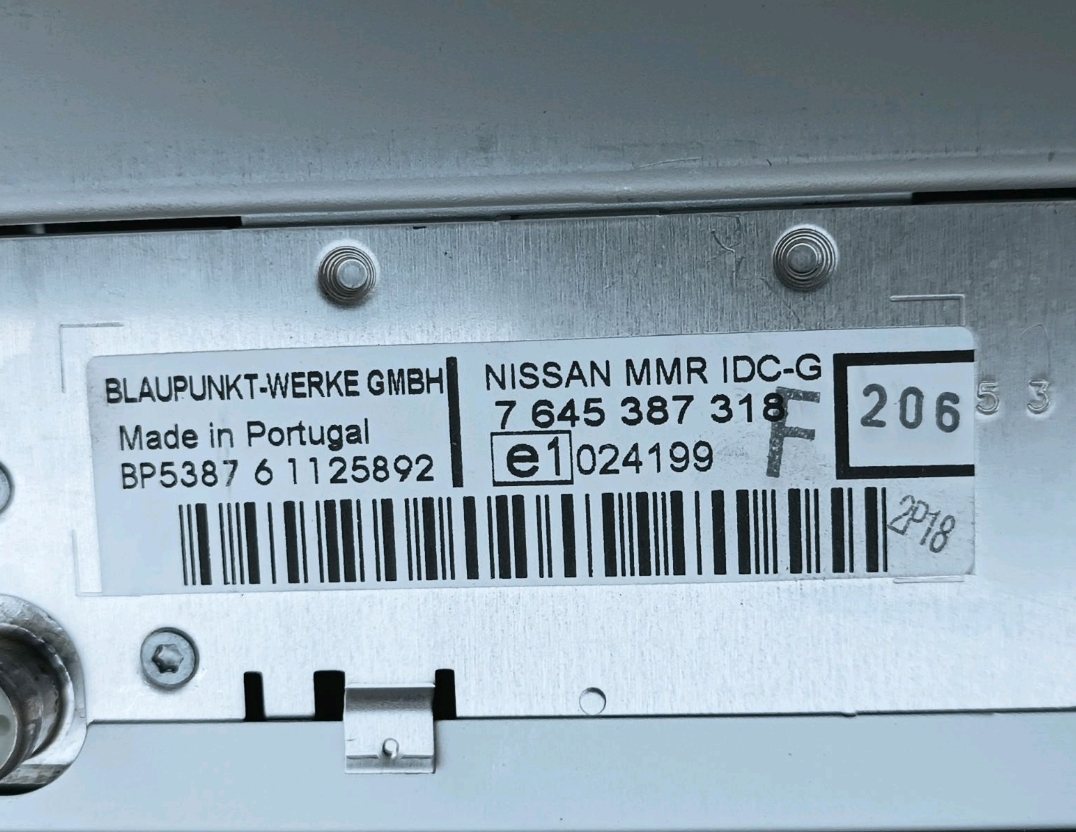
Example: Nissan Qashqai serial number label location
Serial Number Prefixes You'll See on Nissan Qashqai
Your Nissan Qashqai radio serial number may start with:
BPCNLCN
Situations When your Qashqai Requests a Code
Your radio may lock automatically when it detects a power interruption.
These are the some typical scenarios that trigger the radio code prompt.
Radio Locked After Battery Replacement
When the battery is replaced, the Nissan Qashqai radio enters anti-theft mode.
This factory protection system is designed to protect the original head unit by disabling the radio after electrical reset.
More Events That Can Lock Your Qashqai's Radio
- Replacing the head unit with a second-hand one requires the code for that particular radio.
- Even a quick battery boost can activate the anti-theft lock.
- ECU reflashing may reset the radio memory on some Nissan Qashqai units.
- A power surge can interrupt the radio and prompt for a code.
Before You Spend Money
Before you decide to pay, you should check a few places where the code is often stored.
Some owners find their Nissan Qashqai radio code without needing any tools or paperwork.
Here are the most common things to check first.
Look Through the Owner's Manual
- In the owner's manual, often on a code card.
- In the boot compartment, on a service sticker.
- Inside the glovebox, sometimes on a small card.
- In your car paperwork from the previous owner.
- On the radio unit itself, if it was removed before.
Dealer Retrieval Process
Dealerships can retrieve your radio code by checking the VIN in their system.
They typically ask for registration and ID before sharing the security PIN.
This is the official way to restore access to the factory radio.
Downsides:
- Dealers frequently bill for the code (It may cost more than 100$).
- The lookup is often not instant and may require waiting.
- Some imported or older radios may need extra verification.
- You may need to visit the dealer during business hours.
Why Should You Choose Our Nissan Qashqai Radio Code Generator Service?
Our Nissan Qashqai radio code lookup is designed to save time.
Unlike traditional dealer lookup, this method doesn't require VIN and can be done from home in minutes.
It's a faster and cheaper alternative for drivers who need their radio unlocked quickly.
Traditional Option (The Dealer) vs FindRadioCode
- Dealer lookups often come with no guarantee, while FindRadioCode offers a full money-back policy.
- Some dealers require visiting the service center and showing documents, while FindRadioCode is fully online.
- Dealerships operate during weekdays, while FindRadioCode is available anytime.
- Dealer lookup can take days, while our system delivers codes instantly 95% of times.
- Dealer services often charge over $100, while FindRadioCode offers codes from 9.99$.
Entering the Security Code on Your Qashqai
Once you have the Nissan's security code, you can type it in using the infotainment controls.
Most radios display a "CODE", "ENTER CODE", or "----" message when they are locked.
You typically use the number keys to select each digit.
After entering the full code, the radio will restore normal operation.
Try not to make mistakes, because too many wrong attempts can disable your radio temporarily.
It will allow you a few incorrect tries before showing a LOCKED message.
You can try again by leaving the radio on for one hour or a set waiting period.
Radio Code Explained
The anti-theft PIN is a built-in numeric code that keeps your stereo secure.
It is programmed into the radio at the factory and activates automatically whenever the unit loses power.
Without this code, the radio stays locked and produces no sound.
Entering the code tells the radio that the owner is present, unlocking all audio functions immediately.
Frequent Questions about Nissan Qashqai Code
Not all of them require a security code, but many factory radios use it as an security measure.
Certain production series may still use a code depending on the head unit.
Free codes are not usually available.
You might already possess the code in the owner's booklet or from a dealer, but most require a database lookup.
Yes. Each radio unit has its own unique security code.
A used radio will need its correct security code to work.