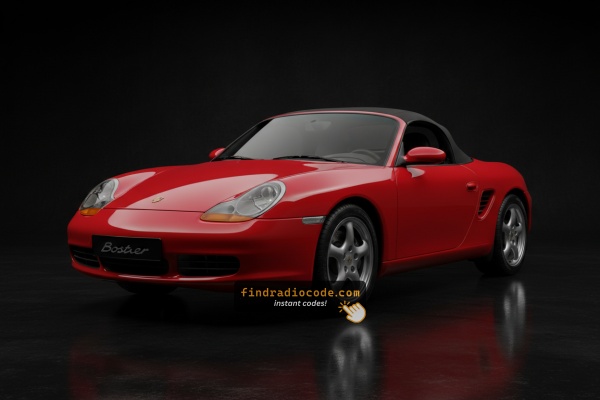
What is a Boxster Radio Code?
The radio code is a built-in numeric code that keeps your stereo secure.
It is stored within the radio at the factory and triggers automatically whenever the unit is disconnected.
Without this code, the radio stays locked and cannot be operated.
Entering the code tells the radio that the owner is present, restoring normal operation immediately.
Common Porsche Boxster Radio Code Problems
Many drivers encounter radio lock problems on their Boxster after battery-related issues.
Below are the most common situations when this can occur.
Lock After a Battery Replacement
When the battery is replaced, the Porsche Boxster radio requests a security code.
This factory protection system is designed to protect the original head unit by disabling the radio after electrical reset.
Other Cases When Your Radio May Ask for a PIN
- A fuse removal can cause the Porsche Boxster radio to request a security code.
- After an ECU or software reset, the radio may lock.
- Installing a replacement head unit will require the original anti-theft code.
- Jump-starting the vehicle can trigger anti-theft mode, requiring the PIN.
Quick Things to Check
Looking for a free Porsche Boxster Radio Code? Actually, you may find it.
In few cases, the code may already be available in the vehicle itself or in the documentation.
Check these places to save time and money before using an online lookup tool.
Below are the most reliable places to look.
Check the Owner's Manual
- On a sticker in the center console.
- Near the boot panel, where some manufacturers place radio labels.
- In the vehicle documentation provided with the car.
- In the owner's handbook, often on a separate code card.
- On the back of the radio if the unit was previously removed.
Requesting It from the Dealer
Dealerships can retrieve your radio code by checking the vehicle records in their system.
They typically require proof of ownership before sharing the unlock code.
This is the official way to restore access to the factory radio.
Things to Consider:
- You may need to visit the dealer during business hours.
- Some imported or older radios may need extra verification.
- Dealers frequently bill for the code (sometimes more than 100$).
- The lookup is often slower and may require waiting.
Finding the Serial N. on a Boxster's Radio
To retrieve the correct radio code, you will need the radio serial number from your Porsche Boxster's head unit.
You can usually find it on the radio body. Common labels to look for: S/N, SN, Serial, Serial Number.
1. How to See the Serial Number on the Boxster Screen
The Porsche Boxster serial number method varies by the generation.
Boxster 986 (1996–2004) — Becker CR-210
- Press TONE, then press 8 and 0 simultaneously.
- Press station up until "SERIAL N" appears, then press the numbered button to display the serial.
Boxster 987 (2005–2011) — Becker CDR-220 or Traffic Pro
CDR-220: Turn radio OFF, hold TP for 10 seconds, turn radio ON, rotate right knob to find serial number.
Traffic Pro: Press NAV + key 10 simultaneously to open Service Menu, then navigate to the serial number.
Boxster 981 / 718 (2012+) — Porsche Communication Management (PCM)
Navigate on the PCM touchscreen: Settings → System → System Information. The serial number is displayed directly.
2. The Serial Number on the Radio Sticker
The serial number is usually found on a sticker attached to the radio casing.
Step 1: Turn off the car.
Step 2: After that, remove the dashboard.
Step 3: Then release the mounting clips.
Step 4: Carefully slide the unit out partially (Be careful not to damage the cables).
Step 5: Search for the serial number on the side of the unit.
Step 6: Write down the full number carefully and come back here so that we can generate your code.
Important: Be careful not to mix the Serial Number for the Part Number!
Porsche Radio Removal Guide
To remove the Porsche Boxster radio, you need to unclip the dashboard panel to access the mounting hardware. The serial label is on the back of the Becker unit.
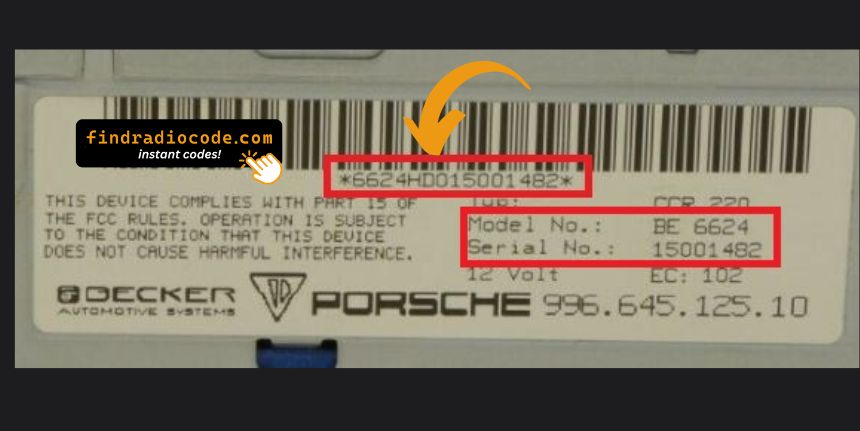
Example: Porsche Boxster serial number label location
Common Serial Formats on Porsche Boxster Units
The radio uses Becker serials starting with BE (e.g. BE7822, BE0512). Units include the CDR-220, CR-220, CDR-23, and CDR-24.
You've Got the Corresponding PIN. How the Entering Process Works?
Once you have the Porsche's security code, you can type it in using the infotainment controls.
Most radios display a "CODE", "ENTER CODE", or "----" message when they are locked.
You typically use the rotary knob to select each digit.
After entering the full code, the radio will confirm the entry.
To input the unlock code on your Porsche radio (Becker):
- Turn the ignition to ON and power on the radio.
- The display will show "CODE" or "SAFE".
- Use the numbered buttons or the right knob to enter each digit of your unlock code.
- After entering all digits, press ENTER or the right knob to confirm.
Note: The exact entry method varies by radio model (CR-220, CR-210, Traffic Pro). If the radio shows "SAFE" after incorrect attempts, it has been locked out.
Why Use Our Porsche Boxster Radio Code Lookup Service?
Our Porsche Boxster radio code lookup service retrieves the anti-theft code using the radio serial number.
Compared to dealership VIN lookup, this Porsche Boxster radio code generator is faster, doesn't require appointments, and costs less.
It's an easy way to restore access to your factory radio without leaving your home.
Dealer Option vs FindRadioCode
- Dealer services often charge over $100, while FindRadioCode offers codes from 9.99 USD.
- Dealerships operate during weekdays, while FindRadioCode is available anytime.
- Some dealers require visiting the service center and showing documents, while FindRadioCode is fully online.
- Dealer lookups often come with limited refunds, while FindRadioCode offers a full money-back policy.
- Dealer lookup can take time, while our system delivers codes instantly 95% of times.