What Does a Radio Code Do?
The security code is a manufacturer-assigned numeric code that protects your car audio from theft.
It is stored within the radio at the factory and activates automatically whenever the unit detects a power cut.
Without this code, the radio stays locked and cannot be operated.
Entering the code tells the radio that the owner is present, restoring normal operation immediately.
Renault Kangoo's Most Common Radio Code Scenarios
Your radio may lock automatically when it loses power.
These are the some well-known scenarios that trigger the radio code prompt.
Radio Locked After Battery Swap
A disconnected battery is the most common reason a Renault Kangoo radio asks for a code.
Even a momentary power loss is enough to trigger the built-in anti-theft lock.
Additional Scenarios
- If a power circuit is interrupted, the radio can lock itself.
- When the head unit is removed, it usually locks automatically.
- After a jump-start, the radio may reset and request a radio code.
- After a software update, electrical repair, or an ECU reset, some Renault Kangoo radios display a CODE message.
Before Paying for Help
Want free Renault Kangoo Radio Code? Actually, you may already have it.
In few cases, the code may already be available in the vehicle or in the documentation.
Check these places to save time and money before using an online generator.
Below are the simplest places to look.
Check the Car Documents
- In the owner's handbook, often on a separate page.
- On the head unit casing if the unit was previously removed.
- Near the boot panel, where some manufacturers place radio labels.
- In the maintenance records provided with the car.
- On a sticker in the center console.
Requesting It from the Dealer
A Renault dealer can usually look up the security code using your Kangoo's vehicle identification number.
In most cases, you need to contact the service department or visit the dealership and show vehicle documents.
When it is verified, they can request the original unlock code for your radio.
Possible Drawbacks:
- You usually need to book an appointment and bring vehicle paperwork.
- Dealers often charge a fee for the lookup service and it can cost more than 100$.
- The process can take days depending on the model and database.
- Some older Renault Kangoo radios may not be supported.
Finding the Serial Number on a Radio
To generate the right unlock code, you first need the radio's serial.
Depending on your radio model, you can display it on the radio screen or check the radio hardware.
Common abbreviations are: S/N / SN / Serial / Serial Num. / Serial Number.
These are the easiest ways to find it:
1. Getting Kangoo's S/N on the Display
On certain models, you can view the serial by pressing and holding 1 + 6 or 1 + 5 while turning on the radio. This works on some units but not all — if nothing appears, the radio needs to be removed.
2. The Serial Number on the Radio Sticker
To find the serial number, you'll need to pull out the radio unit out.
- Start by turning off the ignition and removing the trim panel.
- Next, release the clips and slide the radio out to check the sticker on the back of the radio. Pay attention not to damage the cables that the unit is connected to.
- Write down full serial number carefully and then come back to the website.
- Know that serial number and part number are not the same. You will find both of them on the unit, but you only need for the serial.
Removing the Renault Kangoo Radio
The radio is removed with dedicated extraction keys that fit into the holes on both sides of the faceplate. Push until the clips disengage, then pull the radio forward. The serial and precode are on labels on the housing.
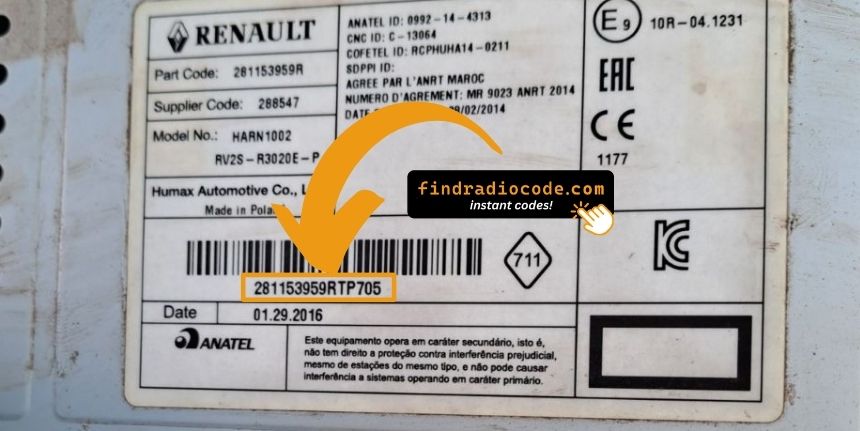
Example: Renault Kangoo serial number label location
Common Serial Letters and Numbers on Renault Kangoo Factory Units
The radio uses serials like 8200####, 2811####, or 7700#### on the radio label. You can also use the Precode — a 4-character code (e.g. A123) often found on a card in the glovebox or printed on the radio sticker.
How to Enter the Radio Code on Renault Kangoo
Once you have the Renault's security code, you can enter it using the infotainment controls.
Most radios display a "CODE", "ENTER CODE", or "----" message when they are locked.
You typically use the preset buttons to input the code.
After entering the full code, the radio will confirm the entry.
Try not to make mistakes, because too many wrong attempts can temporarily lock the radio.
It allows a few missed shots before showing a WAIT message.
You can try again by leaving the radio on for one hour or a set waiting period.