Renault Master's Most Common Anti-Theft Code Triggers
Your radio may enter anti-theft mode when it loses power.
These are the some well-known scenarios that activate the radio code prompt.
Radio Locked After Battery Replacement
When the battery is disconnected, the Renault Master radio locks automatically.
This security feature is designed to prevent theft by disabling the radio after electrical reset.
Other Cases When The Radio Asks for a Code
- If a fuse blows, the radio can lock itself.
- When the head unit is replaced, it usually locks automatically.
- After a boost start, the radio may lose power and request a radio code.
- After a software update, electrical repair, or an ECU reset, some Renault Master radios ask for a code.
Renault Master Radio Security Code Explained
The security code is a factory-set numeric code that protects your car audio from theft.
It is stored within the radio at the factory and activates automatically whenever the unit loses power.
Without this code, the radio stays locked and produces no sound.
Entering the code tells the radio that it is still in the original vehicle, restoring normal operation immediately.
What You Might Try First
There is a chance your Renault Master radio code is written down in your documents.
Before spending money, take a few minutes check the places below - you might be surprised.
Check Inside the Vehicle
- In the radio manual, often on a code card.
- On the head unit itself, if it was removed before.
- Inside the center console, sometimes on a small card.
- In the boot compartment, on a service sticker.
- In your service book from the previous owner.
Requesting It from the Dealer
Dealerships can generate your radio code by checking the vehicle records in their system.
They typically ask for registration and ID before sharing the unlock code.
This is the official way to restore access to the factory radio.
Potential Downsides:
- The lookup is often slower and may require waiting.
- Dealers frequently charge a service fee (sometimes more than 100$).
- You may need to contact service support during business hours.
- Some imported or older radios may need extra verification.
Where to Look for the Serial Number
The only thing you'll need to find the corresponding code is your radio's radio serial. VIN or other details are not required.
On most Renault vehicles, you can find it in these common spots:
- Shown on the radio screen (occasionally by using a key combination)
- On the radio unit itself - you'll need to pull it out and write down serial (which is fairly easy)
Search for text similar to: Serial Number or SN.
1. Find the S/N on Renault Master's Screen
Some Renault Master radios allow on-screen serial display — try holding buttons 1 and 6 or 1 and 5 simultaneously while powering on the radio. If the serial appears, write it down. If not, the radio must be physically removed.
2. Locating the Serial on the Radio Itself
The serial number is usually located on a label attached to the radio casing.
Step 1: Turn off the the ignition.
Step 2: After that, remove the dashboard.
Step 3: Then release the mounting clips.
Step 4: Carefully pull the radio forward partially (Be careful not to damage the connections).
Step 5: Search for the serial number on the rear of the unit.
Step 6: Write down the full S/N carefully and come back to our website so that we can generate your code.
Important: Don't mix the Serial Number and the Part Number!
How to Pull Out Your Renault Radio
To remove the Renault Master radio, you need Renault-specific radio extraction keys — thin tools that insert into the holes on each side of the unit. Once inserted, the clips release and the radio slides out. The serial label is on the back.
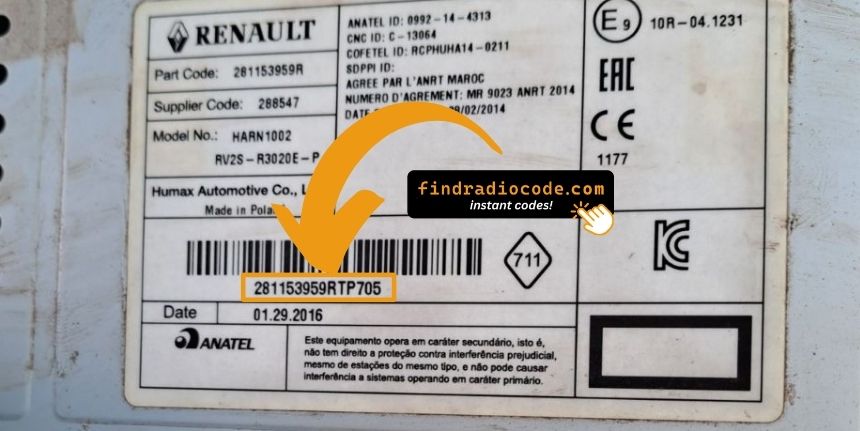
Example: Renault Master serial number label location
Serial Number Prefixes You'll See on Renault Master
Your Renault Master radio serial is typically in one of these formats: 8200####, 2811####, or 7700####, found on the back label of the radio unit. Alternatively, look for the Precode (format A123) printed on a glovebox card or sticker.
Entering the Unlock Code on Renault Master
You need to enter the code into the system to unlock your Renault's radio.
When the unit is locked, the screen usually shows a security message.
You should use radio presets, control knob, or touchscreen to enter the numbers, then confirm the code to reactivate the audio system.
If you make a mistake multiple times, you may cause the Master's head unit to enter lockout mode.
When this happens, the screen can display messages like "CODE ERR", "ERROR", or a blank screen.
To unlock it, you usually need to leave the radio powered for a waiting period that is shown or up to an hour before trying again.