
Situations When your Fabia Requests a Code
Many drivers encounter radio lock problems on their Fabia after battery-related issues.
Below are the most frequent situations when this can occur.
Radio Asking for Code After Battery Change
After a battery change, your radio may lock.
This happens because the radio detects a power reset, which activates the anti-theft system.
More Situations That Can Lock Your Fabia's Radio
- After an ECU or software reset, the radio may lock.
- Jump-starting the vehicle can trigger anti-theft mode, requiring the PIN.
- A blown fuse can cause the Skoda Fabia radio to request a security code.
- Installing a replacement head unit will trigger the original anti-theft code.
Check These Places First
Looking for a free Skoda Fabia Radio Code? Actually, you may already have it.
In few cases, the code may already be available in the vehicle itself or in the documentation.
Checking these sources can save you time and money before using an online lookup tool.
Below are the simplest places to look.
Look Around the Glovebox
- On the head unit itself, if it was removed before.
- In the trunk, on a service sticker.
- In the owner's manual, often on a sticker page.
- Inside the center console, sometimes on a label.
- In your maintenance booklet from the previous owner.
Through the Dealer
A Skoda dealer can usually look up the radio code using your Fabia's VIN.
In most cases, you need to contact the service department or visit the dealership and prove ownership.
When it is verified, they can generate the original anti-theft code for your radio.
Not Always Ideal:
- Dealers often charge a fee for the lookup service and it's sometimes more than 100$.
- Some older Skoda Fabia radios may not be supported.
- The process can take hours depending on the model and database.
- You usually need to visit in person and bring vehicle paperwork.
Finding the S/N on a Radio
To retrieve the correct unlock code, you will need the serial number from your Skoda Fabia's head unit.
You can usually find it directly on the screen. Common labels to look for: S/N, SN, Serial, Serial Number.
1. Get the S/N from Skoda Fabia's Screen
All factory audio units — Swing, Bolero, Amundsen, Columbus, and Stream — require physical removal to read the serial. There is no button combination that will display it on screen.
2. Find the S/N on the Radio Body
To find the serial number, you'll need to remove the radio unit out.
- Start by turning off the ignition and removing the trim panel.
- Next, release the clips and slide the radio out to check the sticker on the side of the radio. Be careful not to damage the cables.
- Write down full serial number carefully and then come back to our website.
- Know that serial number and part number are not the same thing. You will find both on the sticker, and you only need for the serial.
Skoda Radio Removal Guide
Standard VAG removal keys fit all Skoda radios. Insert into the round holes on both sides of the unit, release the retaining clips, and slide out. The serial label is on the radio chassis.
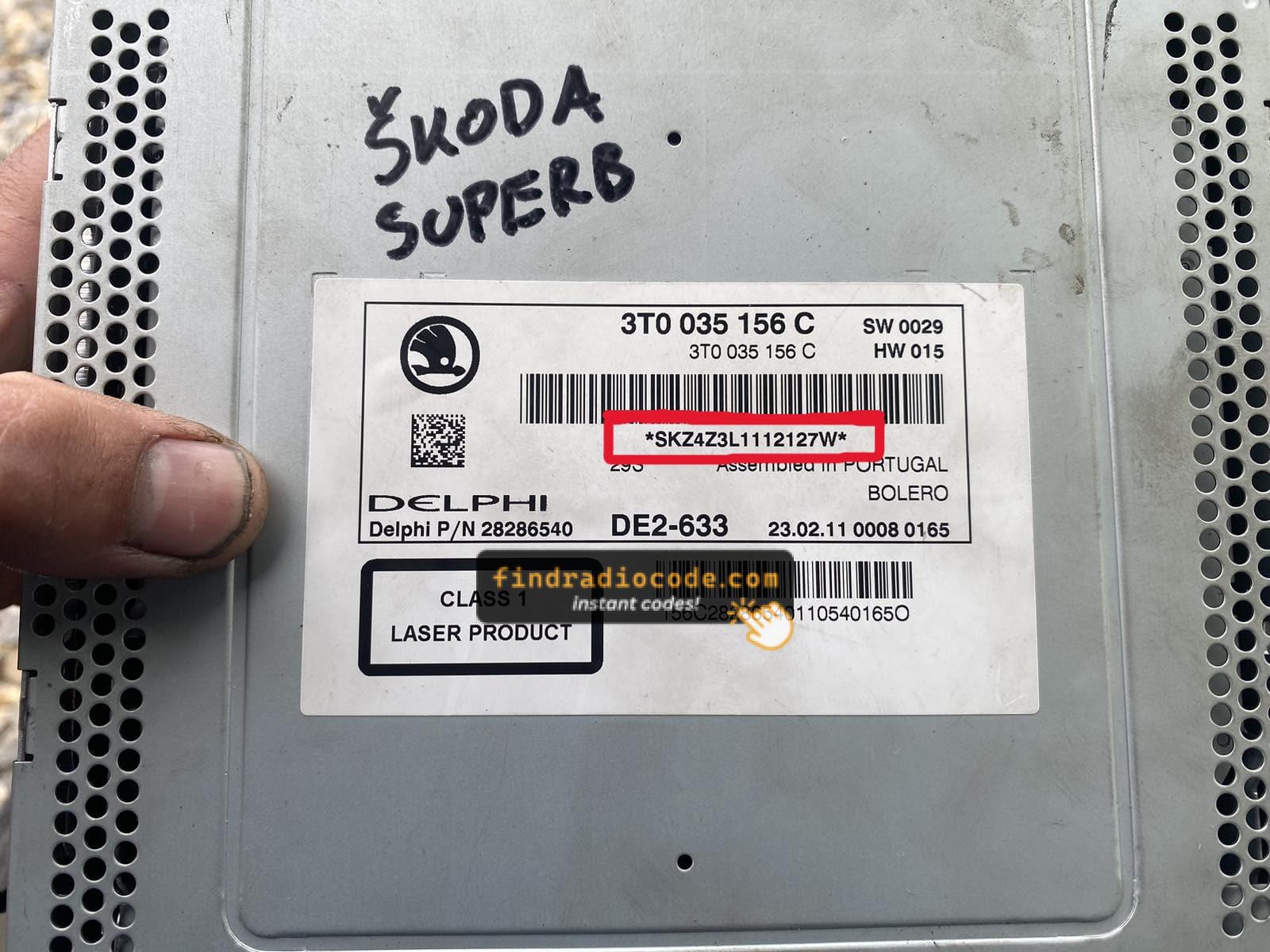
Example: Skoda Fabia serial number label location
Serial Number Prefixes You'll See on Skoda Fabia
The radio uses a serial beginning with SKZ — for example SKZBZ7G1234567. It is always 13 characters long. Some units shared across the VW Group may have a VWZ prefix. The label is on the radio body.
Now You Have the Code. How Entering Works?
With your code ready, it's time to input it into the Skoda Fabia's radio.
The locked radio will usually show an "ENTER CODE" message.
Use the built-in buttons or touch controls to dial in each digit, then press OK to unlock the head unit.
Try not to make mistakes, because too many wrong attempts can disable your radio temporarily.
It allows a few incorrect tries before showing a LOCKED message.
You can try again by keeping the ignition on for 60 minutes or a set waiting period.