
When a Radio Unlock Code Is Needed?
Many drivers encounter radio code issues on their Octavia after power loss.
Below are the most typical situations when this can occur.
Error After a Battery Change
A replaced battery is the most common reason a Skoda Octavia radio asks for a code.
Even a brief power loss is enough to trigger the built-in security system.
Additional Scenarios Where Radio Requires a Code
- After a software update, electrical repair, or an ECU reset, some Skoda Octavia radios display a CODE message.
- If a fuse is pulled, the radio can enter anti-theft mode.
- After a boost start, the radio may lose power and request a security code.
- When the head unit is removed, it usually locks automatically.
Before Paying for Help
Want free Skoda Octavia Radio Code? Actually, you may already have it.
In some cases, the code may already be available in the vehicle itself or in the documentation.
Check these places to save time and money before using an online lookup tool.
Below are the simplest places to look.
Look Around the Interior
- On the radio unit itself, if it was removed before.
- Inside the center console, sometimes on a label.
- In your car paperwork from the previous owner.
- In the boot compartment, on a radio label.
- In the radio manual, often on a code card.
Getting It from the Dealer
A Skoda dealer can usually retrieve the radio code using your Octavia's VIN.
In most cases, you need to contact the service department or visit the dealership and show vehicle documents.
When it is verified, they can request the original anti-theft code for your radio.
Downsides:
- Some older Skoda Octavia radios may require manual lookup.
- Dealers often ask for payment for the lookup service and it's sometimes more than 100$.
- The process can take days depending on the model and database.
- You usually need to visit in person and bring ID.
Where to Search for the S/N on a Octavia
To generate the correct unlock code, you will need the radio serial number from your Skoda Octavia's radio unit.
You may be able to find it on the radio body. Common labels to look for: S/N, SN, Serial, Serial Number.
1. Viewing Octavia's S/N on the Screen
None of the radio systems (Swing, Bolero, Amundsen, Columbus, Stream) support on-screen serial retrieval. The radio must be extracted from the dashboard to access the label.
2. Locating your Serial Number on the Radio Body
To find the serial number, you'll need to remove the head unit out.
- Start by turning off the vehicle and removing the trim panel.
- Next, release the clips and pull the unit forward to check the sticker on the back of the radio. Pay attention not to damage the connections.
- Write down the serial number carefully and come back to the website.
- Know that serial number and part number are not the same thing. You will find both of them on the unit, but you only care for the serial.
Skoda Radio Removal Guide
The radio uses the standard VAG extraction key system. Push the flat keys into the round holes flanking the radio faceplate. When the clips disengage, pull the radio forward. The serial sticker is on the back or side.
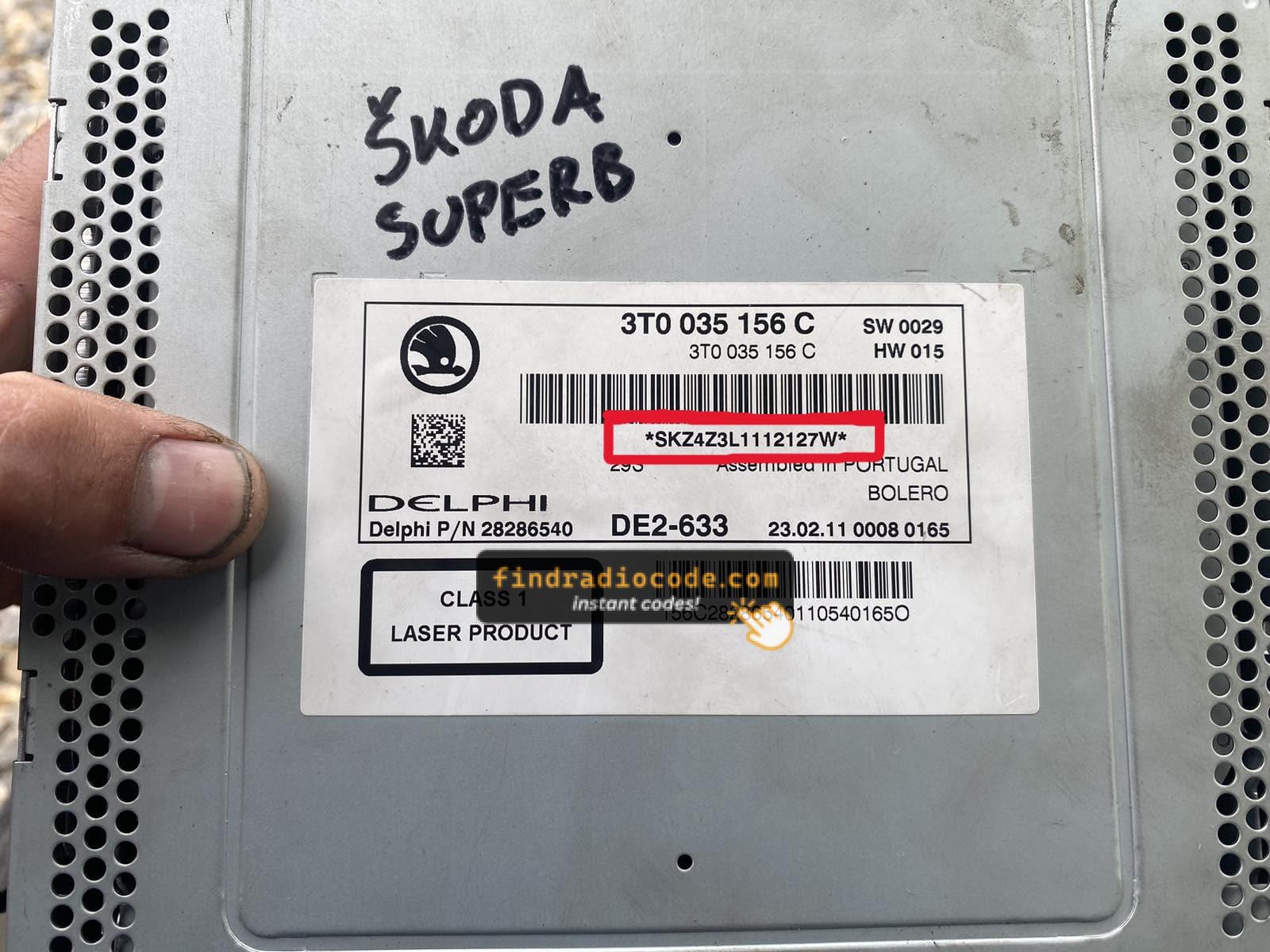
Example: Skoda Octavia serial number label location
Usual Serial Letters and Numbers on Skoda Octavia Radios
Your Skoda Octavia radio serial number starts with SKZ (e.g. SKZBZ7G1234567) and is 13 characters long. On some VAG-shared units, the prefix may be VWZ instead. The serial is on a label attached to the radio housing.
Entering the Radio Code on Skoda Octavia
Once you have the Skoda's radio code, you can type it in using the radio buttons.
Most radios display a "CODE", "ENTER CODE", or "----" message when they are locked.
You typically use the rotary knob to select each digit.
After entering the full code, the radio will unlock automatically.
If you make a mistake multiple times, you may cause the Octavia's head unit to enter lockout mode.
When this happens, your screen can display messages like "CODE ERR", "ERROR", or a blank screen.
To unlock the unit, you usually need to keep the ignition on for a waiting period that is shown or up to a full hour before trying again.
Octavia's Radio Code FAQs
Free radio codes are rarely available.
Some dealers may help, but most codes require a serial number lookup.
The only free way would be to check your car and its glovebox to see if you have it written down.
Yes. Each radio unit has its own unlock code.
If you install a different radio, you'll need the code for that specific unit.
Many OEM stereos use a security code, but not all production years require one.
Whether a code is needed is determined by the installed head unit and the production year.