Common Skoda Yeti Radio Code Problems
Many drivers encounter security code prompts on their Yeti after electrical work.
Below are the most typical situations when this can occur.
Radio Lock After Battery Replacement
After a battery replacement, your radio may stop working.
This happens because the radio detects a power reset, which activates the anti-theft system.
Additional Scenarios Where Radio Requires a Code
- After an ECU or software reset, the radio may enter security mode.
- Installing a used head unit will trigger the original radio code.
- Jump-starting the vehicle can trigger anti-theft mode, requiring the unlock code.
- A blown fuse can cause the Skoda Yeti radio to lock.
Check These Free Methods
There is a chance your Skoda Yeti radio code is written down in your documents.
Before spending money, take a few minutes check the places below - it costs nothing to look.
Check Inside the Vehicle
- In your car paperwork from the previous owner.
- Inside the glovebox, sometimes on a label.
- In the vehicle handbook, often on a code card.
- In the trunk, on a radio label.
- On the head unit itself, if it was removed before.
Can You Get a Skoda Yeti Radio Code from the Dealer?
Dealerships can retrieve your radio code by checking the VIN in their system.
They typically ask for registration and ID before sharing the security PIN.
This is the official way to restore access to the factory radio.
Downsides:
- You may need to visit the dealer during business hours.
- Dealers frequently bill for the code (sometimes more than 100$).
- Some imported or older radios may not be in their database.
- The lookup is often not instant and may require waiting.
Finding the Serial Number on a Yeti's Radio
To generate the correct radio code, you will need the radio serial number from your Skoda Yeti's radio unit.
You can usually find it in one of two places. Common labels to look for: S/N, SN, Serial, Serial Number.
1. Viewing Yeti's S/N on the Display
All factory audio units — Swing, Bolero, Amundsen, Columbus, and Stream — require physical removal to read the serial. There is no button combination that will display it on screen.
2. Finding the S/N on the Radio Unit
The serial number is usually printed on a label attached to the radio casing.
Step 1: Turn off the car.
Step 2: After that, remove the dashboard trim.
Step 3: Then release the mounting clips.
Step 4: Carefully pull the radio forward partially (Be careful not to damage the connections).
Step 5: Look for the serial on the side of the unit.
Step 6: Write down the full S/N carefully and come back to our website so that we can generate your code.
Important: Don't mix the Serial Number and the Part Number!
Skoda Radio Removal Guide
The radio uses the standard VAG extraction key system. Push the flat keys into the round holes flanking the radio faceplate. When the clips release, pull the radio forward. The serial sticker is on the back or side.
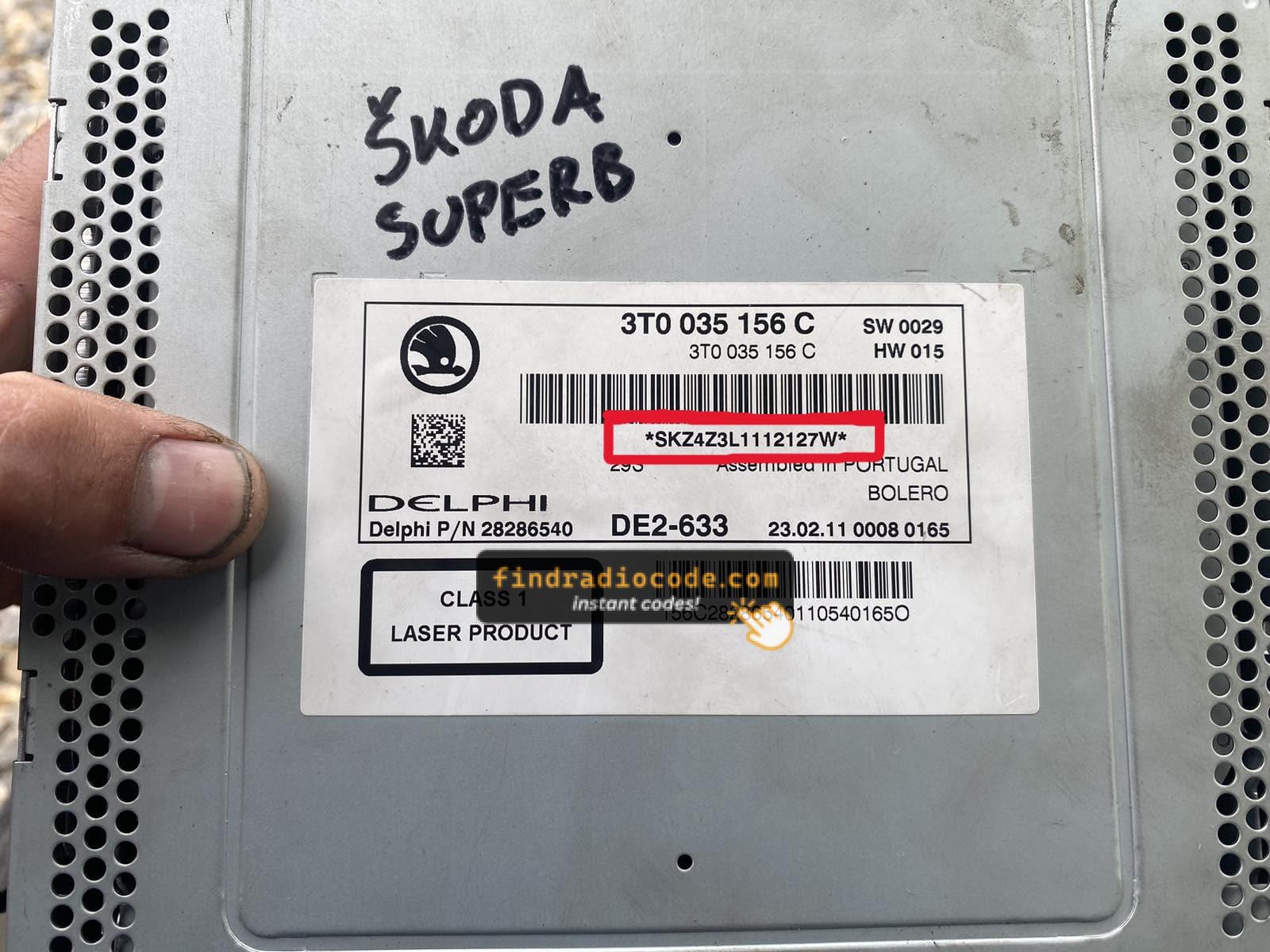
Example: Skoda Yeti serial number label location
Serial Number Prefixes You'll See on Skoda Yeti
The radio uses a serial beginning with SKZ — for example SKZBZ7G1234567. It is always 13 characters long. Some units shared across the VW Group may have a VWZ prefix. The label is on the radio body.
Entering the Security Code on Your Yeti
You need to type in the anti-theft code into the system to unlock your Skoda's radio.
When the unit is locked, the screen usually displays a code prompt.
Based on the radio, use control knob, touchscreen, or radio presets to enter the numbers, then submit the code to reactivate the audio system.
Be careful, because too many wrong attempts can temporarily lock the radio.
It allows a few missed shots before showing a LOCKED message.
You can reset the lockout by keeping the ignition on for one hour or a set waiting period.