
Where to Search for the Serial No.
To generate the correct radio code, you will need the radio serial number from your Volvo FE's head unit.
You may be able to find it in one of two places. Common labels to look for: S/N, SN, Serial, Serial Number.
1. How to See the Serial Number on the FE Screen
Volvo FE radios do not support on-screen serial display. The radio must be physically removed to read the serial label on its back.
2. The Serial Number on the Radio Sticker
To find the serial number, you'll need to pull out the radio unit from the dashboard.
- Start by turning off the ignition and removing the trim panel.
- Next, unscrew the mounting bolts and pull the unit forward to check the sticker on the side of the radio. Pay attention not to damage the connections.
- Write down the serial number carefully and then come back to the website.
- Know that serial number and part number are not the same thing. You can find both of them on the unit, and you only need for the serial.
How to Extract Your Volvo Radio
Radio removal: remove the trim panel, unscrew the mounting, and extract the unit. The serial label is on the radio housing.
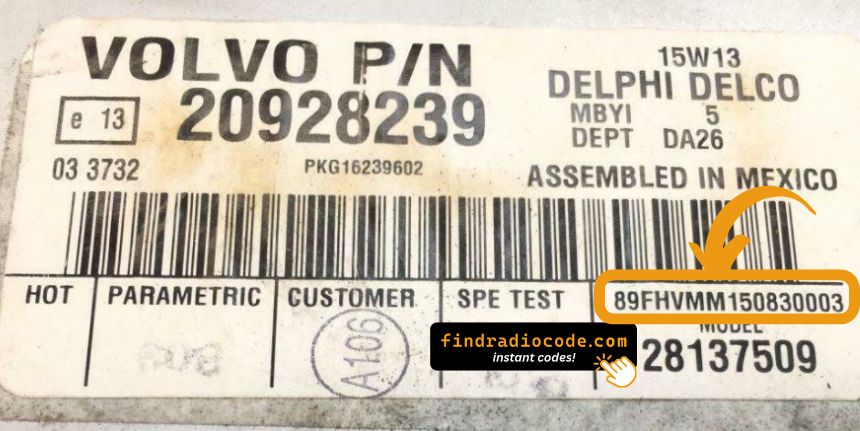
Example: Volvo FE serial number label location
Usual Serial Prefixes on Volvo FE Radios
Your Volvo FE radio serial is on a label on the back of the Bosch or Blaupunkt unit. The serial must be read from the physical label — there is no shortcut to retrieve it remotely.
When Your Volvo FE Radio May Ask for a Code
Your radio may lock automatically when it loses power.
These are the some well-known scenarios that trigger the radio code prompt.
Error After a Battery Change
After a battery replacement, your radio may stop working.
This happens because the radio recognizes a voltage interruption, which activates the anti-theft system.
Other Possible Causes
- After a jump-start, the radio may reset and request a security code.
- When the head unit is replaced, it usually locks automatically.
- If a power circuit is interrupted, the radio can enter anti-theft mode.
- After a software update, electrical repair, or an ECU reset, some Volvo FE radios display a CODE message.
Free Things to Try
Want free Volvo FE Radio Code? Actually, you may already have it.
In few cases, your code may already be available in the vehicle or in the documentation.
Checking these sources can save you time and money before using an online generator.
Below are the simplest places to look.
Check Inside the Car
- On a sticker in the glove compartment.
- In the user guide, often on a separate code card.
- In the service booklet provided with the car.
- On the head unit casing if the unit was previously removed.
- Near the spare tire, where some manufacturers place radio labels.
Can You Get a Volvo FE Radio Code from the Dealer?
A Volvo dealer can usually retrieve the security code using your FE's VIN.
In most cases, you need to contact the service department or visit the dealership and show vehicle documents.
When it is verified, they can request the original anti-theft code for your radio.
Limitations:
- Some older Volvo FE radios may require manual lookup.
- Dealers often ask for payment for the lookup service and it's sometimes more than 100$.
- The process can take hours depending on the model and database.
- You usually need to visit in person and bring vehicle paperwork.
Why Use Our Volvo FE Radio Code Lookup Service?
Our Volvo FE radio code lookup is designed to simplify the unlock process.
Unlike traditional dealer lookup, this method doesn't require VIN and can be done online in minutes.
It's a more convenient and cheaper alternative for drivers who need their radio unlocked quickly.
The Real Difference
- Dealer lookup can take time, while our system delivers codes right away 95% of times.
- Dealer services often charge over $100, while FindRadioCode offers codes from 9.99$.
- Dealerships operate during business hours, while FindRadioCode is available 24/7.
- Dealer lookups often come with limited refunds, while FindRadioCode offers a full money-back policy.
- Some dealers require a visit to the service center, while FindRadioCode is fully remote.
Entering the Radio Code on Volvo FE
Once you have the Volvo's security code, you can enter it using the infotainment controls.
Most radios display a "CODE", "ENTER CODE", or "----" message when they are locked.
You typically use the number keys to select each digit.
After entering the full code, the radio will confirm the entry.
Be careful, because too many wrong attempts can disable your radio temporarily.
It allows a few missed shots before showing a SAFE message.
You can try again by leaving the radio on for one hour or a set waiting period.
Radio Code - Quick Explanation
When the radio is cut off from power, it automatically locks and requires an anti-theft code to be entered before it can be operated.
A factory radio code (also known as an anti-theft code) is a built-in security system integrated into original car stereos to prevent theft.
This system makes sure that a stolen radio becomes useless without the original code.
Entering the correct code returns full stereo and media functionality.
Volvo FE Radio Code - FAQ
Yes. Each radio unit has its own radio code.
A used radio will need its correct security code to work.
Not all of them require a security code, but many factory radios use it as an anti-theft feature.
Some series may not require a code depending on the head unit.
Free codes are uncommon.
You might already possess the code in the manual or from a dealer, but most require a database lookup.