How to Find the Serial Number on a FM's Radio
To generate the right radio code, you first need the radio's serial.
Depending on your model, you can see it on the screen or find it on the radio unit itself.
Common abbreviations are: Serial Num. / S/N / Serial Number etc.
These are the typical ways to locate it:
1. Displaying the Serial Number on the FM Screen
None of the radio systems support on-screen serial retrieval. The unit must be extracted to read the label.
2. Locating the Serial on the Radio Body
The serial number is usually located on a label attached to the head unit.
Step 1: Turn off the vehicle.
Step 2: After that, remove the dashboard trim.
Step 3: Then unscrew the radio brackets.
Step 4: Carefully slide the unit out partially (Be careful not to damage the connections).
Step 5: Search for the serial number on the rear of the unit.
Step 6: Write down the full Serial Number carefully and come back to our website so that we can generate the code.
Important: Be careful not to mix the Serial Number for the Part Number!
How to Extract Your Volvo Radio
Radio removal: remove the trim panel, unscrew the mounting, and extract the unit. The serial label is on the radio housing.
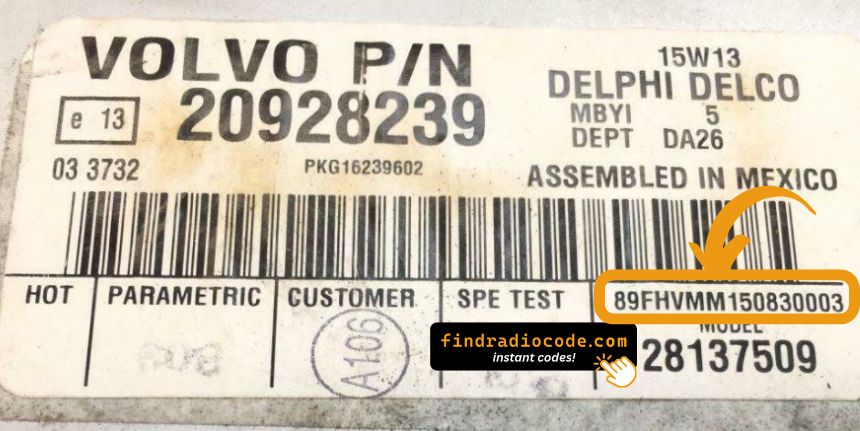
Example: Volvo FM serial number label location
Usual Serial Formats on Volvo FM Radios
To decode your radio, locate the serial on the manufacturer label (Bosch or Blaupunkt) on the back of the radio unit.
Volvo FM's Usual Unlock Code Triggers
Your radio may request a security code when it detects a power interruption.
These are the some well-known scenarios that trigger the radio code prompt.
Error After a Battery Replacement
A replaced battery is the most common reason a Volvo FM radio asks for a code.
Even a brief power loss is enough to activate the built-in security system.
Additional Scenarios Where Radio Requires a Code
- A fuse replacement can reset the radio and prompt for a code.
- Software updates may trigger the anti-theft mode on some Volvo FM units.
- Replacing the factory stereo with a second-hand one requires the code for that particular radio.
- Even a quick battery boost can wake the anti-theft lock.
Quick Fixes Before Buying a Radio Code
Looking for a free Volvo FM Radio Code? Actually, you may already have it.
In few cases, the code may already be available in the vehicle itself or in the documentation.
Checking these sources can save you time and money before using an online lookup tool.
Below are the simplest places to look.
Search the Vehicle Documents
- In the owner's handbook, often on a separate code card.
- On the radio chassis if the unit was previously removed.
- Near the spare tire, where some manufacturers place radio labels.
- On a sticker in the door pillar.
- In the maintenance records provided with the car.
Can You Get a Volvo FM Radio Code from the Dealership?
Dealerships can retrieve your radio code by checking the vehicle records in their system.
They typically ask for registration and ID before sharing the security PIN.
This is the official way to restore access to the factory radio.
Downsides:
- Some imported or older radios may need extra verification.
- Dealers frequently charge a service fee (sometimes more than 100$).
- The lookup is often not instant and may require waiting.
- You may need to contact service support during business hours.
Entering the Radio Code on Volvo FM
Once you have the Volvo's unlock code, you can enter it using the infotainment controls.
Most radios display a "CODE", "ENTER CODE", or "----" message when they are locked.
You typically use the preset buttons to input the code.
After entering the full code, the radio will restore normal operation.
Be careful, because too many wrong attempts can disable your radio temporarily.
It allows a few incorrect tries before showing a SAFE message.
You can reset the lockout by leaving the radio on for 60 minutes or a set waiting period.