Where to Locate the Serial Number on Your VW Radio
Every factory radio has a unique serial number used to generate the unlock code.
By Removing the Radio Unit
In most cases, the serial number is printed on a label on the top, back or side of the radio unit. To access it, you'll need to gently pull the radio from the dash using VW/VAG radio extraction keys (two round-hole keys, one per side).
- Look for a white or yellow barcode sticker marked "Serial" or "S/N".
- The serial number is typically 8–14 characters long.
- VW radios use the prefix VWZ (e.g.
VWZ6Z7J1234567). Units made by Blaupunkt may use BP as the prefix.
- Do not confuse it with the part number, which is longer and not used for code generation.
This method applies to most VW radios including RCD 200, RCD 300, RCD 310, RCD 510, RNS 310, RNS 315, and RNS 510.
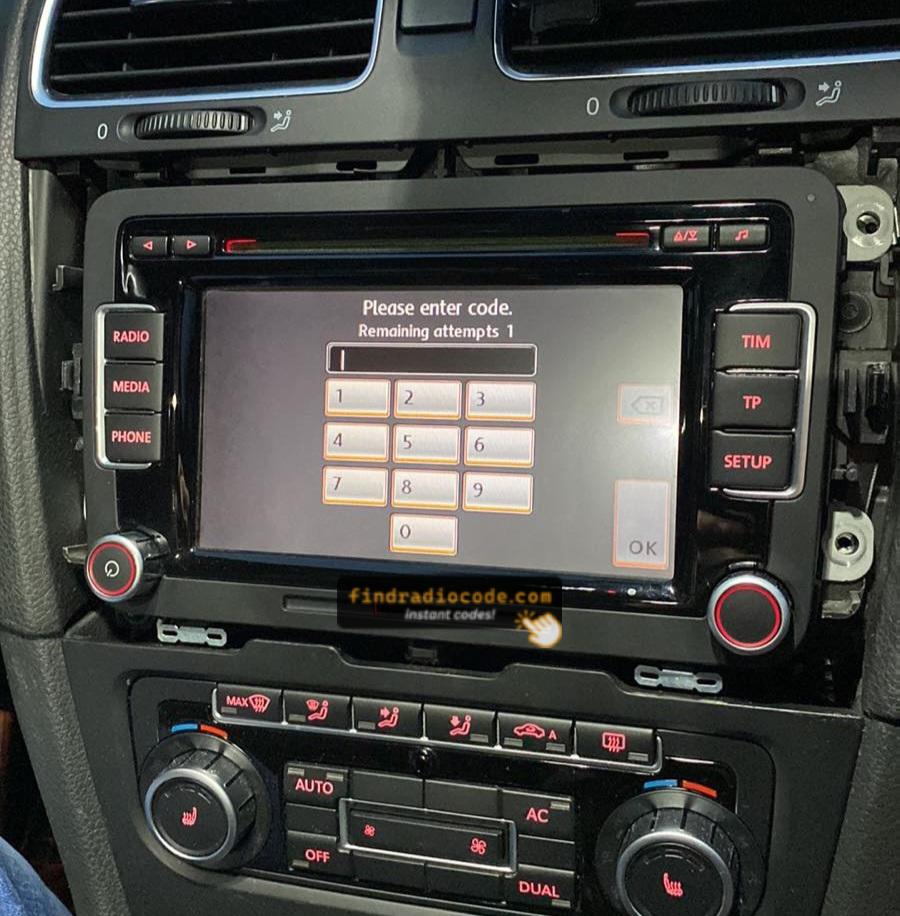
RCD510 SAFE Mode Screen
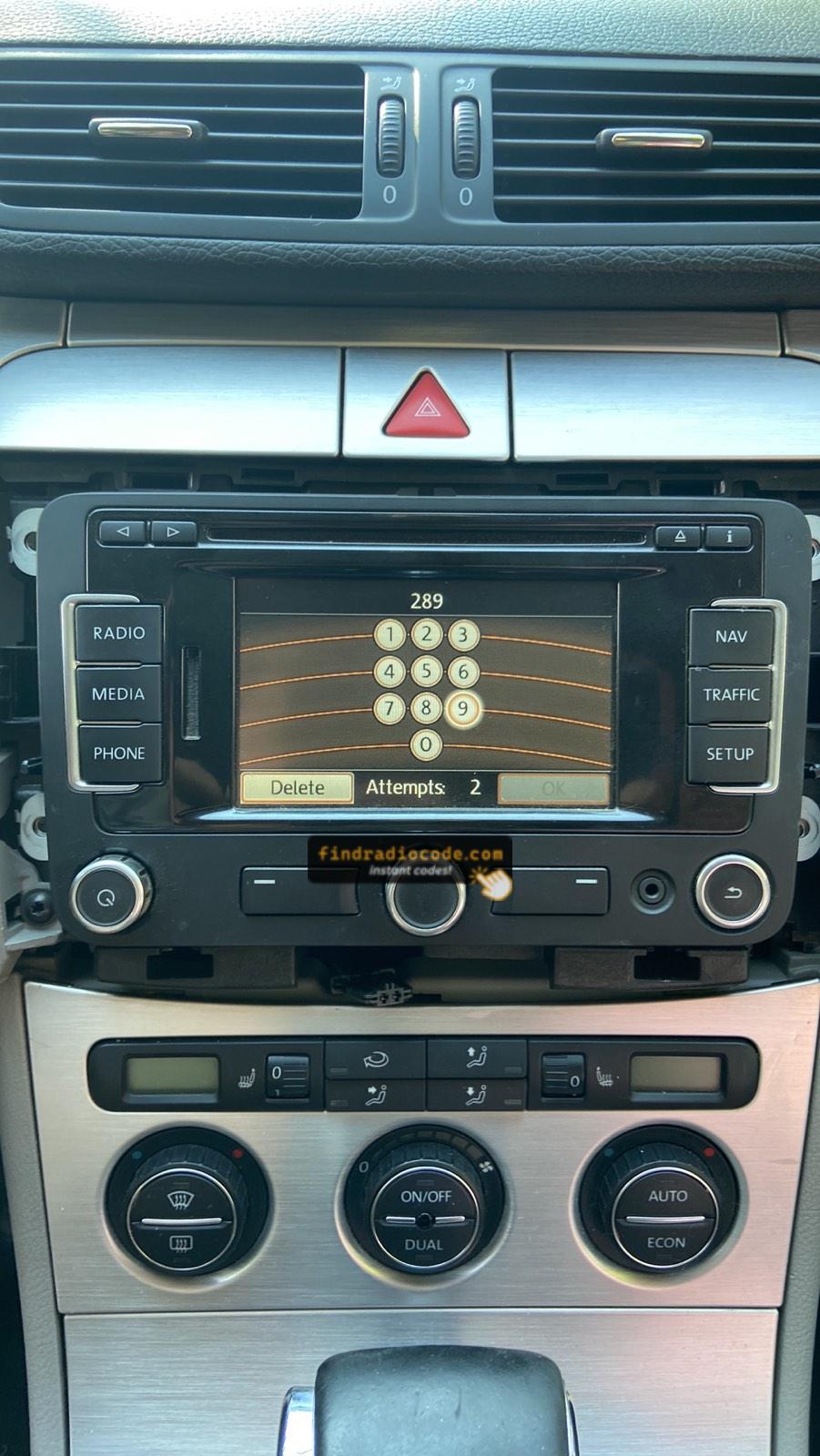
RNS-315 Code Screen
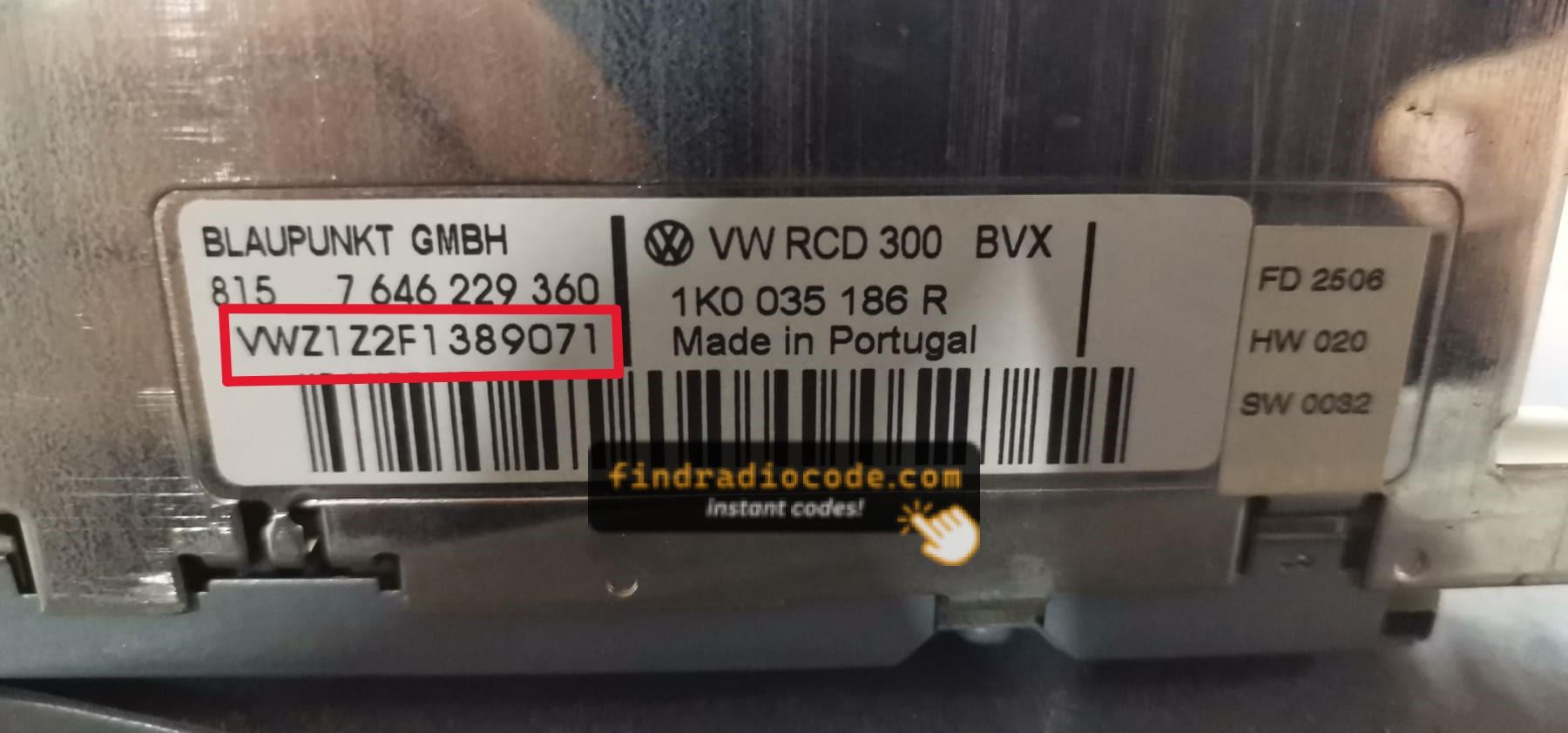
RCD300 Serial Label (VWZ)
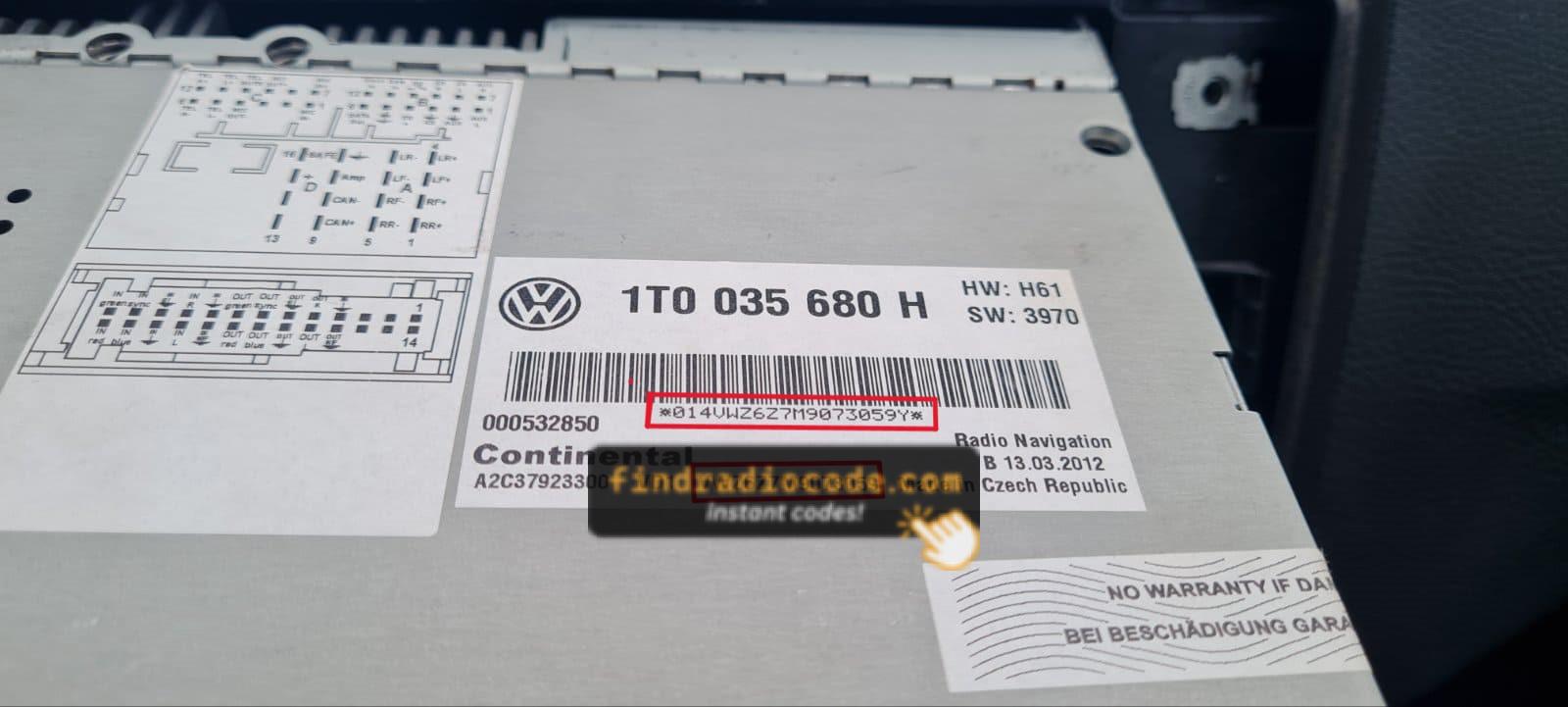
RNS510 Serial Label
Note: VW radios manufactured by Blaupunkt, Becker, Bosch, and Clarion share serial number formats with other VAG group brands (Audi, Skoda, SEAT). Serial numbers typically start with VWZ, AUZ, or have format like VWZ6Z7J1234567, AUZBZ7G1234567, or AUZ1Z1K1234567. Check your glovebox for a radio code card before removing the unit.
Finding the Serial Number on the Display
VW radios do not support on-screen serial number retrieval. The radio must be physically removed from the dashboard to read the serial label on the unit's chassis.
Use VW/VAG extraction keys (two round-hole keys inserted into the slots on each side of the faceplate) to release and slide the unit out.
The Difference Between the Serial Number and Part Number
The Serial Number (S/N):
- This is the unit-specific code assigned to your specific radio.
- It's the only input used by our lookup system.
- Usually found next to a barcode.
The Part Number:
- This refers to the radio series of the unit.
- It's used by manufacturers for replacement purposes, but irrelevant for unlocking your stereo.
- May look similar, but doesn't link to your specific code.
How to Enter VW Anti-Theft Code
Entering the code into your radio takes only a few steps.
Most radios display "CODE" when powered on.
Use the radio preset buttons to select the numbers.
Some models auto-confirm on final digit - like pressing ENTER or OK to confirm or holding preset key, Seek or Tune.
Too many wrong attempts may lock the radio.
After several failed attempts the radio may display WAIT mode.
Different radios use different timers, from a few minutes to several hours.
Refer to your radio manual or our support guides if needed.
How to Get VW Radio Code?
If you no longer have the original code, you can recover it using these methods:
Requesting the Code from an Authorized Dealer
Car manufacturers store security codes in their databases. To retrieve it through official channels, you often need to contact a dealer.
Before providing the code, the dealer will request the VIN, proof of ownership, and supporting vehicle documents. This verification process confirms that the radio belongs to your vehicle.
Because the request is done manually, response can be slow. Some dealerships can provide the code in a few hours, while others may take a few days.
Many dealers charge a service fee for retrieving the PIN, which can make this option quite costly.
Online Radio Code Generator - Fast and Secure
The fastest and easiest way to unlock your VW radio is through our online service.
The only requirements are the radio's serial number, which can be found on the sticker, the unit or the display.
There's zero paperwork involved. Once the payment is completed, your PIN code is displayed instantly and sent to your email.
The database includes thousands of supported VW radio units.
Find Radio Code handles the whole process automatically. If the code doesn't work, you're protected by a money-back guarantee.
How the Code Lookup Works
We've made it easy to retrieve your code in just a few steps.
How the Serial Lookup Works
Using our lookup tool is easy.
Provide the radio's serial, and the system connects it to the exact unlock code.
There's no VIN needed, and the entire lookup is processed instantly.
Our code engine includes thousands of supported serials, allowing reliable delivery.
How Fast Is Code Delivery?
- Immediate on-screen result
- Usually under 30 seconds
- Code also delivered to email
- If your radio is not in the instant database, a notice appears before purchase
- Manual processing may be required
- Maximum wait time is 24 hours
Proven and Secure Code Lookup
We've helped thousands of drivers unlock their factory radios with a trust score of 4.9/5.
VIN not needed, no vehicle documents needed - just the radio's serial.
Our code engine is designed for privacy and precision.
If the code doesn't work, you're protected.
Simply send a quick recording showing the unlock attempt and the radio serial, and you'll get a 100% refund - guaranteed.
Full terms are available on our Refund Policy page.
Help & FAQs
Many factory radios will ask for a radio unlock code after a power interruption.
This happens because the radio includes an factory security mechanism designed to protect the stereo.
When power is restored, the unit enters CODE mode before normal operation resumes.
The required code is a few digit code that allows the radio to function again.
- Someone entered incorrect codes too many times
- You purchased a used vehicle without the unlock code
- A technician disconnected the battery or ran a diagnostic
- You installed a new or used radio
- A blown fuse caused the radio to reset
- Radio was reset to factory settings
- Long periods of disuse can trigger code prompts
- Battery was disconnected or replaced
- You jump-started the vehicle
Yes, all Volkswagen vehicles with factory-installed radios require a radio code after battery disconnection or radio replacement. This applies to all models including Golf, Passat, Polo, Tiguan, Jetta, Touareg, Arteon, T-Roc, and Transporter/Caddy vans.
The anti-theft feature is standard on all VW radios including RCD 200, RCD 210, RCD 300, RCD 310, RCD 510, RNS 310, RNS 510, Gamma, Beta, and Composition systems manufactured by Blaupunkt, Becker, and other VAG suppliers. Your 4-digit code is permanently linked to your radio's unique serial number. VW shares radio systems with Audi, Skoda, and SEAT brands.
Start by looking inside the owner's manual. The code is often found on a label or written directly on a dedicated panel.
You can also search the glovebox or trunk, where dealers or previous owners may have stuck a sticker with the code. Some also check behind trim pieces or inside the fuse box.
If you have the original radio code card, that's the simplest place to find the code - it usually includes both the serial number and unlock key.
There are a few options - but they depend on your situation.
- Call an authorized service center - some offer free code retrieval if you're the original owner and can provide proof of ownership.
- For most users, our system is the easiest way to retrieve the correct code instantly.
- Try DIY forums or online databases, but you risk using incorrect or locked codes.
- Look inside the glovebox or vehicle documents - some vehicles came with the code printed at delivery.
Get Your VW Radio Code Now
100% money-back guarantee if the code doesn't work


