VW Beetle Radio Security Code Explained
When the radio is disconnected from power, it immediately locks and requires an unlock code to be entered before it can be used again.
A radio unlock code (also known as an anti-theft code) is a built-in security system integrated into factory car stereos to protect theft.
This system makes sure that a stolen radio becomes useless without the original code.
Entering the right code restores full audio and media functionality.
Common VW Beetle Radio Code Problems
Many owners encounter security code prompts on their Beetle after battery-related issues.
Below are the most frequent situations when this can occur.
Battery Replacement Radio Code Problem
After a battery replacement, your radio may show a CODE message.
This happens because the radio recognizes a voltage interruption, which activates the anti-theft system.
Other Situations That May Trigger the Code
- Jump-starting the vehicle can trigger anti-theft mode, requiring the PIN.
- After an ECU or software reset, the radio may lock.
- Installing a replacement head unit will trigger the original anti-theft code.
- A fuse removal can cause the VW Beetle radio to request a security code.
No-Cost Options First
Before you decide to pay, you should check a few places where the code is often stored.
Some owners find their VW Beetle radio code without needing any tools or paperwork.
Here are the most common things to check first.
Look Around the Glovebox
- Inside the glovebox, sometimes on a label.
- In the owner's manual, often on a code card.
- On the head unit itself, if it was serviced earlier.
- In your maintenance booklet from the previous owner.
- In the spare wheel area, on a radio label.
VW Dealer Assistance Option
Dealerships can generate your radio code by checking the VIN in their system.
They typically ask for registration and ID before sharing the security PIN.
This is the official way to restore access to the factory radio.
Disadvantages:
- Dealers frequently bill for the code (sometimes more than 100$).
- The lookup is often slower and may require waiting.
- Some imported or older radios may not be in their database.
- You may need to visit the dealer during business hours.
Finding the Serial Number on a Radio
To generate the right security code, you first need the radio serial number.
Depending on your vehicle model, you can see it on the screen or find it on the radio unit itself.
Common abbreviations are: Serial Num. / S/N / Serial Number etc.
These are the most common ways to locate it:
1. View the Serial Number on VW Beetle's Display
All factory VW audio units — the RCD 300, RCD 310, RCD 500, RNS 310, and RNS 510 — require physical removal to access the serial label. There is no key combination or menu option that will show the serial on screen.
2. The Serial Number on the Radio Sticker
The serial number is usually found on a sticker attached to the head unit.
Step 1: Turn off the the ignition.
Step 2: After that, take off the surrounding panel.
Step 3: Then unscrew the radio brackets.
Step 4: Carefully slide the unit out partially (Be careful not to damage the cables).
Step 5: Search for the serial on the side of the unit.
Step 6: Write down the full number carefully and come back here so that we can generate the code.
Important: Differentiate the Serial Number for the Part Number!
Removing the Radio with VAG Extraction Keys
To remove a VW radio you need a pair of VAG extraction keys — flat, U-shaped metal tools that are inserted into the two round holes on each side of the unit. Once fully inserted, the clips release and the radio slides out freely. Be careful not to use a flat-head screwdriver, as this can scratch the trim or damage the release mechanism.
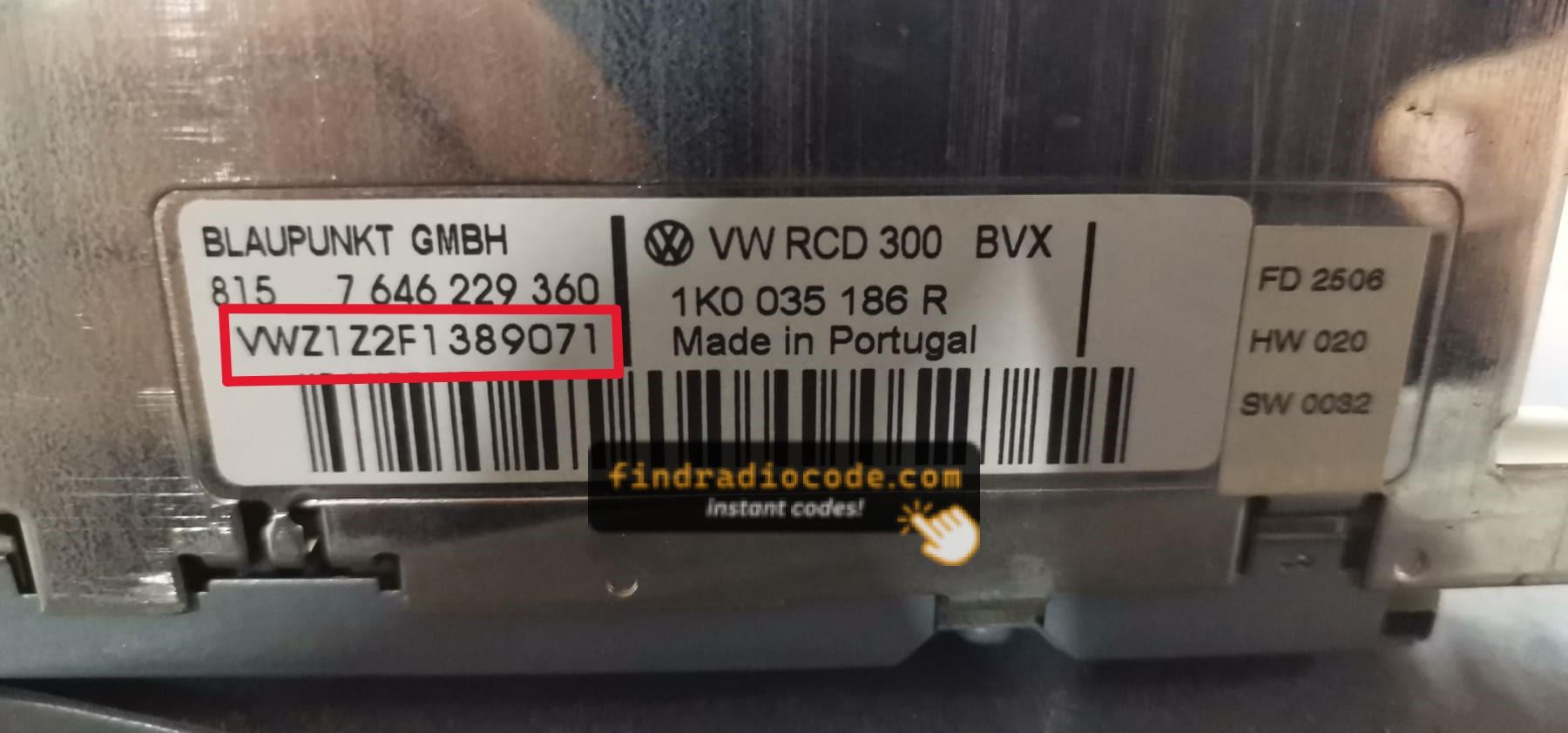
Example: VW Beetle serial number label location
Common Serial Letters and Numbers on VW Beetle Units
To unlock your radio, you need the VWZ-prefixed serial number, which is always exactly 13 characters long. You will find it printed on a label on the radio body itself, for example VWZ6Z7J1234567.
Now You Have the Code. How to Enter It?
You need to input the code into the system to unlock your VW's radio.
When the unit is locked, the screen usually shows a security message.
Based on the radio, use control knob, touchscreen, or radio presets to enter the numbers, then submit the code to reactivate the audio system.
Try not to make mistakes, because too many wrong attempts can disable your radio temporarily.
It allows a few incorrect tries before showing a WAIT message.
You can try again by leaving the radio on for an hour or a set waiting period.
Frequently Asked Questions about VW Beetle Unlock Code
Yes. Each factory radio has its own unique security code.
A different radio will need its own code to work.
Not all of them require a security code, but many factory radios use it as an security measure.
Some production series may still use a code depending on the head unit.
Free codes are rare.
You might already possess the code in the manual or from a previous owner, but most require a serial number lookup.