
Common VW Golf Radio Code Problems
Your radio may request a security code when it loses power.
These are the most common scenarios that trigger the radio code prompt.
After a Battery Replacement
After a battery change, your radio may show a CODE message.
This happens because the radio loses power, which activates the security lock.
More Scenarios That Can Lock Your Golf's Radio
- After an ECU or software reset, the radio may lock.
- Jump-starting the vehicle can trigger anti-theft mode, requiring the PIN.
- A blown fuse can cause the VW Golf radio to request a security code.
- Installing a replacement head unit will trigger the original anti-theft code.
What Does a Radio Code Do?
The security code is a manufacturer-assigned numeric code that keeps your stereo secure.
It is stored within the radio at the factory and activates automatically whenever the unit is disconnected.
If the correct code is not entered, the radio remains disabled and cannot be operated.
Entering the code tells the radio that it is still in the original vehicle, unlocking all audio functions immediately.
Quick Fixes Before Paying for a Radio Code
Want free VW Golf Radio Code? Actually, you may already have it.
In some cases, your code may already be available in the vehicle itself or in the documentation.
Checking these sources can save you time and money before using an online generator.
Below are the simplest places to look.
Check Inside the Glovebox
- On the radio unit itself, if it was serviced earlier.
- In the spare wheel area, on a radio label.
- In the vehicle handbook, often on a code card.
- In your service book from the previous owner.
- Inside the glovebox, sometimes on a small card.
Dealer Retrieval Option
A VW dealer can usually retrieve the radio code using your Golf's VIN.
In most cases, you need to contact the service department or visit the dealership and show vehicle documents.
Once verified, they can request the original unlock code for your radio.
Downsides:
- The process can take days depending on the model and database.
- You usually need to visit in person and bring ID.
- Dealers often ask for payment for the lookup service and it's sometimes more than 100$.
- Some older VW Golf radios may not be supported.
How to Find the Serial N. on a Golf's Radio
To get the correct radio code, you will need the radio serial number from your VW Golf's head unit.
You may be able to find it in one of two places. Common labels to look for: S/N, SN, Serial, Serial Number.
1. View the Serial Number on VW Golf's Display
Unlike some other vehicles, VW Golf radios — including the RCD 300, RCD 310, RCD 500, RNS 310, and RNS 510 — do not support on-screen serial display. The radio must be physically removed from the dashboard to read the label on its back or side.
2. Finding the S/N on the Radio Unit
To find the serial number, you'll need to remove the radio unit from the dashboard.
- Start by turning off the ignition and removing the trim panel.
- Next, unscrew the mounting bolts and slide the radio out to check the sticker on the back of the radio. Be careful not to damage the connections.
- Write down the serial number carefully and come back to our website.
- Know that serial number and part number are not the same. You can find both on the sticker, and you only need for the serial.
VAG Key Removal — Step by Step
VAG extraction keys are the proper tool for removing the radio. Insert one key into each of the round holes on the left and right sides of the unit, push until you feel the clips disengage, then pull the radio forward by the keys. Using anything else risks damaging the fascia.
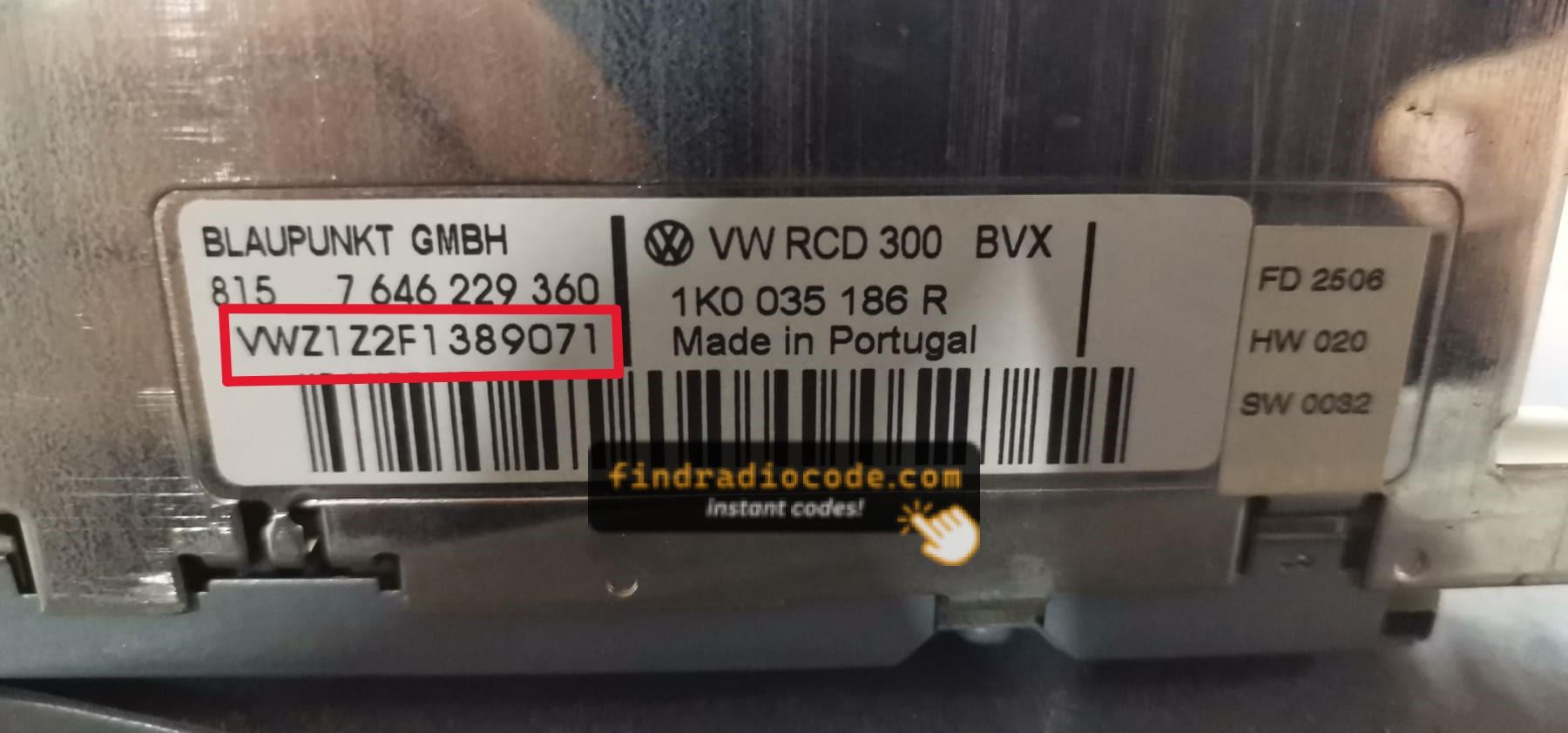
Example: VW Golf serial number label location
Common VW Golf S/N Formats
To unlock your radio, you need the VWZ-prefixed serial number, which is always exactly 13 characters long. You will find it printed on a label on the radio body itself, for example VWZ6Z7J1234567.
How to Enter the Radio Code on VW Golf
You need to input the radio security code into the system to unlock your VW's radio.
When the unit is locked, the screen usually shows a security message.
You should use control knob, touchscreen, or radio presets to enter the numbers, then confirm the code to reactivate the audio system.
If you make a mistake multiple times, you may cause the Golf's head unit to block further attempts.
When this happens, the screen usually displays messages like "CODE ERR", "ERROR", or a blank screen.
To unlock the system, you usually need to keep the ignition on for a waiting period that is shown or up to a full hour before trying again.