Common VW Passat Radio Code Problems
Facing a locked VW Passat radio? Usually, it was triggered by one of these well-known events.
Error After a Battery Replacement
A replaced battery is the most common reason a VW Passat radio asks for a code.
Even a momentary voltage drop is enough to activate the built-in anti-theft lock.
More Situations Causing This Problem
- After an ECU or software reset, the radio may lock.
- Jump-starting the vehicle can trigger anti-theft mode, requiring the unlock code.
- A blown fuse can cause the VW Passat radio to request a security code.
- Installing a used head unit will require the original radio code.
Quick Fixes Before Buying a Radio Code
Looking for a free VW Passat Radio Code? Actually, you may find it.
In some cases, the code may already be available in the vehicle itself or in the documentation.
Check these places to save time and money before using an online generator.
Below are the most reliable places to look.
Search the Car Interior
- In the radio manual, often on a sticker page.
- Inside the glovebox, sometimes on a small card.
- On the head unit itself, if it was removed before.
- In the boot compartment, on a radio label.
- In your service book from the previous owner.
Getting It from the VW Dealer
Dealerships can retrieve your radio code by checking the vehicle records in their system.
They typically ask for registration and ID before sharing the security PIN.
This is the official way to restore access to the factory radio.
Things to Consider:
- Some imported or older radios may not be in their database.
- You may need to contact service support during business hours.
- The lookup is often not instant and may require waiting.
- Dealers frequently charge a service fee (sometimes more than 100$).
Searching for the Serial Number on Your Radio
The only thing you'll need to find the corresponding code is your radio's radio serial. No VIN is needed.
On many VW models, you can find it in these common spots:
- Shown on the radio screen (occasionally by using a key combination)
- On the radio housing itself - you'll need to remove the unit slightly and write down serial (which is fairly easy)
Search for something like: Serial Number or SN.
1. Find the S/N on VW Passat's Screen
Unlike some other vehicles, VW Passat radios — including the RCD 300, RCD 310, RCD 500, RNS 310, and RNS 510 — do not support on-screen serial display. The radio must be physically removed from the dashboard to read the label on its back or side.
2. Find the Serial Number on the Radio Unit
The serial number is usually located on a sticker attached to the head unit.
Step 1: Turn off the vehicle.
Step 2: After that, take off the surrounding panel.
Step 3: Then unscrew the radio brackets.
Step 4: Carefully pull the radio forward partially (Be careful not to damage the cables).
Step 5: Search for the serial number on the rear of the unit.
Step 6: Write down the full number carefully and come back here so that we can generate your code.
Important: Don't mix the Serial Number and the Part Number!
Removing the Radio with VAG Extraction Keys
To remove a VW radio you need a pair of VAG extraction keys — flat, U-shaped metal tools that are pushed into the two round holes on each side of the unit. Once fully inserted, the clips release and the radio slides out freely. Be careful not to use a flat-head screwdriver, as this can scratch the trim or damage the release mechanism.
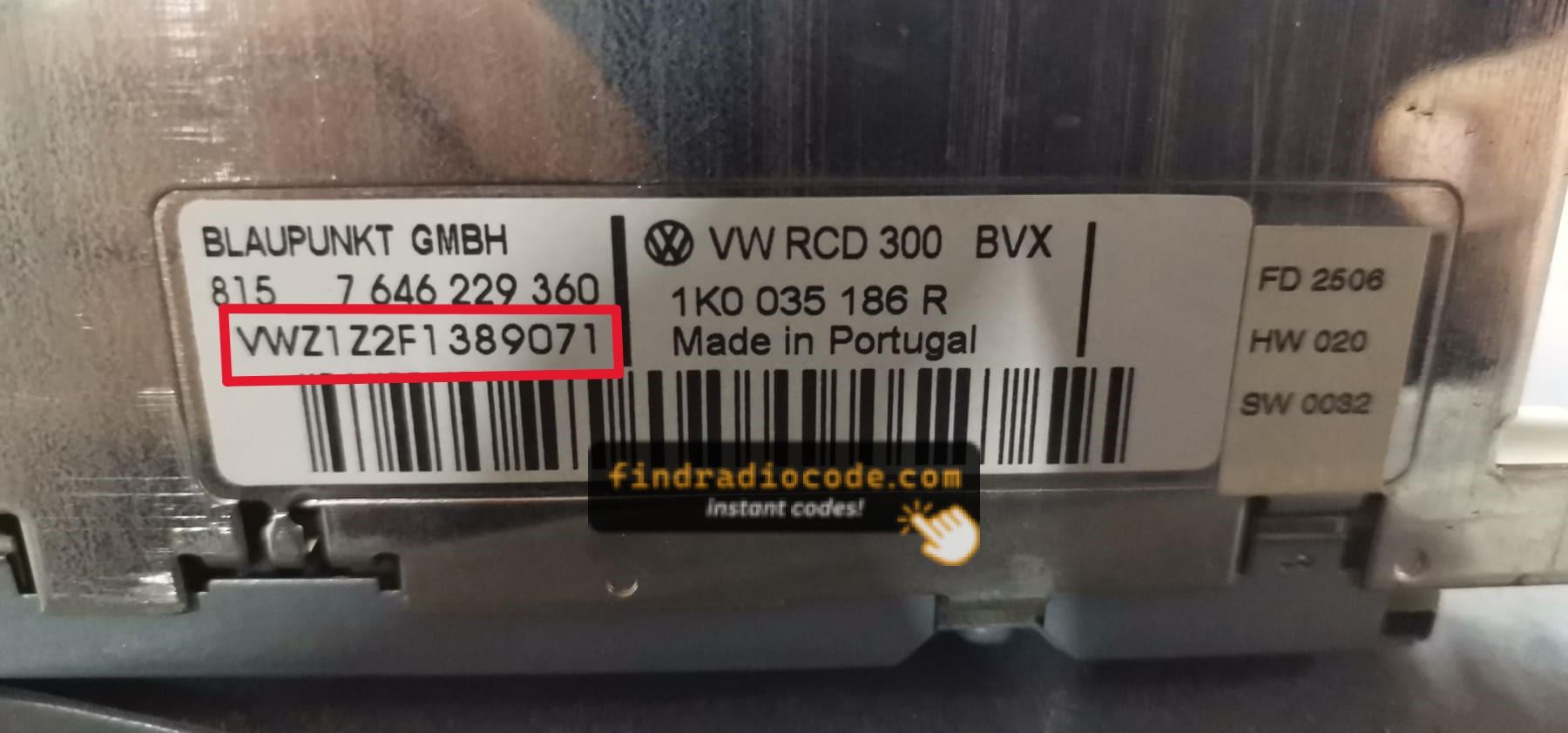
Example: VW Passat serial number label location
Serial Number Formats You'll See on VW Passat
The serial number on your VW Passat radio always starts with the prefix VWZ and is 13 characters long — for example, VWZ6Z7J1234567. This code is printed on a white or silver label affixed to the top or side of the radio unit itself.
How to Enter the Radio Code on VW Passat
You need to input the radio security code into the system to unlock your VW's radio.
When the unit is locked, the screen usually shows a security message.
You should use control knob, touchscreen, or radio presets to enter the numbers, then confirm the code to reactivate the audio system.
Try not to make mistakes, because too many wrong attempts can temporarily lock the radio.
It allows a few incorrect tries before showing a LOCKED message.
You can try again by leaving the radio on for 60 minutes or a set waiting period.
VW Passat Radio Code - FAQ
Yes. Each head unit has its own unlock code.
A second-hand radio will need its correct security code to work.
Free codes are uncommon.
You might find the code in the owner's booklet or from a previous owner, but most require a serial number lookup.
Not all of them require a security code, but many factory radios use it as an security measure.
Certain production series may not require a code depending on the radio unit.