
Where to Look for the Serial Number
To generate the correct unlock code, you will need the radio serial number from your VW Transporter's head unit.
You may be able to find it directly on the screen. Common labels to look for: S/N, SN, Serial, Serial Number.
1. Get the S/N from VW Transporter's Display
Unlike some other vehicles, VW Transporter radios — including the RCD 300, RCD 310, RCD 500, RNS 310, and RNS 510 — do not support on-screen serial display. The radio must be physically removed from the dashboard to read the label on its back or side.
2. The Serial Number on the Radio Housing
The serial number is usually located on a label attached to the radio casing.
Step 1: Turn off the vehicle.
Step 2: After that, remove the dashboard.
Step 3: Then unscrew the radio brackets.
Step 4: Carefully pull the radio forward partially (Be careful not to damage the cables that the unit is connected to).
Step 5: Look for the serial on the side of the unit.
Step 6: Write down the full number carefully and come back here so that we can generate the code.
Important: Be careful not to mix the Serial Number and the Part Number!
VAG Key Removal — Step by Step
To remove a VW radio you need a pair of VAG extraction keys — flat, U-shaped metal tools that are inserted into the two round holes on each side of the unit. Once fully inserted, the clips release and the radio slides out freely. Be careful not to use a flat-head screwdriver, as this can scratch the trim or damage the release mechanism.
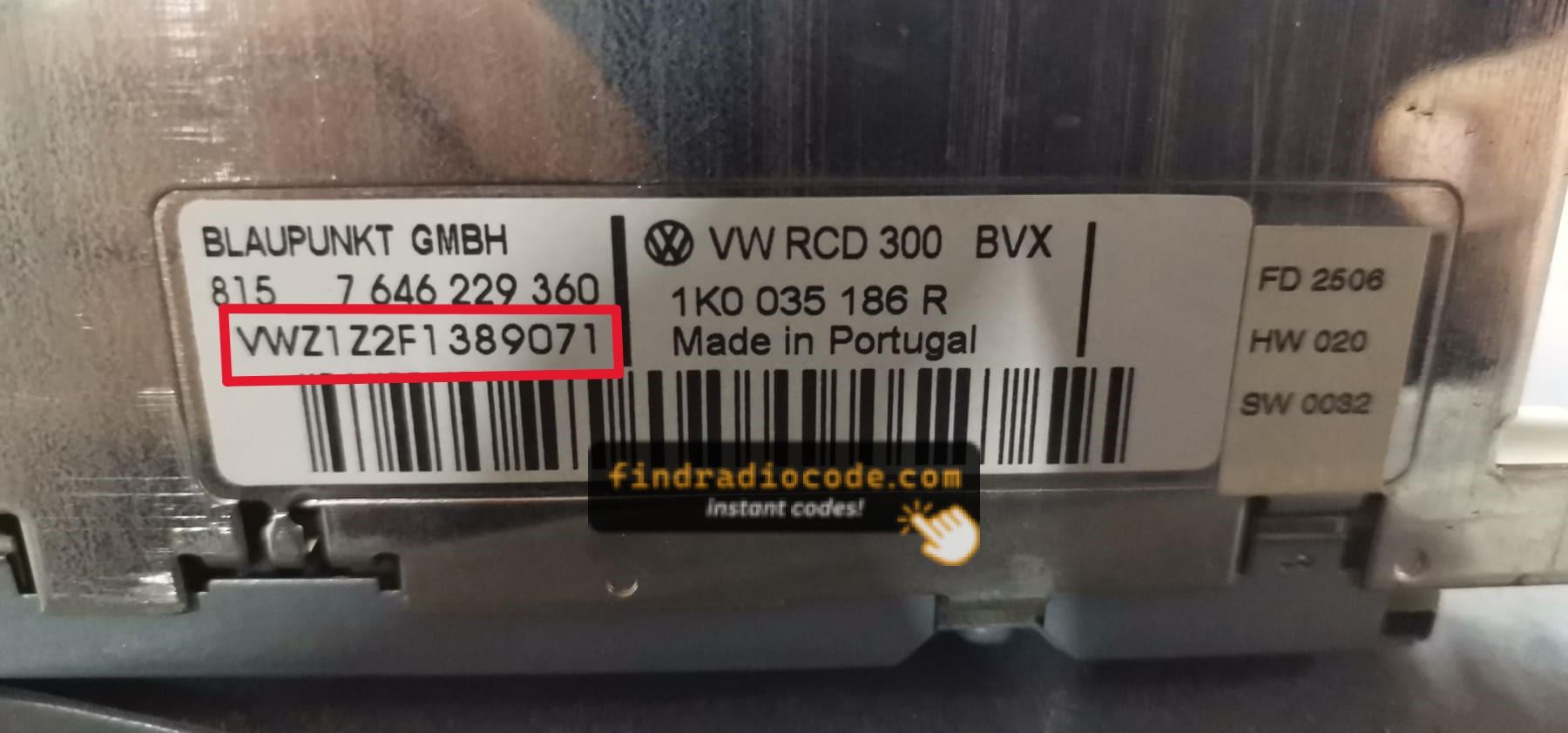
Example: VW Transporter serial number label location
Serial Number Formats You'll See on VW Transporter
The radio uses a serial number beginning with VWZ, spanning 13 characters in total. A typical example looks like VWZ6Z7J1234567. The label carrying this number is stuck directly onto the radio casing — not anywhere else in the vehicle.
When a Radio Unlock Code Is Needed?
Facing a locked VW Transporter radio? In most cases, it was caused by one of these well-known events.
After a Battery Change
When the battery is replaced, the VW Transporter radio locks automatically.
This security feature is designed to protect the original head unit by disabling the radio after power loss.
More Scenarios That Can Lock Your Transporter's Radio
- When the radio is replaced, it usually requires the original code.
- If a fuse is pulled, the radio can lock itself.
- After a software update, electrical repair, or an ECU reset, some VW Transporter radios display a CODE message.
- After a jump-start, the radio may reset and request a radio code.
Places to Check Before Buying a Radio Code
Before you pay for it, it's worth checking a few places where the code is often stored.
Some owners find their VW Transporter radio code without needing any tools or paperwork.
Here are the easiest things to check first.
Search the Car Interior
- Inside the center console, sometimes on a label.
- On the radio unit itself, if it was serviced earlier.
- In the owner's manual, often on a sticker page.
- In your car paperwork from the previous owner.
- In the trunk, on a radio label.
Can You Get a VW Transporter Radio Code from the Dealer?
Dealerships can generate your radio code by checking the VIN in their system.
They typically require proof of ownership before sharing the unlock code.
This is the official way to restore access to the factory radio.
Drawbacks:
- The lookup is often not instant and may require waiting.
- Dealers frequently charge a service fee (It may cost more than 100$).
- Some imported or older radios may need extra verification.
- You may need to visit the dealer during business hours.
How to Enter the Radio Code on VW Transporter
With your code ready, it's time to enter it into the VW Transporter's radio.
The locked radio will usually show a "CODE" prompt.
Use the radio presets or a rotary dial to select each number, then press OK to activate the head unit.
If you make a mistake multiple times, you may cause the Transporter's head unit to enter lockout mode.
When this happens, the screen can display messages like "CODE ERR", "ERROR", or a blank screen.
To unlock the unit, you usually need to keep the ignition on for a waiting period that is shown or up to an hour before trying again.
What Exactly is a Radio Anti-Theft Code?
The radio code is a built-in numeric code that protects your car audio from theft.
It is stored within the radio at the factory and triggers automatically whenever the unit loses power.
Without this code, the radio remains disabled and produces no sound.
Entering the code tells the radio that it is still in the original vehicle, restoring normal operation immediately.