
Acura MDX's Most Common Anti-Theft Code Scenarios
Your radio may enter anti-theft mode when it loses power.
These are the some typical scenarios that activate the radio code prompt.
Radio Asking for Code After Battery Replacement
A disconnected battery is the most common reason a Acura MDX radio asks for a code.
Even a brief voltage drop is enough to trigger the built-in anti-theft lock.
More Scenarios That Can Lock Your MDX's Radio
- After a jump-start, the radio may lose power and request a radio code.
- When the radio is removed, it usually locks automatically.
- After an ECU reset, software update, or electrical repair, some Acura MDX radios ask for a code.
- If a fuse blows, the radio can lock itself.
What is a Radio Code and Why is it Important?
The security code is a factory-set numeric code that protects your car audio from theft.
It is programmed into the radio at the factory and triggers automatically whenever the unit loses power.
If the correct code is not entered, the radio stays locked and produces no sound.
Entering the code tells the radio that it is still in the original vehicle, restoring normal operation immediately.
Quick Fixes Before Buying a Radio Code
Looking for a free Acura MDX Radio Code? Actually, you may find it.
In few cases, your code may already be available in the vehicle itself or in the documentation.
Check these places to save time and money before using an online generator.
Below are the most reliable places to look.
Look Around the Glovebox
- On a sticker in the center console.
- Near the spare tire, where some manufacturers place radio labels.
- On the head unit casing if the unit was previously removed.
- In the service booklet provided with the car.
- In the owner's handbook, often on a separate code card.
Through the Dealer
A Acura dealer can usually retrieve the security code using your MDX's vehicle identification number.
In most cases, you need to contact the service department or visit the dealership and show vehicle documents.
Once verified, they can generate the original anti-theft code for your radio.
Not Always Ideal:
- Some older Acura MDX radios may not be supported.
- The process can take days depending on the model and database.
- You usually need to book an appointment and bring vehicle paperwork.
- Dealers often charge a fee for the lookup service and it's sometimes more than 100$.
Searching for the Serial Number on a MDX
To get the correct unlock code, you will need the radio serial number from your Acura MDX's radio unit.
You can usually find it on the radio body. Common labels to look for: S/N, SN, Serial, Serial Number.
1. View the Serial Number on Acura MDX's Display
Accessing the Serial Number in Acura MDX
The Acura MDX is one of Acura's most popular models, produced from 2001 to present. Like all Honda/Acura vehicles, the MDX includes a built-in method to display the radio serial number without any tools or removal.
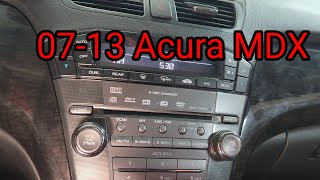
Display Method:
- Turn the ignition ON (engine off is fine).
- If the radio shows "CODE", turn the radio OFF.
- Press and hold preset buttons 1 and 6 simultaneously.
- While holding both buttons, turn the radio ON.
- The serial appears as
U####thenL####(combine both, e.g.12345678).
Generation-Specific Notes:
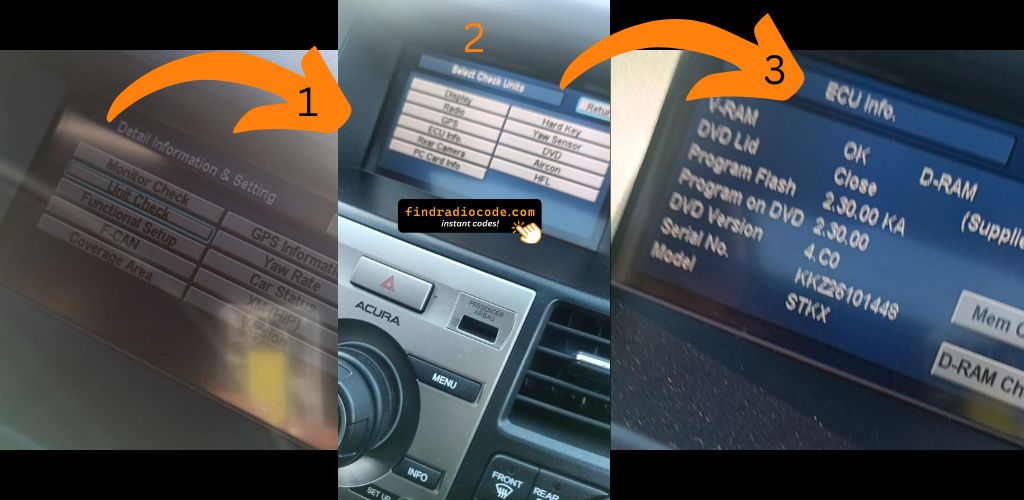
- 2007–2013 MDX (2nd Gen) – Standard radio uses the 1+6 button method. Navigation-equipped models can also use CANCEL + MAP + MENU to access the diagnostic menu → Detail Information → ECU Information.
- 2014–2020 MDX (3rd Gen) – Both the base and Technology/Advance packages support the 1+6 method. The dual-screen setup on Technology+ trims stores the serial in the upper display.
- 2021–2025 MDX (4th Gen) – The new 12.3-inch ELS STUDIO infotainment may display the serial in Settings → System → About. Try this first before using button combinations.
Tip: If you have a 2nd or 3rd gen MDX with navigation, using the diagnostic menu (CANCEL + MAP + MENU) is often the quickest method to find the serial.
2. How to Find the S/N on the Radio Unit
To find the serial number, you'll need to pull out the head unit from the dashboard.
- Start by turning off the ignition and removing the trim panel.
- Next, release the clips and pull the unit forward to check the label on the back of the radio. Be careful not to damage the connections.
- Write down the serial number carefully and then come back to the website.
- Know that serial number and part number are not the same thing. You will find both on the unit, but you only care for the serial.
Acura Radio Removal if On-Screen Fails
If the on-screen method fails, the Acura MDX radio can be removed by removing the dash trim. The serial is on a label on the top or side of the radio unit. Take care with the trim clips.
Example: Acura MDX serial number label location
Typical Acura MDX Serial Number Formats
To unlock your radio, find the serial in U####L#### format. Navigation units show GNA or HBM prefixes. This serial is necessary for generating the correct unlock code.
Why Use Our Acura MDX Radio Code Generator Service?
Our Acura MDX radio code lookup is designed to save time.
Unlike traditional dealer lookup, this method requires no paperwork and can be done from home in minutes.
It's a more convenient and cheaper alternative for drivers who need their radio unlocked quickly.
Side-by-Side Comparison
- Some dealers require a visit to the service center, while FindRadioCode is fully remote.
- Dealer lookup can take time, while our system delivers codes right away 95% of times.
- Dealer lookups often come with no guarantee, while FindRadioCode offers a 100% refund.
- Dealer services often charge high fees, while FindRadioCode offers codes from 9.99 USD.
- Dealerships operate during weekdays, while FindRadioCode is available anytime.
Entering the Radio Code on Acura MDX
You need to enter the anti-theft code into the system to unlock your Acura's radio.
In the locked unit, the screen usually shows a security message.
Based on the radio, use control knob, touchscreen, or radio presets to set each digit, then confirm the code to reactivate the audio system.
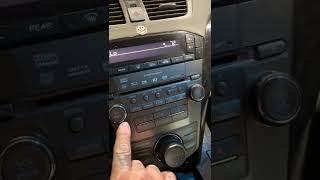
To enter your Acura MDX unlock code:
- Turn the ignition ON – The radio displays "CODE".
- Use preset buttons 1 through 5 to enter each digit of your 5-digit code:
- Button 1 = first digit (press repeatedly to cycle 1–9)
- Button 2 = second digit
- Button 3 = third digit
- Button 4 = fourth digit
- Button 5 = fifth digit
- Confirm by pressing and holding button 6 for 2–5 seconds.
For 2021+ MDX: The 12.3-inch ELS STUDIO touchscreen may display an on-screen keypad. Tap each digit and confirm.
Lockout Warning: After 3 incorrect attempts, the radio locks for 1 hour. The ignition must remain ON during the lockout period – turning it off resets the timer.
MDX's Radio Code FAQs
Yes. Each car stereo has its own unique code.
If you install a different radio, you'll need the code for that individual radio.
Free are uncommon.
Some service documents may help, but most codes require a database lookup.
The only no-cost option would be to check your vehicle and its documentation to see if you have it written down.
Many factory radios use a security code, but not every model year require one.
Whether a code is needed varies by the radio unit and the vehicle generation.
For most Honda radios: turn the ignition ON, turn the radio OFF, then hold preset buttons 1 and 6 while turning the radio back ON. The serial number will appear on the display as a complete number or in two parts (U#### and L####).
For navigation-equipped models (2008–2019), press and hold CANCEL + MAP + MENU simultaneously to access the diagnostic menu, then navigate to Detail Information → Unit Check → ECU Information. See our full Honda serial number guide for all methods.
Honda and Acura radio codes are 5 digits long, using only digits 1 through 6 (no zeros, sevens, eights, or nines). This is unlike most other manufacturers that use 4-digit codes.
You enter the code using the preset buttons 1–5 on the radio. Each button press corresponds to one digit of the code.