
What is a RDX Radio Code?
When the radio is cut off from power, it automatically locks and requires an unlock code to be entered before it can be used again.
A factory radio code (also known as an anti-theft code) is a security feature integrated into factory car stereos to prevent theft.
This system ensures that a removed radio becomes inoperable without the original code.
Entering the right code restores full audio and infotainment functionality.
When the Acura Stereo May Lock
Many owners encounter radio code issues on their RDX after battery-related issues.
Below are the most typical situations when this can happen.
Radio Lock After Battery Replacement
A dead battery is the most common reason a Acura RDX radio asks for a code.
Even a brief power loss is enough to trigger the built-in security system.
Additional Scenarios
- After an ECU reset, software update, or electrical repair, some Acura RDX radios display a CODE message.
- When the head unit is removed, it usually locks automatically.
- After a boost start, the radio may reset and request a security code.
- If a power circuit is interrupted, the radio can lock itself.
Quick Fixes Before Paying for a Radio Code
Looking for a free Acura RDX Radio Code? Actually, you may find it.
In some cases, your code may already be available in the vehicle itself or in the documentation.
Checking these sources can save you time and money before using an online generator.
Below are the most reliable places to look.
Check the Glovebox Documents
- In the vehicle handbook, often on a sticker page.
- In your car paperwork from the previous owner.
- Inside the glovebox, sometimes on a small card.
- On the radio unit itself, if it was removed before.
- In the spare wheel area, on a service sticker.
Requesting It from the Dealer
Dealerships can retrieve your radio code by checking the vehicle records in their system.
They typically ask for registration and ID before sharing the security PIN.
This is the official way to restore access to the factory radio.
Drawbacks:
- The lookup is often not instant and may require waiting.
- Some imported or older radios may need extra verification.
- You may need to contact service support during business hours.
- Dealers frequently charge a service fee (It may cost more than 100$).
How to Find the Serial Number on a RDX's Radio
To get the correct radio code, you first need the serial number from the radio.
Depending on your vehicle model, you can see it on the screen or find it on the radio unit itself.
It's often written as: S/N / SN / Serial / Serial Num. / Serial Number.
These are the most common ways to get it:
1. How to See the Serial Number on the RDX Screen
Accessing the Serial Number in Acura RDX
The Acura RDX (2007–present) uses the same Honda-based radio system found across the Acura lineup. You can quickly display the serial number on screen using a simple button combination – no radio removal needed.
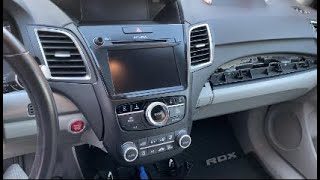
Display Method:
- Turn the ignition ON.
- If the radio shows "CODE", turn the radio OFF.
- Press and hold preset buttons 1 and 6 simultaneously.
- While holding both buttons, turn the radio ON.
- The serial number appears as
U#### L####or a complete 8-digit number.
Generation-Specific Notes:
- 2007–2012 RDX (1st Gen) – The standard radio responds to the 1+6 button method. Navigation models can also use CANCEL + MAP + MENU to access the diagnostic screen.
- 2013–2018 RDX (2nd Gen) – All trim levels support the 1+6 method. Technology Package models with navigation can also try the diagnostic menu approach.
- 2019–2025 RDX (3rd Gen) – Features the True Touchpad Interface. Check Settings → System → About first. If that doesn't show the serial, fall back to the 1+6 button method.
Physical Removal: If the on-screen method doesn't work, the serial label is located on the top or side of the radio unit. The RDX radio removal requires removing the center console trim panel (held by clips).
2. Locating the Serial Number on the Radio Unit
The serial number is usually found on a sticker attached to the head unit.
Step 1: Turn off the vehicle.
Step 2: After that, remove the dashboard.
Step 3: Then release the mounting clips.
Step 4: Carefully pull the radio forward partially (Be careful not to damage the cables).
Step 5: Look for the serial number on the rear of the unit.
Step 6: Write down the full Serial Number carefully and come back here so that we can generate the code.
Important: Be careful not to mix the Serial Number and the Part Number!
Acura Radio Removal if On-Screen Fails
If the on-screen method doesn't work, the Acura RDX radio can be removed by unclipping the surrounding trim panel. The serial is on a label on the top or side of the radio unit. Take care with the trim clips.
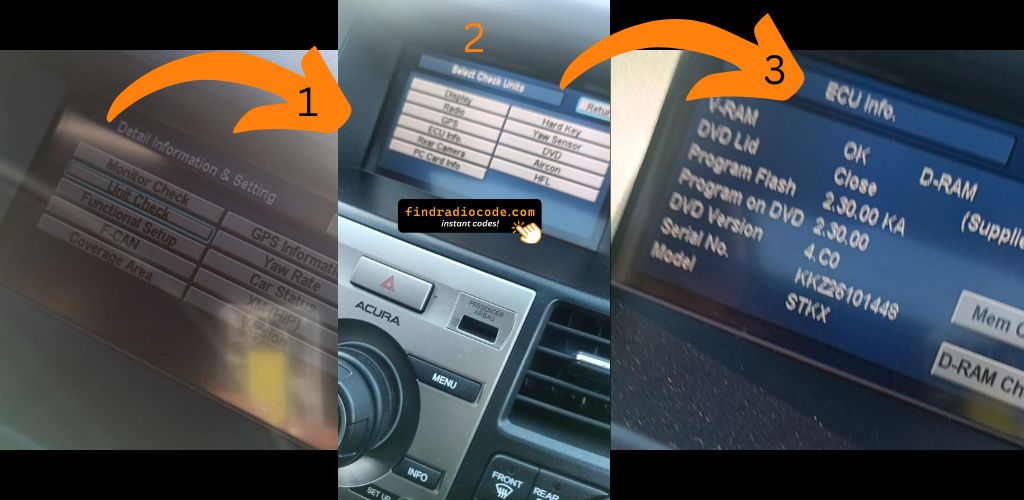
Example: Acura RDX serial number label location
Usual Serial Letters and Numbers on Acura RDX Units
The radio uses a serial number in U####L#### format (e.g. U3456 L7890). Acura shares this format with Honda. Navigation systems display a GNA or HBM prefix.
Entering the Unlock Code on Acura RDX
You need to type in the anti-theft code into the system to unlock your Acura's radio.
When the unit is locked, the screen usually displays a security message.
Based on the radio, use control knob, touchscreen, or radio presets to enter the numbers, then confirm the code to reactivate the audio system.
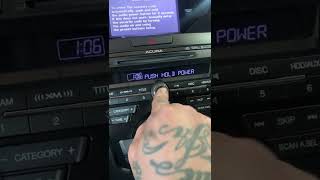
To input your Acura RDX unlock code:
- Turn the ignition ON – The radio shows "CODE".
- Use preset buttons 1 through 5 to enter each digit of your 5-digit code:
- Button 1 = first digit
- Button 2 = second digit
- Button 3 = third digit
- Button 4 = fourth digit
- Button 5 = fifth digit
- Confirm by pressing and holding button 6 for 2–5 seconds.
For 2019+ RDX with True Touchpad Interface: The infotainment may show a numeric keypad on screen. Tap each digit and press "Enter" to confirm.
Lockout Warning: After 3 incorrect attempts, the radio locks for 1 hour. Keep the ignition ON during the wait – turning it off resets the timer.
Frequent Questions about Acura RDX Code
Yes. Each factory radio has its own radio code.
A different radio will need its correct security code to work.
Not all of them require a radio code, but many factory radios use it as an security measure.
Some series may still use a code depending on the radio unit.
Free codes are not usually available.
You might already possess the code in the paperwork or from a dealer, but most require a serial number lookup.
For most Honda radios: turn the ignition ON, turn the radio OFF, then hold preset buttons 1 and 6 while turning the radio back ON. The serial number is displayed on the display as a complete number or in two parts (U#### and L####).
For navigation-equipped models (2008–2019), press and hold CANCEL + MAP + MENU simultaneously to access the diagnostic menu, then navigate to Detail Information → Unit Check → ECU Information. See our full Honda serial number guide for all methods.
Honda and Acura radio codes are 5 digits long, using only digits 1 through 6 (no zeros, sevens, eights, or nines). This is different from most other manufacturers that use 4-digit codes.
You enter the code using the preset buttons 1–5 on the radio. Each button press corresponds to one digit of the code.