
Radio Code - Quick Explanation
The security code is a manufacturer-assigned numeric code that keeps your stereo secure.
It is stored within the radio at the factory and activates automatically whenever the unit is disconnected.
Without this code, the radio stays locked and produces no sound.
Entering the code tells the radio that it is still in the original vehicle, restoring normal operation immediately.
Common Acura RL Radio Code Problems
Your radio may request a security code when it loses power.
These are the some well-known scenarios that trigger the radio code prompt.
Battery Change Lock (Most Common)
After a battery replacement, your radio may stop working.
This happens because the radio loses power, which activates the anti-theft system.
More Situations Causing This Issue
- A power surge can reset the radio and prompt for a code.
- Software updates may trigger the anti-theft mode on some Acura RL units.
- Replacing the head unit with a different one requires the code for that specific unit.
- Even a quick battery boost can activate the anti-theft lock.
What You Might Try First
Before you pay for it, it's worth checking a few places where the code is often already written down.
Some owners find their Acura RL radio code without needing any tools or paperwork.
Here are the easiest things to check first.
Look Inside the Car Papers
- On the head unit itself, if it was serviced earlier.
- In your maintenance booklet from the previous owner.
- Inside the center console, sometimes on a small card.
- In the trunk, on a radio label.
- In the owner's manual, often on a code card.
Acura Dealer Assistance Option
A Acura dealer can usually look up the radio code using your RL's vehicle identification number.
In most cases, you need to contact the service department or visit the dealership and show vehicle documents.
Once verified, they can generate the original unlock code for your radio.
Downsides:
- You usually need to book an appointment and bring ID.
- Some older Acura RL radios may require manual lookup.
- Dealers often ask for payment for the lookup service and it can cost more than 100$.
- The process can take days depending on the model and database.
Where to Search for the Serial Number on a RL
To retrieve the correct radio code, you first need the radio's serial.
Depending on your radio model, you can find it shown on the display or check the radio hardware.
You may see labels such as: S/N / SN / Serial / Serial Num. / Serial Number.
These are the easiest ways to find it:
1. Finding RL's S/N on the Screen
Accessing the Serial Number in Acura RL
The Acura RL (1998–2012) is Acura's flagship luxury sedan. It uses Honda's proven radio system with full serial display capability via button combinations. The method differs depending on your generation and navigation equipment.
Standard Radio Method:
- Turn the ignition ON.
- If the radio shows "CODE", turn the radio OFF.
- Press and hold preset buttons 1 and 6 simultaneously.
- While holding, turn the radio ON.
- Serial appears as
U#### L####.
Generation-Specific Notes:
- 1998–2004 RL (2nd Gen) – Standard AM/FM/CD radio uses the 1+6 button method. Models with the Acura/Bose system use the same approach.
- 2005–2012 RL (3rd Gen) – All models came standard with navigation. Use the diagnostic menu: press and hold CANCEL + MAP + MENU simultaneously, then navigate to Detail Information → Unit Check → ECU Information.
Physical Removal: If needed, the RL radio removal requires removing the wood-grain or metallic center console trim (held by clips) and unscrewing the mounting bolts.
2. Locating the S/N on the Radio Itself
To find the serial number, you'll need to take out the radio unit out.
- Start by turning off the ignition and taking off the dashboard bezel.
- Next, release the clips and slide the radio out to check the label on the side of the radio. Be careful not to damage the cables.
- Write down the serial number precisely and then come back to our website.
- Know that serial number and part number are not the same. You will find both on the unit, but you only need for the serial.
Physical Removal of Your Acura RL Radio
When on-screen retrieval isn't available, physically remove the radio by popping off the trim surround. The serial label is on the radio housing itself.
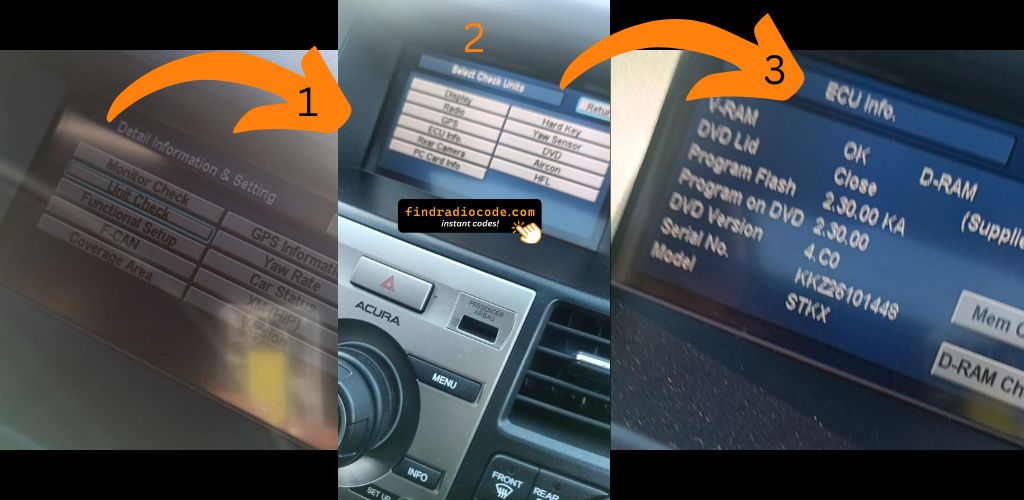
Example: Acura RL serial number label location
Common Serial Formats on Acura RL Units
The radio uses a serial number in U####L#### format (e.g. U3456 L7890). Acura shares this format with Honda. Navigation systems display a GNA or HBM prefix.
You've Got the Security Code. How the Entering Process Works?
Once you have the Acura's radio code, you can type it in using the radio buttons.
Most radios display "ENTER CODE", "----" or "XXXX" message when they are locked.
You typically use the number keys to select each digit.
After entering the full code, the radio will unlock automatically.
To input your Acura RL unlock code:
- Turn the ignition ON – The radio displays "CODE".
- Use preset buttons 1 through 5 to enter your 5-digit code. Press each button to cycle through digits.
- Confirm by pressing and holding button 6 for 2–5 seconds.
Navigation Code: 2005–2012 RL models with navigation may require a separate 4-digit navigation code in addition to the 5-digit radio code.
Lockout Warning: After multiple incorrect attempts, the radio shows "ERR". Disconnect the battery for 10–15 minutes to reset the attempt counter, then re-enter the correct code.