
How to Find the S/N on a TL's Radio
To retrieve the correct radio code, you first need the serial number from the radio.
Depending on your model, you can find it shown on the display or find it on the radio unit itself.
Common abbreviations are: Serial Num. / S/N / Serial Number etc.
These are the typical ways to find it:
1. Finding TL's S/N on the Display
Accessing the Serial Number in Acura TL
The Acura TL (2004–2014) is a popular luxury sedan with Honda's proven radio system. Displaying the serial number is simple using button combinations, though the method varies depending on whether you have a navigation-equipped model.
Standard Radio (Non-Navigation):
- Turn the ignition ON, radio shows "CODE".
- Turn the radio OFF.
- Press and hold preset buttons 1 and 6 simultaneously.
- While holding both buttons, turn the radio ON.
- Serial appears as
U####thenL####.
Navigation-Equipped Models:
- 2004–2008 TL (3rd Gen) – Press and hold the upper halves of both the SEEK/SKIP and CH/DISC bars, then press the PWR/VOL knob. The serial appears in two parts.
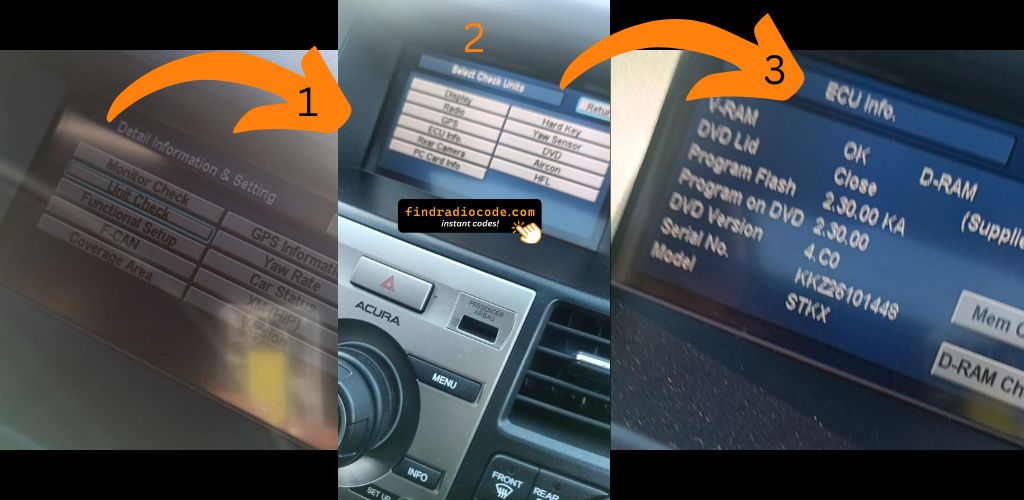
- 2009–2014 TL (4th Gen) – Press and hold CANCEL + MAP + MENU simultaneously to access the diagnostic menu. Navigate to Detail Information → Unit Check → ECU Information to find the serial.
Physical Removal: If neither method works, the TL radio can be removed by carefully prying off the center console trim and unscrewing the mounting bolts. The serial label is on the top or side of the unit.
2. Locating your Serial on the Radio Unit
To find the serial number, you'll need to pull out the radio unit from the dashboard.
- Start by turning off the ignition and removing the trim panel.
- Next, unscrew the mounting bolts and slide the radio out to check the sticker on the back of the radio. Be careful not to damage the cables that the unit is connected to.
- Write down the serial number carefully and come back to the website.
- Know that serial number and part number are not equal. You can find both on the unit, but you only care for the serial.
Acura Radio Removal if On-Screen Fails
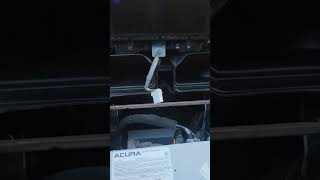
When on-screen retrieval isn't available, physically remove the radio by popping off the trim surround. The serial label is on the radio housing itself.
Example: Acura TL serial number label location
Common Serial Prefixes on Acura TL Radios
To unlock your radio, find the serial in U####L#### format. Navigation units show GNA or HBM prefixes. This serial is necessary for generating the correct unlock code.
Acura TL's Usual Radio Code Causes
Dealing with a locked Acura TL radio? Usually, it was caused by one of these common events.
Radio Asking for Code After Battery Replacement
When the battery is replaced, the Acura TL radio locks automatically.
This factory protection system is designed to protect the original head unit by disabling the radio after electrical reset.
More Events That Can Lock Your TL's Radio
- Jump-starting the vehicle can trigger anti-theft mode, requiring the PIN.
- After an ECU or software reset, the radio may enter security mode.
- Installing a replacement head unit will require the original radio code.
- A fuse removal can cause the Acura TL radio to request a security code.
No-Cost Options First
Before you decide to pay, you should check a few places where the code is often stored.
Some drivers find their Acura TL radio code without needing any tools or paperwork.
Here are the most common things to check first.
Check the Vehicle Paperwork
- On the head unit itself, if it was removed before.
- Inside the center console, sometimes on a small card.
- In your car paperwork from the previous owner.
- In the owner's manual, often on a code card.
- In the spare wheel area, on a service sticker.
Can the Dealer Get It for You?
A Acura dealer can usually look up the security code using your TL's vehicle identification number.
In most cases, you need to visit or contact them and prove ownership.
Once verified, they can generate the original anti-theft code for your radio.
Not Always Ideal:
- The process can take days depending on the model and database.
- Dealers often ask for payment for the lookup service and it's sometimes more than 100$.
- Some older Acura TL radios may require manual lookup.
- You usually need to visit in person and bring ID.
How to Enter the Radio Code on Acura TL
Once you have the Acura's security code, you can type it in using the radio buttons.
Most radios display a "CODE", "ENTER CODE", or "----" message when they are locked.
You typically use the rotary knob to select each digit.
After entering the full code, the radio will confirm the entry.

To input your Acura TL unlock code:
- Turn the ignition ON – The radio displays "CODE".
- Use preset buttons 1 through 5 to enter your 5-digit code. Press each button repeatedly until the correct digit appears.
- Confirm by pressing and holding button 6 for 2–5 seconds.
Navigation Code: If your TL has factory navigation, the navigation system may require a separate 4-digit navigation code in addition to the 5-digit radio code. Both codes are derived from the serial number.
Lockout Warning: After multiple incorrect attempts, the radio displays "ERR" or "ERROR". Disconnect the battery for 10–15 minutes to reset, then try again with the correct code.
What is the Acura TL Radio Security Code?
The anti-theft PIN is a built-in numeric code that protects your car audio from theft.
It is programmed into the radio at the factory and triggers automatically whenever the unit is disconnected.
If the correct code is not entered, the radio stays locked and cannot be operated.
Entering the code tells the radio that it is still in the original vehicle, restoring normal operation immediately.
Acura TL Radio Code - FAQ
Yes. Each stereo has its own radio code.
A replacement radio will need its original code to work.
Free codes are rare.
You might locate the code in the owner's booklet or from a dealer, but most require a paid retrieval.
Not all of them require a security code, but many factory radios use it as an security measure.
Certain production series may not require a code depending on the radio unit.
For most Honda radios: turn the ignition ON, turn the radio OFF, then hold preset buttons 1 and 6 while turning the radio back ON. The serial number will appear on the screen as a complete number or in two parts (U#### and L####).
For navigation-equipped models (2008–2019), press and hold CANCEL + MAP + MENU simultaneously to access the diagnostic menu, then navigate to Detail Information → Unit Check → ECU Information. See our full Honda serial number guide for all methods.
Honda and Acura radio codes are 5 digits long, using only digits 1 through 6 (no zeros, sevens, eights, or nines). This is different from most other manufacturers that use 4-digit codes.
You enter the code using the preset buttons 1–5 on the radio. Each button press corresponds to one digit of the code.