
When a Radio Unlock Code Is Needed?
Facing a locked Audi A4 radio? In most cases, it was caused by one of these well-known events.
Error After a Battery Work
A disconnected battery is the most common reason a Audi A4 radio asks for a code.
Even a momentary voltage drop is enough to activate the built-in anti-theft lock.
Other Possible Causes
- After an ECU reset, software update, or electrical repair, some Audi A4 radios display a CODE message.
- If a fuse is pulled, the radio can enter anti-theft mode.
- After a boost start, the radio may lose power and request a radio code.
- When the head unit is replaced, it usually requires the original code.
What is a Radio Code and Why is it Important?
The radio code is a manufacturer-assigned numeric code that keeps your stereo secure.
It is stored within the radio at the factory and activates automatically whenever the unit is disconnected.
If the correct code is not entered, the radio stays locked and produces no sound.
Entering the code tells the radio that the owner is present, unlocking all audio functions immediately.
Quick Fixes Before Buying a Radio Code
There is a chance your Audi A4 radio code is already somewhere in your car.
Before using a paid service, quickly check the places below - it costs nothing to look.
Check the Owner's Manual and Paperwork
- In your maintenance booklet from the previous owner.
- Inside the glovebox, sometimes on a label.
- On the radio unit itself, if it was removed before.
- In the boot compartment, on a service sticker.
- In the radio manual, often on a sticker page.
Dealer Retrieval Process
A Audi dealer can usually retrieve the radio code using your A4's VIN.
In most cases, you need to visit or contact them and show vehicle documents.
When it is verified, they can request the original anti-theft code for your radio.
Possible Drawbacks:
- You usually need to book an appointment and bring vehicle paperwork.
- The process can take days depending on the model and database.
- Some older Audi A4 radios may require manual lookup.
- Dealers often ask for payment for the lookup service and it can cost more than 100$.
Locating the S/N on Your Radio
To retrieve the correct unlock code, you will need the radio serial number from your Audi A4's head unit.
You may be able to find it in one of two places. Common labels to look for: S/N, SN, Serial, Serial Number.
1. How to See the Serial Number on the A4 Screen
On-screen serial display is only supported on the Audi RNS-E navigation unit — hold buttons 1 and 6 simultaneously while switching the radio on to view the serial. All other Audi radios (Chorus, Concert, Symphony) must be physically removed to access the serial label.
2. The Serial Number on the Radio Housing
To find the serial number, you'll need to pull out the radio unit out.
- Start by turning off the vehicle and removing the trim panel.
- Next, release the clips and slide the radio out to check the sticker on the back of the radio. Pay attention not to damage the connections.
- Write down the serial number carefully and come back to the website.
- Know that serial number and part number are not equal. You can find both on the sticker, and you only care for the serial.
Audi Radio Removal with Extraction Keys
To remove the radio from your Audi A4, use a pair of VAG extraction keys — the same U-shaped tools used on VW, Skoda, and SEAT vehicles. Insert them into the round holes on each side of the radio until the clips release, then slide the unit out.
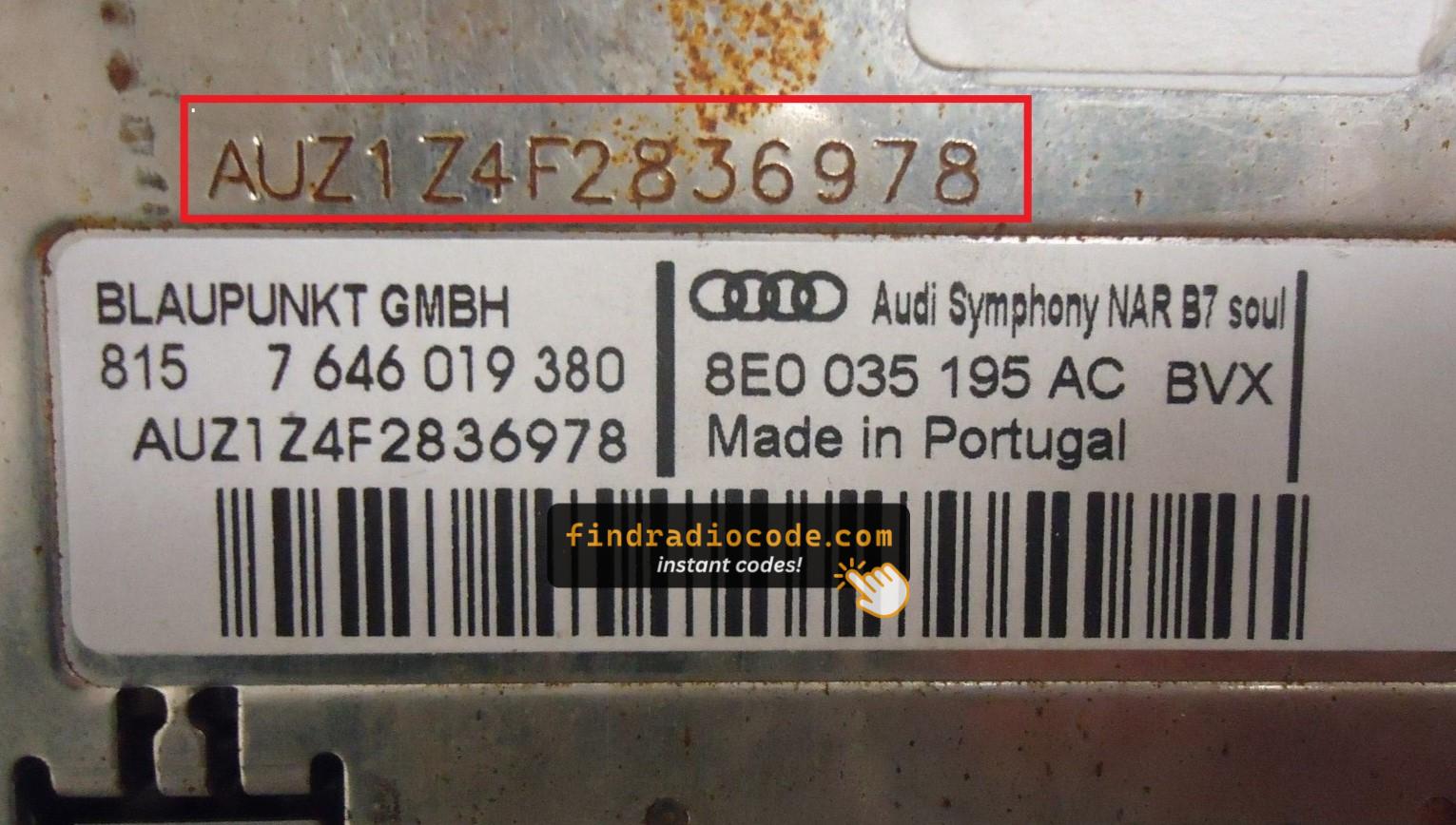
Example: Audi A4 serial number label location
Most Common Audi A4 Serial Formats
To decode your radio, locate the serial that starts with AUZ (typical format: AUZ1Z1K1234567). Some units may show a VWZ prefix instead. The serial is 13 characters long and sits on a label on the unit itself.
How to Enter the Unlock Code on Your A4
Once you have the Audi's radio code, you can enter it using the radio buttons.
Most radios display a "CODE", "ENTER CODE", or "----" message when they are locked.
You typically use the preset buttons to select each digit.
After entering the full code, the radio will restore normal operation.
Try not to make mistakes, because too many wrong attempts can disable your radio temporarily.
It will allow you a few missed shots before showing a LOCKED message.
You can try again by leaving the radio on for 60 minutes or a set waiting period.
A4's Radio Code FAQs
Free codes are uncommon.
You might already possess the code in the owner's booklet or from a dealer, but most require a database lookup.
Yes. Each factory radio has its own radio code.
A second-hand radio will need its correct security code to work.
Not all of them require a security code, but many factory radios use it as an anti-theft feature.
Certain series may still use a code depending on the radio unit.