
Chrysler Voyager's Usual Anti-Theft Code Triggers
Many owners encounter radio code issues on their Voyager after power loss.
Below are the most typical situations when this can occur.
Error After a Battery Change
When the battery is disconnected, the Chrysler Voyager radio locks automatically.
This security feature is designed to prevent theft by disabling the radio after electrical reset.
Additional Scenarios Where Radio Requires a Code
- A blown fuse can reset the radio and prompt for a code.
- Replacing the head unit with a second-hand one requires the code for that particular radio.
- Electrical repairs may trigger the anti-theft mode on some Chrysler Voyager units.
- Even a quick battery boost can activate the anti-theft lock.
Quick Fixes Before Buying a Radio Code
There is a chance your Chrysler Voyager radio code is written down in your documents.
Before spending money, take a few minutes check the places below - you might be surprised.
Check the Manual or Documents
- On a label in the glove compartment.
- In the vehicle documentation provided with the car.
- In the user guide, often on a separate code card.
- On the back of the radio if the unit was previously removed.
- Near the trunk lining, where some manufacturers place radio labels.
Requesting It from the Dealer
Dealerships can retrieve your radio code by checking the VIN in their system.
They typically ask for registration and ID before sharing the security PIN.
This is the official way to restore access to the factory radio.
Potential Downsides:
- You may need to contact service support during business hours.
- The lookup is often slower and may require waiting.
- Some imported or older radios may need extra verification.
- Dealers frequently charge a service fee (It may cost more than 100$).
Finding the S/N on a Voyager's Radio
The only thing you'll need to find the corresponding code is your radio's unit serial. No extra vehicle data is required.
On many Chrysler vehicles, you can find it in one of the following locations:
- Displayed on the radio screen (in some cases by using button combinations)
- On the radio body itself - you'll need to pull it out and write down your serial (which is usually simple)
Search for a label such as: S/N or Serial.
1. View the Serial Number on Chrysler Voyager's Display
The Chrysler Voyager was reintroduced in 2020 as the entry-level minivan in the lineup — essentially the Pacifica with fewer features and a lower price. It rides on the same platform and uses Uconnect 8.4" NEW, which means the bezel-edge method works just like on the Pacifica.
Step 1: Turn ignition to ACC or ON.
Step 2: Press the bottom-left and bottom-right edges of the physical screen bezel frame at the same time. Hold until Dealer Mode appears. You must press the plastic trim border — not the touchscreen glass itself.
Step 3: Navigate System Info → Radio Part Info → Serial Number.
The serial is a 14-character alphanumeric code (e.g. T00AM394958584). Because the Voyager is the value-trim sibling of the Pacifica, no features are different that would affect this method.
2. Locating your S/N on the Radio Unit
The serial number is usually found on a sticker attached to the head unit.
Step 1: Turn off the the ignition.
Step 2: After that, remove the dashboard trim.
Step 3: Then release the mounting clips.
Step 4: Carefully pull the radio forward partially (Be careful not to damage the cables).
Step 5: Search for the serial number on the side of the unit.
Step 6: Write down the full S/N carefully and come back to our website so that we can generate the code.
Important: Don't mix the Serial Number for the Part Number!
Physical Radio Removal for Chrysler Voyager
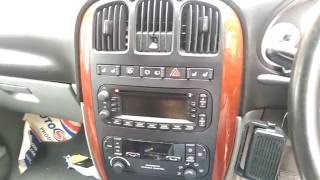
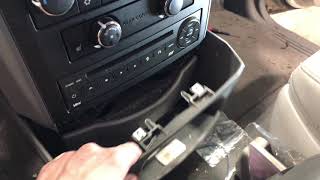
Chrysler Voyager (2020-2024) is essentially a rebadged Pacifica with similar Uconnect system.

Example: Chrysler Voyager serial number label location
Serial Number Prefixes You'll See on Chrysler Voyager
Your Chrysler Voyager radio serial may be in T00AM format (14 characters, e.g. T00AM394958584), TM9 format (e.g. TM9123456789), or A2C format on newer Uconnect systems. The serial is printed on a label on the radio housing.
You've Got the PIN. How the Entering Process Works?
You need to enter the anti-theft code into the system to unlock your Chrysler's radio.
In the locked unit, the screen usually displays a security message.
You should use control knob, touchscreen, or radio presets to set each digit, then submit the code to reactivate the audio system.
To enter the unlock code on your Uconnect radio:
- When the radio is locked, the screen will display "ENTER CODE" or show four dashes (----).
- Use the on-screen keypad (touchscreen models) or the preset buttons (non-touchscreen models) to enter each digit of your 4-digit code.
- After entering all 4 digits, the radio unlocks automatically – no need to press a confirm button.
Tip: Make sure you enter the code carefully. Three incorrect attempts will trigger a temporary lockout.