
Common Dodge Journey Radio Code Problems
Many owners encounter radio code issues on their Journey after battery-related issues.
Below are the most typical situations when this can occur.
Radio Asking for Code After Battery Change
When the battery is disconnected, the Dodge Journey radio locks automatically.
This factory protection system is designed to protect the original head unit by disabling the radio after power loss.
More Situations Causing This Issue
- After an ECU or software reset, the radio may lock.
- Jump-starting the vehicle can reset the radio, requiring the unlock code.
- A blown fuse can cause the Dodge Journey radio to lock.
- Installing a used head unit will require the original radio code.
Free Things to Try
There is a chance your Dodge Journey radio code is written down in your documents.
Before spending money, quickly check the places below - you might be surprised.
Look for it in the Vehicle Itself
- On the radio unit itself, if it was removed before.
- In the spare wheel area, on a radio label.
- Inside the center console, sometimes on a label.
- In your car paperwork from the previous owner.
- In the vehicle handbook, often on a code card.
Getting It from the Dealer
Dealerships can retrieve your radio code by checking the VIN in their system.
They typically require proof of ownership before sharing the security PIN.
This is the official way to restore access to the factory radio.
Drawbacks:
- Dealers frequently bill for the code (sometimes more than 100$).
- Some imported or older radios may not be in their database.
- You may need to contact service support during business hours.
- The lookup is often slower and may require waiting.
Finding the Serial Number on a Journey
The only thing you'll need to find the corresponding code is your radio's serial number. No extra vehicle data is required.
On most Dodge models, you can find it in these common spots:
- Visible on the radio screen (occasionally by using a key combination)
- On the radio housing itself - you'll need to remove the unit slightly and write down the serial number (which is fairly easy)
Search for something like: Serial Number or SN.
1. Getting Journey's S/N on the Infotainment
If you have a 2013–2020 Journey with the Uconnect 8.4" Classic touchscreen, the serial number is accessible on-screen without any tools:
- Turn the ignition to ACC or ON.
- Hold Fan Up + Fan Down + Front Defrost simultaneously for 5 seconds → Dealer Mode opens.
- Select: System Info → Radio Part Info → Serial Number.
Alternate: hold Temp Up + Temp Down for 5 seconds → Engineering Menu → navigate the same path. The serial is a 14-character code, e.g. T00AM394958584.
2. Locating the S/N on the Radio Unit
The serial number is usually found on a label attached to the radio casing.
Step 1: Turn off the car.
Step 2: After that, remove the dashboard trim.
Step 3: Then release the mounting clips.
Step 4: Carefully slide the unit out partially (Be careful not to damage the cables).
Step 5: Search for the serial number on the rear of the unit.
Step 6: Write down the full number carefully and come back to our website so that we can generate your code.
Important: Differentiate the Serial Number and the Part Number!
Accessing the Serial Number in Dodge Journey
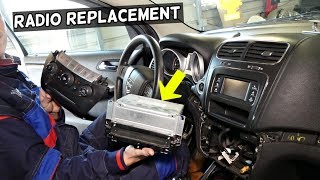
The Journey requires a methodical multi-step process to access the radio unit. The silver accent trim is particularly fragile, so take your time.
Removal Process:
- Remove the silver accent trim strip above the radio—it's held by clips and is fragile. Use only a plastic pry tool to avoid cracking it.
- Remove 2 Phillips screws now exposed behind the trim.
- Remove the climate control panel—secured by clips, pull gently outward.
- Remove the radio unit—4 Phillips screws hold it in place.
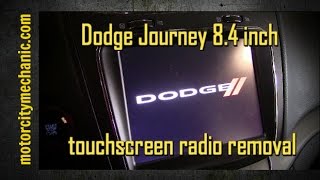
Note for 8.4" models: The touchscreen display is a separate unit from the radio module (two-piece architecture). You may need a Torx T15 driver for some components. The serial number is on the radio module, not the display unit.

Example: Dodge Journey serial number label location
Most Common Dodge Journey Serial Number Formats
The radio uses serials starting with T00AM (14 chars), TM9, or A2C (newer Uconnect). The serial label is on the body of the radio unit — not visible without removal on most models.
Now You Have the Code. How Entering Works?
Once you have the Dodge's security code, you can enter it using the infotainment controls.
Most radios display a "CODE", "ENTER CODE", or "----" message when they are locked.
You typically use the preset buttons to input the code.
After entering the full code, the radio will restore normal operation.
After obtaining your unlock code, the entry method depends on your radio type:
Base models (non-touchscreen):
- Turn on the ignition—the radio displays "CODE".
- Use preset buttons 1-4 to set each digit.
- Press and hold ENTER/OK to unlock.
Uconnect 8.4" touchscreen:
The screen will show an on-screen numeric keypad. Tap each digit and confirm.
Lockout Warning: After 3 incorrect attempts, the radio locks for 30 minutes. Keep the ignition ON during the wait period.
Why Choose Our Dodge Journey Radio Code Generator Service?
Our Dodge Journey radio code lookup service retrieves the anti-theft code using the stereo serial.
Compared to dealership VIN lookup, this Dodge Journey radio code generator is more convenient, doesn't require appointments, and costs less.
It's an easy way to restore access to your factory radio without leaving your home.
How They Compare
- Pricing: It often costs 100 - 200 USD, while our service starts from 9.99 USD.
- Availability: Dealers work business hours only, while our service is always available.
- Delivery time: May take hours, while FindRadioCode is almost instant 95% of the time.
- Refund policy: Dealers usually offer no guarantee, while we include a full money-back guarantee.
- In-person visit: Lookup can require a visit, while FindRadioCode works online.