How do I get the radio code for a Dodge Hornet?
In short: each Dodge Hornet radio from 2023-2025 is locked with its own 4-digit code, and it is calculated from the radio serial number. Get the serial from Dealer Mode on the Uconnect screen or from the label on the unit, then type it into the form above. Codes are usually delivered within seconds, from $19.99 with a money-back guarantee.
Common Situations Requiring a Code
Many drivers encounter radio code issues on their Hornet after battery-related issues.
Below are the most frequent situations when this can happen.
Radio Asking for Code After Battery Change
A disconnected battery is the most common reason a Dodge Hornet radio asks for a code.
Even a momentary power loss is enough to activate the built-in anti-theft lock.
Other Possible Causes
- Even a brief jump-start can activate the anti-theft system.
- Software updates may reset the radio memory on some Dodge Hornet units.
- Replacing the factory stereo with a second-hand one requires the code for that specific unit.
- A power surge can interrupt the radio and prompt for a code.
Quick Things to Check
Before you pay for it, it's worth checking a few places where the code is often already written down.
Some owners find their Dodge Hornet radio code without needing any tools or paperwork.
Here are the easiest things to check first.
Check the Car Itself
- On the radio chassis if the unit was previously removed.
- In the vehicle documentation provided with the car.
- Near the spare tire, where some manufacturers place radio labels.
- In the radio manual, often on a separate code card.
- On a label in the door pillar.
Dodge Dealer Assistance Option
A Dodge dealer can usually look up the radio code using your Hornet's vehicle identification number.
In most cases, you need to visit or contact them and show vehicle documents.
Once verified, they can generate the original unlock code for your radio.
Downsides:
- You usually need to visit in person and bring vehicle paperwork.
- Dealers often charge a fee for the lookup service and it's sometimes more than 100$.
- Some older Dodge Hornet radios may require manual lookup.
- The process can take hours depending on the model and database.
Finding the Serial Number on a Hornet's Radio
The only thing you'll need to find the corresponding code is your radio's radio serial. No extra vehicle data is required.
On most Dodge models, you can find it in one of the following locations:
- Shown on the radio screen (occasionally by using specific button presses)
- On the radio body itself - you'll need to remove the unit slightly and write down the serial number (which is usually simple)
Search for text similar to: S/N or Serial.
1. Getting Hornet's S/N on the Display
The Dodge Hornet launched for 2023 as Dodge's first compact SUV, built on the Alfa Romeo Tonale platform rather than a traditional Stellantis truck platform. This means it uses modern Uconnect 5 infotainment (10.25" screen) and the bezel-edge method to access Dealer Mode.
How to find the serial number:
- Turn ignition to ACC or ON.
- Press the bottom-left corner and bottom-right corner of the plastic bezel frame around the screen simultaneously. Hold until Dealer Mode appears. You must press the frame — not the glass display surface.
- Navigate: System Info → Radio Part Info → Serial Number.
If Dealer Mode is not accessible, the serial may also appear in the Uconnect settings under Settings → System → About. The Hornet's Alfa Romeo-derived architecture means it differs from other Stellantis platforms — if you have trouble, check Alfa Romeo Tonale guides as well, since the same hardware is used. Serial format: 14 characters, e.g. T00AM1801T0282.
2. The Serial Number on the Radio Housing
To find the serial number, you'll need to pull out the head unit out.
- Start by turning off the vehicle and taking off the dashboard bezel.
- Next, release the clips and pull the unit forward to check the label on the back of the radio. Pay attention not to damage the cables.
- Write down the serial number carefully and then come back to the website.
- Know that serial number and part number are not the same thing. You will find both on the sticker, and you only need for the serial.
Accessing the Serial Number in Dodge Hornet
The Hornet is Dodge's newest model, and detailed teardown documentation is not yet widely available. Built on the Alfa Romeo Tonale platform, it features a 10.25" Uconnect 5 touchscreen that's deeply integrated with the vehicle's ADAS (advanced driver assistance), climate control, and other critical systems.
Search for video guides on YouTube
Current Recommendation:
Due to the complexity of modern integrated infotainment systems and the lack of proven DIY guides for the Hornet, we recommend:
- Dealership service — Authorized technicians have the proper tools and procedures.
- Wait for community guides — As the vehicle becomes more common, enthusiast forums and YouTube channels will publish detailed removal procedures.
If you need the serial number urgently, check if it's displayed in the vehicle's settings menu under System Information or About.
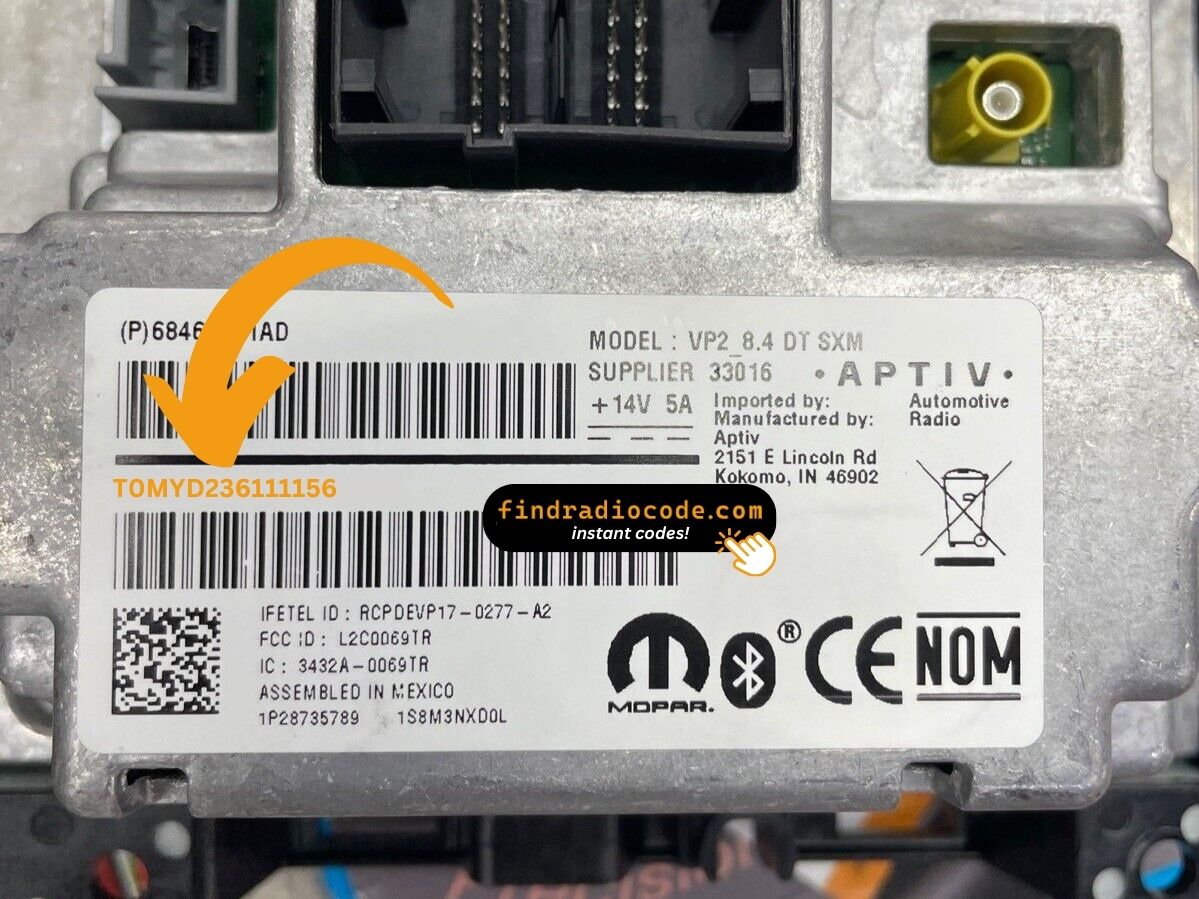
Example: Dodge Hornet serial number label location
Common Dodge Hornet S/N Formats
Your Dodge Hornet radio serial may be in T00AM format (14 characters, e.g. T00AM1801T0282), TM9 format (e.g. TM9123456789), or A2C format on newer Uconnect systems. The serial is printed on a label on the radio housing.
Entering the Radio Code on Dodge Hornet
You need to type in the radio security code into the system to unlock your Dodge's radio.
In the locked unit, the screen usually displays a code prompt.
You should use control knob, touchscreen, or radio presets to set each digit, then submit the code to reactivate the audio system.
Based on the Uconnect 5 system with a 10.25" touchscreen, code entry will likely use an on-screen numeric keypad:
- Turn on the ignition—the system will prompt you to enter the anti-theft code.
- Use the touchscreen keypad to tap each digit of your 4-digit code.
- Tap Confirm or Enter to unlock the radio.
Lockout Warning: After 3 incorrect attempts, the system will likely lock for 30 minutes. Keep the ignition ON during the waiting period.
Why Use Our Dodge Hornet Radio Code Lookup Service?
Our Dodge Hornet radio code lookup is designed to save time.
Unlike traditional dealer lookup, this method requires no paperwork and can be done from home in minutes.
It's a faster and cheaper alternative for drivers who need their radio unlocked quickly.
The Real Difference
- Availability: Dealers work Mon - Fri, while our service is 24/7.
- Refund policy: Dealers usually offer limited refunds, while we include a full money-back guarantee.
- In-person visit: Lookup can require a visit, while FindRadioCode works online.
- Delivery time: May take days, while FindRadioCode is instant 95% of the time.
- Pricing: It often costs over $100, while our service starts from 9.99 USD.
Dodge Hornet Radio Code - Common Questions
Yes. Each head unit has its own unique code.
If you install a replacement radio, you'll need the code for that individual radio.
Many OEM stereos use a anti-theft code, but not all production years require one.
Whether a code is needed is determined by the radio unit and the vehicle generation.
Free radio codes are rarely available.
Some dealers may help, but most codes require a database lookup.
The only free possibility would be to search your car and its glovebox to see if you already have the code.
Uconnect is the infotainment system developed by Stellantis (formerly Fiat Chrysler Automobiles) and used across Chrysler, Dodge, Jeep, Ram, Fiat, and Alfa Romeo vehicles. Most Uconnect radios include an anti-theft protection system that activates whenever the radio loses power – for example after a battery replacement, a dead battery, or electrical work.
When triggered, the radio displays "ENTER CODE" and won't work until the correct 4-digit unlock code is entered. The code is permanently tied to the radio's serial number, not the vehicle's VIN, which is why finding the serial number is the first step to unlocking.
Yes, in most cases. Uconnect systems from 2013 onwards include a hidden Dealer Mode (or Engineering Mode) diagnostic menu that shows the serial number directly on screen. You can access it by holding specific button combinations – no tools or radio removal required.
However, some 2020+ models may have had Dealer Mode disabled via software updates. If you cannot access the on-screen menu, the radio must be physically removed to read the serial number label on the unit. See our full Dealer Mode guide for step-by-step instructions with video tutorials.
No – on a Dodge the code is not derived from the VIN. The unlock code is linked to the radio's own serial number, not the vehicle identification number. The same VIN can leave the factory with different radio units, so the VIN alone can't tell us which code your radio needs.
To unlock the radio you first need the serial number – either from the on-screen Dealer Mode menu or from the label on the unit. Once you have that serial, the code is generated right away. Pricing starts from $9.99 per radio.
The full Dodge lineup is supported. That covers the Charger, Challenger, Durango, Journey, Caliber, Avenger, Grand Caravan, and Caravan – essentially any Dodge fitted with a factory Uconnect or preset-button radio that requests an anti-theft code after a power loss.
Because the code always comes from the radio serial number rather than the model or year, the retrieval works the same way for every one of these. Select your Dodge model to see the exact steps for finding the serial on that dashboard.
The anti-theft lock activates whenever the radio loses power – most often after a battery replacement, a flat battery, a jump-start, or electrical work. When it triggers, the screen shows "ENTER CODE" and the radio will not play until the correct 4-digit code is entered.
To unlock it, you enter the code that matches your radio's serial number. There is no reset button – the radio genuinely needs its own code. Take care entering it: three wrong attempts put the radio into a temporary WAIT lockout, and you then have to leave the ignition ON for the wait to clear before trying again.
We wish we could say yes for every radio. Some very old Dodge units used a simple code printed on a glovebox code card, but the modern Uconnect and preset-button radios generate a unique code tied to each unit's serial number, and that has to be calculated – there is no genuine one-click free generator that actually produces a working code for these.
What we do offer is a fast, verified retrieval from your serial number, with pricing that starts from $9.99 per radio. If you already have the code on a dealer receipt or the code card, you will not need us at all – just enter it straight into the radio.