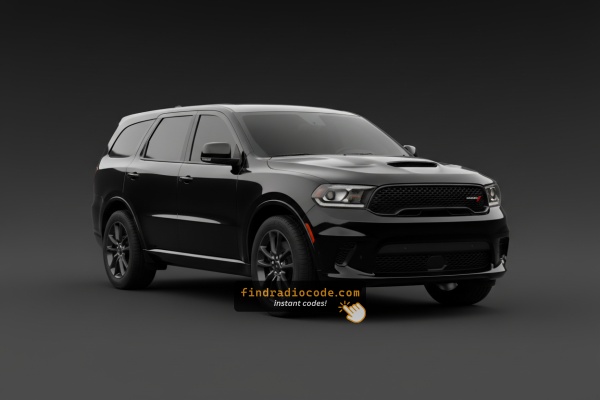
Where do I get my Dodge Durango radio code?
The radio code for a 2011-2025 Dodge Durango is a 4-digit anti-theft code that comes from the radio serial number rather than the VIN. Read the serial in Dealer Mode on most Uconnect touchscreens or on the sticker on the unit itself, enter it in the form above and the code usually appears within seconds, from $19.99.
OEM Radios Used in the Dodge Durango
The head unit in a Dodge Durango varies with the year and trim level. The pages below explain every matching unit in detail.
| Years | Factory radio | Serial starts with |
|---|---|---|
| 2009-2013 | Chrysler RET Alpine Alpine |
TQ1AA, TT1AA, TH1AA, THAAA, TCAAA
|
| 2011-2013 | MyGIG NTG4 RHR Harman |
T00AM, T00BE, T0012
|
| 2014-2018 | Uconnect 8.4 RA4 VP4 MX Harman |
T00AM, T00BE, T0012
|
| 2017-2020 | Chrysler Uconnect 8.4 UAQ Panasonic |
TM9
|
| 2017-2020 | Chrysler Uconnect 8.4 UCQ Panasonic |
TM9
|
| 2017-2020 | Uconnect 5.0 UCA UDA VP2RFP Continental |
TQN, TVPQN, A2C, A3C
|
| 2019-2023 | Aptiv Uconnect 7.0 UAG VP2_7 WD NA Aptiv |
T0MYD
|
| 2019-2023 | Aptiv Uconnect 8.4 UJM VP2_8.4 HDCC SXM WD Aptiv |
T0MYD
|
What the serial label looks like
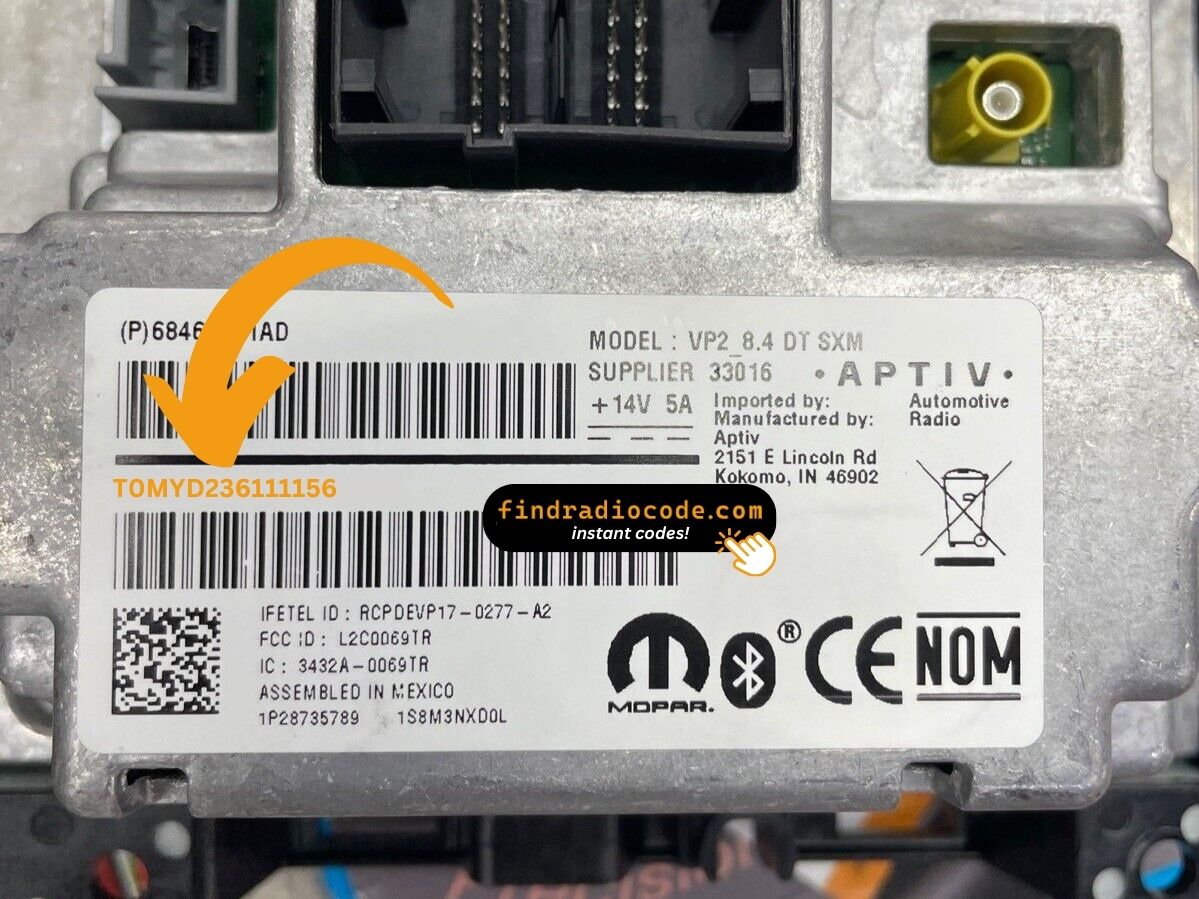
Real labels from these radio families. The serial is the code marked on each photo - not the part number. Tap a photo to see it full size.
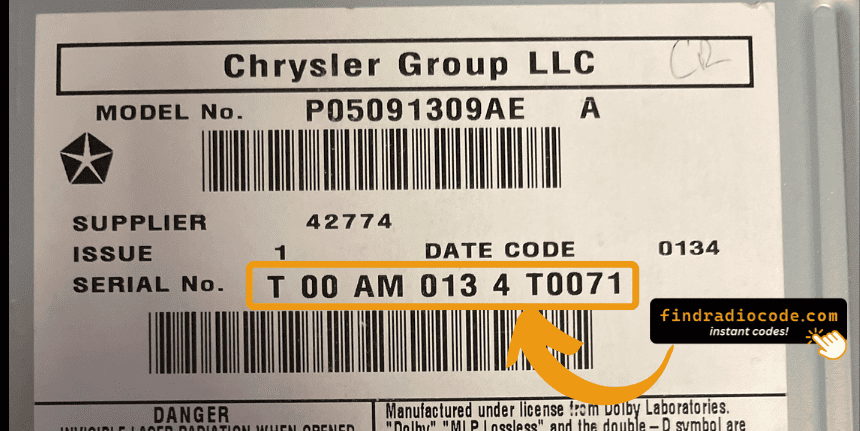
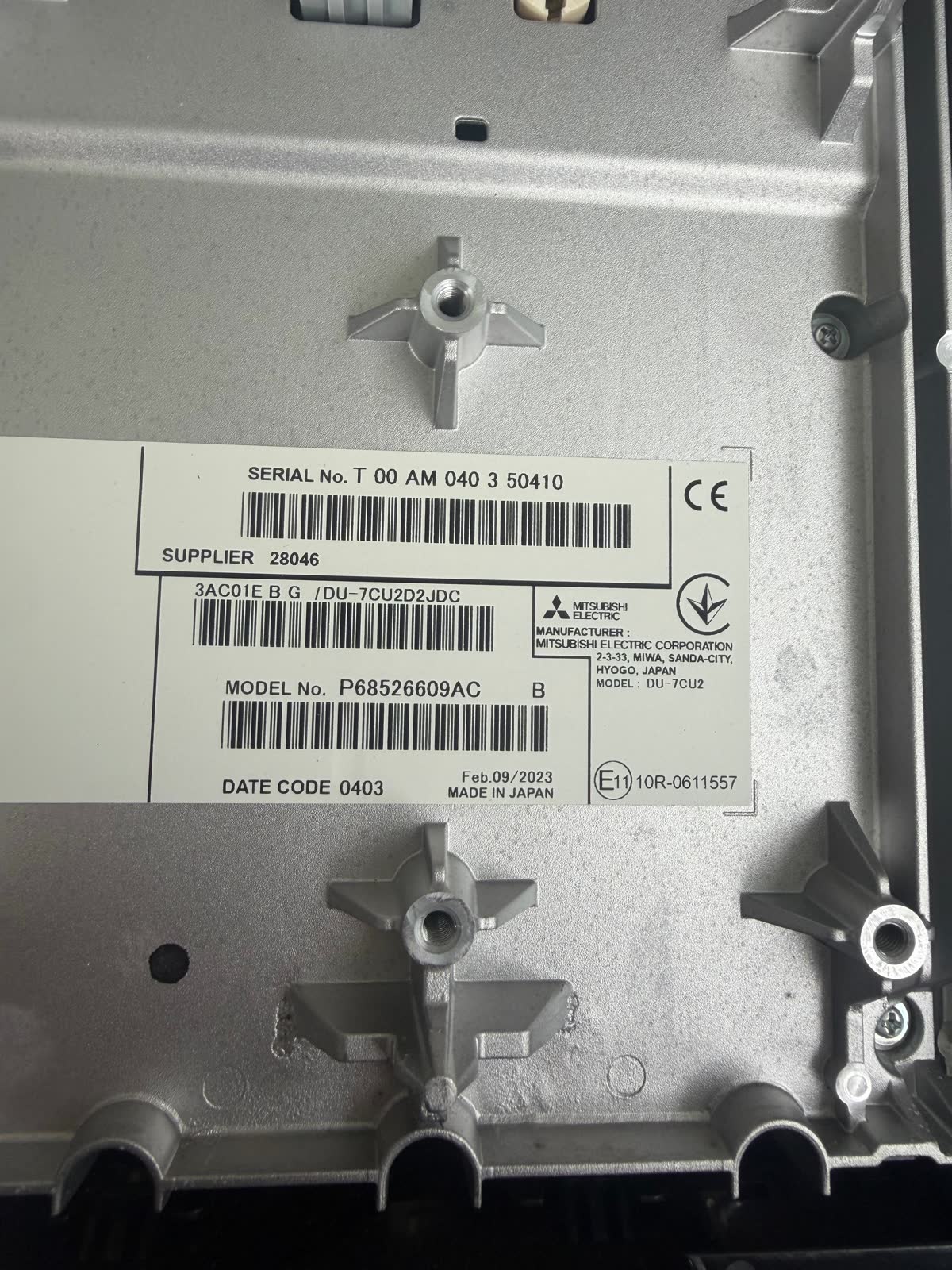
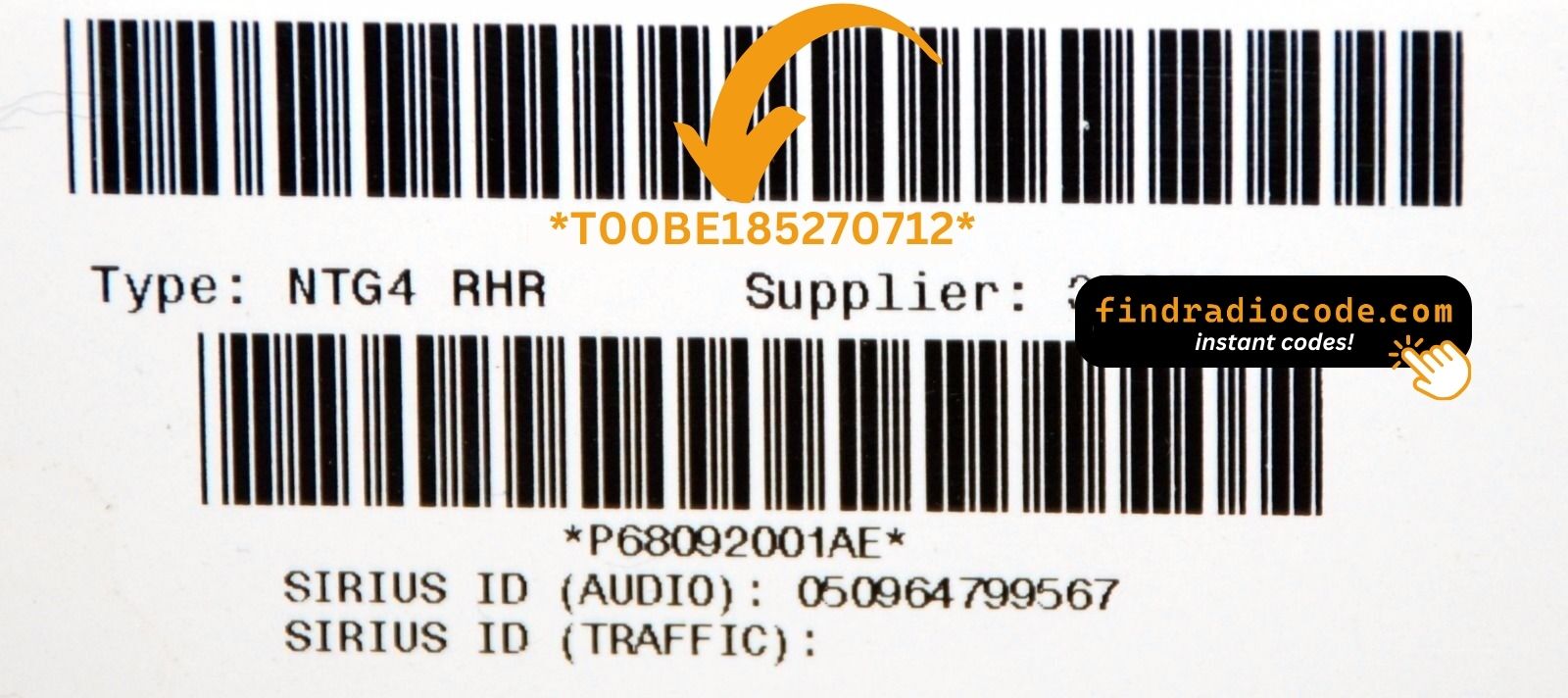
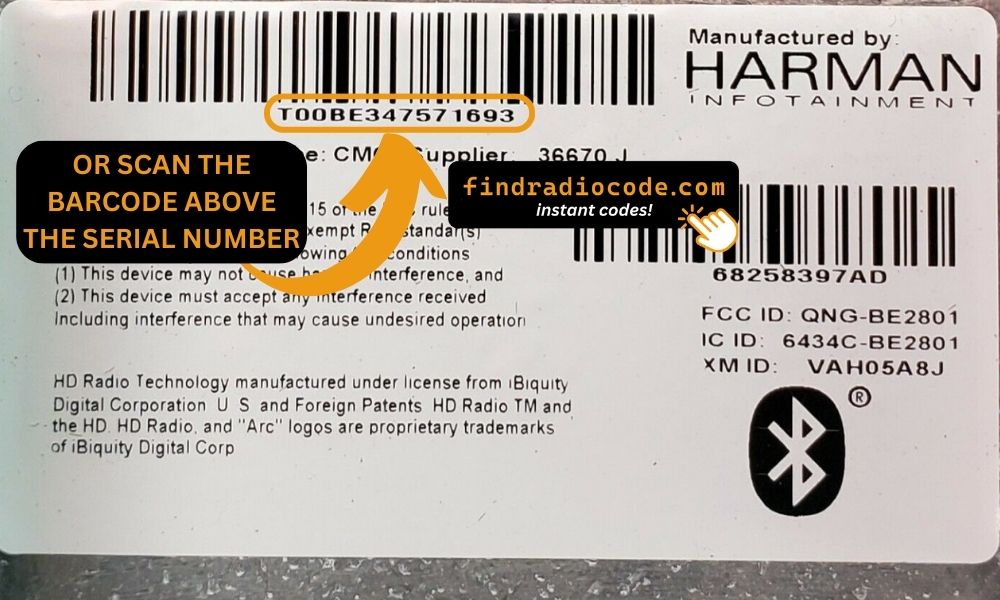
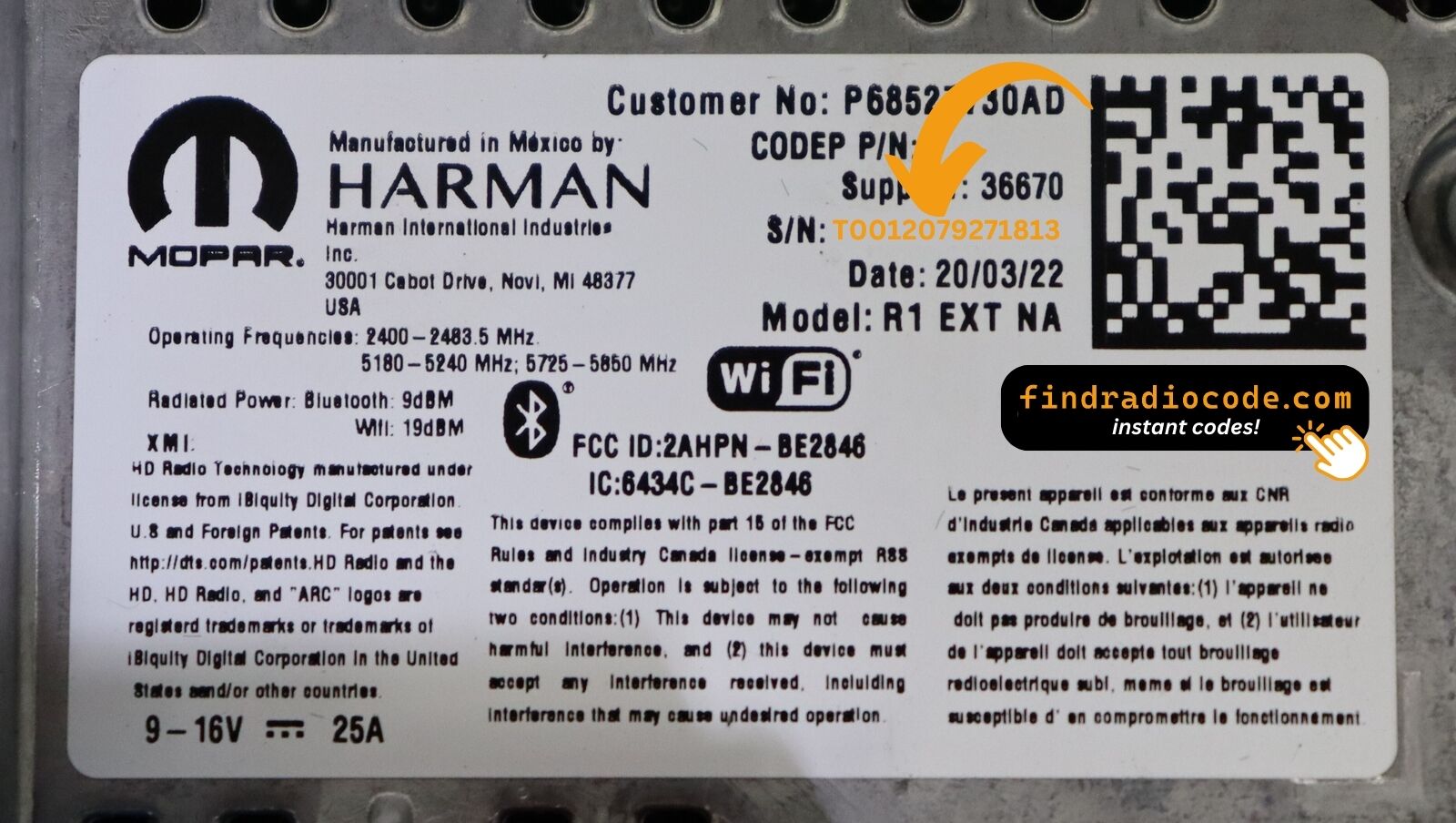
Locating the S/N on Your Radio
To retrieve the correct security code, you first need the radio's serial.
Depending on your model, you can see it on the screen or locate it on the unit.
Common abbreviations are: Serial Num. / S/N / Serial Number etc.
These are the typical ways to find it:
1. View the Serial Number on Dodge Durango's Screen
As a mid-size 3-row SUV sharing its WK platform with the Jeep Grand Cherokee, the Dodge Durango benefits from the same Uconnect 8.4" infotainment system. That means the on-screen serial number method that works on a Grand Cherokee also works here — no dashboard removal necessary.
Here is how to do it, depending on your year:
2014–2018 (Uconnect 8.4" Classic): With the ignition in ACC or ON, simultaneously hold Fan Up, Fan Down, and Front Defrost for 5 seconds. Dealer Mode opens on the screen. Alternatively, hold Temp Up + Temp Down for 5 seconds to reach the Engineering Menu. Both lead to: System Info → Radio Part Info → Serial Number.
2019+ (Uconnect 8.4" NEW): Press the bottom-left and bottom-right edges of the plastic bezel frame at the same time. Hold until Dealer Mode appears. Navigate the same path as above to the serial number.
2011–2013: Early Durango models may not have a Dealer Mode display option. If neither button combination does anything, the serial label is on the radio chassis and requires physical removal. The serial is a 14-character code, e.g. T00AM1801T0282.
2. Locating your Serial on the Radio Unit
To find the serial number, you'll need to remove the head unit from the dashboard.
- Start by turning off the vehicle and removing the trim panel.
- Next, release the clips and slide the radio out to check the label on the side of the radio. Pay attention not to damage the connections.
- Write down the serial number carefully and come back to the website.
- Know that serial number and part number are not the same thing. You will find both of them on the unit, but you only care for the serial.
Accessing the Serial Number in Dodge Durango
The Durango shares its platform with the Jeep Grand Cherokee (WK2), so the removal process is similar. The procedure varies slightly depending on your model year:
Watch removal guides on YouTube
For 2014-2025 models with 8.4" Uconnect:
- Remove the storage tray below the radio—2 hidden 7mm screws secure it from behind.
- Remove the trim panel using a plastic pry tool.
- Unscrew the radio unit—typically 2-4 screws (7mm socket or bolts).
- Support the radio carefully as you pull it forward—there is very little cable slack. Avoid pulling too hard to prevent damaging the connectors.
For 2011-2013 models: The process is similar but simpler, as the earlier dashboard design has fewer integrated components.
Tools needed: Plastic pry tool, 7mm socket, Phillips screwdriver
Example: Dodge Durango serial number label location
Typical Dodge Durango S/N Formats
To unlock your radio, find the serial that starts with T00AM, TM9, or A2C. Important: do NOT use serials ending in W, J, L, or S — those are screen/DVD/amplifier modules, not the main radio brain.
Common Dodge Durango Radio Code Issues
Many drivers encounter radio lock problems on their Durango after battery-related issues.
Below are the most typical situations when this can occur.
Battery Disconnect Triggering the Radio Lock
A replaced battery is the most common reason a Dodge Durango radio asks for a code.
Even a brief voltage drop is enough to activate the built-in security system.
Other Situations That May Trigger the Code
- A fuse replacement can interrupt the radio and prompt for a code.
- ECU reflashing may trigger the anti-theft mode on some Dodge Durango units.
- Replacing the head unit with a second-hand one requires the code for that particular radio.
- Even a quick battery boost can activate the anti-theft lock.
Possible Free Options
Before you pay for it, it's worth checking a few places where the code is often stored.
Some drivers find their Dodge Durango radio code without needing any tools or paperwork.
Here are the easiest things to check first.
Look Through Car Documentation
- In the vehicle documentation provided with the car.
- In the radio manual, often on a separate page.
- On the back of the radio if the unit was previously removed.
- On a sticker in the door pillar.
- Near the boot panel, where some manufacturers place radio labels.
Through the Dealer
A Dodge dealer can usually look up the security code using your Durango's VIN.
In most cases, you need to visit or contact them and prove ownership.
When it is verified, they can generate the original unlock code for your radio.
Possible Drawbacks:
- You usually need to visit in person and bring ID.
- Dealers often charge a fee for the lookup service and it's sometimes more than 100$.
- The process can take days depending on the model and database.
- Some older Dodge Durango radios may require manual lookup.
Entering the Security Code on Dodge Durango
With your code ready, it's time to enter it into the Dodge Durango's radio.
The locked radio will usually show a blank screen with dashes.
Use the built-in buttons or touch controls to select each number, then press OK to activate the head unit.
Once you have your unlock code, here's how to enter it in your Durango:
Standard method (most 2011-2020 models):
- Turn on the ignition—the radio displays "CODE".
- Use preset buttons 1-4 to cycle each digit into position.
- Press and hold ENTER/OK for 2-5 seconds to unlock the radio.
Touchscreen method (Uconnect 4C/5 in 2021+ models):
Newer Durango models may display an on-screen numeric keypad. Simply tap each digit and confirm.
Note: Some early 2011 models with the RBZ radio system may not have the anti-theft code feature. After 3 incorrect attempts, the radio locks for 30 minutes with the ignition ON.
Durango's Radio Code FAQs
Yes. Each head unit has its own unique security code.
A replacement radio will need its original code to work.
Not all of them require a radio code, but many factory radios use it as an anti-theft feature.
Some production series may not require a code depending on the radio unit.
Free codes are not usually available.
You might already possess the code in the manual or from a previous owner, but most require a database lookup.
Uconnect is the infotainment system manufactured by Stellantis (formerly Fiat Chrysler Automobiles) and used across Chrysler, Dodge, Jeep, Ram, Fiat, and Alfa Romeo vehicles. Most Uconnect radios feature an anti-theft protection system that activates whenever the radio loses power – for example after a battery replacement, a dead battery, or electrical work.
When triggered, the radio displays "ENTER CODE" and won't work until the correct 4-digit unlock code is entered. The code is linked to the radio's serial number, not the vehicle's VIN, which is why finding the serial number is the first step to unlocking.
Yes, for most vehicles. Uconnect systems from 2013 onwards feature a hidden Dealer Mode (or Engineering Mode) diagnostic menu that displays the serial number right on the display. You can access it by holding specific button combinations – without any tools or removal.
However, some 2020+ models may have had Dealer Mode restricted via software updates. If you cannot access the on-screen menu, the radio must be physically removed to read the serial number label on the unit. See our full Dealer Mode guide for step-by-step instructions with video tutorials.
No – on a Dodge the code is not derived from the VIN. The unlock code is tied to the radio's own serial number, not the vehicle identification number. The same VIN can ship with more than one radio variant, so the VIN alone can't tell us which code your radio needs.
To retrieve your code you first need the serial number – either from the on-screen Dealer Mode menu or from the label on the unit. Once you have that serial, the code is generated in minutes. Pricing starts from $9.99 per radio.
The full Dodge lineup is supported. That includes the Charger, Challenger, Durango, Journey, Caliber, Avenger, Grand Caravan, and Caravan – essentially any Dodge fitted with a factory Uconnect or preset-button radio that asks for an anti-theft code after a power loss.
Because the code always comes from the radio serial number rather than the model or year, the retrieval works the same way across the whole range. Pick your model above to see the exact steps for finding the serial on that dashboard.
The anti-theft lock arms itself whenever the radio loses power – most often after a battery replacement, a flat battery, a jump-start, or electrical work. When it triggers, the screen shows "ENTER CODE" and the radio will not play until the correct 4-digit code is entered.
To unlock it, you enter the code that matches your radio's serial number. The lock cannot be bypassed by a reset – the radio genuinely needs its own code. Enter it carefully: three wrong attempts put the radio into a temporary WAIT lockout, and you then have to leave the ignition ON for the wait to clear before trying again.
We wish we could say yes for every radio. Some very old Dodge units used a simple code printed on a glovebox code card, but the modern Uconnect and preset-button radios generate a unique code tied to each unit's serial number, and that has to be calculated – there is no genuine one-click free generator that actually produces a working code for these.
What we do offer is a fast, verified retrieval from your serial number, with pricing that starts from $9.99 per radio. If you already have the code on a dealer receipt or the code card, you do not need us – just enter it straight into the radio.