
Where do I get my Dodge Journey radio code?
The radio code for a 2011-2020 Dodge Journey is a 4-digit anti-theft code that comes from the radio serial number rather than the VIN. Read the serial on the Uconnect screen in Dealer Mode or on the label of the radio unit, enter it in the form above and the code usually appears within seconds, from $19.99.
Dodge Journey Head Units We Cover
The following factory radios shipped in the Dodge Journey across its model years. Choose yours to check where its serial number is and how the code is retrieved.
| Years | Factory radio | Serial starts with |
|---|---|---|
| 2008-2012 | Chrysler Media Center 740N RB5 Panasonic |
T00AM, T00BE
|
| 2009-2013 | Chrysler RET Alpine Alpine |
TQ1AA, TT1AA, TH1AA, THAAA, TCAAA
|
| 2011-2014 | MyGIG NTG4 RHP Harman |
T00AM, T00BE, T0012
|
| 2013-2018 | Uconnect 3.0 RA1 VP1 Continental |
TQN, TVPQN, A2C, A3C
|
| 2013-2017 | Uconnect 4.3 REB Continental |
TQN, TVPQN, A2C, A3C
|
| 2013-2018 | Uconnect 8.4 RA3 VP3 MX Harman |
T00AM, T00BE, T0012
|
| 2013-2018 | Uconnect 8.4 RA3 VP3 NA Harman |
T00AM, T00BE, T0012
|
| 2014-2018 | Uconnect 5.0 RA2 VP2 Continental |
TQN, TVPQN, A2C, A3C
|
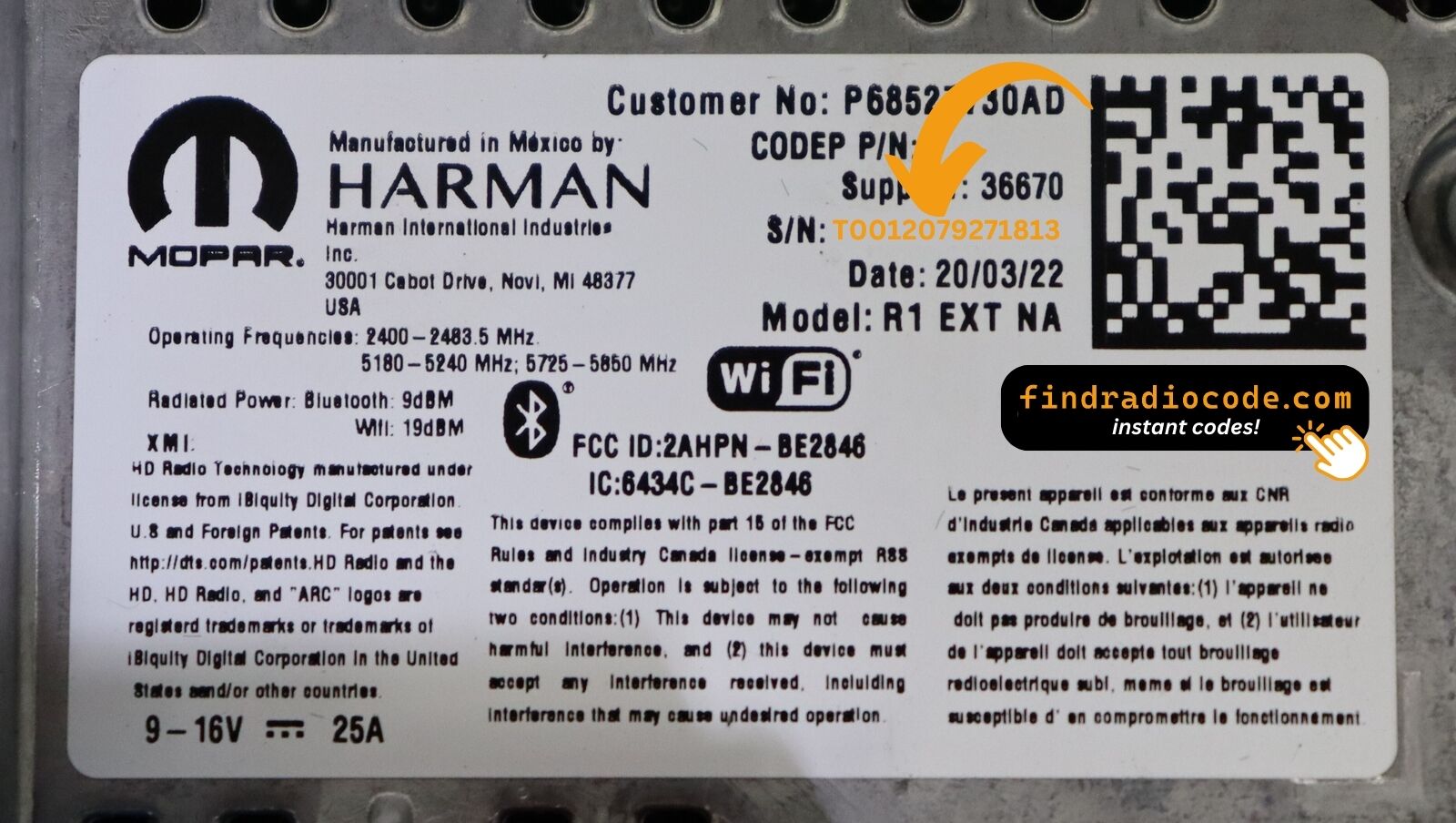
What the serial label looks like
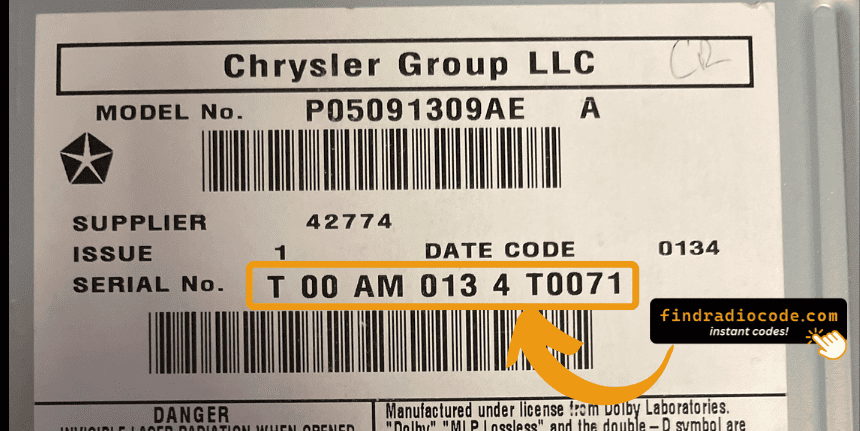
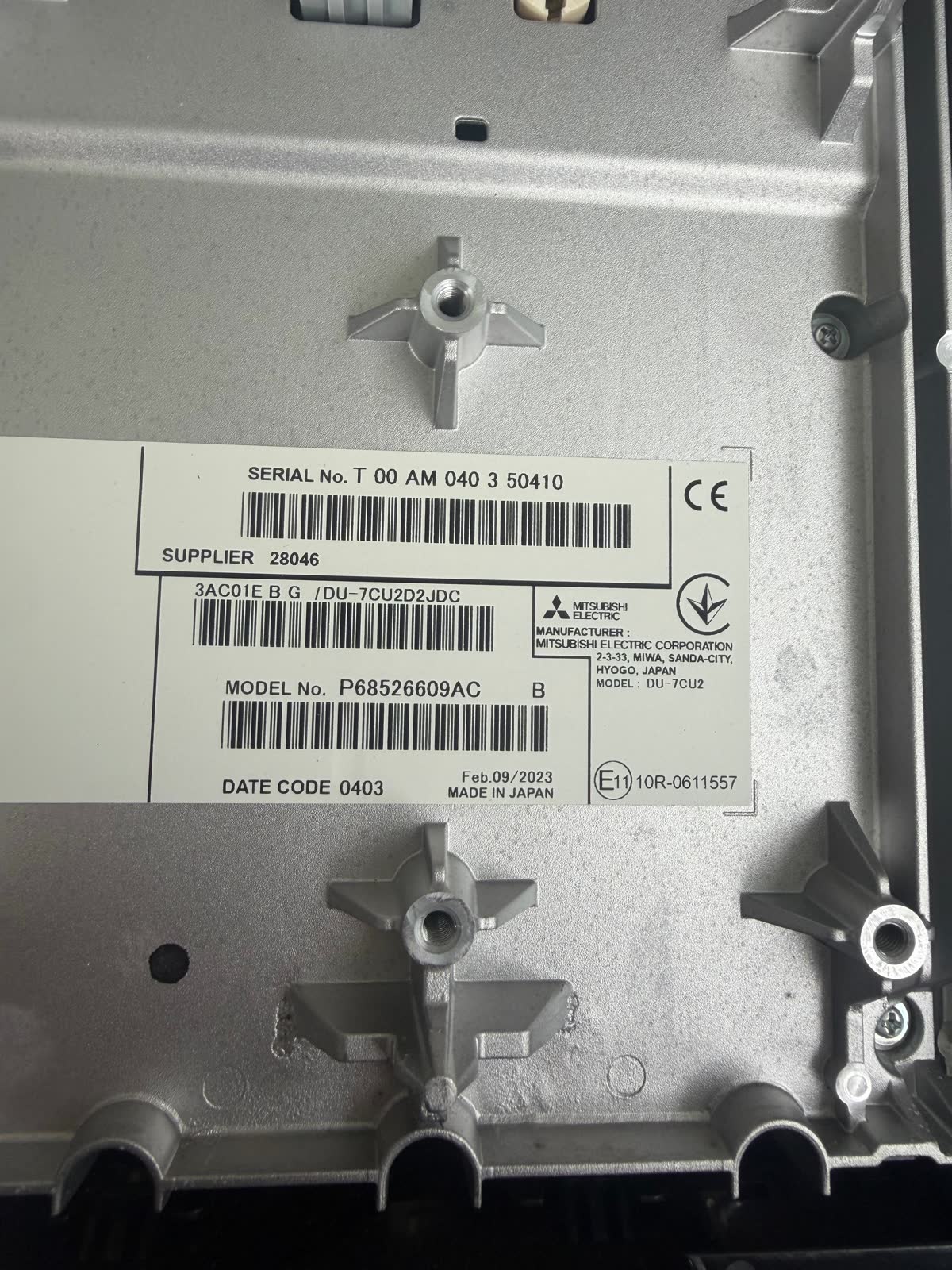
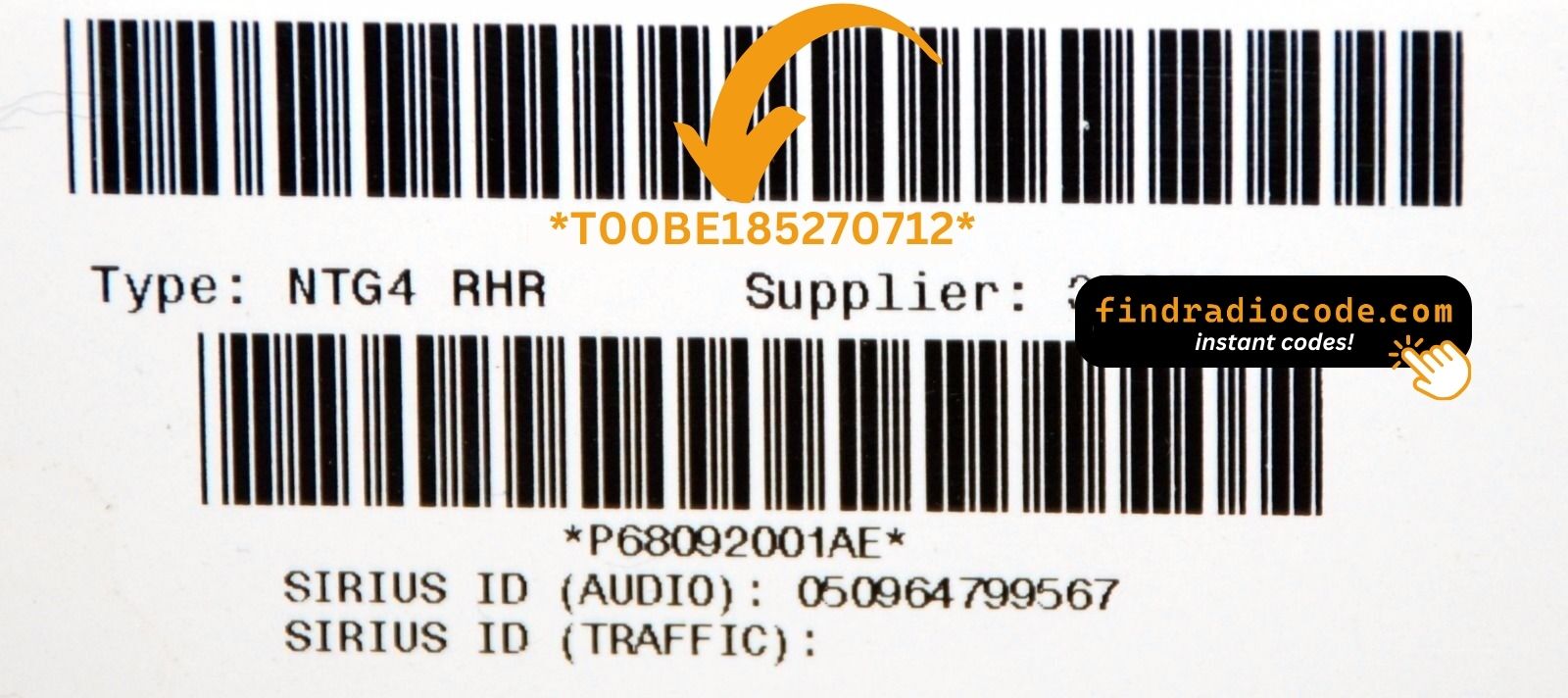
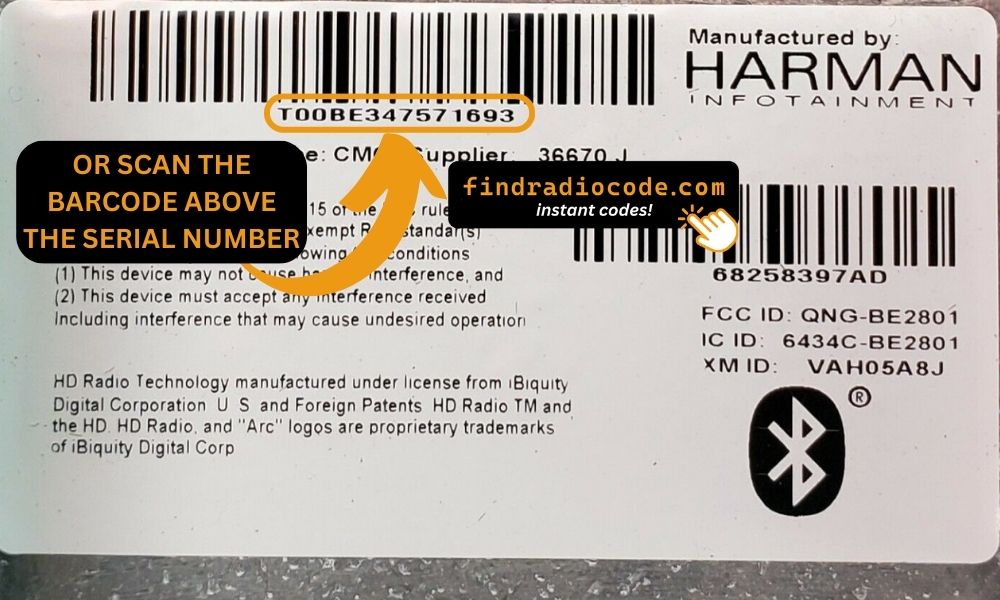
Real labels from these radio families. The serial is the code marked on each photo - not the part number. Tap a photo to see it full size.
What is a Journey Radio Code?
A radio code, sometimes also known as an anti-theft code is a unique numeric unlock key that unlocks your factory radio after it has been locked.
This factory security PIN is triggered when the radio detects a power interruption.
Car manufacturers use this security system to prevent stolen radios from being reused.
If power is interrupted, the radio stops functioning and requires the unlock CODE before it can be used again.
Once the correct numbers is entered, the stereo is restored to normal operation.
Common Dodge Journey Radio Code Problems
Many owners encounter radio code issues on their Journey after battery-related issues.
Below are the most typical situations when this can occur.
Radio Asking for Code After Battery Change
When the battery is disconnected, the Dodge Journey radio locks automatically.
This factory protection system is designed to protect the original head unit by disabling the radio after power loss.
More Situations Causing This Issue
- After an ECU or software reset, the radio may lock.
- Jump-starting the vehicle can reset the radio, requiring the unlock code.
- A blown fuse can cause the Dodge Journey radio to lock.
- Installing a used head unit will require the original radio code.
Free Things to Try
There is a chance your Dodge Journey radio code is written down in your documents.
Before spending money, quickly check the places below - you might be surprised.
Look for it in the Vehicle Itself
- On the radio unit itself, if it was removed before.
- In the spare wheel area, on a radio label.
- Inside the center console, sometimes on a label.
- In your car paperwork from the previous owner.
- In the vehicle handbook, often on a code card.
Getting It from the Dealer
Dealerships can retrieve your radio code by checking the VIN in their system.
They typically require proof of ownership before sharing the security PIN.
This is the official way to restore access to the factory radio.
Drawbacks:
- Dealers frequently bill for the code (sometimes more than 100$).
- Some imported or older radios may not be in their database.
- You may need to contact service support during business hours.
- The lookup is often slower and may require waiting.
Finding the Serial Number on a Journey
The only thing you'll need to find the corresponding code is your radio's serial number. No extra vehicle data is required.
On most Dodge models, you can find it in these common spots:
- Visible on the radio screen (occasionally by using a key combination)
- On the radio housing itself - you'll need to remove the unit slightly and write down the serial number (which is fairly easy)
Search for something like: Serial Number or SN.
1. Getting Journey's S/N on the Infotainment
If you have a 2013–2020 Journey with the Uconnect 8.4" Classic touchscreen, the serial number is accessible on-screen without any tools:
- Turn the ignition to ACC or ON.
- Hold Fan Up + Fan Down + Front Defrost simultaneously for 5 seconds → Dealer Mode opens.
- Select: System Info → Radio Part Info → Serial Number.
Alternate: hold Temp Up + Temp Down for 5 seconds → Engineering Menu → navigate the same path. The serial is a 14-character code, e.g. T00AM1801T0282.
2. Locating the S/N on the Radio Unit
The serial number is usually found on a label attached to the radio casing.
Step 1: Turn off the car.
Step 2: After that, remove the dashboard trim.
Step 3: Then release the mounting clips.
Step 4: Carefully slide the unit out partially (Be careful not to damage the cables).
Step 5: Search for the serial number on the rear of the unit.
Step 6: Write down the full number carefully and come back to our website so that we can generate your code.
Important: Differentiate the Serial Number and the Part Number!
Accessing the Serial Number in Dodge Journey
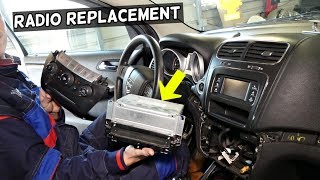
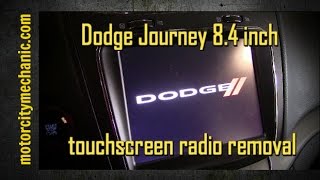
The Journey requires a methodical multi-step process to access the radio unit. The silver accent trim is particularly fragile, so take your time.
Removal Process:
- Remove the silver accent trim strip above the radio—it's held by clips and is fragile. Use only a plastic pry tool to avoid damaging it.
- Remove 2 Phillips screws now exposed behind the trim.
- Remove the climate control panel—secured by clips, pull gently outward.
- Remove the radio unit—4 Phillips screws hold it in place.
Note for 8.4" models: The touchscreen display is a separate unit from the radio module (two-piece architecture). You may need a Torx T15 driver for some components. The serial number is on the radio module, not the display unit.

Example: Dodge Journey serial number label location
Most Common Dodge Journey Serial Number Formats
The radio uses serials starting with T00AM (14 chars), TM9, or A2C (newer Uconnect). The serial label is on the body of the radio unit — not visible without removal on most models.
Now You Have the Code. How Entering Works?
Once you have the Dodge's security code, you can enter it using the infotainment controls.
Most radios display a "CODE", "ENTER CODE", or "----" message when they are locked.
You typically use the preset buttons to input the code.
After entering the full code, the radio will restore normal operation.
After obtaining your unlock code, the entry method depends on your radio type:
Base models (non-touchscreen):
- Turn on the ignition—the radio displays "CODE".
- Use preset buttons 1-4 to set each digit.
- Press and hold ENTER/OK to unlock.
Uconnect 8.4" touchscreen:
The screen will show an on-screen numeric keypad. Tap each digit and confirm.
Lockout Warning: After 3 incorrect attempts, the radio locks for 30 minutes. Keep the ignition ON during the wait period.
Why Choose Our Dodge Journey Radio Code Generator Service?
Our Dodge Journey radio code lookup service retrieves the anti-theft code using the stereo serial.
Compared to dealership VIN lookup, this Dodge Journey radio code generator is more convenient, doesn't require appointments, and costs less.
It's an easy way to restore access to your factory radio without leaving your home.
How They Compare
- Pricing: It often costs 100 - 200 USD, while our service starts from 9.99 USD.
- Availability: Dealers work business hours only, while our service is always available.
- Delivery time: May take hours, while FindRadioCode is almost instant 95% of the time.
- Refund policy: Dealers usually offer no guarantee, while we include a full money-back guarantee.
- In-person visit: Lookup can require a visit, while FindRadioCode works online.
Frequently Asked Questions about Dodge Journey Unlock Code
Free codes are uncommon.
You might find the code in the manual or from a previous owner, but most require a serial number lookup.
Yes. Each factory radio has its own radio code.
A used radio will need its original code to work.
Not all of them require a security code, but many factory radios use it as an security measure.
Certain production series may still use a code depending on the head unit.
Uconnect is the infotainment system developed by Stellantis (formerly Fiat Chrysler Automobiles) and used across Chrysler, Dodge, Jeep, Ram, Fiat, and Alfa Romeo vehicles. Most Uconnect radios feature an anti-theft protection system that activates whenever the radio loses power – for example after a battery replacement, a dead battery, or electrical work.
When triggered, the radio displays "ENTER CODE" and will not function until the correct 4-digit unlock code is entered. The code is linked to the radio's serial number, not the vehicle's VIN, which is why finding the serial number is the first step to unlocking.
Yes, for most vehicles. Uconnect systems from 2013 onwards feature a hidden Dealer Mode (or Engineering Mode) diagnostic menu that displays the serial number right on the display. You can access it by holding specific button combinations – without any tools or removal.
However, some 2020+ models may have had Dealer Mode disabled via software updates. If you cannot access the on-screen menu, the radio must be physically removed to read the serial number label on the unit. See our full Dealer Mode guide for step-by-step instructions with video tutorials.
Not on a Dodge – the VIN does not generate the code. The unlock code is linked to the radio's own serial number, not the vehicle identification number. The same VIN can leave the factory with different radio units, so the VIN alone can't tell us which code your radio needs.
To retrieve your code you first need the serial number – either from the on-screen Dealer Mode menu or from the label on the unit. Once you have that serial, the code is generated right away. Pricing starts from $9.99 per radio.
We cover the full modern Dodge range. That includes the Charger, Challenger, Durango, Journey, Caliber, Avenger, Grand Caravan, and Caravan – any Dodge fitted with a factory Uconnect or preset-button radio that asks for an anti-theft code after a power loss.
Since the code always comes from the radio serial number rather than the model or year, the retrieval works the same way for every one of these. Select your Dodge model to see the exact steps for finding the serial on that dashboard.
The anti-theft lock arms itself whenever the radio loses power – most often after a battery replacement, a flat battery, a jump-start, or electrical work. When it triggers, the screen shows "ENTER CODE" and the radio stays silent until the correct 4-digit code is entered.
To unlock it, you enter the code that matches your radio's serial number. The lock cannot be bypassed by a reset – the radio genuinely needs its own code. Take care entering it: three wrong attempts put the radio into a temporary WAIT lockout, and you then have to leave the ignition ON for the wait to clear before trying again.
We wish we could say yes for every radio. A few older Dodge units used a simple code printed on a glovebox code card, but the modern Uconnect and preset-button radios generate a unique code locked to each unit's serial number, and that has to be calculated – there is no genuine one-click free generator that actually produces a working code for these.
What we do offer is a quick and verified retrieval from your serial number, with pricing that starts from $9.99 per radio. If you already have the code on a dealer receipt or the code card, you do not need us – just enter it straight into the radio.