How to Retrieve a Bosch Radio Code Fast?
Fast, secure, and VIN-free radio code lookup ⚡

Bosch Vehicle Brands Supported:
Quick Answers
A 100% money-back guarantee covers all purchases. Refund verification requires a quick video of the serial number and code attempt. See our Refund Policy for full details.
- Watch our demo video to see in detail how the service works.
- Read verified reviews from real people.
- Explore our comprehensive blog for service verification, video proof, and customer feedback.
You'll receive the code right after payment, both on-screen and via email. Assistance is available anytime, including nights and weekends. Most manually processed requests are completed the same day.
Customer Reviews for Bosch Radio Code Lookup Service
Real reviews from drivers whose factory radios were unlocked through findradiocode.
È stato semplicissimo, c’è anche il video per vedere quale numero devi usare. Dopo aver fatto il pagamento tramite Paypal il codice mi è stato dato immediatamente. Ho provato e ha funzionato. Grazie infinite
Alessandro Quarta - Fiat
TOP Lancia Musa Radio Unblocked in two minutes. Thanks guys!
Artur - Fiat
Thanks so much for this - the code worked perfectly! Before finding your site I used another that charged me twice the price and provided a code that didn’t work.
Luke - Fiat
How can I find the code for my Bosch radio?
If you have not lost the Bosch code yet, check these places first - many vehicles ship with the code written down somewhere in the car.
- Glovebox - Many manufacturers ship a small sticker labelled "Anti-theft unlock code" inside the glovebox door or top panel.
- Owner's manual - Often handwritten on the inside cover or stapled to the page covering the radio.
- Code card - A small slip of paper inside the original purchase pack - sometimes inside the radio sleeve itself.
- Service records - Dealers sometimes write the Bosch radio code into the maintenance log after a battery service.
- Old paperwork - Previous owners often leave the code in the document folder, especially on second-hand cars.
- Dealer paperwork - The original window-sticker pack or sales folder sometimes lists the radio code.
No luck? The next section shows how to retrieve a lost Bosch code without leaving the house.
How to Find the Serial Number on Your Bosch Radio
By Removing the Radio Unit (Most Common Method)
For most factory-installed and aftermarket radios, the serial number is printed on a physical factory tag attached to the back or side of the radio unit casing.
To access it, you'll usually need to slightly pull the stereo out of the console. Depending on the vehicle and radio model, this may require radio removal keys:
- The serial is normally printed near a barcode or QR identification label
- The serial typically contains letters and digits with manufacturer-specific prefixes such as "BP" (Blaupunkt), "M" / "V" (Ford/Visteon), "BE" (Becker), or "CL" (Clarion)
- Do not confuse the serial number with the model or part number
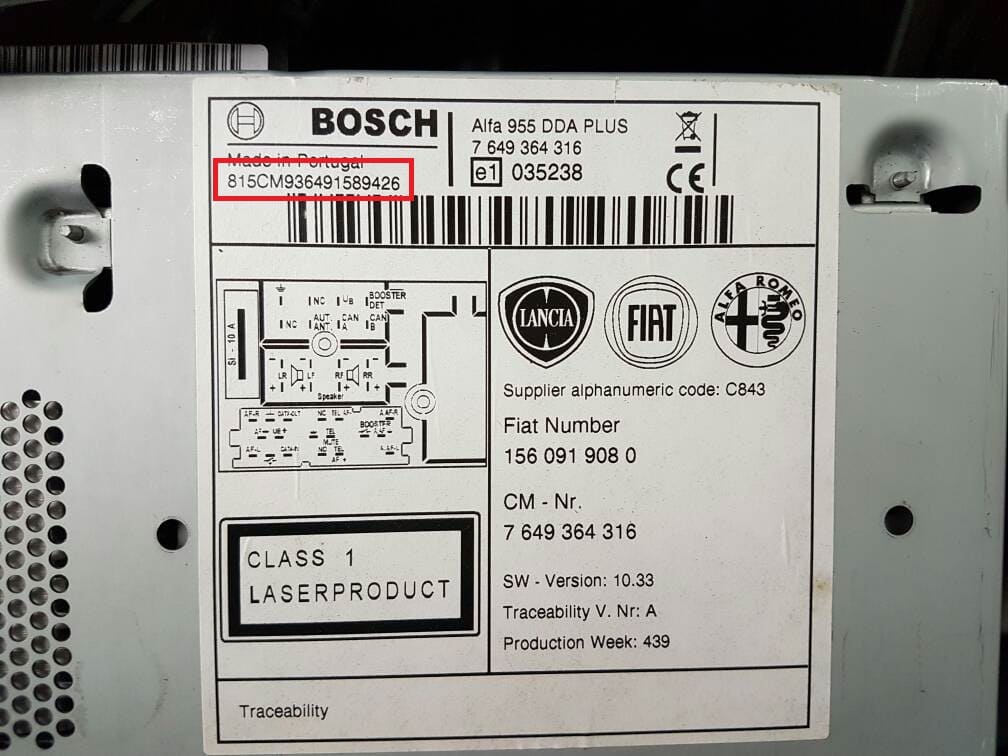
Bosch CM9364 chassis label (Alfa 95 / Fiat / Lancia)
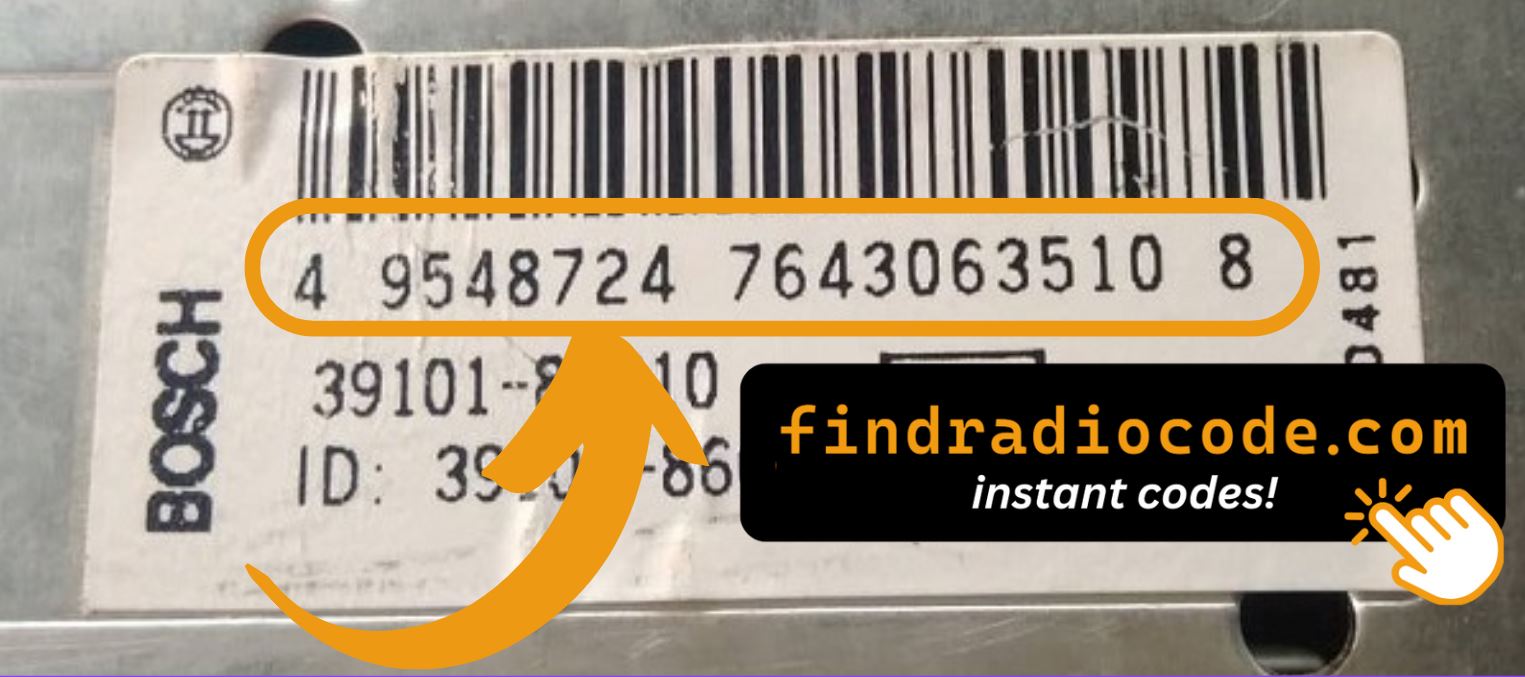
Suzuki Bosch radio - chassis label
On the Radio Screen (No Removal Needed)
Some digital infotainment systems and specific factory units allow the serial number to be displayed directly on-screen using a hidden service menu or a specific button combination.
Bosch-specific: Most older Bosch cassette decks and CD players do not have a service menu - the serial is only visible on the chassis label after removing the radio from the dashboard. Modern Bosch RCM boards and Travelpilot navigation units may show the serial briefly during boot before the CODE prompt loads, but the chassis label remains the most reliable source.
- Try holding preset keys 2 + 6 while switching the radio on
- The serial may briefly appear on the display
- Every manufacturer uses different key sequences
This feature is only available on selected digital and factory-integrated models. If nothing appears after trying the button combinations, you'll need to physically remove the radio and check the metal casing label manually.
About Bosch Radios
Robert Bosch GmbH operates one of the largest automotive electronics divisions in the world, supplying factory radios to Fiat, Alfa Romeo, Lancia, Renault, Suzuki, Subaru and Hyundai. The Bosch radio business covers cassette decks from the 1980s, the Travelpilot navigation generation, and the modern RCM (Radio Control Module) units found in Stellantis EMEA vehicles. Most Bosch serials begin with "CM" (Fiat / Alfa / Lancia chassis) or "BP" on Bosch boards shared with Blaupunkt sister-brand production.
Factory radios produced by Bosch can be found in a wide range of vehicles and infotainment systems.
The same radio family may be used across several vehicle brands, model generations, and regional markets.
One of the easiest ways to recognize a Bosch radio is through its serial number structure and prefix pattern.
The format of the serial number differs between product families and production years.
Depending on the radio family, the serial number may be accessible through a button combination or service screen.
However, many units still require checking the identification label attached to the radio chassis.
To ensure an accurate radio code lookup, always enter the complete serial number exactly as shown.
Radios with the same design may still require different unlock codes if they were produced under different platforms or serial ranges.
Supported Bosch models
Bosch RCM Fiat
CM-prefix Fiat / Alfa / Lancia head units
Bosch Travelpilot
BE-prefix navigation boards
Bosch Renault
Renault factory units, 90s-2000s
Bosch Suzuki
Suzuki Vitara, SX4, Swift radios
Bosch Subaru
Subaru OEM head units
Bosch Hyundai
Hyundai factory radio platforms
Common Car Brands That Use Bosch Radio
Bosch supplies factory radios across multiple manufacturers - especially Stellantis EMEA brands (Fiat, Alfa Romeo, Lancia), Renault, and Japanese OEMs (Suzuki, Subaru, Hyundai). The Bosch / Blaupunkt sister-brand connection means many Alfa Romeo 95-series, Lancia Thesis and Fiat Multipla units use shared BP-prefix serials.
Bosch radios are found in a wide range of vehicles.
Common car brands that may use Bosch radios include:
| Car brand | Radio model coverage | Open |
|---|---|---|

|
112 radio models indexed | Bosch - Fiat |

|
1 radio model indexed | Bosch - Alfa Romeo |

|
1 radio model indexed | Bosch - Renault |

|
21 radio models indexed | Bosch - Lancia |

|
1 radio model indexed | Bosch - Suzuki |
|
|
1 radio model indexed | Bosch - Subaru |

|
6 radio models indexed | Bosch - Hyundai |
The same car brand may use different radio manufacturers across different years and trim levels.
Bosch Serial Number Examples
Different radio manufacturers use different serial number formats.
Below are some common examples found on Bosch radios:
- Prefixes such as "BP," "T00," "M," "V," "CL," or "GM" are commonly used
- Serial formats vary, but they are typically alphanumeric
- Certain digital units show the S/N through a hidden menu
- Classic units often require radio removal to access the serial sticker
Bosch prefix patterns
CM- Bosch Fiat / Alfa Romeo / Lancia head units (e.g. CM9364, CM5251)BP- Bosch-Blaupunkt shared production (Alfa 95-series, Lancia Thesis, Fiat Multipla)BE- Bosch Travelpilot navigation boards
Real Bosch serial examples
CM9364A1234567BP6694X0182634BE2010T9876543
Bosch serials are typically 13-14 characters: 2-letter prefix, 4-digit family code, a separator letter, and a 6-7 digit unique number.
Serial structure can change across regions, production years, and hardware generations. Entering the wrong serial may generate an incorrect code.
How to Enter the Radio Code
After receiving the correct unlock code, the activation process is usually quick and straightforward.
Locked radios typically display messages such as "CODE," "ENTER CODE," "SAFE," or a series of flashing digits.
The Code Input Process Explained:
Depending on your specific Bosch unit interface, use the preset buttons, touchscreen keypad, or numbered controls to input the unlock sequence:
- For radios with a standard 1-6 preset button row: Many classic radios do not let you type numbers directly if the code contains digits higher than 6 (like 7, 8, or 9). Instead, you must press a single preset button repeatedly to cycle through digits. For example, to enter the first digit of your code, press the '1' preset button repeatedly until the correct number appears on screen, then move to preset '2' for the second digit, and so on.
- For touchscreen or full-keypad models: Simply tap the corresponding numbers directly on the display screen or use the full 0-9 physical dial pad to type the sequence.
⚠️ Avoid Repeated Wrong Entry Attempts:
Depending on the manufacturer family, the unit will require a strict waiting period before allowing another entry attempt.
Need help with the specific input method for your model family? Our guides explain the layout steps across different generations.