Sony Radio Code - Instant Unlock
Fast, secure, and VIN-free radio code lookup ⚡

Sony Vehicle Brands Supported:
Quick Answers
Your code is displayed instantly after payment and also sent to your email. Our support operates 24 hours a day, 7 days a week. Manual requests are usually completed within 1 hour and never longer than 24 hours.
A 100% money-back guarantee covers all purchases. A video showing the radio serial and code entry is required for refunds. See our Refund Policy for full details.
- Check our step-by-step demo video to see exactly how the service works.
- Read authentic reviews from our customers.
- Visit our in-depth blog for service verification, video proof, and customer feedback.
How can I find the code for my Sony radio?
If you have not lost the Sony code yet, check these places first - many vehicles ship with the code written down somewhere in the car.
- Glovebox - Many manufacturers ship a small sticker labelled "Anti-theft unlock code" inside the glovebox door or top panel.
- Owner's manual - Often handwritten on the inside cover or stapled to the page covering the radio.
- Code card - A small slip of paper inside the original purchase pack - sometimes inside the radio sleeve itself.
- Service records - Dealers sometimes write the Sony radio code into the maintenance log after a battery service.
- Old paperwork - Previous owners often leave the code in the document folder, especially on second-hand cars.
- Dealer paperwork - The original window-sticker pack or sales folder sometimes lists the radio code.
No luck? The next section shows how to retrieve a lost Sony code without leaving the house.
How to Find the Serial Number on Your Sony Radio
By Removing the Radio Unit (Most Reliable Method)
For most factory-installed and aftermarket radios, the serial number is printed on a physical manufacturer sticker attached to the top, side, or rear of the radio unit casing.
To access it, you'll usually need to carefully remove the radio from the dashboard. Depending on the vehicle and radio model, this may require basic dashboard tools:
- The serial is normally printed near a barcode or QR identification label
- The serial typically contains 8-14 characters
- The lookup system accepts the exact serial string, not the hardware type reference
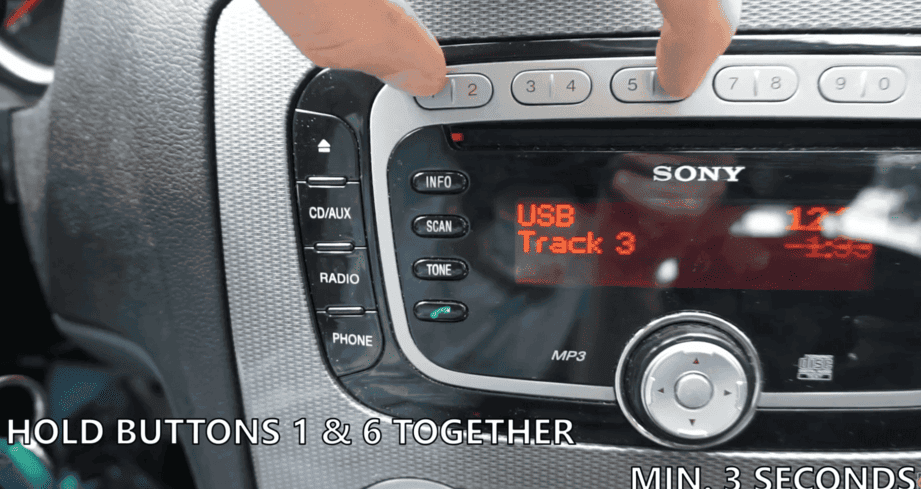
Ford-Sony - hold preset 1 + 6 to display the serial
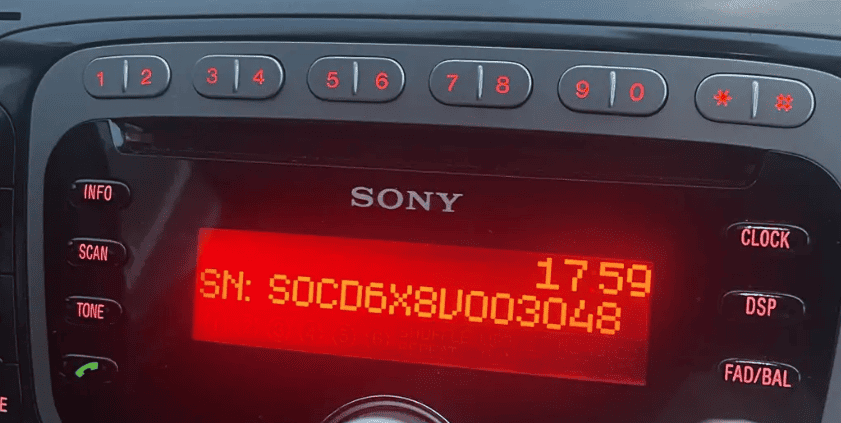
Ford-Sony serial shown on-screen after 1+6 button combo
On the Radio Screen (Without Removing the Unit)
Some touchscreen-based infotainment systems and specific factory units allow the serial number to be displayed directly on-screen using a hidden service menu or a specific button combination.
Sony-specific: Ford-Sony units support on-screen serial retrieval - hold preset buttons 1 + 6 while switching the radio on and the serial appears for 5-10 seconds on the display. If the button combination does not work, fall back to physical removal and read the chassis label.
- Try holding preset keys 2 + 6 while switching the radio on
- A diagnostic screen can reveal the S/N
- Button combinations vary depending on the radio family
Not all units support this digital lookup option.
How to Retrieve a Lost Sony Radio Code
If your anti-theft code is missing, you have a few options.
Find Radio Code - Fast, Reliable and Cheap
The fastest and easiest way to unlock a Sony radio is through our specialized service.
All you need is your radio's unique serial number, which you can find directly on the stereo unit housing, retrieved from the digital display, or located on the factory sticker.
There's no personal ownership data required, and you'll get the code immediately after payment.
Our system works with nearly all radio families manufactured by Sony.
Find Radio Code handles everything automatically, and we offer a no-risk process with refund support.
The 100% easiest and cheapest way to unlock your Sony radio.
Main Dealer Option (Slow & Restricted)
The slower way to retrieve it is by contacting an authorized car dealership or vehicle manufacturer service center.
However, because they lookup codes based on the vehicle, they typically ask for your VIN, official proof of ownership, and car registration documents, along with a photo ID.
The process is frequently inconvenient. Some charge an expensive diagnostic fee, while others offer it for free - but it can take hours, days, or require a physical appointment.
Dealer vs Find Radio Code
| Find Radio Code | Dealer | |
|---|---|---|
| Delivery time | Instant almost always | Same day or several days |
| Availability | Always | Business hours only |
| In person visit? | Never | In some cases |
| Pricing | From $9.99 | $120-$200 |
| Refund | Always | Sometimes |
About Sony Radios
Sony Mobile Electronics supplies Ford with the premium "Sony" branded factory audio system installed in higher trim Focus, Fiesta, Mondeo, Kuga and S-Max models from approximately 2007 onwards. The Ford-Sony units share the Visteon chassis design but use Sony-built head unit boards with the SOC (Sony On-board Computer) module. Serials follow the standard Ford format - typically a "V" or "M" prefix followed by 6-7 digits - and the chassis label is marked "SONY" alongside the Ford logo.
Factory radios produced by Sony can be found in a wide range of vehicles and infotainment systems.
Depending on the production year and vehicle model, these radios may appear under different brand names while sharing the same underlying hardware.
One of the easiest ways to recognize a Sony radio is through its serial number structure and prefix pattern.
Most serial numbers contain a mix of letters and digits and may vary in length depending on the radio generation.
Depending on the radio family, the serial number may be accessible through a button combination or service screen.
For older systems, accessing the label on the radio housing remains the most reliable identification method.
The unlock code is generated from the radio serial number, so every character matters.
Two visually similar radios can use completely different code databases depending on the serial format.
Supported Sony models
Ford-Sony 6000 CD
M-prefix - Focus / Fiesta / Mondeo upgrade trim
Ford-Sony Travelpilot
V-prefix navigation - Mondeo, Kuga, S-Max
Ford-Sony DAB
DAB digital radio variant - 2010+ production
How to Enter the Radio Code
Once your radio code is generated, entering it only takes a few steps.
Locked radios typically display messages such as "CODE," "ENTER CODE," "SAFE," or a series of flashing digits.
How to Type the Security PIN:
Depending on your specific Sony unit interface, use the preset buttons, touchscreen keypad, or numbered controls to select the correct numbers one by one:
- For radios with a standard 1-6 preset button row: Many classic radios do not let you type numbers directly if the code contains digits higher than 6 (like 7, 8, or 9). Instead, you must press a single preset button repeatedly to cycle through digits. Press button 1 multiple times to change the first character, button 2 for the second character, button 3 for the third, and button 4 for the fourth.
- Direct keypad entry method: Simply tap the corresponding numbers directly on the display screen or use the full 0-9 physical dial pad to type the sequence.
⚠️ Avoid Repeated Wrong Entry Attempts:
Some systems lock out input options for 30 to 60 minutes, during which the vehicle ignition and radio power must remain continuously switched ON to let the timer count down.
If you're unsure how to confirm the code or navigate your specific hardware layout, check your original radio manual or contact our support team.
Sony Serial Number Examples
The serial format depends on the radio family and production year.
Below are some common examples found on Sony radios:
- The first characters often identify the radio platform or production series
- The S/N usually contains a mix of letters and numbers
- Newer infotainment systems may reveal the serial without removing the unit
- Many OEM systems place the serial on the top or side of the radio housing
Sony prefix patterns
V- Ford-Sony Travelpilot / DAB V-series (Focus, Mondeo)M- Ford-Sony 6000 CD M-series with Sony SOC boardSOC- Sony On-board Computer marking - paired with the chassis serial
Real Sony serial examples
V067821M045479V123456
Ford-Sony serials follow the standard Ford 6-7 digit format. The "SOC" line on the label is a Sony production marker - submit the chassis serial (V or M prefix), not the SOC line.
The exact format varies depending on the radio manufacturer and vehicle brand. Always enter the full serial exactly as shown on the label or display.
Common Car Brands That Use Sony Radio
Sony supplies Ford premium audio worldwide - Focus, Fiesta, Mondeo, Kuga, S-Max, Galaxy and selected Transit trims from 2007 onwards. The Sony-branded system is the upgrade option above the standard Ford 6000 CD (Visteon-built) and shares the same chassis design but with Sony audio processing boards.
This radio family is used by several car brands.
Common car brands that may use Sony radios include:
| Car brand | Radio model coverage | Open |
|---|---|---|
|
11 radio models indexed | Sony - Ford |
The exact compatibility depends on the radio model, production year, and factory supplier.
Frequently Asked Questions
Unfortunately, the VIN will not work here. The unlock code is generated using only the unique Sony serial number found on the device itself.
This is actually a major advantage:
If your radio was replaced by a previous owner, came from a second-hand car, or was upgraded later, a VIN-based code from a dealer will not work.
Our serial-based generator delivers the exact security PIN for that specific radio unit, regardless of which car it is currently installed in.
A scratched or unreadable barcode label does not mean your radio is permanently locked.
In almost all cases, the manufacturer stamps the primary serial number directly into the side or rear metal frame of the stereo housing.
Look closely at the metal body of the radio - you will find a stamped sequence (such as a prefix followed by a series of digits) that matches the format of your unit.
A countdown timer or a locked message indicates that the wrong radio PIN was entered too many times.
Depending on the exact Sony model, the solution varies.
Temporary Lockout: Keep the stereo powered on for about an hour without touching any buttons. The countdown timer will reset, and the screen will automatically allow you to enter the correct code again.
Permanent Lockout Status: Some units, especially Ford/Visteon or Sony-made systems, lock permanently after 10 or 13 failed attempts. Holding specific key combinations might grant one last entry chance. However, if it shows "LOCKED 13", the radio is fully locked and may require professional hardware service.
Yes. Our database is designed to handle both factory-installed (OEM) units and standalone aftermarket stereos made by Sony.
As long as the radio uses a standard factory anti-theft security system and has a valid, recognizable serial number sequence, our generator can find the matching unlock PIN.
If our lookup form does not recognize your entry, it is usually due to a slight typo or confusing specific characters.
To fix this, check the following common issues:
- Confusing Letters and Numbers: Make sure you aren't swapping the letter "O" with the number "0", or the letter "I" with the number "1".
- Entering the Part Number: Our system strictly rejects part numbers or hardware codes. Make sure the sequence you enter is the unique serial identifier.
- Incorrect formatting: Type the entire serial number as a single continuous string of text without adding spaces, hyphens, or special punctuation marks.