Sanyo Radio Code - Instant Unlock
Instant radio code retrieval for supported Sanyo units ⚡

Sanyo Vehicle Brands Supported:
Quick Answers
A 100% money-back guarantee covers all purchases. A video showing the radio serial and code entry is required for refunds. See our Refund Policy for full details.
Enter the radio serial number and your email and the system will generate the code.
- View our demonstration video to see fully how the service works.
- Read authentic reviews from real people.
- Explore our comprehensive blog for service verification, video proof, and customer feedback.
Radio code is delivered immediately after payment on-screen and via email. We're available 24/7, day and night. Most manually processed requests are completed the same day.
How can I find the code for my Sanyo radio?
If you have not lost the Sanyo code yet, check these places first - many vehicles ship with the code written down somewhere in the car.
- Glovebox - Many manufacturers ship a small sticker labelled "Anti-theft unlock code" inside the glovebox door or top panel.
- Owner's manual - Often handwritten on the inside cover or stapled to the page covering the radio.
- Code card - A small slip of paper inside the original purchase pack - sometimes inside the radio sleeve itself.
- Service records - Dealers sometimes write the Sanyo radio code into the maintenance log after a battery service.
- Old paperwork - Previous owners often leave the code in the document folder, especially on second-hand cars.
- Dealer paperwork - The original window-sticker pack or sales folder sometimes lists the radio code.
No luck? The next section shows how to retrieve a lost Sanyo code without leaving the house.
How to Find the Serial Number on Your Sanyo Radio
By Removing the Radio Unit (Most Common Method)
For most factory-installed and aftermarket radios, the serial number is printed on a physical factory tag attached to the back or side of the radio unit casing.
To access it, you'll usually need to slightly pull the stereo out of the console. Depending on the vehicle and radio model, this may require plastic trim tools:
- Most units have a manufacturer identification sticker on the metal shell
- The serial typically contains 8-14 characters
- Do not confuse the serial number with the model or part number
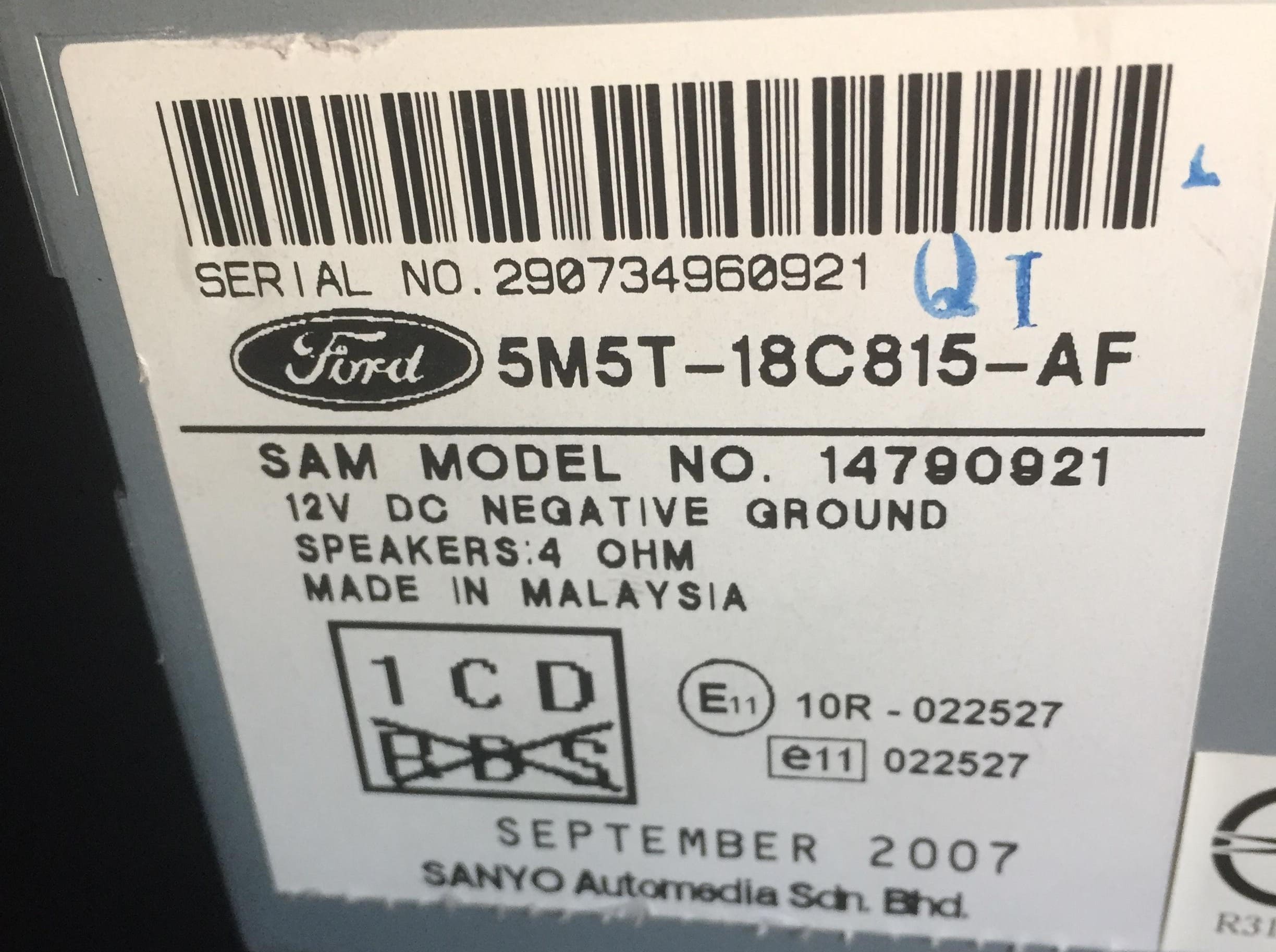
Ford Sanyo (and Sanyo-Panasonic) - 12-digit chassis label
On the Radio Display (Display Method)
Some digital infotainment systems and specific factory units allow the serial number to be displayed directly on-screen using a hidden service menu or a specific button combination.
Sanyo-specific: Sanyo Ford units do not have an on-screen service menu - the serial is only visible on the chassis label after physically removing the radio from the dashboard. The label is marked "Sanyo" or "Sanyo-Panasonic" alongside the Ford logo and shows the 12-digit numeric serial.
- Try holding preset keys 2 + 6 while switching the radio on
- Some radios show the serial before the "CODE" screen loads
- Button combinations vary depending on the radio family
Not all units support this digital lookup option.
How to Enter the Anti-Theft Code
After receiving the correct unlock code, the activation process is usually quick and straightforward.
Locked radios typically display messages such as "CODE," "ENTER CODE," "SAFE," or a series of flashing digits.
The Code Input Process Explained:
Depending on your specific Sanyo unit interface, use the preset buttons, touchscreen keypad, or numbered controls to input the unlock sequence:
- Standard button entry method (No direct number keys): If your unlock code contains numbers like 8 or 0, you use presets 1 to 4 to dial them in. Press button 1 multiple times to change the first character, button 2 for the second character, button 3 for the third, and button 4 for the fourth.
- Direct keypad entry method: Simply tap the corresponding numbers directly on the display screen or use the full 0-9 physical dial pad to type the sequence.
⚠️ Avoid Repeated Wrong Entry Attempts:
Many radios enter a SAFE, WAIT, or temporary lockout mode after 3 to 10 incorrect attempts.
If the radio display remains locked or frozen after entering the code, we can help troubleshoot the issue layout safely.
About Sanyo Radios
Sanyo Electric was a major Japanese factory-radio OEM that supplied Ford with EMEA and Brazil head units before its 2010 acquisition by Panasonic. Sanyo-built Ford radios use a distinctive 12-digit numeric serial (no letter prefix) and the chassis label often shows both "Sanyo" and "Panasonic" markings as production migrated post-acquisition. Most Sanyo Ford units in service today are 2003-2012 production - Focus, Mondeo, Galaxy and selected Fiesta variants in EMEA, plus Brazil-market Ka and EcoSport.
Factory radios produced by Sanyo can be found in a wide range of vehicles and infotainment systems.
The same radio family may be used across several vehicle brands, model generations, and regional markets.
One of the easiest ways to recognize a Sanyo radio is through its serial number structure and prefix pattern.
Serial structures are not universal and can change across different radio platforms manufactured by Sanyo.
Certain models include a diagnostic menu that can reveal the serial number without removing the unit.
In most cases, the serial number can be found on a sticker located on the top, side, or rear of the radio.
The unlock code is generated from the radio serial number, so every character matters.
Two visually similar radios can use completely different code databases depending on the serial format.
Supported Sanyo models
Ford Focus Sanyo
12-digit serial - 2003-2012 EMEA production
Ford Mondeo Sanyo
12-digit serial - Mondeo Mk3 / Mk4
Ford Galaxy Sanyo
Galaxy Mk3 - 12-digit serial
Ford Fiesta Sanyo
Selected Fiesta EMEA variants
Ford Ka Brazil
Brazilian Ka production
Ford EcoSport Brazil
Brazilian EcoSport factory radio
How Our Sanyo Radio Code Service Works
We've streamlined the process to make radio code retrieval quick and hassle-free.
From Serial Number to Unlock Code
Using our Sanyo radio code generator is straightforward.
Enter your radio's unique serial identifier, and our system searches for the matching unlock code associated with that unit.
There's no requirement to provide your VIN, and most lookups are completed automatically.
Our database supports thousands of factory-installed radios from multiple manufacturers, helping ensure accurate and reliable results.
How Fast Is Delivery?
- You'll usually receive your code immediately
- Your code is displayed on-screen and sent by email
- Rare radio models may require a manual lookup
- Most manual requests are resolved the same day
Reliable, Secure, and Backed by a Guarantee
Thousands of drivers have successfully recovered access to their factory radios using our online unlock platform.
We only require the radio serial number. The system is built to deliver codes quickly and accurately.
Sanyo Serial Number Examples
Different radio manufacturers use different serial number formats.
Below are some common examples found on Sanyo radios:
- The first characters often identify the radio platform or production series
- Most serial numbers are between 8 and 14 characters long
- Newer infotainment systems may reveal the serial without removing the unit
- Older factory radios usually store the serial on a label attached to the chassis
Sanyo prefix patterns
FORD:- Required prefix when submitting on findradiocode for 12-digit Ford-Sanyo serials12-digit numeric- Sanyo Ford serial structure - no letter prefix on the chassis label
Real Sanyo serial examples
FORD:123456789012FORD:987654321098FORD:045621987345
Sanyo Ford serials are exactly 12 numeric digits with no letter prefix. The "FORD:" prefix is required when submitting on findradiocode to route to the Sanyo / Panasonic algorithm dispatcher.
Serial structure can change across regions, production years, and hardware generations. Entering the wrong serial may generate an incorrect code.
The Difference Between the Serial Number and Part Number
The Serial Number (S/N):
- This is the radio-specific identification number
- It's used to generate the correct unlock code
- Usually located next to a barcode
The Part Number (P/N):
- This identifies the manufacturer product type
- It's used for repairs, replacements, and inventory, but not for generating the unlock code
- Part numbers are often longer and more generic
Common Car Brands That Use Sanyo Radio
Sanyo shipped Ford EMEA and Brazil head units before the Panasonic acquisition in 2010. The platform covers Ford Focus, Mondeo, Galaxy, Fiesta (EMEA) and Ka / EcoSport (Brazil). Post-2010 production shifted to Panasonic branding on the same 12-digit chassis design - look for "Sanyo-Panasonic" on the label as a transition marker.
Sanyo radios are found in a wide range of vehicles.
Common car brands that may use Sanyo radios include:
| Car brand | Radio model coverage | Open |
|---|---|---|
|
2 radio models indexed | Sanyo - Ford |
The same car brand may use different radio manufacturers across different years and trim levels.