Jt
Verified
Great experience.
Instant Code Generation⚡

The code generator covers most Hyundai radios.
If the serial number matches our database, the unlock code is generated instantly.
1. See the full process in our demo video showing how the code is retrieved.
2. Explore authentic reviews from real people.
3. Our blog includes in-depth examples, full guides and videos.
You're protected - if the code fails, you are eligible for a 100% refund.
Refund requests require a short video showing the code attempt and the radio serial number.
You can find all conditions in the Refund section.
After checkout, the unlock code is displayed immediately and delivered to your inbox for backup.
24/7 support is available.
If your request cannot be processed instantly (only in rare cases), we'll let you know before purchase.
In that case the code typically arrives within 1 hour, with a maximum wait of 24 hours.
Our lookup system works with the radio serial number, so the VIN is not required.
Enter the radio serial number and your email and the system will generate the code.
Great experience.
I was skeptical as the Youtube video did not have any reviews but whats 20 bucks when you want to get your radio back working in your 2014 ram.. Code popped up within less than a minute and I sat the next hour in my truck messing with the radio and all my settings .. I went back to stock from aftermarket and radio was not having it. Thanks guys will for sure use the service again if ever theres a time I need it .
Code is working you guys are fast with helping
A missing PIN can be retrieved through a few different options:
The slower way to get the radio code is by contacting a Hyundai dealer, manufacturer, or authorized service center.
They usually ask for your VIN, proof of ownership, and vehicle documentation.
In some cases, additional verification such as a registration certificate may also be required.
The process is usually slow. Depending on the each dealer and availability of records, retrieving it may take several hours or even a few days.
Some dealers provide the code for free, while others charge a fee - which can sometimes be quite expensive.
Instead of visiting a dealership, you can retrieve your Hyundai radio code very fast using our system.
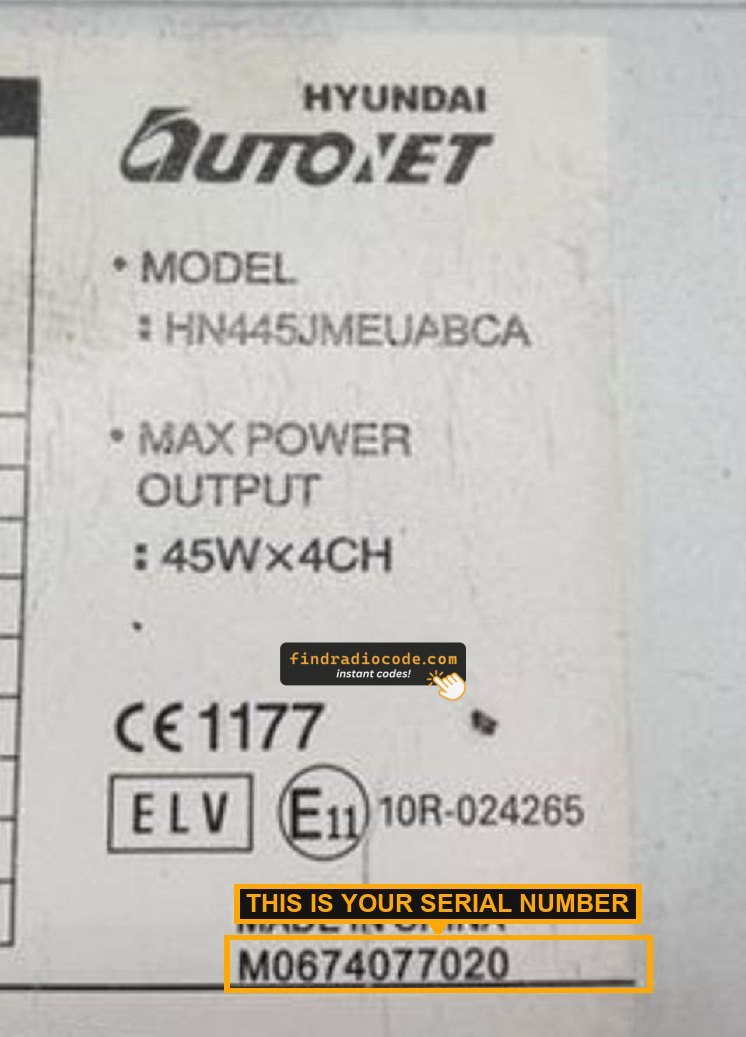
All you need is the radio's serial number, which you can find on the sticker, the unit or the display.
There's zero paperwork involved. Once the payment is done, your PIN code is displayed instantly and sent to your email.
The database includes thousands of supported Hyundai radio units.
Find Radio Code handles everything securely. If the code doesn't work, you're protected by a 100% refund.
The serial number identifies your specific Hyundai radio and allows the system to calculate the correct code.
Most Hyundai radio labels print the serial as a barcode too. Our free barcode scanner reads it from a photo so no character is misread.
Every Hyundai radio code is generated from the serial number printed on the unit itself. Whatever is on your label, the simplest way to enter it is to put HYUNDAI: in front of it - that prefix works for every supported Hyundai unit.
The short answer: type HYUNDAI: followed by the serial from your label.
Examples: HYUNDAI:MP01060807 · HYUNDAI:M0674077020 · HYUNDAI:UAU9404233S · HYUNDAI:1234
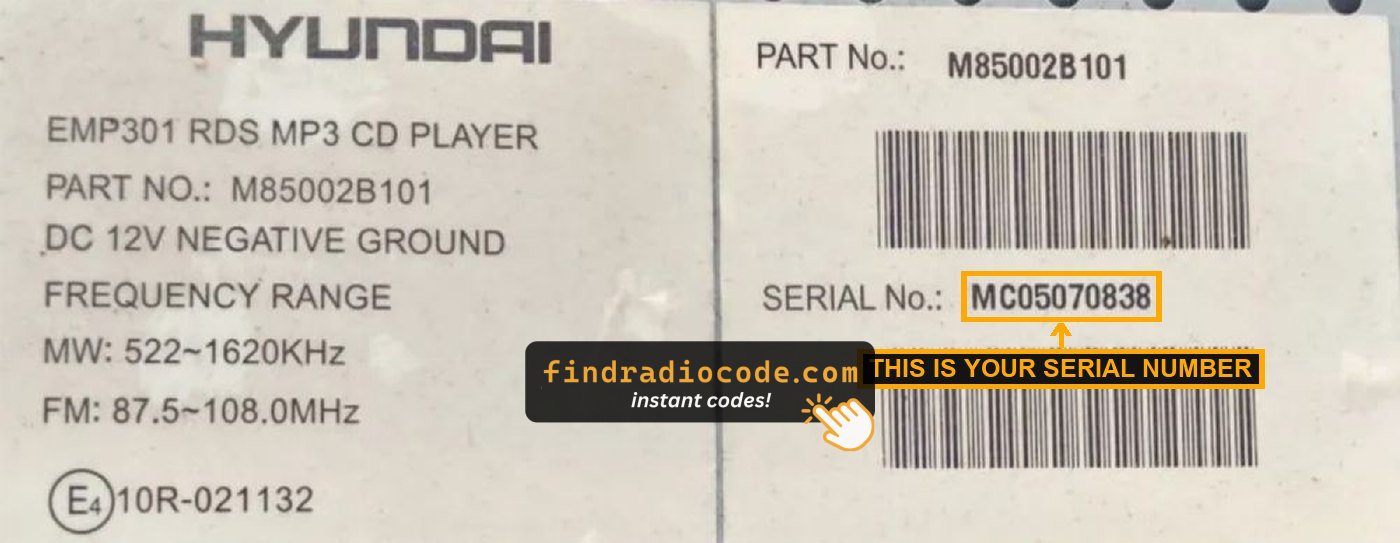

i30 (2012-2014) - release keys and trim

Tucson - trim panel and unit removal
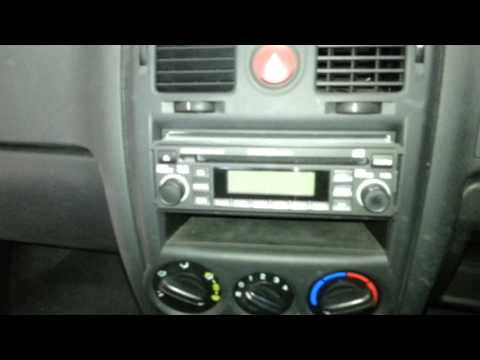
Getz - fascia off, radio slides out
Other models follow the same pattern: trim off, four screws or clips, slide the unit forward far enough to read the label on top. Nothing needs unplugging.
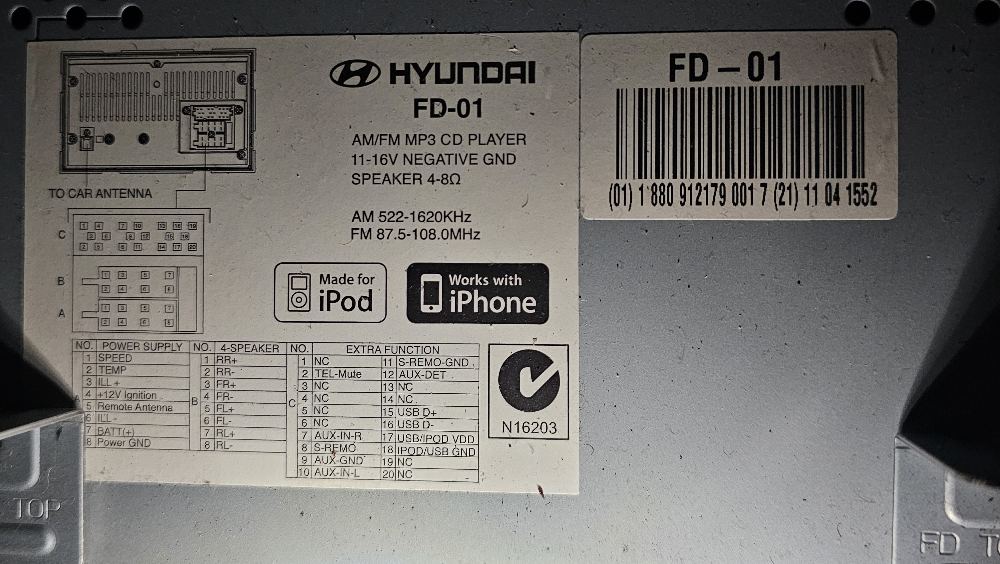
(01) 1 880 912179 001 7
part number - ignore
(21) 06 12 4122
serial - use the last 4
HYUNDAI:4122
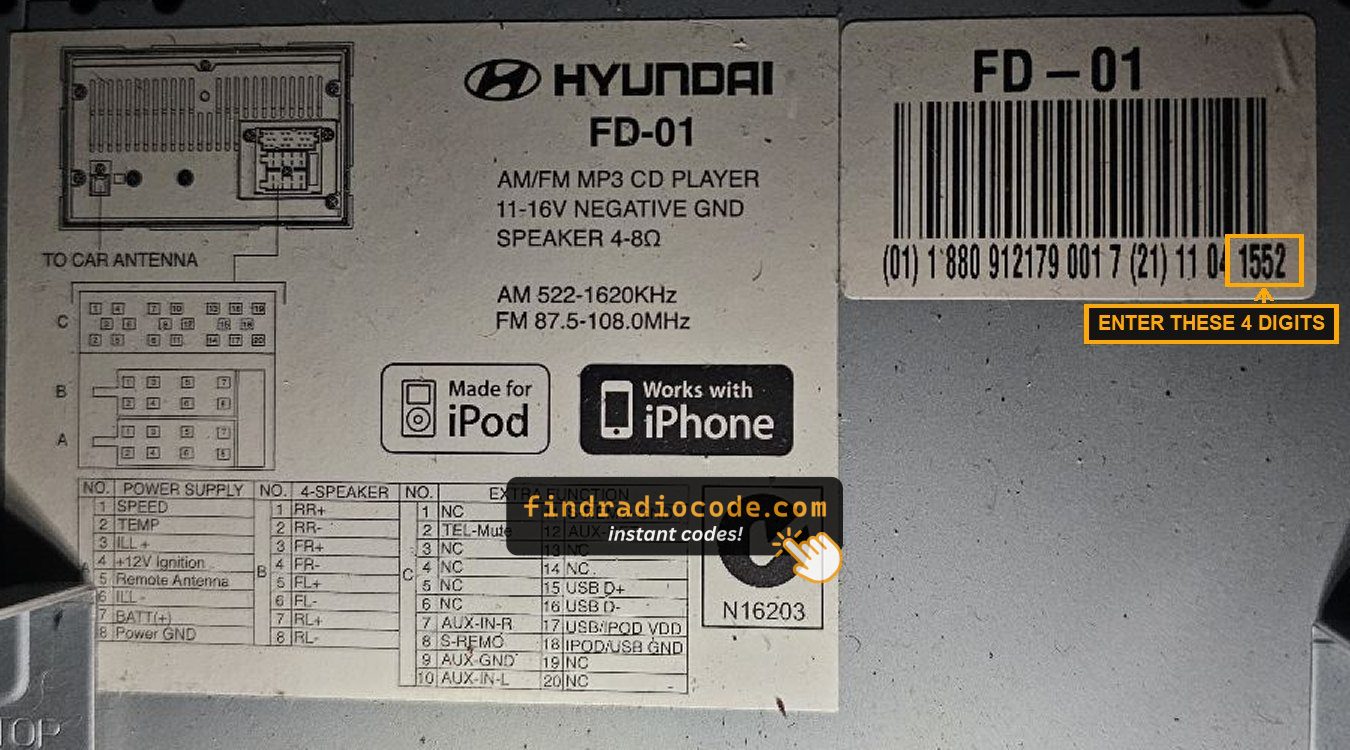
The same label in the flesh - only the marked digits are needed.
The (01) section is identical on every FD-01 and MP3 unit, so it can never identify your radio. Your own last 4 digits will differ - they are unique to your radio.
Some Hyundai MP3 units do show the serial on screen - hold the preset buttons as described in your manual and the number appears in the display. Take the last 4 digits from it and enter them as HYUNDAI:1234.
EMP3 and Autonet units do not show the serial on screen. Those radios have to be slid out of the dash with the correct release keys so the label on the top of the case can be read - the trim usually comes off without disconnecting anything.
After retrieving the unlock code, the input process is quick.
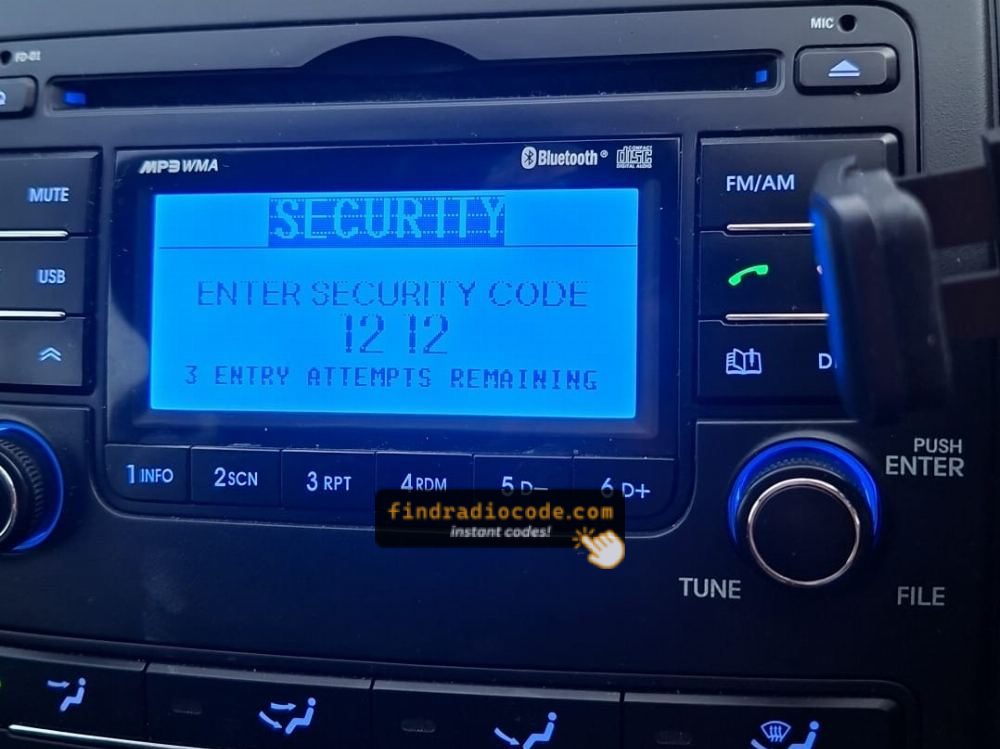
The unit typically shows four dashes on startup.
Use the radio keys to select the numbers.
Some models auto-confirm on final digit - like pressing OK, Enter, or 5 to confirm or holding preset key, Seek or Tune.
Too many wrong attempts may lock the radio.
Too many incorrect tries the radio may temporarily disable input.
Lockout time varies by brand, from a few minutes to several hours.
If you're unsure about the entry method, check the manual or our guides.
We've made it easy to retrieve your code in just a few steps.
Using our lookup tool is straightforward.
Submit the radio's serial number, and the system connects it to the security PIN.
There's no paperwork involved, and the entire lookup is automatic.
Our code engine includes thousands of factory radios, allowing reliable delivery.
We've helped thousands of drivers unlock their factory radios with a verified track record.
No VIN necessary, no sensitive information required - just the radio's serial number.
Our radio database is designed for fast and secure processing.
If the code doesn't work, you're covered.
Simply send a video proof showing the code attempt and the serial number, and you'll get back a full refund - no questions asked.
Visit the Refund Policy page for detailed info.
Many built-in vehicle radios will ask for a PIN code after a power interruption.
This happens because the radio includes an built-in protection feature designed to discourage stolen units.
When power is restored, the unit enters CODE mode before normal operation resumes.
The required code is a few digit code that restores normal operation.
Yes. Hyundai factory radios lock themselves after the battery is disconnected, the car is jump started, or the unit is moved to another vehicle. The display shows a code prompt and the radio stays silent until the correct 4-digit code is entered on the preset buttons.
The code is tied permanently to the radio's own serial number, not to the VIN and not to the car. That is why a replacement or second-hand Hyundai radio needs its own code rather than the one from the unit it replaced. We cover the Hyundai EMP3, Autonet and MP3 units, and the code is delivered instantly after payment.
Start by inspecting the user guide. The code is often found on a label or written directly on a page.
You can also search the glovebox or trunk, where dealers or previous owners may have stuck a sticker with the code. Some also search for it behind trim pieces or inside the fuse box.
If you have the original radio code card, that's the simplest place to find the code - it usually includes both the serial number and unlock key.
There are a few options - but they don't always work.
Typical Hyundai radio codes cost $19.99 - a one-time fee with no extra fees, and the exact price for your serial number is shown at checkout. Compared with dealer prices that run much higher, our online service delivers the code instantly after payment, and it's backed by a full money-back guarantee if it does not work.
Need the exact price for another radio? See the full pricing page.
The maker on the radio label tells you which guide you need. Below are the radio makers we support for Hyundai, with the number of units behind each.

Entering the code with presets 1 to 4
There is no keypad. Each preset button steps its own digit up by one: button 1 sets the first digit, 2 the second, and so on to 4.
Check all four digits before you confirm - a wrong entry starts the lockout timer and costs you about an hour.
Our Hyundai radio code guide walks through the EMP3, Autonet and MP3 labels, how to read the GS1 barcode on FD-01 units, and how to clear the WAIT lockout if a wrong code has been tried.
Check the part number on the radio label against the list below. If your unit is here, the code is generated instantly from its serial number.
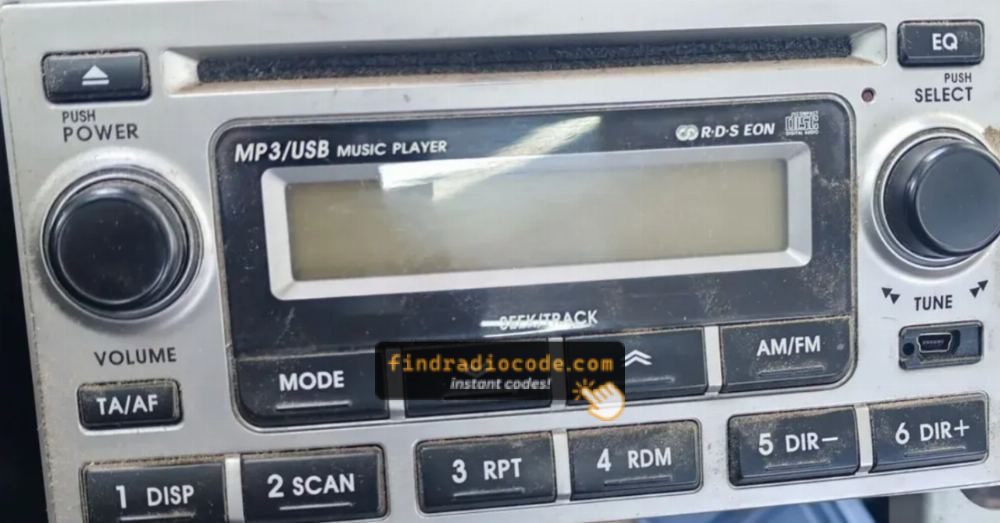
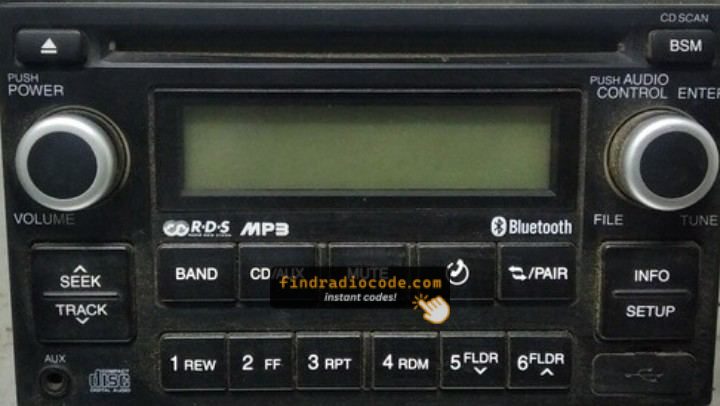
| Radio Model | Part Number | Serial Format |
|---|---|---|
| EMP300 RDS MP3 CD | M85002B100 |
MP0 + 7 digits |
| EMP301 RDS MP3 CD | M85002B101 |
MP0 + 7 digits |
| EMP301 RDS MP3 CD | M85002B200 |
MP0 + 7 digits |
| EMP302 RDS MP3 CD | M85002B200BT |
MP0 + 7 digits |
| EMP310B RDS MP3 CD | M85003D101 |
MP0 + 7 digits |
| EMP310G RDS MP3 CD | M85003D102 |
MP0 + 7 digits |
| EMP310K RDS MP3 CD | M85003D103 |
MP0 + 7 digits |
| EMP311K RDS MP3 CD | M85003K230 |
MP0 + 7 digits |
| EMP320 RDS MP3 CD | M85002E200 |
MP0 + 7 digits |
| EMP322 RDS MP3 CD | M85002E200BT |
MP0 + 7 digits |
| EMP350 RDS MP3 CD | M85001C106 |
MP0 + 7 digits |
| B458 RDS MP3 CD | M85004H107BT |
MP0 + 7 digits |
| MP3-03A | (01) 1 880 912179 001 7 |
Last 4 digits of (21) - HYUNDAI: |
| MP3-03G | (01) 1 880 912179 001 7 |
Last 4 digits of (21) - HYUNDAI: |
| MP3-05G | (01) 1 880 912179 001 7 |
Last 4 digits of (21) - HYUNDAI: |
| MP3-05TU | (01) 1 880 912179 001 7 |
Last 4 digits of (21) - HYUNDAI: |
| MP3-36TU | (01) 1 880 912179 001 7 |
Last 4 digits of (21) - HYUNDAI: |
| FD-01 | (01) 1 880 912179 001 7 |
Last 4 digits of (21) - HYUNDAI: |
| Autonet HN445 | HN445 / HN445JMEUABCA |
M0 + 9 digits, or the HN445 model number |
| Autonet (label serial) | UAU / G7U / UBTE / FSV / CXNB |
Full label serial - e.g. UAU9404233S |
(01) 1 880 912179 001 7, so it cannot identify your radio. The code is generated from the serial number - enter that in the form at the top of the page.
These Hyundai models are commonly fitted with the EMP3, Autonet and MP3 units we decode. If your car is not listed, enter the serial anyway - the unit is what matters, not the model.
Hatchback
Hyundai i10, i20, i30, Getz and Accent radio code - EMP3 and MP3 units, code read from the radio serial number.
SUV & Crossover
Hyundai Tucson, Santa Fe, Kona and ix35 radio code - EMP3 and Autonet units, unlocked instantly from the serial.
Saloon & Estate
Hyundai Elantra, Sonata, i40 and Matrix radio code - EMP3 and MP3 units, no VIN required.