Radio Code - Quick Explanation
The security code is a built-in numeric code that protects your car audio from theft.
It is stored within the radio at the factory and activates automatically whenever the unit is disconnected.
If the correct code is not entered, the radio stays locked and produces no sound.
Entering the code tells the radio that the owner is present, restoring normal operation immediately.
When the Hyundai Stereo May Lock
Your radio may request a security code when it loses power.
These are the some typical scenarios that activate the radio code prompt.
Radio Asking for Code After Battery Change
When the battery is removed, the Hyundai Matrix radio requests a security code.
This factory protection system is designed to protect the original head unit by disabling the radio after electrical reset.
Other Situations
- Replacing the head unit with a used one requires the code for that specific unit.
- A fuse replacement can interrupt the radio and prompt for a code.
- Software updates may reset the radio memory on some Hyundai Matrix units.
- Even a quick battery boost can wake the anti-theft system.
Free Options First
There is a chance your Hyundai Matrix radio code is already somewhere in your car.
Before using a paid service, take a few minutes check the places below - you might be surprised.
Check the Owner's Manual
- Near the trunk lining, where some manufacturers place radio labels.
- In the radio manual, often on a separate page.
- In the vehicle documentation provided with the car.
- On a label in the door pillar.
- On the back of the radio if the unit was previously removed.
Can You Get a Hyundai Matrix Radio Code from the Dealership?
A Hyundai dealer can usually retrieve the security code using your Matrix's VIN.
In most cases, you need to contact the service department or visit the dealership and prove ownership.
Once verified, they can generate the original unlock code for your radio.
Possible Drawbacks:
- You usually need to book an appointment and bring vehicle paperwork.
- The process can take hours depending on the model and database.
- Some older Hyundai Matrix radios may not be supported.
- Dealers often charge a fee for the lookup service and it can cost more than 100$.
Searching for the Serial Number on a Matrix
The only thing you'll need to retrieve the unlock code is your radio's radio serial. VIN or other details are not required.
On most Hyundai vehicles, you can find it in one of these places:
- Visible on the radio screen (in some cases by using specific button presses)
- On the radio unit itself - you'll need to pull it out and write down your serial (which is fairly easy)
Search for text similar to: Serial Number or SN.
1. Viewing Matrix's S/N on the Display
Hyundai Matrix radio does not display the serial number on the screen.
Unfortunately, the unit must then be physically removed to find the serial on a manufacturer label on the radio casing.
2. How to Find the S/N on the Radio Sticker
To find the serial number, you'll need to take out the radio unit from the dashboard.
- Start by turning off the vehicle and removing the trim panel.
- Next, unscrew the mounting bolts and pull the unit forward to check the sticker on the back of the radio. Be careful not to damage the cables.
- Write down full serial number carefully and come back to our website.
- Know that serial number and part number are not the same. You will find both on the sticker, but you only need for the serial.
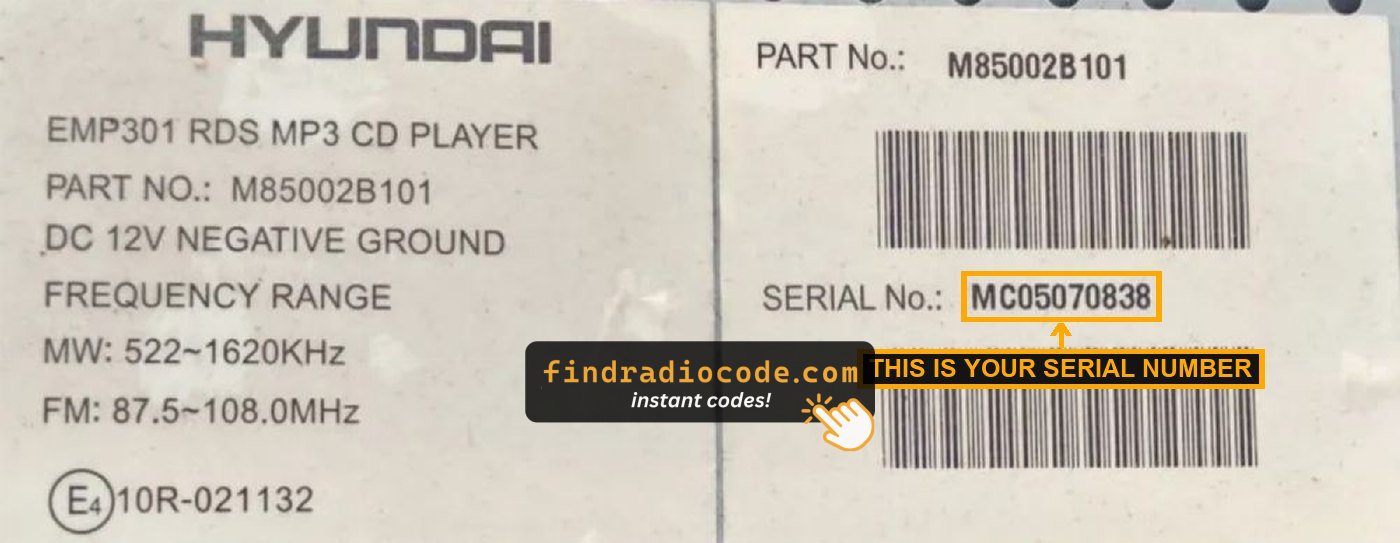
Example: Hyundai Matrix serial number label location
Usual Serial Letters and Numbers on Hyundai Matrix Factory Units
Your Hyundai Matrix radio serial number may start with:
FD-01MP0
Entering the Radio Code on Hyundai Matrix
You need to input the code into the system to unlock your Hyundai's radio.
When the unit is locked, the screen usually shows a code prompt.
Based on the radio, use radio presets, control knob, or touchscreen to set each digit, then submit the code to reactivate the audio system.
If you make a mistake multiple times, you may cause the Matrix's head unit to block further attempts.
When this happens, your screen can display messages like "CODE ERR", "ERROR", or a blank screen.
To unlock the system, you usually need to leave the radio powered for a shown waiting period or up to an hour before trying again.
What Are the Benefits of Our Hyundai Matrix Code Lookup Service?
Our Hyundai Matrix radio code lookup is designed to save time.
Unlike traditional dealer lookup, this method doesn't require VIN and can be done online in minutes.
It's a more convenient and cheaper alternative for drivers who need their radio unlocked quickly.
The Dealer vs FindRadioCode
- In-person visit: Lookup can require an appointment, while FindRadioCode works online.
- Pricing: It often costs 100 - 200 USD, while our service starts from 9.99$.
- Refund policy: Dealers usually offer no guarantee, while we include a full money-back guarantee.
- Availability: Dealers work Mon - Fri, while our service is always available.
- Delivery time: May take days, while FindRadioCode is almost instant 95% of the time.