Hyundai i30's Most Common Anti-Theft Code Causes
Many drivers encounter radio code issues on their i30 after power loss.
Below are the most frequent situations when this can happen.
After a Battery Work
After a battery replacement, your radio may show a CODE message.
This happens because the radio detects a power reset, which activates the anti-theft system.
Other Situations That May Trigger the Code
- After a jump-start, the radio may reset and request a radio code.
- If a fuse is pulled, the radio can enter anti-theft mode.
- After a software update, electrical repair, or an ECU reset, some Hyundai i30 radios display a CODE message.
- When the head unit is replaced, it usually requires the original code.
Try These First
Want free Hyundai i30 Radio Code? Actually, you may already have it.
In some cases, the code may already be available in the vehicle itself or in the documentation.
Checking these sources can save you time and money before using an online lookup tool.
Below are the simplest places to look.
Look for it in the Car Itself
- In your car paperwork from the previous owner.
- On the head unit itself, if it was serviced earlier.
- In the radio manual, often on a code card.
- In the boot compartment, on a service sticker.
- Inside the center console, sometimes on a label.
Can the Dealer Help?
Dealerships can generate your radio code by checking the vehicle records in their system.
They typically ask for registration and ID before sharing the security PIN.
This is the official way to restore access to the factory radio.
Downsides:
- Dealers frequently charge a service fee (It may cost more than 100$).
- You may need to visit the dealer during business hours.
- The lookup is often not instant and may require waiting.
- Some imported or older radios may not be in their database.
Finding the Serial N. on a i30's Radio
To retrieve the correct unlock code, you first need the radio serial number.
Depending on your vehicle model, you can find it shown on the display or check the radio hardware.
It's often written as: S/N / SN / Serial / Serial Num. / Serial Number.
These are the most common ways to find it:
1. How to See the Serial Number on the i30 Screen
The Hyundai i30 does not offer on-screen serial number display.
You will need to remove the head unit from the dashboard and check the label on the rear side of the unit.
2. The Serial Number on the Radio Sticker
The serial number is usually found on a label attached to the head unit.
Step 1: Turn off the car.
Step 2: After that, remove the dashboard trim.
Step 3: Then release the mounting clips.
Step 4: Carefully slide the unit out partially (Be careful not to damage the connections).
Step 5: Look for the serial on the rear of the unit.
Step 6: Write down the full Serial Number carefully and come back here so that we can generate your code.
Important: Differentiate the Serial Number and the Part Number!
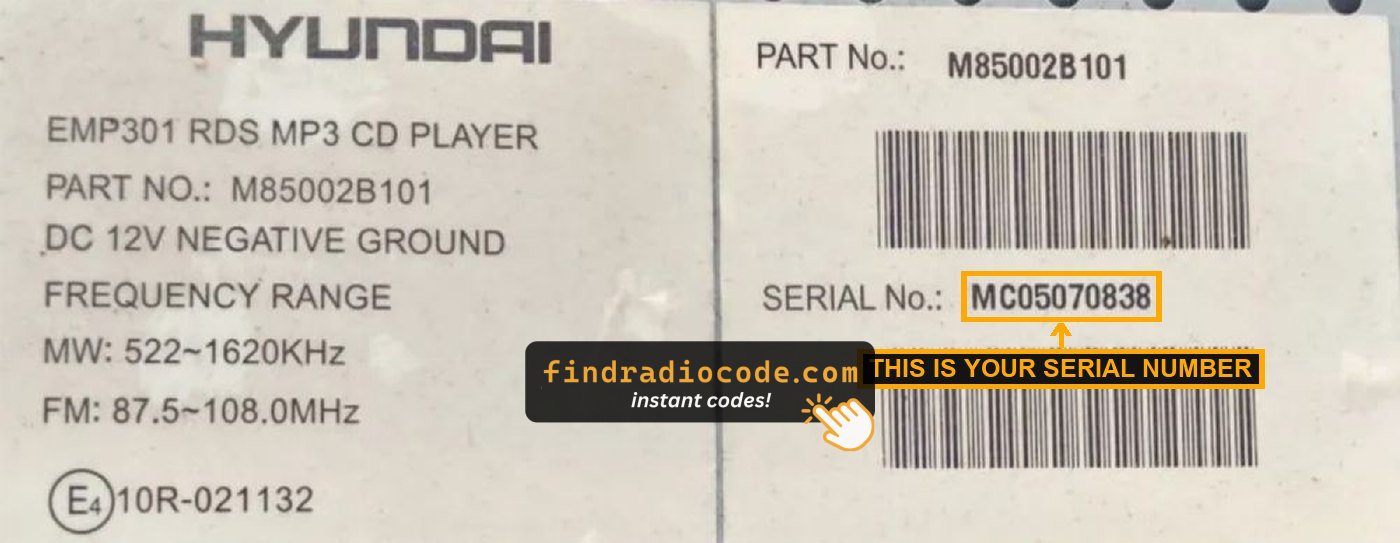
Example: Hyundai i30 serial number label location
Usual Serial Formats on Hyundai i30 Factory Units
Your Hyundai i30 radio serial number may start with:
MP0M0
Entering the Radio Code on Hyundai i30
You need to input the radio security code into the system to unlock your Hyundai's radio.
When the unit is locked, the screen usually displays a security message.
Based on the radio, use control knob, touchscreen, or radio presets to set each digit, then confirm the code to restore radio functionality.
If you fail multiple times, you may cause the i30's head unit to block further attempts.
When this happens, the screen can display messages like "CODE ERR", "ERROR", or a blank screen.
To unlock it, you usually need to keep the ignition on for a shown waiting period or up to a full hour before trying again.
Frequent Questions about Hyundai i30 Unlock Code
Yes. Each head unit has its own unlock code.
A used radio will need its correct security code to work.
Free codes are not usually available.
You might already possess the code in the manual or from a service center, but most require a database lookup.
Not all of them require a radio code, but many factory radios use it as an anti-theft feature.
Some production series may not require a code depending on the radio unit.