Searching for the S/N on Your Radio
To generate the right radio code, you first need the serial number from the radio.
Depending on your radio model, you can display it on the radio screen or check the radio hardware.
Common abbreviations are: S/N / SN / Serial / Serial Num. / Serial Number.
These are the most common ways to get it:
1. Get the S/N from Hyundai Grandeur's Display
Hyundai Grandeur radio does not show the serial number on the screen.
Unfortunately, the unit must then be extracted from the dashboard to find the serial on a factory sticker on the radio casing.
2. The Serial Number on the Radio Sticker
To find the serial number, you'll need to remove the radio unit from the dashboard.
- Start by turning off the ignition and taking off the dashboard bezel.
- Next, release the clips and pull the unit forward to check the sticker on the side of the radio. Be careful not to damage the cables.
- Write down full serial number carefully and come back to our website.
- Know that serial number and part number are not equal. You can find both on the sticker, but you only need for the serial.
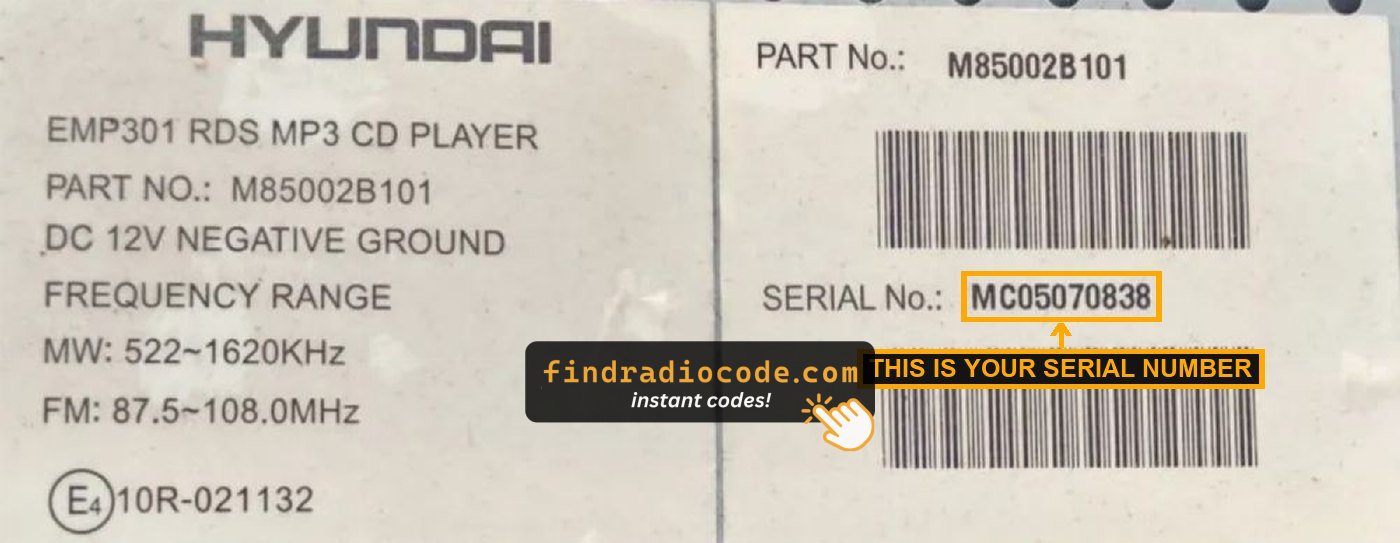
Example: Hyundai Grandeur serial number label location
Usual Serial Prefixes on Hyundai Grandeur Factory Units
Your Hyundai Grandeur radio serial number may start with:
MP0M0
Hyundai Grandeur's Most Common Unlock Code Triggers
Your radio may request a security code when it detects a power interruption.
These are the some well-known scenarios that activate the radio code prompt.
Radio Locked After Battery Replacement
When the battery is replaced, the Hyundai Grandeur radio enters anti-theft mode.
This security feature is designed to prevent theft by disabling the radio after power loss.
Other Possible Causes
- After an ECU reset, software update, or electrical repair, some Hyundai Grandeur radios display a CODE message.
- If a fuse is pulled, the radio can lock itself.
- After a jump-start, the radio may reset and request a security code.
- When the head unit is removed, it usually locks automatically.
Things to Try First
Before you decide to pay, you should check a few places where the code is often stored.
Some drivers find their Hyundai Grandeur radio code without needing any tools or paperwork.
Here are the easiest things to check first.
Look Around the Dashboard
- In the radio manual, often on a separate page.
- On the head unit casing if the unit was previously removed.
- Near the trunk lining, where some manufacturers place radio labels.
- In the maintenance records provided with the car.
- On a label in the glove compartment.
Getting It from the Dealer
A Hyundai dealer can usually retrieve the radio code using your Grandeur's vehicle identification number.
In most cases, you need to visit or contact them and show vehicle documents.
When it is verified, they can request the original unlock code for your radio.
Not Always Ideal:
- The process can take hours depending on the model and database.
- Dealers often charge a fee for the lookup service and it's sometimes more than 100$.
- Some older Hyundai Grandeur radios may not be supported.
- You usually need to book an appointment and bring vehicle paperwork.
You Found the PIN. How to Enter It?
You need to type in the anti-theft code into the system to unlock your Hyundai's radio.
In the locked unit, the screen usually shows a security message.
You should use control knob, touchscreen, or radio presets to set each digit, then confirm the code to restore radio functionality.
Be careful, because too many wrong attempts can disable your radio temporarily.
It allows a few missed shots before showing a WAIT message.
You can try again by leaving the radio on for 60 minutes or a set waiting period.