Common Hyundai Sonata Radio Code Situations
Many drivers encounter radio code issues on their Sonata after battery-related issues.
Below are the most typical situations when this can occur.
Problems After a Battery Replacement
When the battery is replaced, the Hyundai Sonata radio locks automatically.
This factory protection system is designed to protect the original head unit by disabling the radio after power loss.
Other Situations That May Trigger the Code
- After an ECU reset, software update, or electrical repair, some Hyundai Sonata radios display a CODE message.
- After a boost start, the radio may reset and request a security code.
- If a fuse is pulled, the radio can enter anti-theft mode.
- When the radio is removed, it usually requires the original code.
What Exactly is a Radio Anti-Theft Code?
When the radio is cut off from power, it automatically locks and requires a security code to be entered before it can be operated.
A radio unlock code (also known as an anti-theft code) is a built-in security system integrated into original car stereos to protect theft.
This system ensures that a removed radio becomes useless without the correct code.
Entering the correct code restores full audio and media functionality.
Places to Check Before Paying for a Radio Code
There is a chance your Hyundai Sonata radio code is already somewhere in your car.
Before using a paid service, quickly check the places below - you might be surprised.
Check the Glovebox Documents
- In the vehicle handbook, often on a code card.
- In the trunk, on a radio label.
- Inside the center console, sometimes on a small card.
- On the radio unit itself, if it was serviced earlier.
- In your maintenance booklet from the previous owner.
Dealer Retrieval Option
A Hyundai dealer can usually look up the radio code using your Sonata's vehicle identification number.
In most cases, you need to visit or contact them and show vehicle documents.
Once verified, they can request the original anti-theft code for your radio.
Limitations:
- You usually need to book an appointment and bring ID.
- Dealers often ask for payment for the lookup service and it's sometimes more than 100$.
- The process can take days depending on the model and database.
- Some older Hyundai Sonata radios may not be supported.
Locating the S/N on Your Radio
To generate the right radio code, you first need the radio serial number.
Depending on your vehicle model, you can find it shown on the display or locate it on the unit.
You may see labels such as: S/N / SN / Serial / Serial Num. / Serial Number.
These are the most common ways to locate it:
1. Getting Sonata's S/N on the Infotainment
Unfortunately, on Hyundai Sonata radios the serial number cannot be viewed on the screen.
In that case, you'll need to remove the radio unit and check the label on the side of the radio.
2. How to Find the Serial Number on the Radio Unit's Sticker
To find the serial number, you'll need to take out the radio unit from the dashboard.
- Start by turning off the vehicle and removing the trim panel.
- Next, release the clips and slide the radio out to check the sticker on the side of the radio. Be careful not to damage the connections.
- Write down full serial number precisely and then come back to the website.
- Know that serial number and part number are not the same thing. You can find both on the sticker, and you only care for the serial.
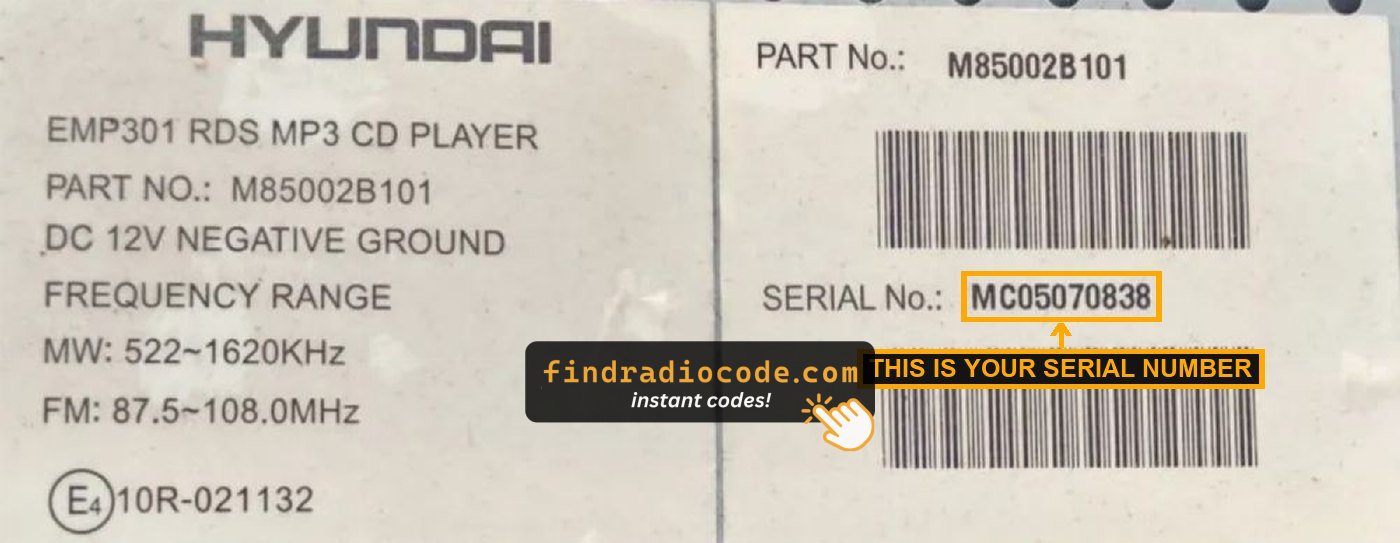
Example: Hyundai Sonata serial number label location
Typical Hyundai Sonata Serial Number Formats
Your Hyundai Sonata radio serial number may start with:
MP0M0
Entering the Anti-Theft Code on Your Sonata
With your code ready, it's time to input it into the Hyundai Sonata's radio.
The locked radio will usually show a blank screen with dashes.
Use the built-in buttons or touch controls to select each number, then confirm to activate the head unit.
Try not to make mistakes, because too many wrong attempts can disable your radio temporarily.
It will allow you a few incorrect tries before showing a WAIT message.
You can try again by keeping the ignition on for 60 minutes or a set waiting period.
Sonata's Radio Code FAQs
Free codes are not usually available.
You might locate the code in the owner's booklet or from a service center, but most require a database lookup.
Yes. Each radio unit has its own radio code.
A different radio will need its correct security code to work.
Not all of them require a security code, but many factory radios use it as an security measure.
Certain series may not require a code depending on the head unit.